Artificial intelligence for recruiting is easiest to implement well when you first decide what work should disappear from a recruiter’s day and what work must stay human. A practical way to do that is the “no laptop” test: imagine every transactional task is automated, then redesign the recruiter role around trust, judgment, and candidate experience. In this guide, I keep the original metaphor and turn it into an AI in hiring process plan you can run with your team, including guardrails, a workflow map, and a measurement checklist. I also show where StrategyBrain AI Recruiter fits naturally in artificial intelligence and recruitment by automating LinkedIn outreach, follow up, and résumé collection while leaving final fit decisions to recruiters.
Table of Contents
- Why recruiting feels uncertain right now
- The “no laptop” test: what it really means
- What should be automated vs what should stay human
- A practical implementation plan for AI in the hiring process
- Where StrategyBrain AI Recruiter fits in a LinkedIn first workflow
- Skills your recruiters need when transactional work disappears
- Common mistakes and how to avoid them
- FAQ
- Conclusion
Key Takeaways
- The “no laptop” test is a planning tool: treat it as a way to separate automatable transactions from human trust work in artificial intelligence for recruiting.
- Automate the repetitive front end first: outreach, follow up, scheduling, and CRM updates are common early wins in the AI in hiring process.
- Keep final qualification human: AI can confirm interest and collect information, but recruiters should decide role fit after reviewing résumés.
- Use guardrails, not vibes: define what the AI can say, what it must never say, and when it must hand off to a recruiter.
- StrategyBrain AI Recruiter is strongest on LinkedIn workflows: it can connect, introduce roles, answer questions, confirm interview interest, and collect résumés and contact details.
- Scale responsibly: managing many LinkedIn accounts can expand capacity, but only with clear governance, security controls, and compliance review.
Why recruiting feels uncertain right now
I have never seen recruiters and recruitment leaders as bewildered as they are right now. We have lived through technology shifts, recessions, and a pandemic, and each time there was a sense that the market would stabilize again. With artificial intelligence and recruitment, the uncertainty feels different because the impact is harder to predict and the claims are louder than the evidence.
One of the most damaging patterns I see is confident guidance from people who have not implemented AI in a real recruiting environment. That gap matters because the AI in hiring process is not just a tool decision. It is an operating model decision that affects candidate trust, recruiter workload, and hiring quality.
So leaders end up stuck between two risks. Move too slowly and you fall behind on productivity. Move too fast and you automate the wrong things, damage candidate experience, or create compliance exposure.
The “no laptop” test: what it really means
Here is the question that sounds crazy but is smarter than it seems. What would happen if you took your recruiters’ laptops away from them?
I am not suggesting you do that. The laptop is a metaphor for the transactional work that software can do. Think job ads, screening, content drafting, shortlisting, reference checking, interview scheduling, database search, and CRM updates. In other words, the parts of recruiting that are mostly process and repetition.
When you run the “no laptop” test, you force two decisions that most teams avoid. First, you decide what you actually want to automate. Second, you decide what the recruiter role becomes when those hours come back.
What should be automated vs what should stay human
Automate first: high volume, low judgment tasks
In most organizations, the first wave of artificial intelligence for recruiting should target work that is repetitive, time sensitive, and easy to standardize. This is where you can gain speed without gambling with trust.
- Initial outreach and follow up: consistent messaging, timely replies, and structured handoffs.
- Scheduling coordination: collecting availability and confirming interview times.
- Information capture: collecting résumés, contact details, and basic screening answers.
- CRM hygiene: logging conversations and updating pipeline stages.
Keep human: trust, judgment, and relationship work
Just because something can be automated is not a good reason that it should be automated. The human parts of recruiting are the parts that create trust and reduce risk. If you automate these poorly, you do not just lose efficiency. You lose credibility.
- Final qualification: deciding whether a résumé matches the role requirements and team context.
- Complex negotiation: aligning expectations on compensation, scope, and growth paths.
- Stakeholder consulting: challenging unrealistic hiring managers and shaping the role.
- Candidate advocacy: ensuring fairness, clarity, and a respectful experience.
The flip side leaders must face
Once the laptop work is automated, two questions become unavoidable.
- What should recruiters do more of when they are freed from transactional tasks?
- Do they have the skills to do that higher value work consistently?
My view is that recruiters evolve into true consultants. That is not a motivational poster. It is a job redesign requirement if you want AI in the hiring process to improve outcomes rather than just speed.
A practical implementation plan for AI in the hiring process
Below is the implementation sequence we have found most reliable when teams want results without chaos. It is designed to be reproducible and auditable, which matters for trust.
Step 1: Map the recruiter day into tasks and decisions
- List tasks recruiters do in a typical week, including outreach, screening, scheduling, and updates.
- Label each item as “transaction” or “judgment.” A transaction is repeatable with clear rules. Judgment requires context and accountability.
- Identify handoff points where the AI must stop and a recruiter must take over.
Practical template you can copy:
| Workflow step | Transaction or judgment | Automation candidate | Human handoff trigger |
|---|---|---|---|
| Initial LinkedIn message | Transaction | Yes | Candidate asks a complex question or requests a call |
| Confirm interest in interview | Transaction | Yes | Candidate expresses concerns about role scope or compensation |
| Assess résumé fit | Judgment | No | Always recruiter owned |
Step 2: Define guardrails before you deploy
Guardrails are the difference between “we tried AI” and “we run AI responsibly.” For artificial intelligence for recruiting, I recommend writing these down and reviewing them with legal or compliance if your organization requires it.
- Message boundaries: what the AI can say about the role, company, and compensation, and what it must not speculate about.
- Disclosure policy: whether you disclose automation in candidate messaging, and how you handle questions about it.
- Escalation rules: when the AI must hand off to a recruiter, including sensitive topics and complex negotiations.
- Data handling rules: what data is collected, where it is stored, and who can access it.
Step 3: Pilot on one role family and one channel
To reduce risk, start with a narrow pilot. For many teams, LinkedIn is the most measurable channel for outreach and follow up, which makes it a practical place to begin the AI in hiring process.
- Pick one role family with steady hiring volume.
- Pick one channel for outreach, such as LinkedIn.
- Run a 14 day pilot with daily review of conversations and handoffs.
What to measure during the pilot:
- Response time: median time to first reply to candidate messages.
- Conversation completion rate: percent of outreach threads that reach a clear outcome, such as interested, not interested, or later.
- Handoff quality: percent of handoffs that include résumé and contact details when the candidate is interested.
- Recruiter time saved: hours per week reclaimed from messaging and follow up.
Step 4: Scale only after you can explain outcomes
Scaling AI in recruiting is not about adding more automation. It is about adding more controlled automation. If you cannot explain why the pilot improved or harmed outcomes, scaling will multiply confusion.
When you do scale, scale one dimension at a time. Add more roles, or add more recruiters, or add more accounts. Do not change everything at once.
Where StrategyBrain AI Recruiter fits in a LinkedIn first workflow
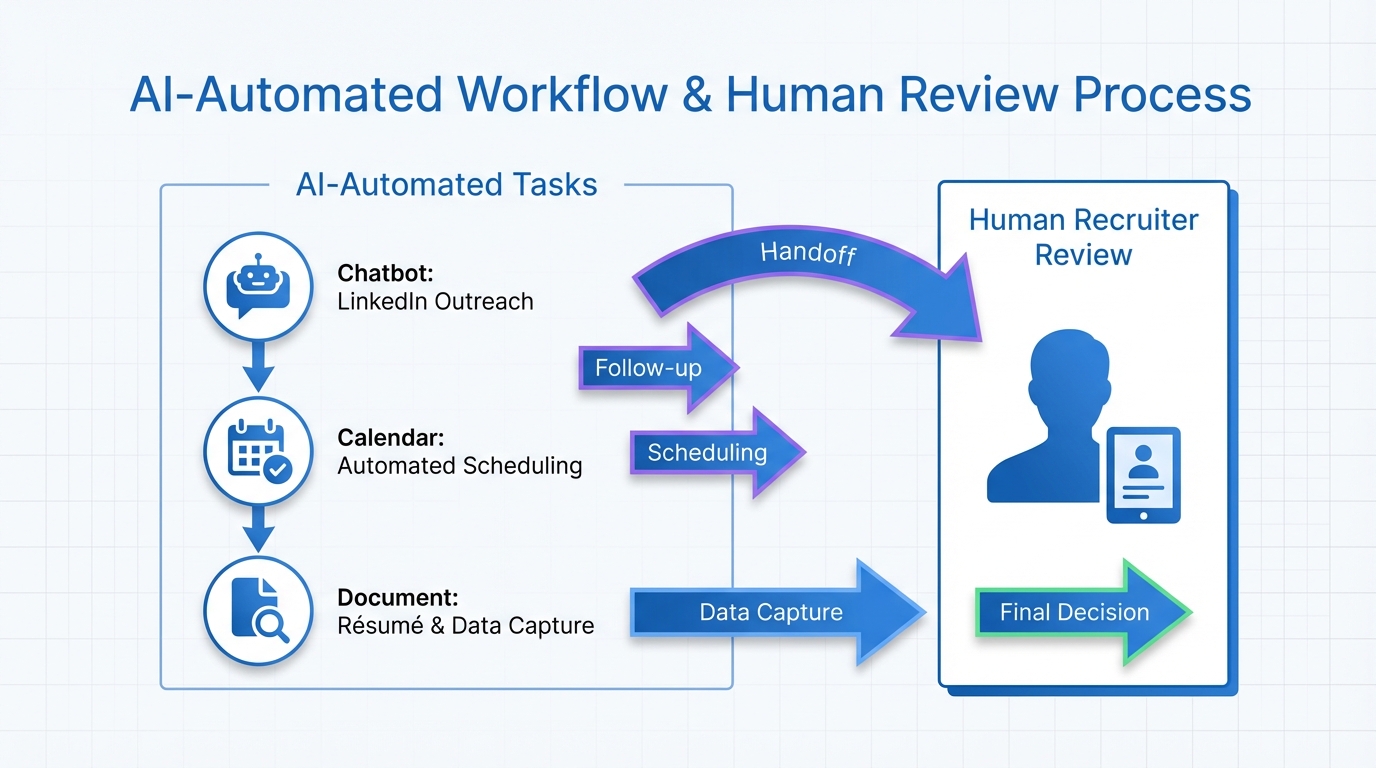
In the “no laptop” framing, the best use of StrategyBrain AI Recruiter is to take over the repetitive LinkedIn work that consumes recruiter attention but does not require final judgment. That includes connecting with candidates who match your search criteria, introducing the opportunity, answering common questions about the role and company, confirming interview interest, and collecting résumés and contact information from interested candidates.
What it automates in practice
- Smart LinkedIn recruitment automation: automatically connects with candidates within your targeted search criteria and runs the initial outreach and qualification conversation.
- Always on candidate communication: provides 24/7 responses and follow up so candidates are not waiting for a recruiter to come online.
- Multilingual messaging: communicates in the candidate’s native language to reduce misunderstandings across time zones and regions.
- Information capture: requests résumés and captures contact details when a candidate wants to move forward.
What it does not do, by design
This matters for trust. StrategyBrain AI Recruiter can identify willingness to communicate or interview, but it does not decide whether a résumé fully matches job requirements. Recruiters still review the résumé and make the final qualification decision. That separation is a healthy pattern for artificial intelligence and recruitment because it keeps accountability where it belongs.
Scaling with AI powered recruiting teams
If your organization runs multiple LinkedIn accounts, StrategyBrain AI Recruiter supports managing more than 100 accounts so you can build an AI powered recruiting team. The operational point is not “more messages.” The point is consistent follow up, consistent information capture, and consistent handoffs so recruiters can focus on consulting and closing.
Limitations we would plan for
- Not a replacement for recruiter judgment: you still need a clear résumé review and interview process.
- Requires good job inputs: if compensation, benefits, and role scope are unclear, candidate conversations will surface that quickly.
- Governance is mandatory at scale: managing many accounts requires access control, message policy, and monitoring.
Skills your recruiters need when transactional work disappears
If you remove the laptop work, you do not remove the need for recruiters. You raise the bar for what they do. This is where leaders should invest the time they just “saved.”
- Consultative intake: translating business needs into a realistic role and hiring plan.
- Candidate experience design: clarity, responsiveness, and respectful communication across the funnel.
- Decision quality: structured evaluation, interviewer calibration, and bias aware processes.
- Closing and negotiation: aligning expectations and reducing late stage drop off.
In other words, artificial intelligence for recruiting should make recruiters more human, not less. It should remove the busywork so they can do the work that earns trust.
Common mistakes and how to avoid them
- Automating without a handoff plan: fix this by defining escalation triggers and requiring a clean summary when the AI hands off.
- Chasing tools instead of workflows: fix this by mapping tasks first, then selecting automation that fits the map.
- Assuming speed equals quality: fix this by measuring downstream outcomes, not just response rates.
- Letting messaging drift: fix this by setting a message policy and reviewing samples weekly during rollout.
- Ignoring privacy and security: fix this by documenting data handling, access controls, and retention rules before scaling.
FAQ
What is artificial intelligence for recruiting in plain terms?
Artificial intelligence for recruiting is the use of software that can generate messages, respond to candidates, and automate repeatable steps like outreach, follow up, scheduling, and data capture. It works best when paired with clear human ownership of final hiring decisions.
Will AI replace recruiters?
AI can replace many transactional tasks, but it does not replace accountability, trust building, and judgment. In a strong AI in hiring process, recruiters spend less time on messaging and more time acting as consultants to hiring managers and candidates.
What does the “no laptop” test help me decide?
It helps you decide what work should be automated and what work should remain human. It also forces a skills conversation, because the remaining work requires stronger consulting and decision making capabilities.
How does StrategyBrain AI Recruiter support LinkedIn recruiting?
StrategyBrain AI Recruiter automates LinkedIn connecting and initial outreach, introduces the role, answers common questions, confirms interview interest, and collects résumés and contact details from interested candidates. Recruiters then review résumés and proceed with interviews.
Does StrategyBrain AI Recruiter decide if a candidate is qualified?
No. It can identify willingness to communicate or interview, but it does not determine whether the résumé matches the job requirements. That final qualification step remains with the recruiter.
Can it communicate with candidates in different languages?
Yes. StrategyBrain AI Recruiter supports multilingual communication and can respond around the clock, which is useful for global hiring across time zones.
How does it collect résumés and contact details?
When a candidate expresses interest, the system requests a résumé and contact information. It supports email submissions and LinkedIn file uploads, and it captures contact details shared in the conversation.
What is a safe first pilot for AI in the hiring process?
A safe pilot is one role family, one channel, and a short review cycle. For many teams, that means LinkedIn outreach and follow up for 14 days with daily monitoring of conversations and handoffs.
Conclusion
The fastest way to make artificial intelligence for recruiting practical is to stop debating tools in the abstract and run the “no laptop” test. Decide what should be automated, decide what must stay human, and then build guardrails so the AI in hiring process improves trust and speed at the same time.
Next steps are straightforward. Map your recruiter workflow, write escalation rules, and pilot one LinkedIn workflow. If your biggest time sink is outreach and follow up, StrategyBrain AI Recruiter is a natural fit because it automates those conversations, captures résumés and contact details, and hands control back to recruiters for final qualification and closing.