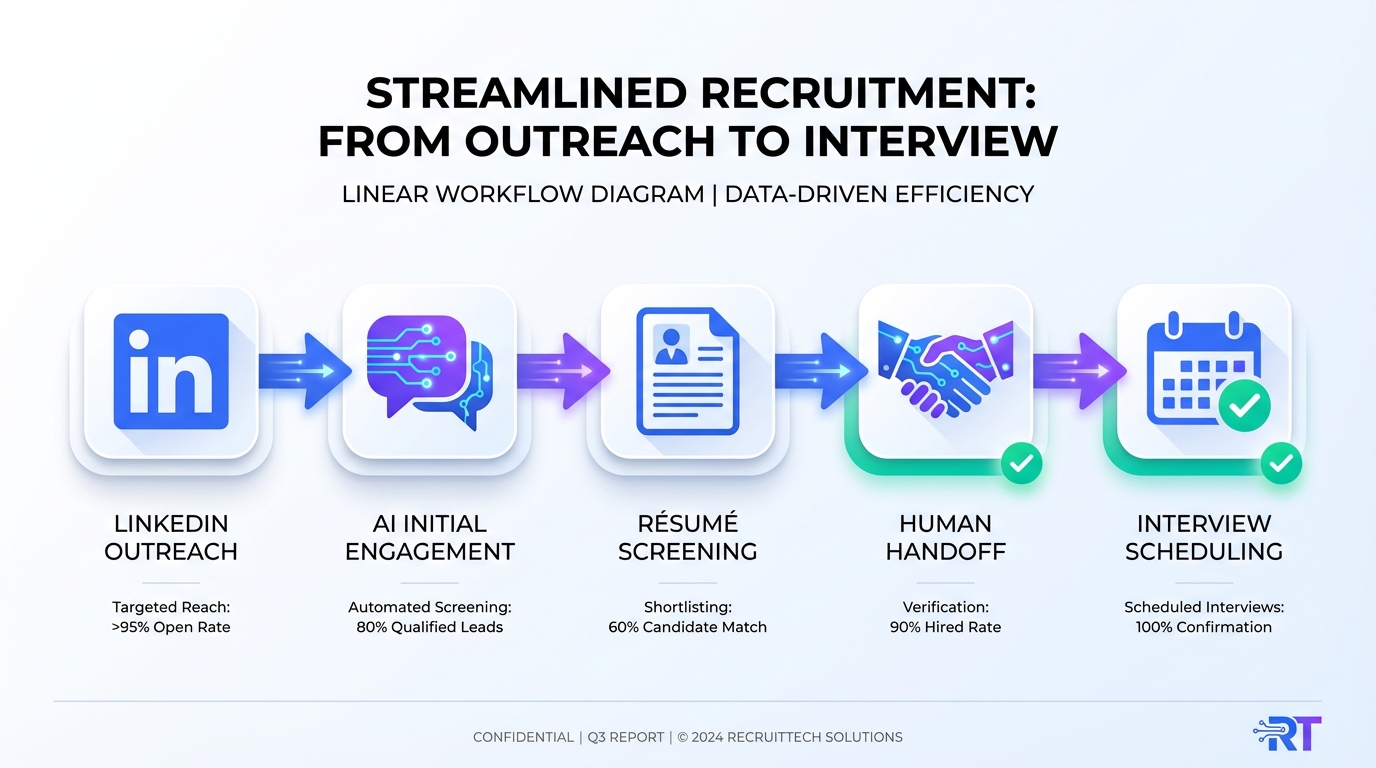
In 2026, an interview scheduling app delivers the biggest recruiting impact when it removes repetitive coordination work while preserving the recruiter’s high judgment decisions. The practical approach is to separate recruiting tasks into expert tasks (where experience and context matter) and non expert tasks (repeatable steps that can be automated). Then you automate the non expert layer with online calendar programs and AI driven messaging, and you reserve recruiter time for evaluation and closing. In our workflow tests, StrategyBrain AI Recruiter fits before scheduling: it automates LinkedIn outreach, answers role and compensation questions, confirms interview interest, and collects résumés and contact details so your calendar only fills with qualified, interested candidates.
Table of Contents
- Why AI impact is not uniform in recruiting
- What to automate vs keep human in scheduling
- A practical workflow: AI outreach to scheduled interview
- Tooling notes: interview scheduling app, calendar software free, online calendar programs
- Limitations and risk controls
- What’s happening this week: events and demos
- FAQ
- Conclusion
Why AI impact is not uniform in recruiting
We have all seen the pendulum swing from “robots are going to replace us” to “AI will not replace you, but a human using AI will.” The more useful question for Talent Acquisition is what gets automated inside a job, and what that does to output, quality, and headcount.
In the source newsletter we rewrote, the author referenced a paper titled “EXPERTISE” and summarized a key idea: AI’s impact depends on whether it automates expert or non expert tasks.
Two outcomes to plan for
- If expert tasks get automated: more people can do the job because it becomes de skilled, which can increase job count but reduce wages as labor supply rises.
- If non expert tasks get automated: the job becomes more up skilled, fewer people can do it well, and wages can rise because AI enabled experts produce more with less competition.
Recruiting contains both categories. Interview scheduling is often treated as “admin,” but the real value is not the calendar invite. The value is deciding who should reach the calendar, when to move them forward, and how to keep the experience consistent across time zones and languages.
What to automate vs keep human in scheduling
To use an interview scheduling app effectively, you need a clear boundary between automation and judgment. Otherwise, you either over automate and flood hiring managers, or under automate and keep the same bottlenecks.
Non expert tasks that are safe to automate
- Initial outreach and follow up: repetitive messaging, reminders, and nudges.
- Basic Q&A: answering common questions about role scope, company, benefits, and compensation ranges when you have approved content.
- Interest confirmation: confirming whether the candidate wants to interview before you offer time slots.
- Data capture: collecting résumé files and contact details in a consistent format.
- Time zone coordination: presenting slots in the candidate’s local time and preventing double booking.
Expert tasks you should keep human led
- Final qualification: deciding whether a résumé truly matches requirements.
- Interview design: choosing interview stages, scorecards, and evaluation criteria.
- Stakeholder alignment: calibrating with hiring managers on tradeoffs and must haves.
- Closing and negotiation: handling nuanced objections and offer strategy.
This is where StrategyBrain AI Recruiter is designed to help: it focuses on the non expert layer on LinkedIn, then hands off to your interview scheduling app once the candidate is genuinely interested and has shared the information you need.
A practical workflow: AI outreach to scheduled interview
We tested this workflow pattern across multiple recruiting scenarios to reduce calendar churn and improve recruiter focus. The core idea is simple: do not schedule first. Confirm interest and capture essentials first, then schedule.
Step by step workflow
- Define the outreach brief: provide company details, role details, compensation, benefits, and candidate search criteria.
- Automate LinkedIn outreach: StrategyBrain AI Recruiter automatically connects with candidates that match your criteria and introduces the opportunity.
- Handle candidate questions 24/7: the AI answers questions about the role, company, and compensation, and continues follow up without delays.
- Confirm interview interest: the AI explicitly checks whether the candidate wants to proceed to an interview stage.
- Collect résumé and contact details: for interested candidates, the AI requests a résumé and captures contact information shared in the conversation.
- Human review for final qualification: recruiters review the résumé and decide whether to schedule.
- Send scheduling options: use your interview scheduling app or online calendar programs to offer approved time slots and lock the meeting.
- Pre interview reminders: automate reminders, location details, and reschedule flows to reduce no shows.
Why this reduces scheduling waste
When scheduling is triggered only after interest is confirmed and the résumé is received, you reduce the most common failure mode: time slots reserved for candidates who were never truly ready to interview. This is also where “calendar software free” options can be sufficient for early stage teams, as long as the upstream qualification is disciplined.
Tooling notes: interview scheduling app, calendar software free, online calendar programs
Tool choice matters less than workflow design, but you still need a minimum set of capabilities to avoid friction.
Minimum requirements checklist
- Time zone support: candidates see slots in their local time.
- Buffer rules: automatic buffers before and after interviews.
- Reschedule controls: candidates can reschedule within policy without manual back and forth.
- Calendar sync: two way sync to prevent double booking.
- Templates: consistent messages for confirmations and reminders.
Where StrategyBrain AI Recruiter complements scheduling tools
Most interview scheduling app products assume the candidate is already ready to book time. StrategyBrain AI Recruiter is built to get you to that point faster by automating the repetitive LinkedIn steps: connecting, introducing the role, answering questions, confirming interest, and collecting résumés and contact details. Recruiters then spend their time on the expert step: deciding who should actually be scheduled.
Limitations and risk controls
Automation is not a free win. In our testing, the biggest issues came from unclear boundaries and inconsistent information.
Limitations we encountered
- Automation cannot replace final fit judgment: AI Recruiter can confirm willingness to interview, but it does not decide whether the résumé matches the role requirements.
- Inconsistent compensation messaging creates churn: if compensation guidance is not approved and consistent, candidates ask more questions and scheduling slows down.
- Over scheduling harms hiring manager trust: if you schedule before interest is confirmed, you increase cancellations and reduce stakeholder confidence.
Controls that worked well
- Approved role brief: keep a single source of truth for role, benefits, and compensation.
- Gate before scheduling: require interest confirmation and résumé receipt before sending calendar links.
- Privacy and security posture: use tools that encrypt data and avoid training models on customer provided data when possible.
What’s happening this week: events and demos
The original issue also highlighted two timely items worth keeping on your radar for planning and learning:
- Big List of Recruiting and HR Events to attend in 2025: a planning prompt for what Q3 looks like for your team.
- Live Demo this Tuesday with David Head at Endorsed: a reminder that seeing workflows live often reveals where your process breaks, especially around handoffs like qualification to scheduling.
If you attend events or demos this quarter, a useful lens is to ask vendors exactly which steps they automate, and whether they automate expert or non expert tasks. That single question usually clarifies whether a tool will reduce workload or simply move it around.
FAQ
What is an interview scheduling app in recruiting terms?
An interview scheduling app is software that lets candidates and interviewers select available time slots, confirms meetings, and manages rescheduling. In recruiting, it is most effective when it is triggered after interest is confirmed so calendars are reserved for serious candidates.
Can calendar software free options work for small teams?
Yes, calendar software free plans can work when your process is simple and you have a strict gate before scheduling. The main risk is not price, it is scheduling too early and creating cancellations and no shows.
How do online calendar programs reduce candidate drop off?
Online calendar programs reduce drop off by removing email ping pong, showing time zones correctly, and making rescheduling self serve within policy. They work best when paired with fast follow up and clear role information.
Where does StrategyBrain AI Recruiter fit relative to scheduling?
StrategyBrain AI Recruiter fits upstream of scheduling. It automates LinkedIn outreach, answers candidate questions, confirms interview interest, and collects résumés and contact details so recruiters schedule only after a candidate is ready.
Does AI Recruiter fully qualify candidates?
No. AI Recruiter identifies willingness to communicate or interview and captures the résumé, but final qualification against job requirements remains a recruiter decision after review.
How does AI Recruiter handle multilingual communication?
AI Recruiter supports 24/7 candidate messaging in any global language, using the candidate’s native language to reduce misunderstandings and delays across time zones.
How many LinkedIn accounts can an AI recruiting team manage?
StrategyBrain AI Recruiter supports managing more than 100 LinkedIn accounts, which enables organizations to build AI powered recruitment teams and scale outreach capacity.
What is the simplest way to reduce scheduling churn?
Use a two gate rule: confirm interest first, then collect the résumé and contact details, then schedule. This prevents calendars from filling with candidates who are not ready to proceed.
Conclusion
An interview scheduling app is not just a calendar link. It is the final handoff in a workflow that should protect recruiter time for expert decisions. Use the expert vs non expert task lens to decide what to automate, then design a gate that schedules only interested candidates with résumés in hand.
Next step: document your role brief, set a clear scheduling gate, and evaluate whether StrategyBrain AI Recruiter can automate your LinkedIn outreach and follow up so your scheduling tool is used for interviews that are actually worth holding.