AI pilot projects fail most often because organizations treat AI as a software install instead of a behavior change. In recruiting, an ai recruiting tool only delivers value when recruiters trust the workflow, leaders pick a specific use case, and the team is explicit about what to automate, what to augment, and what should remain human led. In a recent Recruiting Future episode, Matt Alder spoke with Taylor Bradley, VP Talent Strategy & Success at Turing, about why pilots stall early and how grassroots experimentation and change management determine whether AI based recruitment software actually sticks. Below is a recruiter focused translation of those ideas, plus a practical rollout plan and where StrategyBrain AI Recruiter can fit when your use case includes LinkedIn outreach and early stage candidate engagement.
Why AI pilots fail before they start
In the Recruiting Future discussion, the core message is simple: progress with AI is less about the tool and more about the change. When pilots fail early, it is usually because the organization cannot answer three operational questions in plain language.
- What is the use case: A pilot framed as “try AI in recruiting” is too broad to measure or adopt.
- Who must change behavior: If recruiters, coordinators, and hiring managers are not aligned on the new workflow, the pilot becomes optional work.
- What is the decision boundary: Teams do not define what the AI can do alone, what it can assist with, and what it must not touch.
This is why many teams buy new sourcing platforms for recruiters or AI based recruitment software and still see no meaningful throughput improvement. The pilot is not failing because the model is “not smart enough.” It is failing because the operating system of recruiting did not change.
Trust and adoption: the real gating factor
Employee trust is not a soft metric in recruiting. It is the prerequisite for usage. If recruiters believe the AI will create risk, damage candidate experience, or add rework, they will route around it.
In our experience evaluating recruiting automation workflows, trust tends to come from four visible signals.
- Transparency: Recruiters can see what the system sent, why it sent it, and what it captured.
- Control: There is a clear way to pause, adjust messaging, and set boundaries.
- Consistency: The workflow behaves predictably across roles, regions, and time zones.
- Accountability: Ownership is defined for outcomes, compliance, and candidate experience.
This is also where an ai recruiting tool that operates in high volume channels like LinkedIn needs extra care. If the outreach feels spammy or inconsistent, adoption collapses quickly. A system like StrategyBrain AI Recruiter is designed around a specific trust building use case: it automates initial LinkedIn connection and early conversation steps, while leaving final qualification to the recruiter after reviewing the résumé and context captured.
A practical automation vs augmentation framework for recruiting
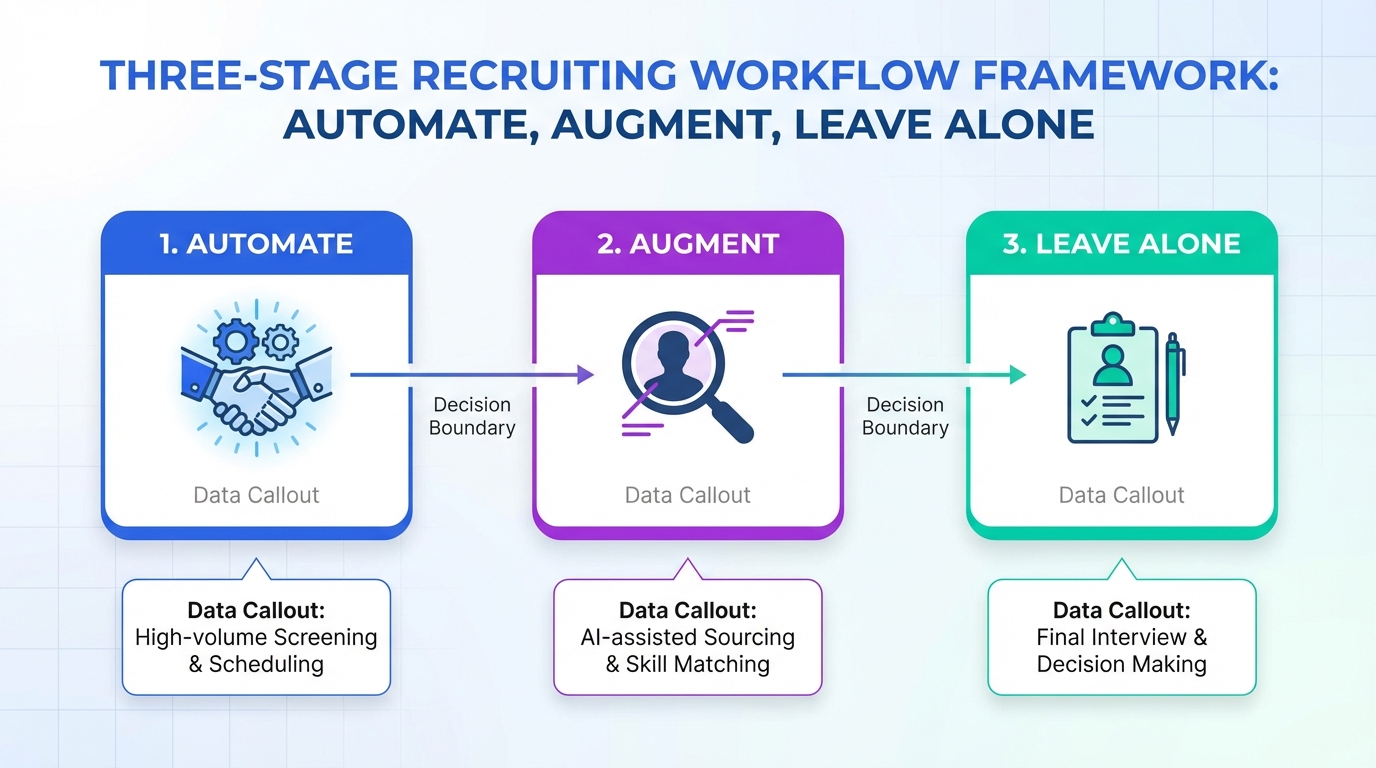
The episode highlights a framework that is especially useful in talent teams: decide what to automate, what to augment, and what to leave alone. Here is a recruiting specific version you can use in stakeholder meetings.
Definitions (so everyone uses the same language)
- Automation: The system completes a task end to end with minimal human input, then hands off a result.
- Augmentation: The system assists a human decision maker by drafting, summarizing, prioritizing, or suggesting, but the human remains the operator.
- Leave alone: The task stays human led because it is high risk, highly contextual, or tightly tied to employer brand.
Recruiting tasks that often fit each bucket
These are not universal rules. They are starting points for a pilot scope that can be measured.
- Often automate: initial outreach sequences, follow ups, scheduling nudges, collecting contact details, capturing résumés when candidates opt in.
- Often augment: crafting role specific messaging, summarizing candidate conversations, generating screening question sets, prioritizing outreach lists.
- Often leave alone: final selection decisions, sensitive compensation negotiation, complex candidate objections that require nuanced judgment.
StrategyBrain AI Recruiter maps cleanly to the “often automate” bucket for LinkedIn: it can connect with candidates within defined criteria, introduce the opportunity, answer common questions about the role, company, and compensation, confirm interview interest, and collect résumés and contact information from interested candidates. It also supports 24/7 multilingual communication, which matters when your pipeline spans time zones and languages.
Legacy process inertia and how to break it
Another theme from the conversation is inertia. Recruiting teams inherit workflows that were built for a different era, then try to bolt AI onto them. The result is friction and duplicated work.
To break inertia without destabilizing delivery, focus on process seams. A seam is the handoff point where work pauses, context is lost, or follow up is inconsistent. In LinkedIn recruiting, a common seam is the gap between “connection accepted” and “qualified conversation.” That gap is exactly where an ai recruiting tool can create measurable lift because it reduces latency and keeps the conversation moving.
If you are evaluating sourcing platforms for recruiters, ask a seam based question: “Which handoff becomes faster and more consistent if we deploy this tool?” If you cannot name the seam, the pilot scope is still too vague.
Grassroots experimentation that does not create chaos
The episode also points to grassroots experimentation as a driver of adoption. In practice, that means enabling small tests inside guardrails. You want learning, not a free for all.
We recommend a simple structure for experimentation in AI based recruitment software pilots.
- Pick one workflow owner: A recruiter lead who is accountable for outcomes and feedback.
- Define one measurable outcome: For example, response rate, number of qualified conversations, or time to first reply.
- Set non negotiables: Compliance, candidate experience standards, and data handling rules.
- Run a short cycle: 7 to 14 days is long enough to see patterns without locking in a bad approach.
- Publish learnings: Share what worked and what did not, so adoption spreads through evidence.
StrategyBrain AI Recruiter supports this style of experimentation because it is purpose built for a defined channel and task set: LinkedIn outreach and early engagement. That makes it easier to isolate impact compared with a broad “AI everywhere” pilot.
Where StrategyBrain AI Recruiter fits in a modern recruiting stack
Not every ai recruiting tool should try to do everything. In our view, the most durable deployments are modular: one tool owns one workflow seam extremely well, then hands off cleanly to the next stage.
StrategyBrain AI Recruiter is positioned for the top of funnel and early funnel on LinkedIn.
- Smart LinkedIn recruitment automation: Automatically connects with candidates within your targeted criteria and runs the initial conversation to confirm interest.
- Always on multilingual communication: Responds 24/7 in the candidate’s native language to reduce delays and misunderstandings.
- Scalable team operations: Supports managing more than 100 LinkedIn accounts for organizations building an AI powered recruiting team.
Scope boundary matters. StrategyBrain AI Recruiter can identify willingness to communicate or interview, but it does not decide whether a résumé fully matches job requirements. That final qualification remains with the recruiter, which is often the right trust preserving boundary for early deployments.
A 30 day rollout playbook for an AI recruiting tool pilot
This playbook is designed for a single team running a controlled pilot. It assumes you are using LinkedIn as a sourcing channel, but the structure applies to other sourcing platforms for recruiters as well.
Week 1: Define the pilot so it can succeed
- Choose one role family: Keep it narrow enough that messaging and qualification criteria are consistent.
- Write the automate vs augment boundary: One page, plain language, shared with the team.
- Set candidate experience rules: Tone, frequency, and escalation to a human recruiter.
Week 2: Launch with tight feedback loops
- Start with a small candidate batch: Enough volume to learn, not enough to create risk.
- Review conversations daily: Look for confusion points and adjust prompts and templates.
- Track one primary metric: For example, number of interested candidates who share a résumé.
Week 3: Expand volume and standardize what works
- Increase outreach volume: Only after the workflow is stable and trusted.
- Document the best performing message patterns: Keep a shared library for the team.
- Train stakeholders: Hiring managers should understand what the AI does and does not do.
Week 4: Decide whether to scale
- Audit outcomes: Compare against the baseline process for the same role family.
- List failure modes: Where did the workflow break, and what is the mitigation.
- Choose the next seam: Either expand to another role family or deepen the same workflow.
Quick comparison: automate, augment, or leave alone
| Recruiting activity | Best approach | Why this approach tends to work | Where StrategyBrain AI Recruiter can help |
|---|---|---|---|
| LinkedIn connection and first message | Automate | High repetition, clear intent, measurable outcomes | Automates connecting and introducing the opportunity |
| Answering common role and company questions | Automate with guardrails | Fast responses improve momentum when content is approved | Handles Q&A and follow up, including compensation details provided by the recruiter |
| Confirming interview interest | Automate | Binary outcome, easy to hand off to recruiter | Confirms interest and captures next step intent |
| Collecting résumé and contact details | Automate | Structured data capture reduces manual copy and paste | Requests and captures résumé and contact information when candidates opt in |
| Final qualification against job requirements | Augment | Requires context, tradeoffs, and human judgment | Provides conversation context and collected materials for recruiter review |
| Offer negotiation for complex cases | Leave alone | High risk, nuanced, brand sensitive | Not a recommended automation target |
FAQ
What is the most common reason an AI recruiting tool pilot fails?
The most common reason is treating the pilot as a tool test instead of a change initiative. If you do not define a single use case, a clear automate vs augment boundary, and a trust building workflow, adoption usually stalls.
How do I choose a first use case for AI based recruitment software?
Pick a workflow seam with high repetition and clear outcomes, such as initial outreach and follow up. LinkedIn top of funnel engagement is often a good starting point because response speed and consistency are measurable.
Can StrategyBrain AI Recruiter replace recruiters?
No. StrategyBrain AI Recruiter is designed to replace repetitive early stage LinkedIn tasks like connecting, introducing roles, answering common questions, confirming interest, and collecting résumés and contact details. Recruiters still perform final qualification and run interviews.
Does StrategyBrain AI Recruiter support multilingual candidate communication?
Yes. It supports 24/7 multilingual communication and can respond in the candidate’s native language, which helps global hiring teams reduce delays across time zones.
How do I prevent automation from harming candidate experience?
Set message tone guidelines, frequency limits, and escalation rules before launch. Then review real conversations daily during the first 7 to 14 days and adjust templates and guardrails based on what candidates actually ask.
Do I need to change my sourcing platforms for recruiters to use an AI recruiting tool?
Not necessarily. Many teams start by improving one channel workflow first, then decide whether broader platform changes are justified. A narrow pilot can produce evidence before you redesign the entire stack.
What should I measure in the first 30 days?
Choose one primary metric tied to the use case, such as number of interested candidates who share a résumé or time to first reply. Also track a small set of quality checks like candidate complaints and recruiter rework.
Is this article a tool comparison of recruiting products?
No. This is an adoption and change management guide that uses StrategyBrain AI Recruiter as a concrete example of a focused LinkedIn automation workflow.
Conclusion and next steps
AI pilots fail when teams chase tools instead of change. If you want an ai recruiting tool to stick, start with one measurable use case, build recruiter trust through transparency and control, and use an explicit automation vs augmentation boundary so humans and AI do not fight each other. Next, pick one workflow seam to improve, run a short experiment cycle, and publish learnings so adoption spreads through evidence.
If your first seam is LinkedIn outreach and early engagement, consider piloting StrategyBrain AI Recruiter as a focused layer that automates connecting, initial messaging, follow up, multilingual responses, and résumé and contact capture, while keeping final qualification with recruiters. Your next step is to write a one page pilot charter and define the single metric you will use to decide whether to scale.