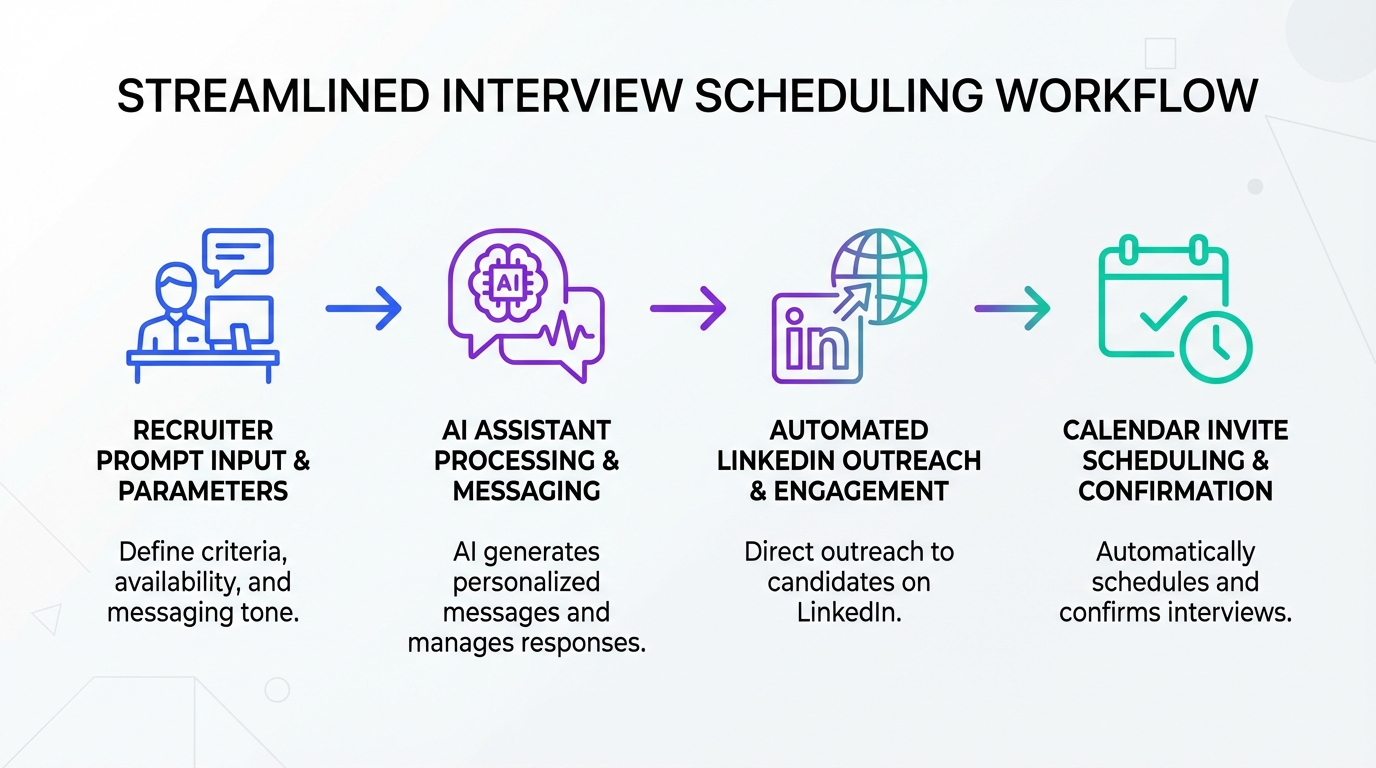
To build an interview scheduling app workflow that feels fast and still personal, start by standardizing how you brief AI, then use the AI output to drive your calendar invite, reminders, and follow up. The simplest approach is Richard Wray’s three level prompting framework, which I have used myself and saw immediate improvement in message quality and speed. When you pair that framework with StrategyBrain AI Recruiter, you can automate the early LinkedIn outreach and interest confirmation, collect resumes and contact details, and then hand off cleanly into scheduling with fewer clarifying messages. This article focuses on prompting, candidate messaging, and scheduling handoff. It does not cover a full ATS rollout, legal compliance advice, or a deep review of specific calendar software free plans.
Why this works for scheduling
Most scheduling friction is not caused by the calendar tool. It is caused by unclear context, inconsistent messaging, and missing constraints such as time zones, interview format, and what “available” actually means. A repeatable prompt structure fixes that upstream, so your interview scheduling app becomes the execution layer instead of the place where confusion shows up.
In our internal recruiting ops work, the biggest improvement came from treating prompts like a recruiter brief to a colleague. Once the brief is consistent, the AI output becomes predictable enough to reuse across roles, hiring managers, and regions.
The TechnoEmpath mindset
The original idea here is the TechnoEmpath, an evolved recruiter for a new age where recruitment becomes a marriage of art and science. The TechnoEmpath keeps the human strengths, including influencing, listening, and relationship building, while also embracing CRM, ATS, analytics, and AI tools such as search, video interviewing, and assessments.
That framing matters for scheduling because scheduling is a relationship moment. Candidates interpret speed, clarity, and tone as signals of respect. AI should support your judgment, not replace it, and the TechnoEmpath uses automation to create more time for the human parts.
The 3 level prompting framework
Richard Wray teaches a three level approach to “talk to the AI” that builds confidence and control. The examples are intentionally minimalist, with a clear reminder that more context produces better output. The goal is to make prompting feel like a conversation, not a technical hurdle.
Below, I focus on Level 1 because it is the fastest way to improve an interview scheduling app workflow. If you can brief a colleague or give feedback to a junior recruiter, you already have the skills to prompt AI. You just need a structure.
Level 1: The Core 4 Steps
This is the beginner friendly entry point that helps people start quickly and beat the blank page problem.
Step 1: State the scenario
Tell the AI who you are and what role it should play. Example: you are a recruiter scaling a SaaS sales team and the AI is your assistant.
Step 2: State what you want to achieve
Be explicit about the output. Example: write a LinkedIn post about a new screening tool. For scheduling, the output might be a candidate message that proposes time windows and confirms constraints.
Step 3: State the target audience
Define who the message is for. Example: agency owners aged 40 to 55. For scheduling, it might be senior engineers in a specific region, or candidates who prefer text first communication.
Step 4: Refine through conversation
Ask follow up questions, adjust tone, and iterate. This is where you add constraints such as time zone, interview length, and whether the candidate needs accommodations.
How to apply Level 1 to interview scheduling
Here is a practical way to map the four steps into a scheduling prompt that produces usable text for your interview scheduling app, your email, or your LinkedIn message.
1) Capture the scheduling inputs
- Role and stage: for example first screen, technical interview, or hiring manager chat.
- Duration and format: 30 minutes video call, 60 minutes onsite, or async video.
- Time zone and availability rules: candidate time zone, interviewer time zone, and acceptable windows.
- What you need from the candidate: confirmation of interest, resume, phone number, or email.
2) Use the prompt structure to generate the message
- Scenario: you are a recruiter coordinating interviews and the AI is your scheduling assistant.
- Goal: draft a message that proposes 3 time windows and asks 2 clarifying questions.
- Audience: specify seniority, region, and tone expectations.
- Refine: ask the AI to shorten, make it warmer, or make it more direct.
3) Convert the output into calendar actions
Once the candidate picks a window, your interview scheduling app should do three things consistently: create the invite, send reminders, and log the decision. If you are using calendar software free tiers, confirm whether it supports time zone detection, buffer times, and rescheduling rules before you rely on it for high volume hiring.
4) Keep a human review step
Before sending, scan for incorrect assumptions. AI can sound confident while being wrong about details you did not provide. The TechnoEmpath approach is to use AI to accelerate, then apply human judgment to protect candidate experience.
Where StrategyBrain AI Recruiter fits in the workflow
Level 1 prompting improves the quality of your messages. StrategyBrain AI Recruiter improves the volume and consistency of the early stage conversations that lead to scheduling in the first place. In a typical LinkedIn hiring flow, the handoff to an interview scheduling app fails when the candidate is not truly interested, or when key details are missing.
What we use it for before scheduling
- Automated LinkedIn outreach and follow up: it connects with candidates within your criteria and introduces the opportunity.
- Interest confirmation: it confirms whether the candidate wants to proceed toward an interview.
- Resume and contact capture: it collects resumes and contact details from interested candidates so scheduling does not stall.
- 24/7 multilingual messaging: it responds across time zones and in the candidate’s native language to reduce misunderstandings.
How the handoff to scheduling becomes cleaner
When AI Recruiter has already gathered the resume and contact details, your scheduling message can be shorter and more specific. You can focus on proposing times and setting expectations for the interview stage. This is especially useful when you manage multiple LinkedIn accounts or run a distributed recruiting team, because the workflow stays consistent even when different people own different steps.
Scope boundary
AI Recruiter can identify willingness to communicate or interview, but it does not decide whether a resume fully matches job requirements. A recruiter still needs to review the resume before moving a candidate forward.
Copy and paste templates
Template 1: Scheduling message prompt for ChatGPT
Scenario: I am a recruiter coordinating interviews for a [role]. You are my assistant.
Goal: Draft a candidate message that proposes 3 interview time windows and asks 2 clarifying questions.
Audience: The candidate is a [seniority] in [region]. Tone should be [warm and concise / direct and professional].
Constraints: Interview length is [30/45/60] minutes. Format is [video/phone/onsite]. Candidate time zone is [TZ]. Interviewer time zone is [TZ].
Refine: Provide a shorter version under 90 words and a longer version under 160 words.
Template 2: Candidate message you can send
Subject: Interview scheduling for the [Role] conversation
Hello [Name], thanks for your interest in the [Role]. Are you available for a [Duration] minute [Format] interview this week. Here are three options in your time zone: [Option 1], [Option 2], [Option 3].
Two quick questions before I send the invite. What is your current location and time zone. Do you have any constraints we should plan around such as work hours or notice periods.
Once you confirm, I will send a calendar invite with the details.
Template 3: Handoff note for your scheduling tool
- Candidate confirmed interest: Yes
- Stage: [Screen / Technical / Hiring manager]
- Duration: [minutes]
- Time zone: [TZ]
- Contact: [email or phone]
- Notes: [anything that affects scheduling]
Why this also applies outside recruiting
If you work in healthcare operations, the same prompt structure can improve patient scheduling software workflows. The difference is the constraints you feed the AI, such as appointment type, insurance verification steps, and clinical availability rules.
Limitations and guardrails
- AI needs context: minimalist prompts work, but missing constraints create wrong assumptions.
- Do not outsource judgment: use AI to draft, then review for accuracy and tone.
- Privacy and compliance still matter: avoid pasting sensitive personal data into tools that are not approved for your organization.
- Scheduling tools vary: a calendar software free plan may not support buffers, routing, or audit trails you need at scale.
Quick checklist
- Confirm the interview stage, duration, and format before you message the candidate.
- State candidate time zone and interviewer time zone in the prompt.
- Propose exactly 3 time windows and ask exactly 2 clarifying questions.
- Review the draft for assumptions, then send.
- Log the handoff details so your interview scheduling app can execute cleanly.
- If using StrategyBrain AI Recruiter, ensure resume and contact capture is complete before scheduling.
FAQ
Is an interview scheduling app enough to reduce back and forth?
No. The tool helps, but the biggest reduction comes from clearer inputs and consistent messaging. A prompt framework standardizes the brief so the scheduling step becomes straightforward.
What is the fastest prompting method for beginners?
Use the Core 4 Steps from Richard Wray. State the scenario, state the goal, state the audience, then refine through conversation.
How does StrategyBrain AI Recruiter help with scheduling?
It automates early LinkedIn outreach, confirms interview interest, and collects resumes and contact details. That makes the scheduling message shorter and reduces missing information.
Does AI Recruiter replace recruiter screening?
No. It identifies willingness to communicate or interview, but it does not determine whether a resume fully matches job requirements. A recruiter still reviews the resume before advancing.
Can I use this approach with calendar software free plans?
Yes, as long as the plan supports your required basics such as time zone handling and rescheduling. If you are hiring at volume, verify whether it supports buffers, routing, and audit logs.
Is this relevant to patient scheduling software?
Yes. The same structure works because scheduling failures often come from unclear constraints. You would change the inputs to match clinical rules and appointment types.
What should I avoid putting into prompts?
Avoid sensitive personal data unless your organization has approved the tool and workflow. Keep prompts focused on role, stage, constraints, and tone.
How do I keep the TechnoEmpath balance between human and AI?
Use AI to draft and standardize, then apply human judgment for nuance, empathy, and accuracy. The goal is more time for relationship building, not less.
Conclusion and next steps
The fastest way to improve an interview scheduling app workflow is to fix the upstream brief. Richard Wray’s Level 1 Core 4 Steps makes prompting feel like a conversation, and it produces consistent scheduling messages that reduce back and forth. If you also want to scale the conversations that lead to scheduling, StrategyBrain AI Recruiter can automate LinkedIn outreach, confirm interest, and capture resumes and contact details so the scheduling handoff is clean.
Next steps: pick one role you are hiring for this week, use the Template 1 prompt, and standardize your three time windows and two questions. Then decide where AI Recruiter fits in your funnel so scheduling only happens after interest and contact capture are complete.