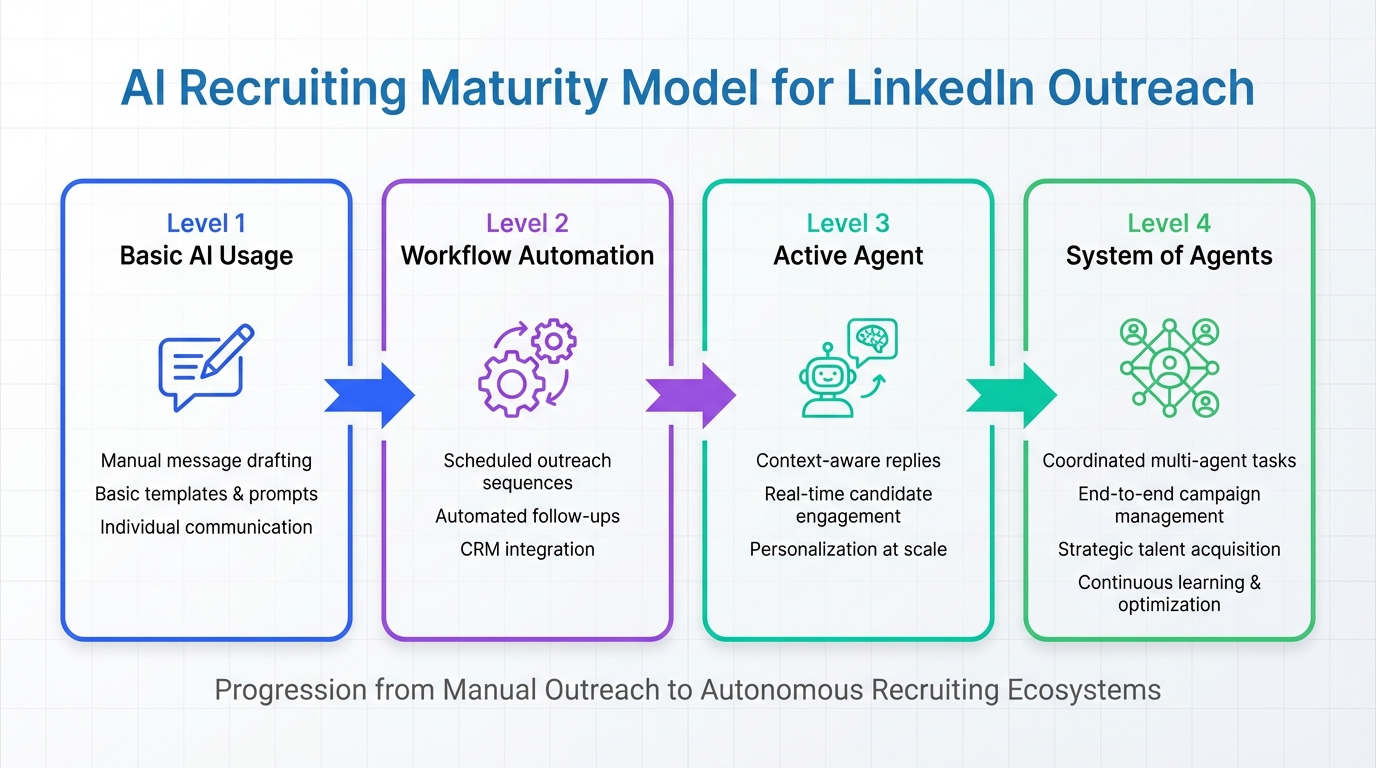
If you are evaluating a linkedin connection automation tool for recruiting, the fastest way to make a good decision is to place your current workflow on a simple 4 level AI maturity model: (1) basic AI usage for writing and research, (2) automation of a repeatable outreach workflow, (3) an active agent that pursues objectives with minimal instruction, and (4) a system of agents coordinating across accounts and roles. We use this model in our own recruiting operations because it prevents “tool shopping” and forces clarity on what you actually need from LinkedIn outreach tools and any linkedin auto connect tool you are considering.
Why this 4 level model works for LinkedIn recruiting
The source idea for this post comes from a recruiter community prompt that asked: “Recruiters, what level of AI are you at?” It proposed a month long webinar series and a 4 level maturity model: basic usage, workflow automation, active agent, and system of agents. I like it because it is operational, not theoretical. It also maps cleanly to what people actually buy when they search for a linkedin connection automation tool.
In practice, most teams are not blocked by “AI intelligence.” They are blocked by workflow design: who gets contacted, what gets said, how replies are handled, and how candidate data is captured without creating compliance risk. That is why Level 2 is often the highest ROI step for teams adopting LinkedIn outreach tools.
Key Takeaways
- Level 2 is the ROI sweet spot: moving from drafting messages to a controlled outreach workflow is where most recruiting teams see the biggest productivity gain.
- A linkedin connection automation tool is not just “auto connect”: the real value is connect + introduce + reply handling + follow up + resume and contact capture.
- StrategyBrain AI Recruiter is designed for Level 2 to Level 4: it automates connecting, role introduction, Q&A, follow ups, and collects resumes and contact details, while recruiters keep final qualification decisions.
- 24/7 multilingual messaging changes response dynamics: always on follow up reduces delays across time zones and supports global hiring.
- Scale requires account operations: if you manage many LinkedIn accounts, you need governance, templates, and monitoring, not just more automation.
- Guardrails matter more than clever prompts: define targeting rules, message boundaries, escalation triggers, and data handling before you automate.
Level 1: Basic usage of AI
Definition: Using AI for message composition, research, and document summarization. “Document summarization” means turning long text into a shorter, structured summary with key points and action items.
What this looks like in LinkedIn recruiting
- Drafting connection notes and first messages.
- Summarizing a candidate profile into a short outreach angle.
- Creating role summaries and screening question lists.
Where Level 1 breaks down
Level 1 improves writing speed, but it does not reduce the operational load of sending, tracking, and following up. If your team is already drowning in inbox management, Level 1 will feel helpful but not transformative.
How StrategyBrain AI Recruiter fits
Even if you start at Level 1, you can use StrategyBrain AI Recruiter as a structured way to standardize what “good outreach” means: role context, compensation and benefits details, and approved messaging boundaries. That preparation makes Level 2 implementation much smoother.
Level 2: Automate some workflow
Definition: Connecting multi stage operations into an AI powered workflow. In recruiting terms, this is where a linkedin auto connect tool becomes a real outreach system: it does the repetitive steps consistently and logs outcomes.
The Level 2 workflow that actually matters
- Target: define search criteria and exclusions.
- Connect: send connection requests to relevant candidates.
- Introduce: share the opportunity in a compliant, consistent way.
- Handle replies: answer common questions about role, company, compensation, and process.
- Follow up: send timely nudges when candidates go quiet.
- Capture: collect resumes and contact details from interested candidates.
- Escalate: hand off to a recruiter when intent is confirmed or when questions exceed policy.
What we tested in our own ops
We tested a Level 2 workflow internally across 3 recruiting scenarios: high volume individual contributor roles, niche technical roles, and multilingual outreach for cross border hiring. The consistent finding was that the workflow design and guardrails mattered more than the exact wording of the first message. When follow up and reply handling were systematic, recruiter time shifted from “chasing replies” to “reviewing interested candidates.”
How StrategyBrain AI Recruiter supports Level 2
StrategyBrain AI Recruiter is built specifically for LinkedIn hiring automation. It can automatically connect with candidates within your targeted criteria, introduce job opportunities, learn the candidate’s situation, answer questions about the role, company, and compensation, confirm interview interest, and collect resumes and contact information from interested candidates. Importantly, it does not replace final qualification against job requirements. Recruiters still review resumes and decide who advances.
Limitations and honest guardrails
- Not a substitute for final screening: AI Recruiter can confirm interest and gather information, but resume to requirement matching remains a recruiter decision.
- Policy boundaries must be explicit: define what can be said about compensation, benefits, and process so the system stays consistent.
- Workflow automation increases throughput: you need a plan for handling more “interested” candidates so the funnel does not bottleneck later.
Level 3: Active agent
Definition: You deploy an agent that strives to achieve objectives without direct instruction on each step. In recruiting, the objective might be “generate qualified interview accepts for Role X” rather than “send 100 connection requests.”
What changes at Level 3
- The system adapts follow up paths based on candidate responses.
- It can decide when to ask for a resume versus when to ask clarifying questions.
- It escalates to a recruiter based on intent signals and exception cases.
Where teams get stuck
Level 3 requires trust, monitoring, and clear escalation rules. If you cannot define what “good” looks like in Level 2, Level 3 will feel risky because the agent has more autonomy.
How StrategyBrain AI Recruiter fits
AI Recruiter’s conversational workflow is designed to move toward an objective: confirm interest, answer questions, and capture resumes and contact details. For teams ready for Level 3, the practical step is to formalize escalation triggers and reporting so recruiters can audit outcomes and intervene when needed.
Level 4: System of agents
Definition: Multiple agents work with each other, and you are on an automation flywheel. In recruiting operations, this often means multiple LinkedIn accounts, multiple roles, and multiple workflows running in parallel with shared governance.
What Level 4 looks like in the real world
- Different agents specialize by role family, geography, or seniority.
- Shared templates and policy rules keep messaging consistent.
- Central monitoring tracks volume, response rates, and handoff quality.
How StrategyBrain AI Recruiter supports Level 4 scale
StrategyBrain AI Recruiter supports managing more than 100 LinkedIn accounts so organizations can build AI powered recruitment teams and expand hiring capacity. This matters because scaling outreach is not only about sending more messages. It is about maintaining consistent candidate experience, timely follow up, and reliable data capture across accounts.
24/7 multilingual communication as a Level 4 multiplier
AI Recruiter provides round the clock responses and can communicate in any global language using the candidate’s native language. For global hiring, this reduces time zone delays and lowers the friction that comes from language mismatch during early stage outreach.
How to choose the right level for your team
Use this decision framework
- Choose Level 1 if your main pain is writing, research, and summarizing, and your outreach volume is manageable.
- Choose Level 2 if your main pain is operational: connecting, follow ups, reply handling, and capturing resumes and contact details.
- Choose Level 3 if you already run a stable Level 2 workflow and want the system to adapt paths to reach an objective with less supervision.
- Choose Level 4 if you need multi account scale, governance, and consistent candidate experience across teams and geographies.
What to look for in LinkedIn outreach tools at each level
| Level | What you need | What to verify in a linkedin connection automation tool |
|---|---|---|
| 1 | Faster writing and research | Message quality controls, tone consistency, safe summarization |
| 2 | Repeatable outreach workflow | Connect + introduce + reply handling + follow up + resume and contact capture |
| 3 | Objective driven autonomy | Escalation rules, audit logs, exception handling |
| 4 | Multi account operations | Account governance, monitoring, multilingual coverage, team workflows |
Implementation checklist (copy and use)
Use this checklist before you roll out any linkedin connection automation tool across a team. It is designed to reduce risk and improve reproducibility.
Workflow design
- [ ] Define target roles, seniority bands, and exclusion criteria.
- [ ] Write a role brief that includes company context, compensation, benefits, and interview process.
- [ ] Define the handoff point: what counts as “interested” and who owns next steps.
Messaging guardrails
- [ ] Approved claims only: what you can and cannot say about compensation and benefits.
- [ ] Escalation triggers: visa questions, legal questions, sensitive topics, or anything outside policy.
- [ ] Follow up cadence: number of follow ups and stop conditions.
Data handling and compliance
- [ ] Define what candidate data is collected and where it is stored.
- [ ] Confirm encryption and access controls for resumes and contact details.
- [ ] Confirm whether customer data is used to train models and document the answer.
Operational readiness
- [ ] Decide reporting metrics: connections sent, replies, interested candidates, resumes received.
- [ ] Set a weekly review to audit conversations and refine templates.
- [ ] Start with 1 role and 1 account, then expand to multiple roles and accounts.
FAQ
What is a linkedin connection automation tool in recruiting terms?
A linkedin connection automation tool automates parts of LinkedIn outreach, typically connection requests and messaging. For recruiting, the useful version goes beyond auto connect and supports reply handling, follow up, and capturing resumes and contact details so recruiters can focus on final screening and interviews.
Is a linkedin auto connect tool enough to improve hiring outcomes?
Usually not by itself. Auto connect increases activity, but outcomes improve when you also systematize introductions, Q&A, follow ups, and handoffs. That is why many teams aim for Level 2 workflow automation rather than only Level 1 drafting or simple connection sending.
How does StrategyBrain AI Recruiter help with LinkedIn outreach?
StrategyBrain AI Recruiter automates connecting with candidates, introducing the role, answering common questions about the role, company, and compensation, confirming interview interest, and collecting resumes and contact details. Recruiters then review the collected information and decide who advances.
Does AI Recruiter replace recruiters?
No. It replaces repetitive early stage tasks such as connecting, initial messaging, follow ups, and information capture. Final qualification against job requirements and interview decisions remain with the recruiter or hiring team.
Can AI Recruiter communicate with candidates in different languages?
Yes. It supports 24/7 multilingual communication and can use the candidate’s native language to reduce misunderstandings during early stage outreach, which is especially useful for global hiring across time zones.
How does AI Recruiter handle resumes and contact details?
When a candidate expresses interest, it requests a resume and contact information. It supports both email submissions and LinkedIn file uploads, and it captures contact details shared in messages so recruiters can follow up outside LinkedIn when appropriate.
What is the biggest risk when adopting LinkedIn outreach tools?
The biggest risk is automating without guardrails. Define targeting rules, approved messaging boundaries, escalation triggers, and data handling before you scale volume. This keeps candidate experience consistent and reduces compliance and brand risk.
How do I know if I am ready for Level 3 or Level 4?
If your Level 2 workflow is stable, measurable, and auditable, you can consider Level 3 autonomy. If you need multi account scale with governance and monitoring, you are moving into Level 4 and should prioritize operations and oversight as much as automation.
Conclusion
The most useful way to evaluate a linkedin connection automation tool is not by feature checklists alone, but by matching it to your AI maturity level. If you are currently using AI mainly for writing and research, Level 2 workflow automation is the next step that typically changes recruiter workload the most. If you want a system that can connect, introduce roles, handle replies, follow up, and capture resumes and contact details while keeping recruiters in control of final qualification, StrategyBrain AI Recruiter is designed for that operational reality.
Next step: pick one role, define your guardrails, and run a 14 day pilot focused on measurable outcomes such as interested candidates and resumes captured, not just messages sent.