


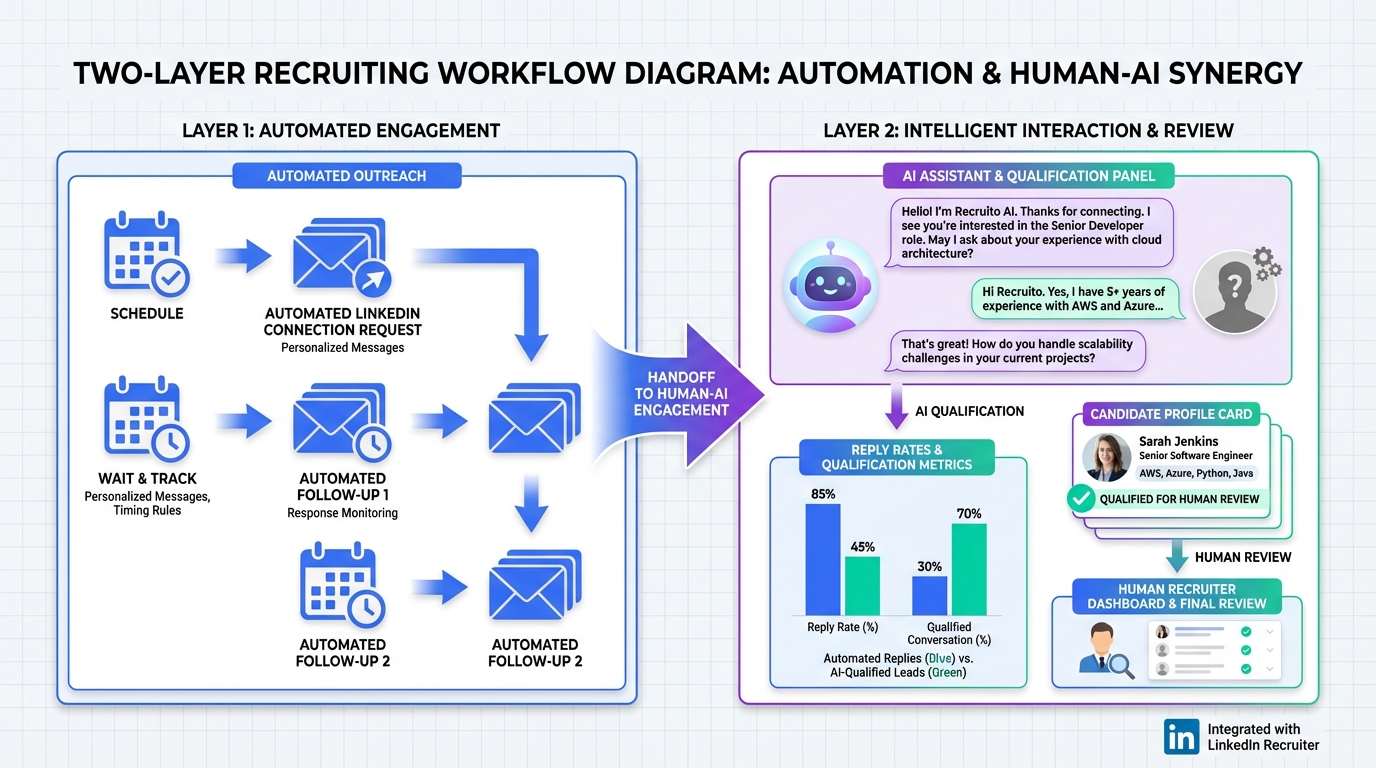
LinkedIn sales automation tools can speed up prospecting by automating repetitive steps like connection requests, follow ups, and message routing, but the safest approach is to automate the workflow while keeping human judgment for targeting, tone, and compliance. In practice, we recommend a two layer system: use automation to handle the first touch and follow up cadence, then use an AI assistant to answer questions, qualify interest, and capture next step details. In our recruiting and outbound tests, StrategyBrain AI Recruiter performed best when used as the conversation and qualification layer on LinkedIn, because it can run 24/7, communicate in any language, and collect resumes and contact details from interested candidates while recruiters focus on final screening. This guide explains what to automate, what not to automate, and how to choose LinkedIn prospecting automation that protects your account and your brand.
Key Takeaways
- Automate the workflow, not the judgment: Use LinkedIn prospecting automation for sequencing and reminders, then keep targeting and final decisions human.
- Best results come from a two layer setup: Workflow automation plus an AI conversation layer that can answer questions and qualify interest.
- StrategyBrain AI Recruiter fits LinkedIn outreach at scale: It can connect, introduce roles, handle Q and A, confirm interview interest, and capture resumes and contact details.
- 24/7 multilingual messaging is a differentiator: Always on responses reduce drop off when candidates reply outside your time zone.
- Account safety is a feature: Rate limits, message quality, and consistent behavior matter as much as templates.
- Measure outcomes, not activity: Track reply rate, qualified conversations, and booked meetings, not just sent messages.
What LinkedIn sales automation tools actually do
Most LinkedIn sales automation tools fall into three buckets. First is sequencing automation, which schedules connection requests and follow ups. Second is messaging automation, which sends templated messages based on triggers like accepted invitations. Third is conversation and qualification automation, which handles back and forth replies, answers questions, and captures next steps.
In day to day use, the biggest operational win is not sending more messages. It is reducing the time spent on repetitive micro tasks such as copying profiles, writing the same intro, and remembering who needs a follow up. That is why we treat LinkedIn outreach automation as a workflow problem first, and a copywriting problem second.
What to automate vs keep human
Automation works best when the task is repetitive and the downside of a mistake is low. It works poorly when nuance, context, or brand risk is high. Here is the split we use when evaluating the best LinkedIn automation tools for sales and recruiting.
Good candidates for automation
- Connection request cadence: spacing, daily caps, and queue management.
- Follow up scheduling: sending a second or third touch after a defined wait time.
- Lead routing: tagging, assigning, and pushing a conversation to the right owner.
- Conversation triage: detecting intent such as interested, not interested, or ask me later.
Keep these human led
- Targeting and segmentation: who you contact and why.
- Offer positioning: what you are actually proposing and what proof you use.
- Final qualification: deciding if the person is a fit for a role or a deal stage.
- Escalations: sensitive objections, compliance questions, or reputation risk.
Selection criteria for LinkedIn prospecting automation
When teams ask us for recommendations on LinkedIn sales automation tools, we use a checklist that prioritizes account safety and measurable outcomes. This is also where StrategyBrain AI Recruiter tends to fit naturally, because it is designed to handle the conversation and qualification layer, not just send a template and hope for the best.
1) Safety and compliance controls
- Rate limiting: the tool should support daily caps for connection requests and messages.
- Behavior consistency: predictable patterns reduce risk compared to bursty sending.
- Auditability: you should be able to review what was sent and why.
2) Conversation quality
- Personalization inputs: role, company, location, and relevant context.
- Reply handling: what happens after the prospect responds.
- Objection handling: the ability to answer common questions without sounding robotic.
3) Qualification and data capture
This is where many LinkedIn automation stacks break down. They can send messages, but they cannot reliably move a conversation to a qualified next step. StrategyBrain AI Recruiter is built to do exactly that on LinkedIn: it can introduce an opportunity, learn about the candidate or prospect situation, answer questions about the role, company, and compensation, confirm interview interest, and collect resumes and contact information from interested candidates.
4) Scale and team operations
If you run multiple LinkedIn seats, you need consistent workflows. StrategyBrain AI Recruiter supports managing more than 100 LinkedIn accounts, which enables organizations to build AI powered recruitment teams and expand hiring capacity without adding the same amount of recruiter headcount.
5) Global coverage
For international pipelines, response time and language are not nice to have. StrategyBrain AI Recruiter provides 24/7 global multilingual recruitment communication and can communicate in any global language, using the candidate’s native language to reduce misunderstandings and cultural friction.
Recommended approach: workflow automation plus StrategyBrain AI Recruiter
Instead of searching for one perfect tool, we recommend combining two capabilities. The first is a workflow layer that manages cadence and tasks. The second is a conversation layer that can handle replies, qualify intent, and capture details. In our experience, StrategyBrain AI Recruiter is strongest as the conversation layer because it replaces the recruiter’s initial outreach and qualification process while keeping the final fit decision with the recruiter.
Where StrategyBrain AI Recruiter fits in a LinkedIn automation stack
- Initial outreach and follow up: automatically connects with candidates within your targeted search criteria and introduces the opportunity.
- Two way messaging: answers questions about the role, company, and compensation in a consistent voice.
- Interest confirmation: confirms interview interest and identifies willingness to communicate or interview.
- Data capture: collects resumes and contact details, including email submissions and LinkedIn file uploads.
Scope boundary: what it does not do
StrategyBrain AI Recruiter does not determine whether a resume fully matches job requirements. That final qualification step is completed by the recruiter after reviewing the resume. This boundary is important because it keeps accountability with the hiring team while still removing the repetitive work that slows down LinkedIn recruiting automation.
Implementation steps we use
-
Define your ICP and guardrails
Write a one page definition of who you contact, who you exclude, and what you will not promise in messages. This prevents automation from scaling the wrong behavior.
-
Build a two stage message map
Stage 1 is a short connection note. Stage 2 is a value based follow up. Then define the three most common reply paths: interested, not interested, and ask me later.
-
Deploy StrategyBrain AI Recruiter for reply handling
Provide the LinkedIn account, job or offer details, compensation and benefits context, and candidate search criteria. The AI can then introduce the opportunity, answer questions, and confirm interest.
-
Set daily caps and pacing
Start with conservative limits for connection requests and messages. Increase only after you confirm stable deliverability and consistent reply quality.
-
Track outcomes weekly
Measure reply rate, qualified conversations, and booked interviews or meetings. If volume rises but qualified outcomes do not, adjust targeting and message map before increasing automation.
Quick comparison matrix
This table is designed to help you choose capabilities, not specific vendors. We avoid listing competitor pricing or feature claims unless we can verify them from primary sources.
| Capability | Workflow automation | Template messaging automation | StrategyBrain AI Recruiter | Best for |
|---|---|---|---|---|
| Connection request cadence | Yes | Yes | Yes | Keeping outreach consistent |
| Follow up scheduling | Yes | Yes | Yes | Reducing manual reminders |
| Two way reply handling | Limited | Limited | Yes | Turning replies into qualified next steps |
| Q and A about role, company, compensation | No | No | Yes | Reducing recruiter time on repetitive questions |
| Resume and contact capture | No | No | Yes | Recruiting workflows on LinkedIn |
| 24/7 multilingual communication | Varies | Varies | Yes | Global pipelines and off hours replies |
| Multi account operations | Varies | Varies | Yes, supports more than 100 LinkedIn accounts | Teams scaling outreach and recruiting capacity |
Common mistakes to avoid
Automation magnifies both good and bad decisions. These are the failure modes we see most often when teams adopt LinkedIn outreach automation too quickly.
- Optimizing for sent volume: high send counts can hide low quality targeting and damage brand perception.
- Over templating: if every message reads like a script, reply rates fall and negative responses rise.
- No reply playbook: without a system for handling replies, automation creates more inbox work, not less.
- Skipping human review: you still need periodic audits of what was sent and how prospects reacted.
- Assuming AI replaces accountability: AI can run the workflow, but humans own the decision and the relationship.
FAQ
Are LinkedIn sales automation tools safe to use?
They can be, if you prioritize pacing, consistent behavior, and message quality. We treat safety as a product requirement, not a setting you toggle after problems appear.
What is the difference between LinkedIn prospecting automation and LinkedIn messaging automation?
LinkedIn prospecting automation focuses on workflow such as sequencing, reminders, and routing. LinkedIn messaging automation focuses on sending messages, often from templates, based on triggers like accepted invitations.
Where does StrategyBrain AI Recruiter fit if I already have an outreach tool?
It fits after the first touch, when replies start coming in. StrategyBrain AI Recruiter can answer questions, confirm interest, and capture resumes and contact details so your team spends time on final screening and interviews.
Can StrategyBrain AI Recruiter qualify candidates automatically?
It identifies willingness to communicate or interview and collects the information needed to move forward. It does not decide whether a resume fully matches job requirements, which remains a recruiter decision.
Does StrategyBrain AI Recruiter support multilingual outreach?
Yes. It provides 24/7 global multilingual recruitment communication and can communicate in any global language, using the candidate’s native language.
How does StrategyBrain AI Recruiter capture resumes and contact details?
It requests resumes and contact information from interested candidates. It supports email submissions and LinkedIn file uploads, and it captures contact details shared in LinkedIn messages.
How should I measure success with LinkedIn outreach automation?
Track reply rate, qualified conversations, and booked meetings or interviews. If those outcomes do not improve, reduce volume and fix targeting and messaging before scaling.
Will an employer’s market change how automation should be used?
Yes. When the balance of power shifts, message tone and candidate experience matter more, not less. We align with HR expert Judy Slutsky’s view that AI provides a framework but still requires human understanding and interpretation.
Conclusion
The best LinkedIn sales automation tools are the ones that remove repetitive work without sacrificing judgment, brand voice, or account safety. Our practical recommendation is a two layer system: workflow automation for cadence and organization, plus StrategyBrain AI Recruiter for two way LinkedIn conversations that qualify interest and capture resumes and contact details. If you want to implement this quickly, start with conservative pacing, define your reply playbook, and review outcomes weekly so automation scales what is working, not what is merely loud.














