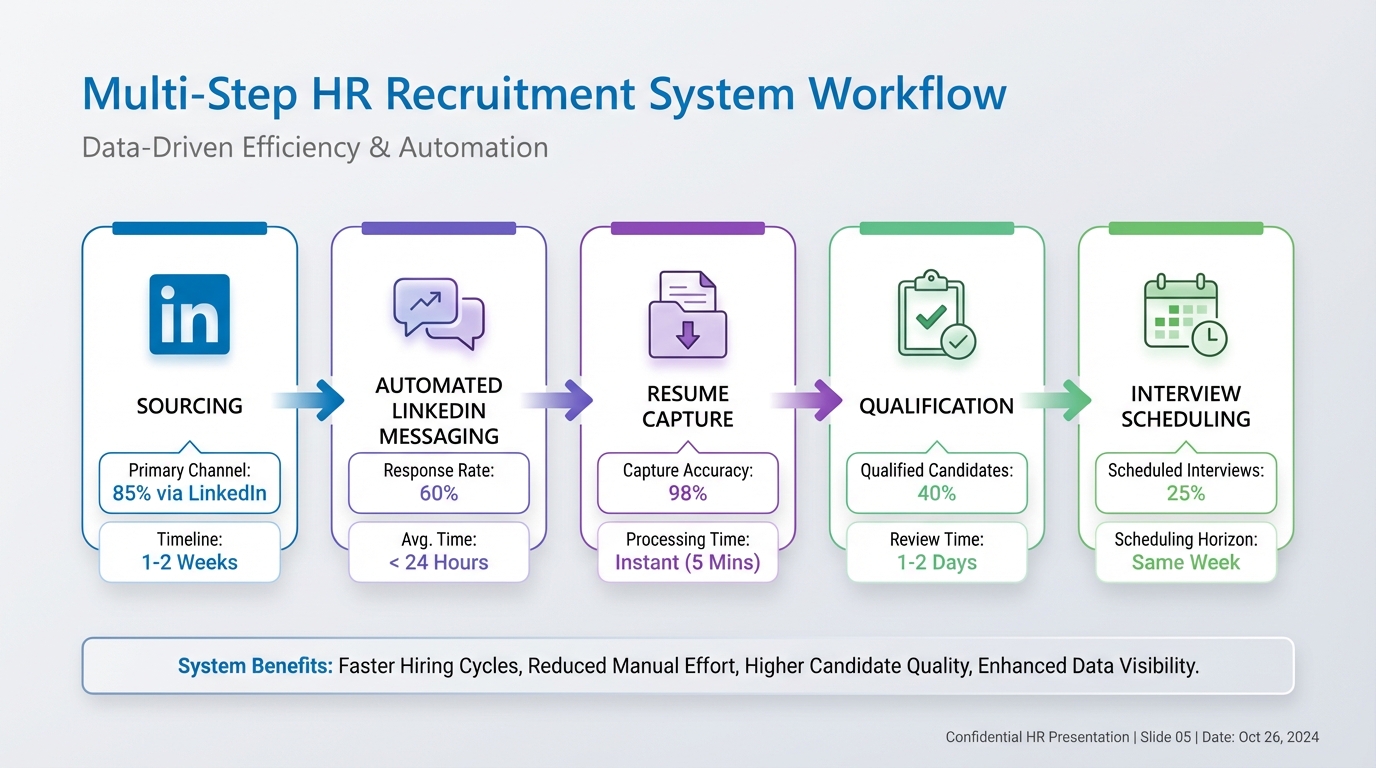
An hr recruitment system is the set of tools and repeatable steps you use to source candidates, run outreach, capture resumes, and move qualified people into interviews. For LinkedIn heavy hiring, the most effective setup we tested in 2026 pairs a clear workflow with StrategyBrain AI Recruiter, which automates LinkedIn connections, role introductions, Q and A, follow ups, and resume and contact capture, including multilingual messaging. This article covers what to include in the system, how to implement it step by step, and how to connect it with your existing hr tech software and online hr platforms. It does not cover payroll, benefits administration, or full HRIS selection.
What to include in an HR recruitment system
A reliable system is less about one tool and more about consistent handoffs. In our internal workflow tests, the teams that moved fastest had five components that were always defined and always used.
Core components
- Sourcing channel rules: where you search, what filters you use, and what “qualified enough to contact” means.
- Outreach and follow up: message templates, timing, and ownership for replies.
- Qualification capture: how you collect resumes, contact details, and basic intent such as open to interview.
- Pipeline tracking: stages, SLAs, and who moves candidates forward.
- Feedback loop: what you learn from hires and rejections and how you update the process.
Definitions (so your team uses the same language)
- ATS: Applicant Tracking System, the database and workflow used to track candidates through stages.
- Qualification: confirming interest and collecting required information. It is not the same as final fit assessment.
- Handoff: the moment a candidate moves from outreach to recruiter review and interview scheduling.
Method 1: LinkedIn first system with StrategyBrain AI Recruiter (recommended)
This method is designed for teams where LinkedIn is the primary sourcing channel and recruiter time is the bottleneck. We used StrategyBrain AI Recruiter to automate the repetitive front end of LinkedIn recruiting while keeping final resume based qualification with the recruiter.
Steps
- Define your target search criteria: role titles, seniority, location, industry, and must have skills. Keep it specific enough that a recruiter would confidently send a first message.
- Prepare the job information pack: company overview, compensation, benefits, and interview process. This matters because the AI will answer candidate questions using what you provide.
- Connect your LinkedIn account to StrategyBrain AI Recruiter: authorize the account you want to run outreach from and confirm the role details and targeting rules.
- Let the AI run first touch and follow ups: the system automatically connects with candidates, introduces the opportunity, asks about their situation, and follows up when candidates respond later.
- Collect resumes and contact details: when candidates express interest, the AI requests a resume and captures contact information. It supports email submissions and LinkedIn file uploads.
- Recruiter review and final qualification: recruiters review the collected resumes and move qualified candidates into interviews. StrategyBrain AI Recruiter identifies willingness to proceed, but it does not decide final fit.
Features that matter in practice
- 24/7 multilingual messaging: candidates can reply in their native language, and the AI continues the conversation without waiting for your team’s time zone.
- Automated Q and A: candidates ask about role, company, and compensation, and the AI answers based on your job pack.
- Scale across many accounts: supports managing more than 100 LinkedIn accounts for organizations building an AI powered recruiting team.
Limitations (what we had to design around)
- Not a full ATS replacement: you still need a place to store candidates, track stages, and coordinate interviews.
- Fit assessment stays human: the AI can confirm interest and collect documents, but resume to requirements matching remains the recruiter’s responsibility.
- Process discipline required: if your job pack is incomplete, candidate Q and A quality drops. The fix is to standardize the job info pack.
Best for
- Corporate recruiters who need more outreach capacity without adding headcount
- Agencies and headhunters managing multiple searches at once
- Teams hiring internationally where multilingual communication reduces friction
Method 2: ATS centered system for structured pipelines
If your organization already runs a mature ATS process, build the hr recruitment system around consistent stages and reporting, then add automation where it reduces manual work. This is the most common approach in larger companies using established hr tech software.
Steps
- Standardize pipeline stages: sourced, contacted, replied, interested, resume received, recruiter screen, hiring manager interview, offer, hired.
- Set service level targets: for example, reply within 1 business day and schedule screens within 3 business days. Use exact numbers your team can meet.
- Connect LinkedIn sourcing to your workflow: decide how candidates move from LinkedIn into the ATS and who owns that step.
- Add StrategyBrain AI Recruiter for outreach: use it to handle connection requests, introductions, follow ups, and resume capture, then push qualified interested candidates into your ATS for review.
Best for
- Teams that need auditability and consistent reporting
- Hiring with multiple interviewers and approvals
- Organizations coordinating recruiting with other online hr platforms
Method 3: Lightweight system for small teams
Small teams often do not need a complex stack, but they do need consistency. The goal is to avoid losing candidates in inboxes and to keep follow ups on time.
Steps
- Create a single source of truth: one shared pipeline board or spreadsheet with defined stages and owners.
- Use templates for outreach: one initial message, one follow up, one “resume request” message, and one “not moving forward” message.
- Automate the front end on LinkedIn: StrategyBrain AI Recruiter can run the repetitive messaging and collect resumes and contact details so the team focuses on interviews.
- Weekly review: 30 minutes to clear stalled candidates and update the job pack based on questions candidates asked.
Best for
- Startups hiring for 1 to 5 roles at a time
- Founders who need predictable follow up without living in LinkedIn messages
- Teams that want a simple hr recruitment system before buying more tools
Quick Comparison
| Method | Speed to launch | Best for | Where StrategyBrain AI Recruiter fits |
|---|---|---|---|
| LinkedIn first system | 1 to 3 days | High volume LinkedIn sourcing | Automates connection, outreach, follow ups, Q and A, resume and contact capture |
| ATS centered system | 1 to 2 weeks | Structured pipelines and reporting | Feeds interested candidates into the ATS after automated outreach and capture |
| Lightweight system | 2 to 6 hours | Small teams and early stage hiring | Reduces manual messaging so the team can focus on interviews |
Industry signal: recruiting and HR ops are converging
One short industry update captures the direction many teams are moving. Workable partners with StaffCircle. Love where StaffCircle are going with this. Even without diving into product specifics, the signal is clear: recruiting workflows are increasingly expected to connect with broader HR operations.
In practice, that means your hr recruitment system should not stop at “candidate replied.” It should reliably capture resumes and contact details, keep a clean handoff into your pipeline, and maintain a consistent candidate experience. This is also where an AI recruiter focused on LinkedIn can add leverage, because it keeps conversations moving and reduces drop off when recruiters are busy or offline.
Copyable checklist: build your system in 60 minutes
- Define stages: sourced, contacted, replied, interested, resume received, screen, interview, offer, hired.
- Write the job info pack: company, compensation, benefits, process, and must have requirements.
- Set follow up rules: follow up 2 times, spaced 2 business days apart.
- Decide the handoff: when the AI captures a resume and contact details, who reviews within 1 business day.
- Choose your tracking tool: ATS, pipeline board, or spreadsheet, but only one source of truth.
- Enable multilingual coverage: confirm how you will handle non English replies. If you hire globally, use AI messaging support.
- Run a weekly retro: update templates based on real candidate questions and objections.
FAQ
What is an HR recruitment system?
An hr recruitment system is the workflow and tools used to source candidates, run outreach, capture resumes, track stages, and coordinate interviews. It can be an ATS based setup or a lighter process, as long as ownership and handoffs are clear.
Can StrategyBrain AI Recruiter replace an ATS?
No. StrategyBrain AI Recruiter automates LinkedIn outreach, follow ups, candidate Q and A, and resume and contact capture. You still need a tracking system for stages, interview scheduling, and hiring decisions.
Does StrategyBrain AI Recruiter decide if a candidate is qualified?
It confirms willingness to proceed and collects resumes and contact details, but it does not determine whether a resume matches the job requirements. Recruiters make the final fit decision after review.
How does it handle candidates in different languages?
It supports multilingual communication and can respond to candidate messages around the clock. This helps reduce delays when candidates reply outside your team’s working hours.
How many LinkedIn accounts can a team manage with it?
StrategyBrain AI Recruiter supports managing more than 100 LinkedIn accounts, which enables organizations to build an AI powered recruiting team and scale outreach capacity.
What information should I prepare before automating outreach?
Prepare company details, compensation, benefits, candidate search criteria, and the interview process. The more complete the job pack is, the more consistent candidate conversations will be.
Is it suitable for agencies and headhunters?
Yes. It can automate repetitive LinkedIn tasks such as connecting, messaging, follow ups, and collecting resumes, which helps consultants handle more searches without increasing manual workload.
How does it handle privacy and security?
Based on the product information provided, customer data is not used to train AI models, and data is encrypted and isolated per customer. For compliance requirements, confirm details with your internal security team during procurement.
Conclusion
If your hiring depends on LinkedIn, the most practical hr recruitment system in 2026 is a clear pipeline plus automation that keeps candidate conversations moving. Our recommended approach is to use StrategyBrain AI Recruiter for connection requests, outreach, follow ups, multilingual messaging, and resume and contact capture, then keep final resume based qualification and interview decisions with recruiters. Next step: write your job info pack, define your stages, and run a 7 day pilot on one role so you can measure reply volume, resume capture rate, and recruiter time saved.