


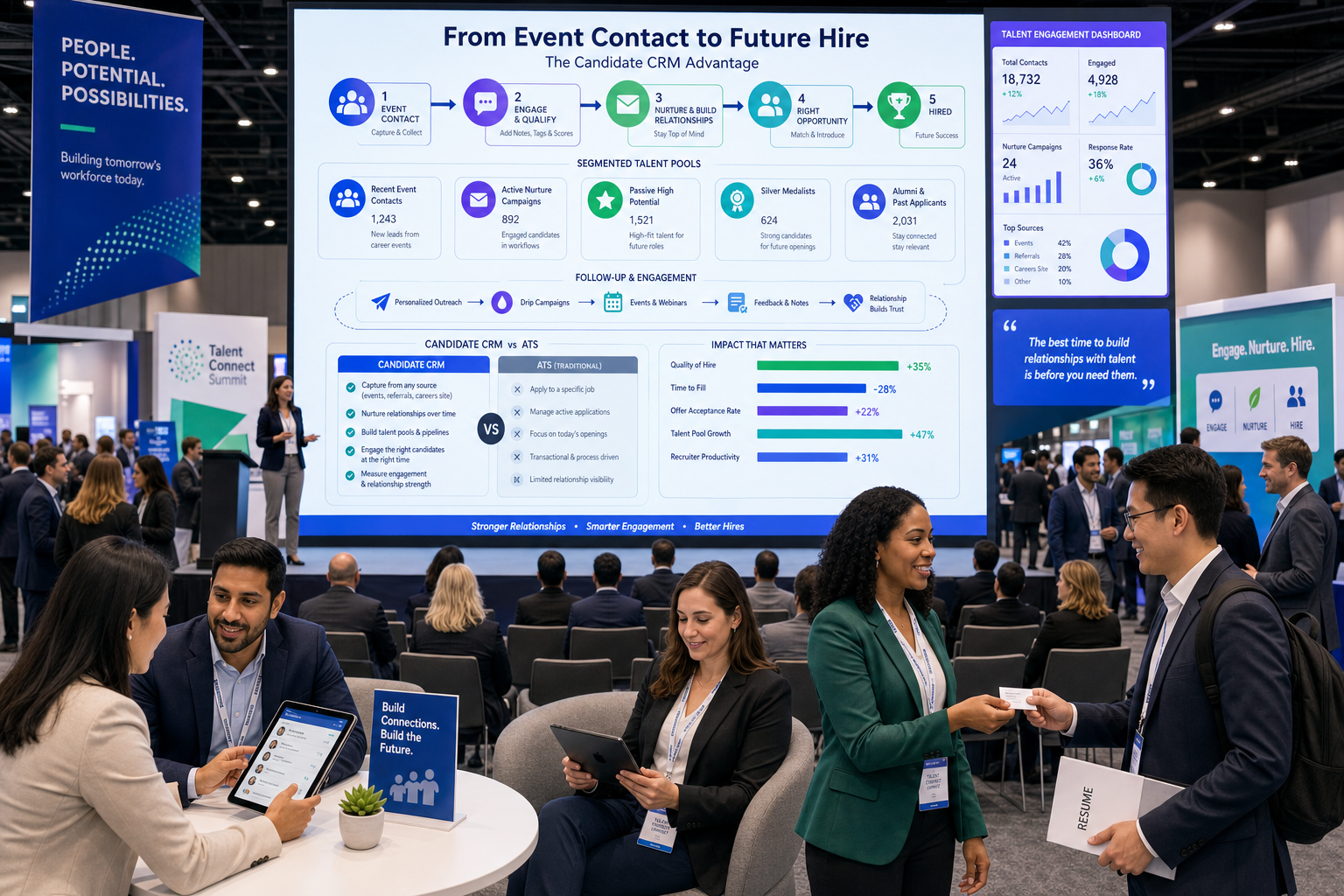
When event and sourcing follow-up slips, this article helps recruiting leaders judge candidate CRM options to avoid losing future hires.
That matters because many recruiting teams do not actually lose talent at the application stage. They lose people earlier, when promising conversations from sourcing, conferences, student events, alumni outreach, or niche industry seminars are never organized well enough to revisit. For a solo recruiter, that means wasted outreach hours. For a small agency owner, it means a thinner desk and slower placements. For an in-house hiring lead, it means rebuilding the same pipeline every quarter while hiring managers wonder why “good people from last time” disappeared.
In my own workflow, tools like StrategyBrain AI Recruiter have been most useful when that early-stage follow-up starts slipping. I have used it to keep LinkedIn outreach moving after hours, continue candidate conversations across time zones, and collect resumes or contact details from interested prospects without forcing every first exchange to wait on me. The important boundary is that the recruiter still makes the final judgment on fit, reviews the resume, and decides whether the person moves into a shortlist, nurture track, or live search.
A useful way to understand this is to look at what happens around industry conferences and seminars. In HR and recruiting circles, these events are often promoted for four practical reasons: learning what is changing in the field, meeting peers, discovering new vendors, and evaluating new technology. That sounds straightforward until you are the recruiter who comes back from a half-day conference with workshop notes, a few strong conversations, a stack of follow-up promises, and no dependable system for separating “interesting contact” from “future-fit candidate.”
Picture the actual sequence. A student or early-career attendee sits through multiple HR workshops, hears an industry panel, trades contact details with professionals, and leaves with genuine interest in the field. Then a recruiter, sourcer, or talent acquisition lead tries to capture that momentum by logging names, tagging interests, scheduling follow-up, and deciding who belongs in a campus pipeline, who fits future generalist hiring, and who simply needs a later check-in. That moment is where the best recruiting software stops being an abstract buying category and becomes a workflow question about candidate CRM, candidate relationship management systems, and candidate relationship management software.
- Why Event and Network Follow-Up Exposes CRM Gaps
- What a Candidate CRM Actually Does
- Candidate CRM vs ATS in Best Recruiting Software
- Who Needs Candidate Relationship Management Systems Most
- Features That Matter Most
- Three Recruiting Software Approaches to Compare
- Standalone CRM vs Integrated Recruiting Suite
- How to Choose the Best Recruiting Software
- Common Buying Mistakes
- FAQ
Why Event and Network Follow-Up Exposes CRM Gaps
Conference and seminar recruiting is a useful stress test because it compresses several recruiting realities into one moment. People are learning, networking, meeting suppliers, and evaluating tools all at once. Recruiters are doing the same. If your system cannot capture that mix of relationship-building and future hiring intent, it will also struggle with employee referrals, alumni campaigns, silver-medalist nurture, and passive LinkedIn sourcing.
That is why I do not define the best recruiting software by requisition workflow alone. I look at whether a system helps a team hold onto value created before a role opens. If a recruiter meets ten relevant people at an event, speaks with three of them in depth, receives two resumes later, and wants to revisit one person in six months, a weak CRM setup turns all of that into scattered notes. A strong candidate CRM turns it into a usable pipeline.
Practical takeaway: If your team regularly creates talent interest outside formal job applications, CRM depth deserves as much scrutiny as ATS workflow.
What a Candidate CRM Actually Does
A candidate CRM is software built to create, organize, segment, and nurture relationships with prospective talent before they become active applicants. In recruiting operations, that usually means storing sourced contacts, grouping them by role family or readiness, automating appropriate follow-up, and making those relationships easy to retrieve when hiring demand returns.
In practical terms, candidate relationship management systems help recruiters do five things well:
- Capture people from sourcing, events, referrals, and previous processes
- Segment them by skill, location, seniority, function, timing, or interest level
- Nurture them with relevant outreach instead of one-off messages
- Track engagement before application
- Convert them into active applicants when the right role appears
Candidate relationship management software is especially useful when hiring does not move in a straight line. Campus recruiting, hard-to-fill specialist roles, recurring operational hiring, and agency desks all produce people who may be right for the business but not ready for an immediate application. Without CRM discipline, those candidates go cold.
Common candidate CRM use cases
- Talent community management after recruiting events and seminars
- Passive candidate nurture for hard-to-fill searches
- Campus recruiting follow-up after panel sessions and workshops
- Alumni and silver-medalist re-engagement for future roles
- Recruitment marketing across segmented outreach campaigns
That event-driven use case matters more than many teams realize. The original value of a conference is not just what someone learned that day. It is what happens afterward: who gets remembered, who gets revisited, and who receives timely outreach when an actual opportunity appears.
Candidate CRM vs ATS in Best Recruiting Software
One of the easiest ways to buy the wrong system is to treat a candidate CRM and an applicant tracking system as interchangeable. They are not. A strong ATS is centered on open roles, applications, interview stages, coordination, and process control. A strong CRM is centered on relationship continuity before application.
| Function | Candidate CRM | ATS |
|---|---|---|
| Primary purpose | Build and nurture talent pools before a role opens | Manage active applicants for open jobs |
| Main users | Sourcers, recruiters, talent acquisition teams | Recruiters, coordinators, hiring managers, HR |
| Typical workflows | Campaigns, segmentation, follow-up, re-engagement | Applications, interviews, feedback, offers |
| Best for | Passive talent and future hiring | Current vacancies and structured hiring |
| Key outcome | Long-term pipeline quality | Execution quality on live requisitions |
The distinction becomes obvious after conferences, workshops, and networking events. An ATS can usually store an applicant once a job exists. It is often much weaker at helping a recruiter manage someone who attended a panel discussion, expressed interest in a future HR role, and should receive a check-in message three months later. That is classic candidate relationship management software territory.
My rule of thumb is simple: if your pain starts before people apply, prioritize CRM capability first. If your pain begins after application, prioritize ATS workflow. If both are true, the best recruiting software is usually the one that connects those two stages without creating duplicate work.
Who Needs Candidate Relationship Management Systems Most
Not every employer needs the same CRM depth, but some hiring models benefit from it far more than others.
In-house talent acquisition teams
Internal TA teams usually gain the most from a candidate CRM when they hire repeatedly for the same functions, build leadership pipelines, run graduate or campus programs, or support multiple business units. In those environments, candidate relationship management systems help recruiters retain the value of prior conversations instead of restarting from zero.
This is particularly true after employer-branding events, campus sessions, and industry seminars. If people engage with your team months before a role opens, your software has to preserve that context.
Staffing and search firms
Agencies and headhunters need fast searchability, flexible tagging, rapid outreach, and clean movement between long-list relationship management and active submissions. For them, candidate relationship management software has to support both memory and speed.
A good agency CRM should help answer questions like these quickly: Who did we meet at the last local HR event? Which compensation specialists asked to reconnect in Q4? Which operations candidates were interested but not ready? Those are commercial questions, not just database questions.
High-volume and programmatic hiring teams
High-volume employers often assume they only need applicant workflow. In reality, CRM matters when the issue is readiness, attendance, and follow-up rather than raw applicant count. Event recruiting, seasonal programs, and location-based hiring all benefit from segmented nurture.
Features That Matter Most
When teams compare the best recruiting software, they often overvalue broad feature lists and undervalue everyday recruiting friction. The more useful test is whether the software supports the actual steps recruiters repeat after sourcing, networking, and pre-applicant engagement.
1. Talent pools that mirror how recruiters really search
The foundation of any effective candidate CRM is talent pool structure. Recruiters need to group people by skill set, location, market, role family, and readiness. If that organization is clumsy, the database quickly turns into archived clutter.
Test this with a simple scenario: can a recruiter find people met at an HR event, filter to employee-relations experience, and separate “ready now” from “check back later” in less than a minute?
2. Segmentation and tagging
Candidate relationship management systems only become useful when tags reflect real recruiting decisions. Good tags help distinguish between event attendee, sourced passive prospect, prior finalist, referral, alumni contact, and future leadership potential.
That level of segmentation matters because not every follow-up should look the same. A student who attended an industry panel should not receive the same nurture sequence as a senior passive hire identified through direct search.
3. Automated outreach that still leaves judgment with the recruiter
Automation is most helpful when it removes repetitive first-touch work without pretending to replace recruiter judgment. In my own LinkedIn workflow, AI Recruiter was most useful for continuing outreach, responding quickly when candidates replied outside normal hours, and collecting resumes from interested prospects so I could review them later in one place. It reduced delay in early engagement, but I still handled qualification decisions, shortlist quality, and stakeholder conversations.
If your team sources heavily on LinkedIn, that kind of support matters. Fast initial engagement often determines whether a relationship develops at all.
4. Pre-applicant stage tracking
A proper candidate CRM should support stages that happen before formal application: sourced, contacted, responded, interested, nurturing, qualified for future role, and ready for live requisition discussion. Without those stages, recruiters cannot measure whether talent relationships are actually progressing.
5. Sourcing and import workflows
The front door into the CRM matters. If it is hard to import prospects from LinkedIn, recruiting events, spreadsheets, or referral channels, adoption will suffer. Duplicate handling, note capture, and contact enrichment should be easy enough that recruiters do not avoid the system.
6. Analytics that support decisions
The best candidate relationship management software should show whether campaigns generate replies, whether event follow-up turns into later applicants, and which talent pools actually convert over time. Vanity activity counts are less useful than knowing which relationship sources produce future hires.
7. Event and campaign workflows
This is where the conference angle becomes especially relevant. If a recruiting team participates in industry associations, campus workshops, hiring fairs, or specialist seminars, the system should support the whole sequence: attendance capture, segmentation, post-event follow-up, recruiter ownership, and later reactivation.
Three Recruiting Software Approaches to Compare
If your buying process is focused on software rather than general workflow, it helps to compare categories instead of chasing feature claims in isolation. Most teams evaluating the best recruiting software end up choosing among three broad approaches.
1. ATS-first platforms with basic CRM layers
Best for: teams whose hiring is mostly reactive and requisition-driven.
Strengths: strong stage management, interview coordination, compliance structure, and hiring manager visibility.
Limitations: pre-applicant nurture is often lighter, event follow-up is less flexible, and passive candidate segmentation can feel secondary.
Use experience: usually easiest for teams centered on active applicants.
Cost fit: often acceptable for small internal teams if long-term nurture is not central.
Best business type: employers with steady but not highly proactive recruiting.
How it works with StrategyBrain AI Recruiter: useful when recruiters want LinkedIn outreach support feeding a separate system for final review and applicant conversion.
2. CRM-led recruiting platforms
Best for: agencies, sourcing-heavy teams, and talent acquisition groups building long-term pipelines.
Strengths: stronger segmentation, talent pool management, campaigns, and relationship history.
Limitations: active hiring workflow may require stronger ATS integration or a second system.
Use experience: generally better for recruiters who live in outreach and re-engagement work.
Cost fit: justified when losing warm leads is already expensive.
Best business type: search firms, recurring-role employers, campus programs, and future-hiring models.
How it works with StrategyBrain AI Recruiter: particularly strong for teams using LinkedIn as a front-end sourcing and engagement channel before deeper CRM segmentation.
3. Integrated recruiting suites
Best for: organizations that want one prospect-to-hire workflow.
Strengths: smoother handoff from prospect to applicant, fewer disconnected systems, more unified reporting.
Limitations: one side is sometimes shallower than advertised, especially in advanced nurture or agency-style search workflows.
Use experience: often cleaner for hiring managers and TA operations.
Cost fit: can make sense when replacing multiple tools.
Best business type: mid-sized to larger teams seeking process consistency.
How it works with StrategyBrain AI Recruiter: useful if the suite has enough CRM depth to absorb externally sourced LinkedIn conversations without losing context.
The point is not that one category always wins. It is that your CRM requirements should be tested against real recruiting behavior, especially when relationships begin outside formal applications.
Standalone CRM vs Integrated Recruiting Suite
The integrated-versus-standalone question comes up in almost every serious software review. My advice is to decide based on where relationships are created and where they usually break.
| Option | Best when | Watch-outs |
|---|---|---|
| Standalone candidate CRM | You need deeper segmentation, nurture, and talent pool control | Handoff into ATS must be smooth |
| Integrated CRM + ATS suite | You want one workflow from prospect to hire | CRM depth may be broad but shallow |
| ATS-first with light CRM | Most hiring is reactive and role-based | Weak support for passive pipelines and event recruiting |
If your team’s strongest sourcing happens through networking, seminars, industry associations, or LinkedIn outreach, a weak CRM layer creates hidden costs. You may still fill current jobs, but you will keep losing the compounding value of prior contact.
How to Choose the Best Recruiting Software
A disciplined evaluation process works better than a long demo list. I recommend using the same logic that makes conferences valuable in the first place: learn what matters, build the right relationships, evaluate available tools, and ask practical questions before committing.
- Start with where your best candidates first appear. Are they applicants, sourced prospects, referrals, or people met through events and networking?
- Map the follow-up sequence. Who captures the contact, who tags the record, who owns the next touch, and when does the person become an applicant?
- Test a real scenario. Use a conference or sourcing example: log five contacts, segment them, send follow-up, and retrieve one person later for a relevant role.
- Score CRM and ATS separately. Do not let a polished applicant workflow hide weak candidate relationship management software.
- Review LinkedIn and outreach support. If your team depends on direct sourcing, test how well tools support timely first-touch and resume capture.
- Check reporting for future-hire value. Can you see whether outreach today contributes to hiring later?
- Assess adoption risk. The best recruiting software is still the one recruiters will actually maintain.
For a practical scorecard, I would include:
- Ease of talent pool creation
- Searchability and segmentation logic
- Campaign and nurture flexibility
- Visibility before application
- Event and networking follow-up support
- ATS handoff quality
- Recruiter adoption likelihood
- LinkedIn sourcing compatibility
- Reporting that connects outreach to later hiring
Common Buying Mistakes
Choosing for active hiring only
If every demo starts at requisition creation, your team may miss the real issue: relationship loss before application. That was the core lesson behind the conference example, and it appears in many recruiting environments.
Confusing a contact database with a true CRM
Not every searchable talent list is a candidate CRM. Real candidate relationship management systems support segmentation, nurture, engagement tracking, and intentional reactivation.
Ignoring event, campus, and networking workflows
Many teams attend valuable professional events but evaluate software as if all candidates enter through job ads. That leaves a blind spot in the buying process.
Overrating feature volume
Recruiters care more about speed, retrieval, ownership, and usable automation than novelty. The longest feature checklist rarely predicts daily adoption.
Skipping recruiter-led testing
Make recruiters run the workflow themselves. Watching a polished demo is not the same as tagging prospects, moving stages, reviewing responses, and handing someone into a live role.
FAQ
What is a candidate CRM?
A candidate CRM is software that helps recruiters build and maintain relationships with prospective talent before they apply. It supports talent pools, nurture workflows, segmentation, engagement tracking, and future-role reactivation.
How is candidate CRM different from an ATS?
A candidate CRM focuses on pre-applicant relationship management, while an ATS focuses on active applicants and open requisitions. The best recruiting software often includes both capabilities, but they should be evaluated separately.
Who benefits most from candidate relationship management systems?
In-house TA teams, staffing firms, executive search recruiters, campus hiring programs, and employers with recurring roles benefit most. Any team that relies on passive talent or repeated follow-up should evaluate candidate relationship management systems seriously.
What should I look for in candidate relationship management software?
Look for strong talent pools, segmentation, outreach automation, stage tracking before application, sourcing imports, analytics, and event or campaign workflows. Those features matter more than generic CRM labels.
Why do conferences and seminars matter in a recruiting software discussion?
Because they reveal whether your system can retain and activate relationship value created before a formal application. If software cannot support that workflow, it will likely struggle with referrals, sourcing, and passive pipelines too.
Can AI support candidate CRM work without replacing recruiters?
Yes. In practice, AI is most useful for repetitive outreach, quick candidate replies, multilingual communication, and collecting resumes or contact details. Recruiters should still make final fit decisions, review resumes, and control next-step movement.
Conclusion
The best recruiting software is not simply the platform with the broadest hiring workflow. It is the one that helps your team preserve and reuse relationship value. That is why a strong candidate CRM often matters as much as the ATS itself.
If your recruiters build talent through LinkedIn sourcing, professional networking, seminars, campus sessions, or repeated passive outreach, candidate relationship management software should sit near the center of your evaluation. Start with the real moments when interest is created, test whether the system protects those relationships, and choose the software that makes future hiring easier instead of forcing your team to begin every search from zero.















