


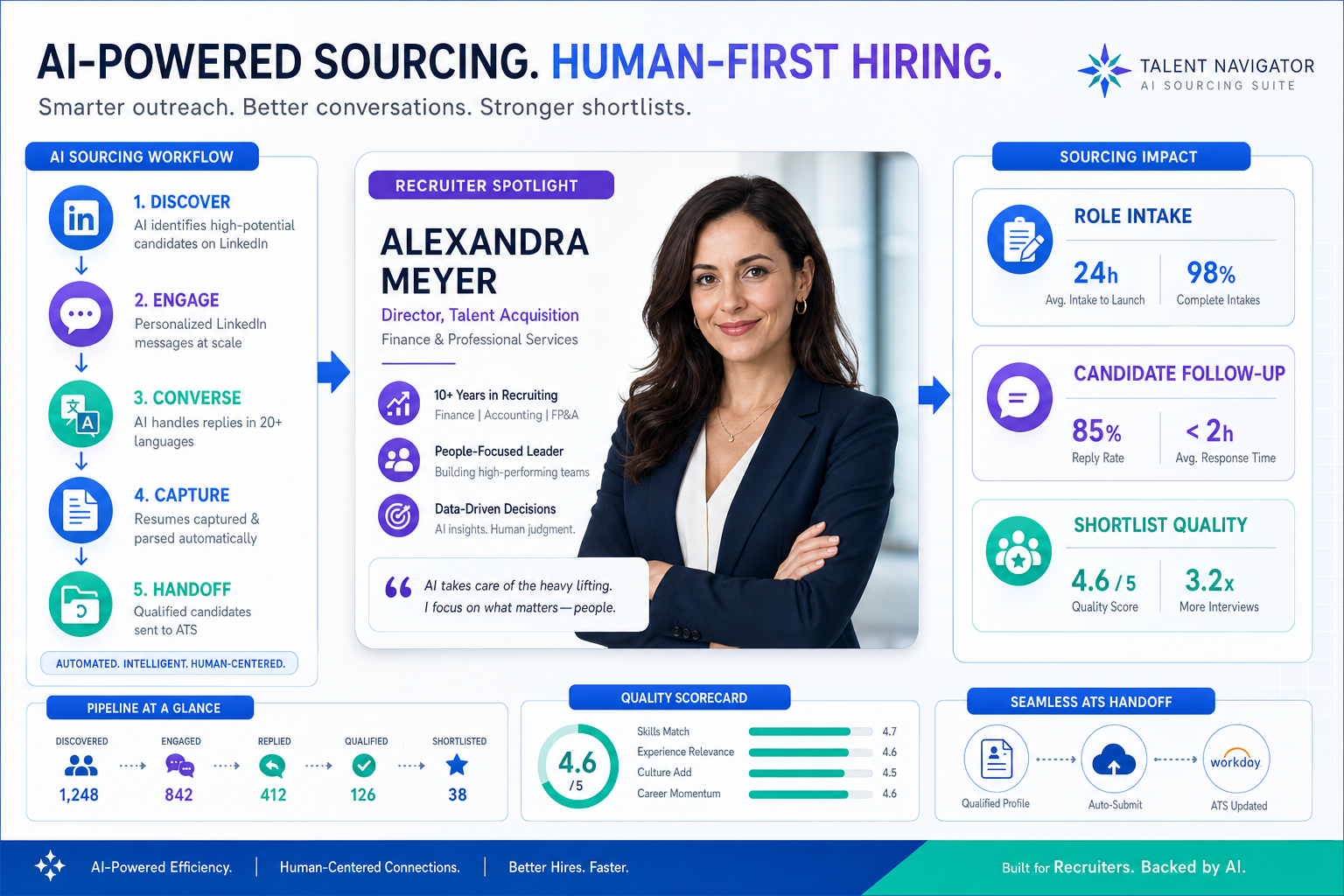
See how headhunters can judge an ai recruiting tool against intake, follow-up, and shortlist quality to avoid slow, weak searches.
That sounds obvious, but it is where many sourcing projects fail. Agency owners lose billable time because recruiters rebuild searches from scratch and chase candidate replies after hours. Solo recruiters get trapped between sourcing, messaging, and resume collection. In-house teams feel a different version of the same drag: slow shortlists, inconsistent calibration with hiring managers, and weak handoff into the rest of the hiring workflow.
In my own LinkedIn-heavy sourcing work, StrategyBrain AI Recruiter stood out less as a magic matcher and more as a practical support layer for the repetitive front end of outreach. It can keep candidate conversations moving, respond across time zones in multiple languages, and collect resumes or contact details once interest is confirmed. That matters because the recruiter still owns the real call: reviewing the profile, judging fit, and deciding whether the candidate should move forward.
A useful way to understand this is through the same decision logic independent consultants use when choosing engagements. In the reference case behind this article, an experienced finance leader moved from full-time employment into fractional CFO work after more than 15 years in leadership roles. About a year into consulting, the learning was not just about finding any client. It was about choosing work where she could add value quickly, handle both strategic and day-to-day demands, and build trust with owners from the start.
Her early-engagement habits are especially relevant to sourcing: start with a kickoff to align on priorities, assess the business as a whole rather than one narrow symptom, and establish communication with stakeholders from day one. That same pattern is what separates average search tools from effective ai candidate sourcing workflows. If you are comparing an ai recruiting tool, looking at sourcing tools for recruiters, or testing free ai recruiting tools, the real question is whether the system helps recruiters qualify the opportunity, understand the wider hiring context, and act quickly without losing control.
Table of Contents
- Why Context Matters in AI Candidate Sourcing
- How an AI Recruiting Tool Supports the Real Workflow
- A Better First-Week Framework for Sourcing
- What to Look for in Sourcing Tools for Recruiters
- Where AI Helps Most in LinkedIn Outreach
- How to Judge Free AI Recruiting Tools
- Implementation Tips for Recruiters and TA Teams
- Common Buying Mistakes
- FAQ
Why Context Matters in AI Candidate Sourcing
One lesson from executive consulting transfers directly into recruiting: you create better outcomes when you understand the full assignment, not just the visible request. A recruiter who gets a vague brief like “find a senior operator quickly” will usually produce a shallow list. A recruiter who understands the business stage, reporting line, urgency, tradeoffs, and stakeholder concerns will source differently and better.
That is why AI candidate sourcing should not be framed as simple automation. The strongest systems help recruiters turn messy role inputs into a more usable search brief, then support the repetitive steps that follow. This mirrors how experienced consultants evaluate new work. They do not only ask whether the opportunity exists. They ask whether it is the right challenge, whether they can add impact from day one, and whether the engagement fits their strengths.
In recruiting terms, that means an ai recruiting tool should help answer questions like these:
- What problem is the role actually solving?
- Which candidate signals are truly must-have versus preferred?
- How quickly can outreach begin without sacrificing relevance?
- What feedback loop will refine the search after the first responses?
If the software only gives you a ranked list without helping you work through those questions, it may save clicks but not improve hiring outcomes.
Key takeaway: The best sourcing results come from tools that support recruiter judgment before, during, and after search, not just at the moment of matching.
How an AI Recruiting Tool Supports the Real Workflow
Most buyers understand the search part of AI sourcing. Fewer look closely at what happens after the match appears. In practice, recruiters need more than search. They need a workable flow from role intake to outreach to response handling to handoff.
A modern ai recruiting tool usually does some combination of the following:
- Interpret the role with natural language or structured criteria
- Search internal or external candidate sources beyond exact keyword overlap
- Rank profiles using fit signals
- Assist with outreach drafting or sequencing
- Track candidate replies and interest signals
- Capture resumes and contact details
- Pass selected candidates into ATS or CRM workflows
That workflow matters most on LinkedIn, where strong sourcing often breaks down not at the search stage but at the communication stage. Recruiters send initial outreach, then lose momentum because replies come in late, across time zones, or in bursts that are hard to manage alongside live req loads.
That is where I found AI Recruiter more helpful than a standard search utility. In use, it handled the repetitive conversation layer that usually slows LinkedIn sourcing: initial introductions, back-and-forth questions, and collection of resumes from interested candidates. It also kept communication moving outside normal working hours, which is especially useful for agency recruiters balancing multiple searches at once. The important boundary is that it did not replace recruiter qualification. I still reviewed the resume, checked relevance, and decided who deserved a real interview conversation.
That distinction is critical for trust. Recruiters adopt AI faster when the tool removes repetitive communication tasks without pretending to own the hiring decision.
A Better First-Week Framework for Sourcing
The reference interview offered a simple but strong operating model for new engagements: align on priorities, assess the whole business, and establish communication early. I think this is one of the best ways to evaluate AI sourcing maturity too.
1. Align on priorities before you search
Just as a consultant starts with a kickoff meeting to learn what is keeping owners up at night, recruiters need a real intake process before relying on AI. The first search prompt should reflect actual business priorities, not a recycled job description.
Useful intake inputs include:
- Must-have capabilities
- Acceptable adjacent backgrounds
- Business stage and reporting context
- Non-negotiables versus trainable gaps
- Why the role matters now
Without that, even the best sourcing tools for recruiters produce noisy output.
2. Assess the whole hiring context
The fractional CFO lesson about reviewing structure, systems, finances, and long-term goals maps neatly to recruiting. A good sourcer should know whether the role sits inside a new market push, a turnaround, a replacement search, or a scaling function. Each context changes how you rank profiles.
For example, a candidate who looks imperfect on paper may be highly relevant if the company needs someone who can operate in ambiguity and build process from scratch. Semantic matching can help surface those adjacent candidates, but only if the recruiter has defined the context clearly enough.
3. Establish communication early and keep it structured
The reference case emphasized communication from day one to create buy-in and enable course correction. In AI sourcing, this means two things: recruiter-to-stakeholder communication and recruiter-to-candidate communication.
On the stakeholder side, shared scorecards and shortlist reviews help refine the search. On the candidate side, responsive messaging keeps promising people engaged. For LinkedIn outreach in particular, this is where an AI-supported workflow can make a visible difference. A system like StrategyBrain AI Recruiter can keep dialogues moving, answer basic role questions, and gather next-step information while the recruiter focuses on fit, nuance, and timing.
What to Look for in Sourcing Tools for Recruiters
When I compare sourcing tools for recruiters, I care less about whether a vendor says “AI-powered” and more about whether it supports the three conditions above: priority alignment, full-context understanding, and communication flow.
| Evaluation Area | What to Check | Why It Matters |
|---|---|---|
| Role intake quality | Structured prompts, scorecards, editable criteria | Prevents vague searches and weak fit logic |
| Search and matching | Natural language search, semantic interpretation, title variation handling | Finds relevant candidates beyond exact keywords |
| Candidate ranking | Transparent fit signals, editable weighting, explainable results | Builds recruiter trust and better review discipline |
| Outreach support | Personalized messaging help, response tracking, follow-up continuity | Keeps candidate engagement from stalling |
| Resume and contact capture | Simple collection and clean handoff | Reduces admin work after candidate interest appears |
| Integration | ATS or CRM export, duplicate handling, stage updates | Protects downstream workflow consistency |
| Recruiter control | Approval steps, overrides, auditability | Keeps final judgment with the human recruiter |
| Governance | Data handling, privacy practices, secure access controls | Important for enterprise adoption and compliance |
That final row matters more than many teams expect. If a tool helps with candidate engagement, it will touch sensitive data and communication history. Buyers should confirm how candidate information is stored, whether customer data is isolated, and whether it is used to train models.
Questions worth asking in demos
- Can I see how the system interprets this specific role, not just a polished sample?
- Which sources are being searched, and how current are they?
- Can recruiters adjust or override fit logic?
- How does the tool handle candidate replies outside working hours?
- What happens after a candidate expresses interest?
- How easily can resumes and contact details move into our existing workflow?
Those questions expose whether the product is a search feature or a usable recruiting workflow.
Where AI Helps Most in LinkedIn Outreach
Because this topic often overlaps with active sourcing, LinkedIn deserves its own section. Recruiters do not usually fail on LinkedIn because they cannot send a message. They fail because manual outreach creates too many micro-tasks: connection requests, follow-ups, reply triage, role explanation, timing coordination, and resume collection.
Used well, AI support helps in three specific places:
- Initial contact at scale: keeping outreach active across multiple searches
- Always-on communication: responding when candidates reply after work or from other regions
- Interest conversion: collecting resumes and contact details from candidates who want to proceed
My experience using AI Recruiter was strongest in exactly those areas. For agency-style sourcing, it reduced the stop-start nature of LinkedIn messaging and made it easier to return to the part of the job recruiters actually get judged on: narrowing the field, reading the resume critically, and presenting a credible shortlist. It is especially useful for recruiters handling international searches, after-hours response windows, or high-volume outreach where continuity matters.
That said, recruiters should keep realistic expectations. An outreach automation layer is not the same thing as candidate qualification. A candidate can be willing to talk and still be wrong for the role. The software can move the conversation forward; the recruiter still decides whether the profile deserves serious time.
How to Judge Free AI Recruiting Tools
Search demand for free ai recruiting tools is understandable, especially for solo recruiters, early-stage agencies, and hiring teams testing adoption. But “free” can mean very different things, and the operational difference matters.
Common free models
- Free trial: short-term access to paid functionality
- Freemium utility: lightweight support for one part of the workflow
- Permanent free tier: ongoing access with strict usage limits
- Limited outreach or search quota: enough to test fit, not enough to run a team process
Free options can be useful when you want to:
- Test whether natural language search beats your current Boolean process
- Learn how recruiters react to AI-assisted outreach
- Compare response handling workflows on LinkedIn
- Validate whether resume capture and follow-up reduce admin drag
They are less useful when you need:
- Consistent recruiter oversight
- Shared workflows across a team
- Stable ATS or CRM handoff
- Reliable multilingual or after-hours candidate communication
In other words, many free ai recruiting tools are good for experimentation but weak for production. Evaluate them against the same first-week framework: do they help you align priorities, understand context, and maintain communication?
Implementation Tips for Recruiters and TA Teams
AI sourcing adoption is rarely blocked by the technology alone. More often, it stalls because the intake process is poor, the shortlist review standard is unclear, or the team does not know where automation should stop.
Practical rollout advice
- Start with one repeatable role family. Similar roles make it easier to compare search quality and outreach response patterns.
- Use a structured kickoff. Borrow the consulting logic: align on priorities first, especially what success looks like for the hiring manager.
- Document the wider business context. Note whether this is a growth hire, replacement, turnaround, or specialist build.
- Set recruiter review checkpoints. Do not allow fit scores or message drafts to become final output without human review.
- Decide who owns candidate communication. If AI helps with outreach, be explicit about when the recruiter steps in.
- Measure operational impact honestly. Look at shortlist speed, response continuity, and admin reduction, not just raw message volume.
For leaders, this is also a change-management issue. Teams trust new tools faster when they can see the boundary clearly: AI handles repetitive front-end tasks; recruiters handle judgment, persuasion, and final qualification.
Field note: The highest-value use case is not “let AI hire for us.” It is “let AI keep the front end moving while recruiters focus on decisions that actually require experience.”
Common Buying Mistakes
The mistakes I see most often in AI sourcing decisions are surprisingly consistent.
- Buying around the demo: polished search results do not prove the workflow works in live recruiting
- Treating sourcing as end-to-end recruiting: discovery and engagement are only part of the process
- Ignoring communication load: many teams underestimate how much sourcing breaks at the reply stage
- Skipping context capture: weak intake creates weak shortlists no matter how advanced the tool looks
- Assuming free means scalable: trials and freemium tools are often too limited for team operations
- Trusting black-box rankings too quickly: recruiters need explainability and override control
- Forgetting the handoff: if resumes and candidate data do not move cleanly, time savings disappear
The reference case behind this article is a useful reminder. High-impact work starts with alignment, broad assessment, and communication discipline. AI candidate sourcing works the same way. If your process lacks those basics, software will expose the weakness rather than solve it.
FAQ
What is AI candidate sourcing?
AI candidate sourcing is the use of AI to help recruiters identify, rank, and engage potential candidates before they apply. It often includes natural language search, matching, shortlist support, and outreach assistance.
How is an ai recruiting tool different from a standard sourcing database?
A database mainly stores and returns profiles. An ai recruiting tool typically adds interpretation, ranking, messaging support, and workflow assistance around search and candidate engagement.
What should recruiters evaluate first?
Start with workflow fit. Ask whether the tool helps with role intake, candidate discovery, follow-up, and handoff, while still keeping final judgment in recruiter hands.
Are sourcing tools for recruiters replacing Boolean search?
Not entirely. Many recruiters still use Boolean when needed, but modern sourcing tools for recruiters increasingly add natural language and semantic matching to reduce the limits of exact-keyword search.
Are free ai recruiting tools worth trying?
Yes, if your goal is testing. Free ai recruiting tools can help teams learn how AI fits their workflow, but many have limits that make them unsuitable for full production use.
Can AI help with LinkedIn candidate outreach?
Yes. It can support outreach continuity, reply handling, multilingual communication, and resume collection. But recruiters should still review fit and decide who advances.
What part should always stay human?
Role calibration, shortlist approval, resume evaluation, stakeholder alignment, and final candidate decisions should remain with recruiters and hiring teams.
Conclusion
AI candidate sourcing becomes valuable when it supports the same fundamentals strong consultants rely on in new engagements: align early, understand the whole situation, and keep communication flowing. That is a better lens than simply asking whether a tool has AI.
If you are selecting an ai recruiting tool, comparing sourcing tools for recruiters, or experimenting with free ai recruiting tools, judge the software by the workflow pressure it removes and the control it leaves with recruiters. In LinkedIn-heavy sourcing especially, the biggest gains often come not from search alone but from keeping candidate conversations active until the recruiter is ready to make the real call.















