


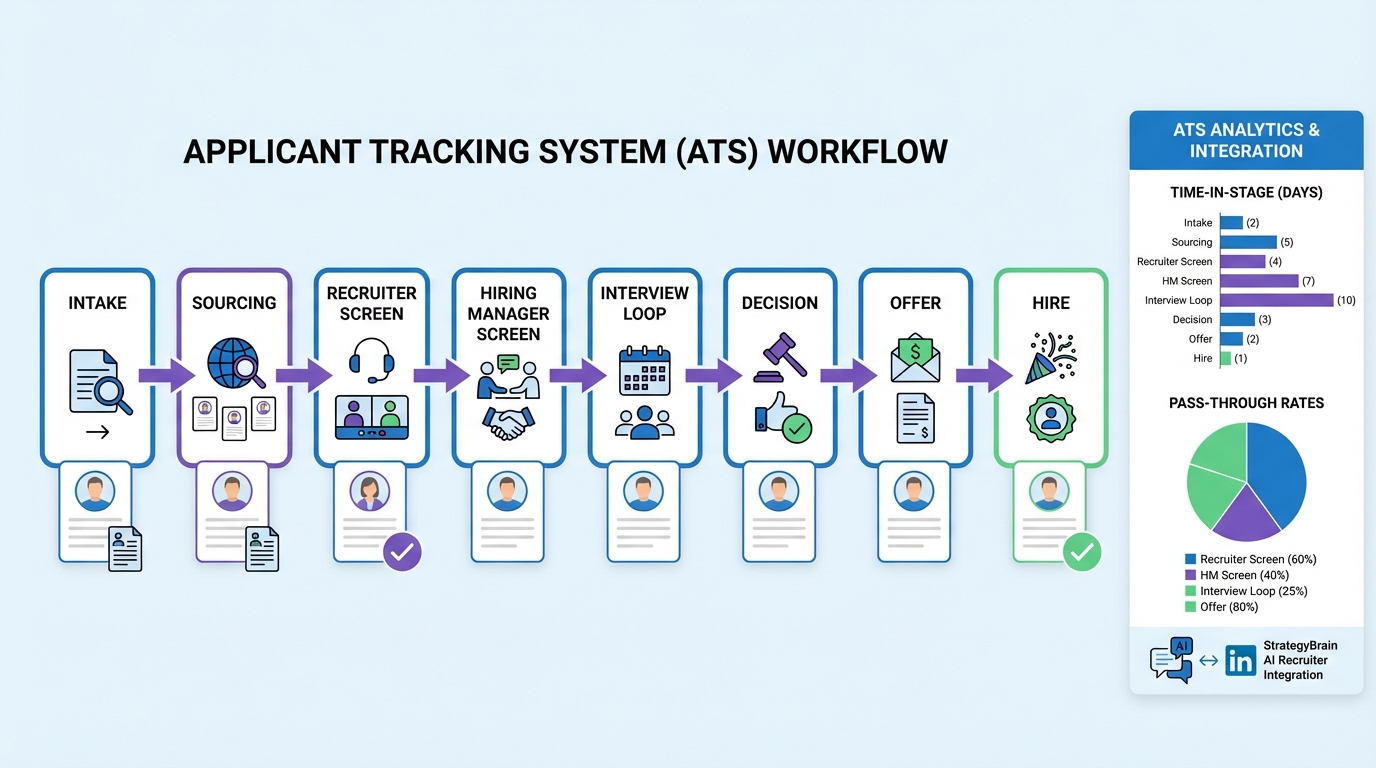
An ATS for recruiters is an Applicant Tracking System, meaning software that stores candidates and applications in one place and moves them through a defined hiring workflow from intake to offer. If you set it up well, an ATS reduces manual tracking, makes handoffs clearer, and creates an auditable record of decisions. In our recruiting operations work, the fastest improvements usually come from tightening three things inside the ATS: stage definitions, required fields, and feedback timing. This guide covers the ATS definition, a practical ATS hiring workflow you can copy, and a setup checklist. It also explains where StrategyBrain AI Recruiter fits naturally, especially for LinkedIn outreach and early qualification, so your ATS stays clean while candidate conversations keep moving.
Key Takeaways
- ATS definition: An Applicant Tracking System is the system of record for candidates, stages, and hiring decisions.
- ATS hiring works best with clear stages: 6 to 10 stages with entry and exit criteria beats a long, ambiguous pipeline.
- Data quality is a workflow problem: Required fields and ownership rules prevent missing compensation ranges, locations, and interview notes.
- Speed comes from fewer handoffs: Standardized intake and structured scorecards reduce back and forth and rework.
- StrategyBrain AI Recruiter complements ATS hiring: It automates LinkedIn outreach and follow up, answers candidate questions, and collects resumes and contact details for recruiter review.
- Measure what matters: Track time in stage, response time, and pass through rates to find bottlenecks.
What is an ATS for recruiters
ATS definition: An Applicant Tracking System is the software recruiters and hiring teams use to manage candidates through a hiring process. It typically includes a candidate database, job requisitions, pipeline stages, interview scheduling support, feedback capture, and reporting.
In a well run team, the ATS is the system of record. That means if it is not in the ATS, it did not happen. This is not about bureaucracy. It is about preventing lost candidates, inconsistent decisions, and unclear ownership.
What an ATS is responsible for
- Intake: job requirements, location, compensation range, and approvals.
- Pipeline control: stages, stage ownership, and stage exit criteria.
- Decision record: interview notes, scorecards, and disposition reasons.
- Reporting: time to fill, time in stage, and source performance.
What an ATS is not
- Not a sourcing strategy: it stores and routes candidates, but it does not create a compelling outreach motion by itself.
- Not a guarantee of quality: a messy workflow produces messy data, even in a great tool.
- Not a replacement for recruiter judgment: it supports decisions, it does not make them.
How ATS hiring works in practice
Most ATS hiring workflows look similar on paper, but the difference between a smooth process and a slow one is how clearly each stage is defined and how quickly feedback is captured. Below is a recruiter friendly workflow that maps to how teams actually operate.
Typical ATS hiring workflow stages
- Requisition intake: role scope, must haves, compensation range, and interview plan are confirmed.
- Sourcing and inbound: candidates enter from applications, referrals, and outbound sourcing.
- Recruiter screen: basic qualification, motivation, logistics, and compensation alignment.
- Hiring manager screen: role fit and priority alignment.
- Interview loop: structured interviews with scorecards.
- Decision: debrief, references if used, and final disposition.
- Offer: offer creation, negotiation notes, and approvals.
- Hired or closed: start date recorded and requisition closed.
Where ATS hiring usually slows down
- Unclear intake: missing compensation range or location constraints creates rework later.
- Stage ambiguity: candidates sit in a stage because nobody owns the next action.
- Feedback latency: interviewers delay scorecards, so decisions stall.
- Manual outreach: recruiters spend hours on repetitive messaging and follow up, which reduces throughput.
That last point is where automation can help without turning your ATS into a patchwork. For example, StrategyBrain AI Recruiter can handle the repetitive LinkedIn outreach and early conversation steps, then pass qualified, interested candidates into your ATS with the key artifacts captured.
A practical ATS setup recruiters can copy
This section is intentionally operational. It is the setup we recommend when a team wants ATS hiring to be predictable and measurable. You can implement it in most Applicant Tracking System products because it focuses on workflow design, not vendor specific buttons.
Step 1: Define stages with entry and exit criteria
Keep the pipeline short enough that everyone can remember it. We typically aim for 6 to 10 stages. For each stage, write one sentence for entry and one sentence for exit.
- Entry example: Recruiter Screen means the candidate has a resume and meets minimum requirements.
- Exit example: Candidate moves to Hiring Manager Screen only after compensation alignment is confirmed and notes are saved.
Step 2: Make a required fields list
Required fields prevent the most common ATS data gaps. Start with a small list and expand only when the team is consistent.
- Role location and work model
- Compensation range and currency
- Candidate current location and work authorization status
- Source category and source detail
- Disposition reason for every rejection
Step 3: Standardize recruiter screen notes
Create a structured template so every recruiter captures the same decision inputs. This improves handoffs and reduces repeated questions.
Copyable recruiter screen template
- Motivation: Why are they open to a move right now
- Role fit: 2 to 3 bullets mapping experience to must haves
- Compensation: current and expected, plus constraints
- Logistics: location, notice period, work model preferences
- Risks: any concerns and what would de risk them
- Next step: recommended stage move and why
Step 4: Use scorecards for interviews
Scorecards are structured evaluation forms tied to competencies. They reduce bias and make debriefs faster because feedback is comparable. For guidance on structured hiring and selection methods, see the U.S. Office of Personnel Management guidance on structured interviews and assessment approaches (tier1 source in citations).
Step 5: Set feedback timing rules
ATS hiring breaks when feedback is late. Set a simple rule and enforce it.
- Rule: Interview scorecards are submitted within 24 hours of the interview end time.
- Owner: Interviewer submits, recruiter follows up, hiring manager escalates if needed.
Step 6: Build a clean handoff from LinkedIn outreach into the ATS
If your team sources on LinkedIn, decide what must be captured before a candidate becomes an ATS record. This prevents duplicate profiles and missing context.
- Conversation summary
- Candidate interest status
- Resume received status
- Contact details received status
StrategyBrain AI Recruiter is designed for this exact front end of the funnel. It can connect with candidates, introduce the role, answer questions about role, company, and compensation, confirm interview interest, and collect resumes and contact information. Recruiters then review the collected resumes and proceed with screening and interviews.
Where StrategyBrain AI Recruiter fits with an ATS
Recruiters often ask whether automation belongs inside the ATS or alongside it. Our experience is that the ATS should remain the system of record, while automation should reduce repetitive work that happens before a candidate is fully qualified.
Best fit use cases
- LinkedIn outreach at scale: AI Recruiter can automatically connect with candidates within your targeted search criteria and start the initial conversation.
- Candidate Q and A: It can answer questions about the role, company, and compensation using the information you provide.
- Follow up discipline: It provides 24/7 responses and follow up, which reduces drop off caused by slow reply cycles.
- Global hiring communication: It communicates in any global language, using the candidate’s native language to reduce misunderstandings.
- Multi account operations: It supports managing more than 100 LinkedIn accounts for organizations building an AI powered recruiting team.
Scope boundary and honest limitation
AI Recruiter can identify willingness to communicate or interview, but it does not determine whether a resume fully matches job requirements. Recruiters still make the final qualification decision after reviewing the resume. This division of labor is usually what teams want because it keeps accountability clear.
Data protection and compliance notes
According to StrategyBrain product information, AI Recruiter is designed to comply with privacy regulations in the EU, United States, and Canada, and customer provided data is not used to train AI models. Credentials are encrypted and stored independently per user with explicit authorization. Treat this as product level guidance and confirm your own internal requirements with legal and security teams before deployment.
ATS metrics recruiters should track
Metrics are only useful if they point to an action. These are the ones we use to diagnose ATS hiring bottlenecks quickly.
Pipeline speed metrics
- Time in stage: median days per stage, by role family.
- Feedback time: hours from interview end to scorecard submission.
- Recruiter response time: hours from candidate message to first reply for sourced candidates.
Quality and conversion metrics
- Pass through rate: percentage moving from recruiter screen to hiring manager screen.
- Interview to offer rate: percentage of interview loops resulting in an offer.
- Offer acceptance rate: accepted offers divided by extended offers.
Source performance metrics
- Qualified candidates per source: count of candidates reaching a defined qualified stage.
- Cost per qualified candidate: if you track spend, divide by qualified count.
If you add StrategyBrain AI Recruiter to your LinkedIn motion, one practical metric is the percentage of LinkedIn conversations that result in a resume and contact details captured for recruiter review. StrategyBrain product information also states it can lower LinkedIn recruiting costs to as little as USD 2.40 per resume and replace up to 90% of manual LinkedIn recruiting work. Treat these as product claims and validate against your own workflow and role mix.
Common ATS mistakes and fixes
Mistake 1: Too many stages
If your pipeline has 15 stages, people stop using it consistently. Consolidate stages and use tags for nuance.
Mistake 2: No ownership per stage
Every stage should have a single owner responsible for the next action. Shared ownership usually means no ownership.
Mistake 3: Free form notes only
Free form notes are hard to compare. Use structured templates for screens and scorecards for interviews.
Mistake 4: Outreach lives outside the system
If LinkedIn outreach is not summarized and attached to the candidate record, hiring managers lose context. Use a consistent handoff. AI Recruiter can help by keeping outreach and follow up consistent and by collecting resumes and contact details before the recruiter invests time.
Mistake 5: Treating the ATS as a strategy
An ATS is infrastructure. Strategy is how you source, engage, and decide. Pair the ATS with a clear LinkedIn motion and automation where it reduces repetitive work.
FAQ
What does ATS mean in recruiting
ATS means Applicant Tracking System. It is the software used to track candidates, manage pipeline stages, and document hiring decisions.
Is an ATS only for large companies
No. Small teams benefit because an ATS prevents lost candidates and makes handoffs clear. The key is to keep stages and required fields simple so the team actually uses it.
What is the difference between ATS and CRM in recruiting
An ATS is typically tied to open requisitions and hiring stages. A recruiting CRM focuses on long term relationship management and nurturing talent pools, even when there is no open role.
Does ATS hiring replace recruiters
No. ATS hiring tools organize workflow and data, but recruiters still define requirements, assess fit, and manage stakeholder alignment. Automation can reduce repetitive tasks, not replace judgment.
How does StrategyBrain AI Recruiter work with LinkedIn recruiting
StrategyBrain AI Recruiter automates initial LinkedIn outreach and qualification by connecting with candidates, introducing the role, answering questions, confirming interest, and collecting resumes and contact details for recruiter review.
Can AI Recruiter decide if a candidate is qualified
It can identify willingness to communicate or interview, but it does not determine whether a resume fully matches job requirements. Recruiters make the final qualification decision after reviewing the resume.
What should be required fields in an ATS
Start with role location, compensation range, source, and disposition reason. Add more only when the team is consistent, otherwise required fields become a workaround game.
How do I reduce time to hire using an ATS
Define stage ownership, enforce scorecards within 24 hours, and standardize recruiter screen notes. If LinkedIn outreach is a bottleneck, use automation for follow up so candidates do not stall waiting for replies.
Conclusion
An ATS for recruiters works best when it is treated as the system of record with a simple, owned pipeline and consistent data capture. If you implement clear stages, required fields, and structured feedback, ATS hiring becomes faster and easier to manage. Next, look at where time is being spent outside the ATS. If LinkedIn outreach and follow up are consuming recruiter hours, StrategyBrain AI Recruiter can complement your ATS by automating early conversations, answering candidate questions, and collecting resumes and contact details so recruiters can focus on evaluation and closing. Use the setup checklist above, then review your time in stage metrics after 30 days and tighten the bottleneck you see first.














