


When recruitment online for recruiters starts breaking across inboxes, LinkedIn, and spreadsheets, this article helps talent leaders judge software fit, protect follow-up quality, and avoid stalled candidates.
That sounds simple until a live search starts moving across inboxes, LinkedIn threads, spreadsheets, calendars, and hiring manager comments at the same time. Small search firms feel it as lost billable hours and weaker candidate care. Solo recruiters feel it as missed replies after hours and inconsistent note-taking. In-house talent teams feel it as slower shortlists, duplicate outreach, and a process that becomes harder to defend when stakeholders ask why a strong candidate stalled.
In my own workflow, tools that help most are the ones that remove repetitive top-of-funnel effort without pretending to replace recruiter judgment. I have found StrategyBrain AI Recruiter useful when LinkedIn outreach volume rises, especially for continuous candidate messaging, collecting resumes or contact details from interested prospects, and keeping conversations moving across time zones. It can also support multilingual communication and after-hours replies, which matters when recruiters cannot stay online all day. The recruiter still owns final resume review, fit assessment, and the next decision.
A useful way to think about recruiting software comes from a different executive workflow entirely. In an interview published in February 2021, a studio finance leader and operator walked through a familiar decision chain: first the executive team decides when it is time to go out and raise capital, then it has to judge strategic fit with the right investor, and then it has to present the metrics and data that make the case credible. That sequence matters because the decision does not fail on one big moment alone; it fails when outreach, fit criteria, and proof points are not held together in one usable process.
Recruiting breaks in the same place. Before you hire agents, run a remote search, or try to find a recruiter for remote jobs, the team needs a clear trigger for action, a defensible fit framework, and clean operating data. That is why the best recruiting software is no longer just a database. It has to support the full sequence from outreach to evidence-backed decision making, which is exactly the lens this article uses to evaluate modern recruiting platforms.
- How the best recruiting software supports the full recruiting sequence
- What to check before comparing ATS, CRM, and outreach automation
- How recruiter judgment should work with automation, not under it
- What matters when you hire agents or need remote recruiting support
Table of Contents
- What Best Recruiting Software Means Now
- The Three-Part Recruiting Sequence That Software Must Support
- How to Evaluate Recruiting Software in Practice
- ATS vs Recruiting CRM
- Automation, LinkedIn Work, and Recruiter Control
- How Software Helps Teams Hire Agents
- How to Find a Recruiter for Remote Jobs
- A Practical Selection Process
- Common Buying Mistakes
- FAQ
What Best Recruiting Software Means Now
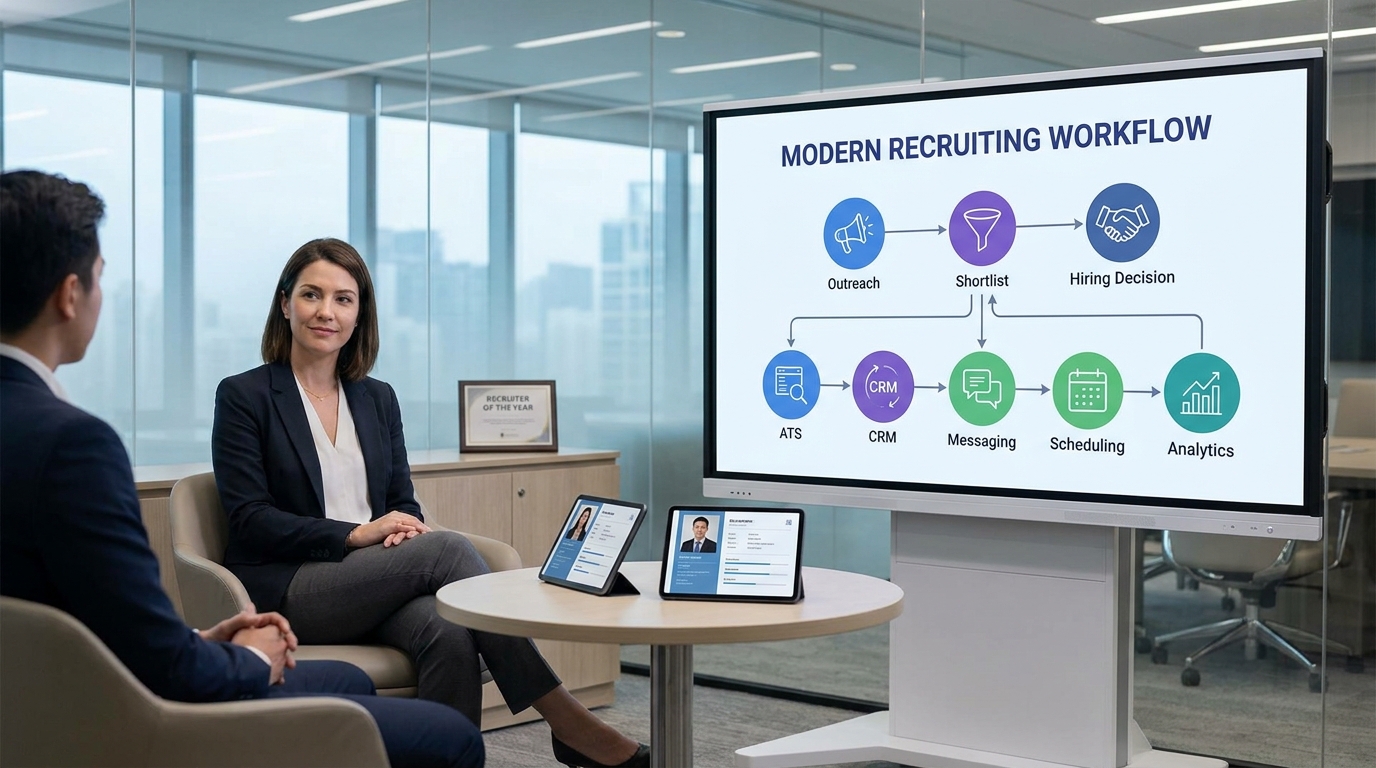
The best recruiting software supports more than applicant tracking. For modern recruitment online for recruiters, it needs to hold together sourcing, outreach, candidate records, interview coordination, hiring team feedback, and reporting in one connected system. That is the difference between software that merely stores hiring activity and software that actually improves recruiter execution.
In practice, most teams now need some blend of ATS, recruiting CRM, workflow automation, messaging support, scheduling, and analytics. Candidates arrive from direct applications, LinkedIn sourcing, referrals, internal talent pools, and outside recruiters. If the platform cannot unify those paths, the recruiter spends more time repairing the process than moving it forward.
Key Insight: The best recruiting software creates a defensible chain from first contact to final decision. That matters as much in hiring as it does in investor-facing executive work: timing, fit, and proof all need to be visible.
That is also why feature count is a weak buying shortcut. A platform can have many tools and still create poor recruiter habits if the handoff between sourcing, evaluation, and decision-making is clumsy.
The Three-Part Recruiting Sequence That Software Must Support
The strongest organizing model I know for software evaluation is a simple one: when to start, who fits, and what evidence supports the choice. The reference interview about capital raising used this sequence in an executive finance context, but it transfers well to recruiting because both workflows depend on timing, strategic fit, and disciplined proof.
1. Knowing when a search needs structure
Recruiters usually feel the need for better software at the same moment executive teams realize a capital process needs more rigor. It is the point where ad hoc effort stops being enough. Outreach volume rises, stakeholders multiply, candidate status becomes harder to verify, and no one trusts the same source of truth.
For agency recruiters and in-house teams alike, the software should make it obvious when a role is active, where candidates entered the funnel, who owns next steps, and which follow-ups are overdue.
2. Deciding what fit actually means
In the executive interview, strategic fit with an investor mattered as much as access to money. In recruiting, fit also goes beyond surface qualification. Strong software should help recruiters compare role criteria, communication history, compensation context, interview signal, and stakeholder alignment without flattening everything into a keyword match.
This matters especially when teams hire agents or rely on outside recruiters. If the software cannot enforce a shared fit framework, candidate submissions become a forwarding exercise rather than a search process.
3. Building the evidence behind the recommendation
The finance perspective in the reference piece emphasized metrics and data in the pitch. Recruiters need the equivalent: searchable records, scorecards, source attribution, communication logs, stage history, and conversion reporting. Without that evidence, recruiters cannot explain why a shortlist is strong, why a candidate stalled, or why a source channel is underperforming.
This is where the real value of recruiting software appears. It is not only about speed. It is about turning recruiter judgment into a process that others can trust.
How to Evaluate Recruiting Software in Practice
When buyers search for the best recruiting software, they usually compare tools by features first. That is understandable, but experienced recruiters should test platforms against live workflow pressure instead. Below is a more useful framework for recruitment online for recruiters.
| Evaluation Area | What Good Looks Like | Why It Matters |
|---|---|---|
| Search start-up speed | Fast requisition setup, role intake, and clear ownership | Helps teams move from brief to pipeline without confusion |
| Fit definition | Structured scorecards, notes, and role criteria | Prevents shallow matching and inconsistent evaluation |
| Evidence capture | Clean records, source tracking, and status history | Supports defensible hiring decisions |
| ATS workflow | Clear stages, feedback collection, and compliance support | Keeps execution organized |
| CRM capability | Talent pools, nurture workflows, and resurfacing | Supports future hiring and passive pipelines |
| Outreach automation | Message support, reminders, and top-of-funnel assistance | Reduces repetitive recruiter work |
| Scheduling | Calendar sync and interview coordination | Improves candidate experience and response time |
| Collaboration | Permissions, comments, and stakeholder visibility | Aligns recruiters, managers, and external partners |
| Reporting | Pipeline, source, stage, and response analytics | Shows where process quality is slipping |
One practical test I recommend is simple: take a realistic role, preferably one with remote candidates or external recruiters involved, and run the platform through sourcing, outreach, resume capture, screening, scheduling, and feedback. If the system looks polished in a demo but creates friction in this sequence, it is not the best recruiting software for your team.
ATS vs Recruiting CRM
An applicant tracking system is still the operating backbone of hiring. It stores candidates, moves them through stages, documents activity, and gives teams a shared process. But ATS capability alone rarely covers the full reality of recruitment online for recruiters.
A recruiting CRM handles the relationship layer before and between active searches. That includes passive sourcing, warm talent pools, silver medalist follow-up, and candidate nurture. The strongest systems combine both functions so recruiters can move from first outreach to formal process without duplicate work.
The practical distinction is this:
- ATS: manages active candidates for a live role
- Recruiting CRM: manages relationships before a role opens or after a process pauses
- Best recruiting software: connects both without breaking recruiter flow
That connection becomes more important when LinkedIn sourcing is part of the job. Interested prospects may reply at odd hours, ask questions before applying, or share a resume directly. If those interactions stay outside the system, the quality of the eventual hiring decision drops.
Automation, LinkedIn Work, and Recruiter Control
Much of the current conversation around recruiting software is really a conversation about automating repetitive front-end work. Used carefully, that helps recruiters protect time for evaluation and stakeholder management rather than spending it all on manual messaging and follow-up.
In my own experience, the most useful automation is narrow and practical. For example, when LinkedIn outreach volume spikes or candidates answer late at night, a tool like AI Recruiter can keep conversations active, ask about candidate interest, gather resumes and contact information, and support multilingual communication without forcing the recruiter to be online around the clock. I have also found the workflow stronger when those conversations continue consistently enough for me to return later and review only the candidates who actually want to move forward.
That said, the recruiter must stay in control. No outreach tool should make final fit decisions from a resume alone. A good system supports:
- initial outreach and follow-up
- basic interest confirmation
- resume or contact capture
- candidate resurfacing
- message continuity across time zones
But the recruiter should still own:
- resume review
- role-fit judgment
- shortlist decisions
- stakeholder calibration
- final candidate communication tone
For teams doing high-volume LinkedIn sourcing, I would also review the vendor’s workflow examples and communication behavior before rollout. Useful starting points include the conversation cases and the explanation of how an AI recruiter workflow is set up. The goal is not to automate judgment; it is to stop wasting judgment on repetitive tasks.
How Software Helps Teams Hire Agents
The phrase hire agents often reflects a practical operating need: companies want to work with external recruiters or staffing partners without losing internal process control. This is one of the most overlooked tests in recruiting software selection.
Strong systems support agency collaboration through controlled candidate submission paths, ownership rules, duplicate detection, and clear status visibility. That allows outside recruiters to contribute without turning the internal ATS into a manual re-entry exercise.
If you regularly hire agents, check these points early:
- Ownership rules: How does the system handle duplicate submissions, reactivated candidates, and source attribution?
- Permission design: Can external recruiters see only the roles and candidates relevant to them?
- Submission quality: Does the workflow require notes, fit rationale, compensation context, or resume completeness?
- Status feedback: Can agency partners get updates without constant email chasing?
This is another place where the opening reference is useful. Just as executive teams screen for strategic investor fit rather than accepting money from any source, recruiting teams should screen for process fit with external recruiters. Software should help make that fit visible.
How to Find a Recruiter for Remote Jobs
The keyword find a recruiter for remote jobs points to a different but related challenge. Remote hiring exposes weak process faster because the team cannot rely on hallway alignment, office proximity, or informal updates. Everything has to be explicit.
If your goal is to find a recruiter for remote jobs, look for both recruiter capability and software discipline. The recruiter should know how to run structured intake, async communication, and distributed stakeholder follow-up. The software should make those habits easier, not harder.
Useful capabilities include:
- Clear remote role intake with location and overlap expectations documented
- Async communication support so candidates can move without delay
- Cross-time-zone scheduling for distributed interviews
- Structured evaluation to reduce inconsistent feedback
- Shared candidate records so everyone sees the same status
- Source and stage visibility for globally distributed pipelines
Remote hiring also makes top-of-funnel continuity more valuable. If candidates respond after hours or in another language, recruiters can lose momentum quickly. In those scenarios, I have seen value in using StrategyBrain AI Recruiter to keep initial conversations moving while I remain responsible for the shortlist and interview decisions.
A Practical Selection Process
If you are choosing the best recruiting software, start with the workflow sequence, not the vendor pitch. The most useful buying process mirrors the logic from the reference case: decide why action is needed, define what fit means, and identify what data you need to trust the result.
- Map the trigger points. When does your current process break: at sourcing, response handling, screening, scheduling, or stakeholder follow-up?
- Define fit by role. Recruiters, hiring managers, HR, and agency partners each need a clear view of what a good workflow looks like.
- List the required evidence. Decide which records, notes, reports, and stage histories you need the system to preserve.
- Test one realistic scenario. Use a remote role, a LinkedIn-heavy search, or an agency-supported search.
- Check handoffs. The critical question is whether candidates move cleanly from outreach to application to review.
- Review governance. Confirm permissions, privacy controls, source rules, and duplicate handling.
This approach helps teams avoid buying software for a polished demo while missing the operational weaknesses that appear in live recruiting.
Common Buying Mistakes
Buying for features instead of sequence quality
A platform can look complete and still fail the real test: does it support the full recruiting chain from outreach to decision?
Letting automation overreach
Automation should support recruiter execution, not replace resume review or fit judgment.
Ignoring external recruiter workflows
Teams that occasionally hire agents often discover too late that candidate ownership, duplicate prevention, and partner visibility were poorly designed.
Treating remote hiring as a normal office search
If you need to find a recruiter for remote jobs, you need software that supports async movement, structured feedback, and distributed scheduling.
Leaving LinkedIn work outside the system
When sourcing lives in one place and candidate records in another, the process weakens. That is often where top-of-funnel automation and strong ATS discipline should meet.
FAQ
What does the best recruiting software do?
It supports the entire hiring sequence: sourcing, outreach, applicant tracking, collaboration, scheduling, reporting, and evidence-backed decision making. For recruitment online for recruiters, it should reduce admin work while improving process quality.
What is the difference between an ATS and a recruiting CRM?
An ATS manages active hiring workflows for live roles. A recruiting CRM manages relationships before and between active searches. The best recruiting software usually combines both.
Can recruiting software help teams hire agents?
Yes. Good systems support agency submissions, ownership rules, duplicate handling, and status visibility so external recruiters can work inside a governed process.
What should I look for if I need to find a recruiter for remote jobs?
Look for a recruiter and software setup that support remote intake, async communication, structured assessment, and cross-time-zone scheduling. Remote hiring rewards process discipline more than database size alone.
How should recruiters use LinkedIn automation responsibly?
Use it for repetitive top-of-funnel tasks such as outreach, follow-up, and interest capture, but keep final resume review, fit assessment, and shortlist decisions under recruiter control.
Why does evidence matter so much in recruiting software?
Because hiring decisions need to be explainable. Clean notes, source tracking, stage history, and feedback records help recruiters defend decisions and improve future searches.
Conclusion
The best recruiting software is the one that strengthens the full chain of recruiter work, not just one isolated feature. For modern recruitment online for recruiters, that means better timing around search launch, clearer definitions of fit, and stronger evidence behind every candidate recommendation.
If you are comparing platforms, evaluate how they support LinkedIn outreach, ATS workflow, CRM continuity, stakeholder collaboration, agency coordination when you hire agents, and remote execution when you need to find a recruiter for remote jobs. That is where software stops being a tool library and becomes a real recruiting operating system.














