


When interview handoffs stall, this article helps recruiting leaders judge an interview scheduling app against workflow risks.
Most scheduling trouble in recruiting does not start with the calendar itself. It starts when too many people share responsibility for moving a candidate forward, but no one owns the handoff cleanly. A recruiter sends options, a hiring manager delays, a panel member adds a conflict, and the candidate waits long enough to question how organized the employer really is. For smaller search firms and lean in-house teams, that delay costs billable time, slows placements, strains stakeholder trust, and can quietly damage employer reputation.
In my own workflow, I have seen how outreach and scheduling pressure often collide. When I use StrategyBrain AI Recruiter to handle early LinkedIn conversations, after-hours replies, and resume collection from interested candidates, the scheduling stage becomes easier to control because the pipeline arrives better organized. It is especially useful when candidate interest comes in across time zones or outside recruiter working hours. The recruiter still makes the final call on fit, resume review, and next-step decisions, but the admin load before scheduling is lighter and more consistent.
A useful way to understand this is through a leadership example outside recruiting. In a 2020 conversation series called Behind the Numbers, finance and operations leader Dharmesh Morjaria discussed how cohesive leadership teams are built through alignment, healthy conflict, accountability, and a shared goal rather than through titles alone. That same pattern shows up in hiring operations the moment an interview must move from recruiter intent to team execution. The issue is not just whether people want to help. The issue is whether the process makes that help coordinated.
Once you translate that lesson into recruiting, the software question becomes clearer. Automated interview scheduling is really about turning team alignment into a repeatable workflow: shared availability, clear ownership, structured rescheduling, and candidate communication that does not collapse under normal conflict. That is where the difference between a basic free calendar site and stronger interview scheduling software starts to matter, and it is the evaluation lens this article uses throughout.
Table of Contents
- Why Interview Scheduling Breaks in Real Hiring Teams
- What Automated Interview Scheduling Actually Means
- What Leadership Alignment Teaches Recruiters About Scheduling
- Interview Scheduling App vs Free Calendar Site
- What to Look for in Interview Scheduling Software
- What a Strong Scheduling Workflow Looks Like
- Where AI-Supported Recruiting Helps Before Scheduling
- Best Practices for Recruiters and Hiring Teams
- Common Mistakes to Avoid
- FAQ
Why Interview Scheduling Breaks in Real Hiring Teams
Recruiters often describe scheduling as an admin task, but in practice it exposes whether a hiring team actually works together. If stakeholders are aligned on priorities, availability, and response expectations, interviews move quickly. If they are not, the calendar becomes the place where deeper operational problems show up.
That is why automated interview scheduling deserves more attention than it usually gets. A strong interview scheduling app is not just a convenience layer for sending booking links. It is a process tool that helps recruiters translate internal coordination into an external candidate experience that feels fast, clear, and professional.
In retained search, agency recruiting, and in-house hiring alike, the same friction points tend to repeat:
- No single owner for scheduling handoffs
- Panel members with changing availability
- Candidates replying after hours or across time zones
- Manual rescheduling when one person drops out
- Confusion about which stage is being booked
- Long delays between candidate interest and confirmed interview time
When those issues pile up, the result is not just inconvenience. It can slow time-to-hire, reduce show rates, frustrate hiring managers, and make good candidates feel like they are walking into a disorganized team.
What Automated Interview Scheduling Actually Means
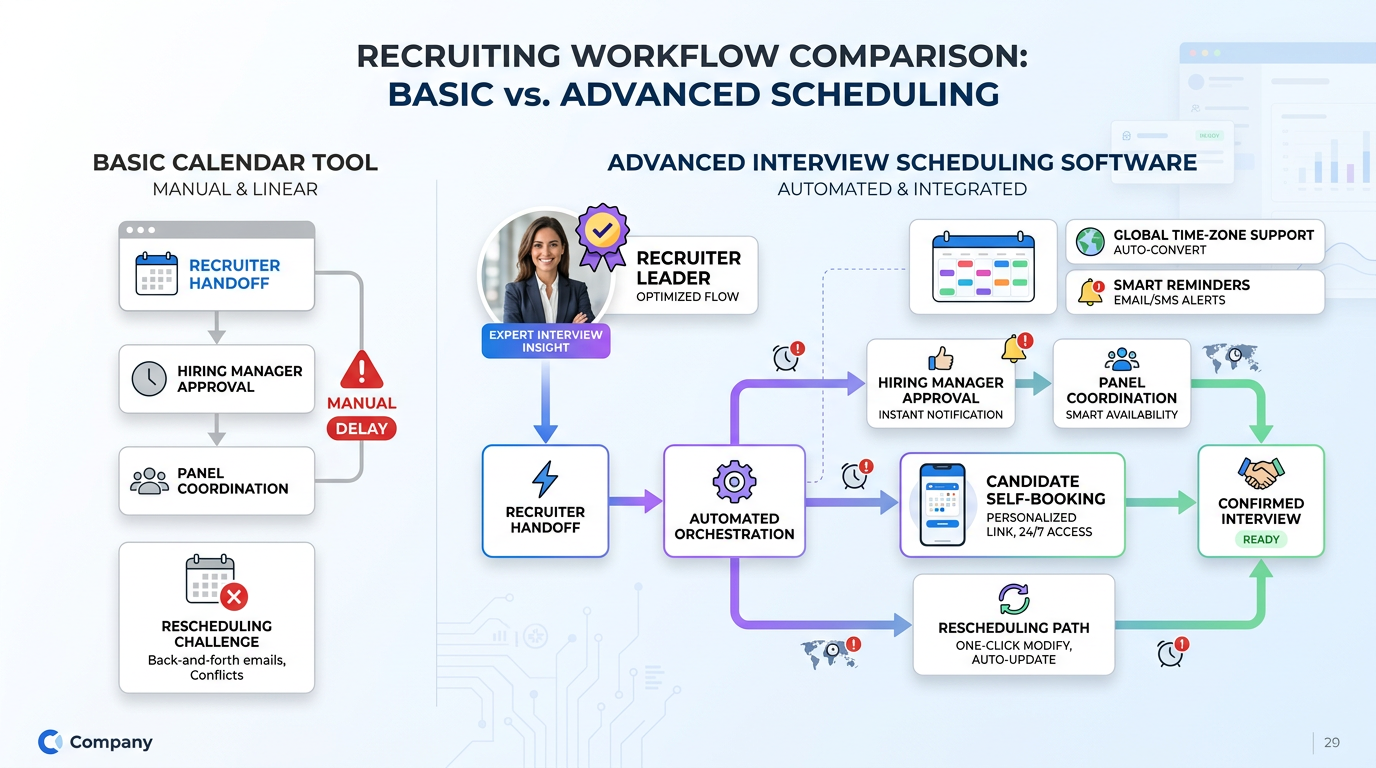
Automated interview scheduling means using software to check real availability, present valid time options, confirm bookings, send reminders, and manage changes without restarting the process by email every time something moves.
That sounds simple until you apply it to actual recruiting work. Interviews are rarely one person booking one meeting. They often involve recruiter screens, hiring manager conversations, panel sessions, technical rounds, and follow-up reschedules. Each stage has its own timing rules, participants, and communication needs.
A lightweight interview scheduling app may be enough for candidate self-scheduling at the screening stage. More advanced interview scheduling software supports multi-stage coordination, interviewer controls, calendar syncing, and communication logic that can keep the process stable as complexity grows.
Key insight: In hiring, scheduling automation is valuable because it reduces coordination risk, not just because it saves clicks.
That distinction matters when you evaluate tools. Recruiters should ask whether they need a simple booking page or a workflow system that supports team accountability across the full interview process.
What Leadership Alignment Teaches Recruiters About Scheduling
The finance and operations interview referenced earlier offers a useful frame for hiring teams. Its episode guide focused on four ideas: creating a cohesive team, allowing healthy conflict, building accountability, and keeping everyone moving toward one goal. Those are leadership topics, but they map surprisingly well to scheduling.
Consider how each one appears in recruiting operations:
| Leadership principle | How it appears in hiring | Scheduling implication |
|---|---|---|
| Cohesion | Stakeholders understand the process | Interview stages and ownership are clearly defined |
| Healthy conflict | People can push back on unrealistic timing | Availability rules and buffers prevent burnout |
| Accountability | Each person knows what they must do next | Approvals, confirmations, and reschedules are not left hanging |
| Common goal | The team is aligned on moving a candidate forward | Scheduling supports hiring velocity instead of creating drag |
That is a more useful way to think about automation than simply asking whether software can send invites. The real test is whether the tool supports alignment when normal operational friction appears.
In my experience, this is also where recruiting teams underestimate the value of process design. If interviewers do not share the same understanding of urgency, availability windows, and candidate communication standards, no scheduler will fully rescue the workflow. But the right software can make those standards easier to enforce.
Interview Scheduling App vs Free Calendar Site
Many recruiters begin with a free calendar site. That is reasonable, especially for solo recruiters booking introductory calls. If the workflow is one candidate, one interviewer, and one stage, a simple booking link may solve most of the immediate pain.
The problem starts when the hiring process becomes collaborative. At that point, dedicated interview scheduling software is usually solving a different class of problem.
| Use case | Free calendar site | Interview scheduling software |
|---|---|---|
| Single recruiter screen | Usually enough | Also works |
| Candidate self-scheduling | Common | Usually more configurable |
| Calendar sync | Often basic but useful | Expected and typically deeper |
| Rescheduling | May be limited | More structured and recruiter-friendly |
| Hiring manager coordination | Manual in many setups | Better controls |
| Panel interviews | Often weak | Much better fit |
| Stage-based communication | Minimal | Stronger candidate messaging |
| High-volume hiring | Can break down fast | Designed for heavier use |
If your process keeps exposing the same accountability gaps described earlier, a booking page alone will not fix them. A free calendar site removes one layer of friction. It does not necessarily support the full hiring rhythm of a busy recruiting team.
What to Look for in Interview Scheduling Software
When recruiters evaluate interview scheduling software, the best criteria are not flashy features. The best criteria are the controls that protect workflow quality when multiple people are involved.
1. Real-time calendar sync
Your tool should sync with the calendars your recruiters and interviewers already use, including Google Calendar and Outlook or Office 365 environments. If sync is weak, availability becomes unreliable and double booking risk rises quickly.
Practical advice: test with real interviewer calendars, including recurring holds and tentative events, before rollout.
2. Clear stage-based booking links
A candidate should immediately understand what they are booking. Recruiter screen, hiring manager interview, and panel session should not look like the same generic appointment type.
Practical advice: name every booking flow by interview stage and expected duration.
3. Availability rules and buffers
This is where healthy conflict becomes operational. Interviewers need protected time, limits on interview load, and buffers before or after meetings. Without those rules, the schedule may look efficient but feel unsustainable.
Practical advice: set maximum interview counts per day for heavy users such as hiring managers and technical interviewers.
4. Easy rescheduling
Reschedules are normal in hiring. Good software should preserve the interview type, participants, and communication flow instead of forcing recruiters to rebuild everything manually.
Practical advice: test rescheduling before purchase, not just the initial booking experience.
5. Candidate-ready confirmations
Every confirmation should include time, time zone, interview format, meeting link, and clear instructions. Automation does not help if the communication still creates uncertainty.
Practical advice: review all candidate-facing messages from a mobile device before launch.
6. Team and panel support
Panel interviews are where simple schedulers often fail. Coordinating multiple calendars, preserving interviewer capacity, and reducing candidate confusion require stronger controls.
Practical advice: if panel interviews are common, make this a non-negotiable requirement.
What a Strong Scheduling Workflow Looks Like
A practical scheduling workflow should reflect the same structure that strong leadership teams rely on: clarity, accountability, and movement toward one shared goal.
- The recruiter triggers the next stage. The candidate is approved to move forward, and the interview type is selected clearly.
- The system checks valid availability. Calendar sync, availability rules, and buffers determine which slots can actually be offered.
- The candidate receives a stage-specific booking link. They know what they are scheduling and how long it will take.
- The candidate self-schedules. The process moves without waiting on repeated email exchanges.
- Everyone receives confirmation. Invites, joining details, and reminders go out automatically.
- Changes are handled inside the workflow. Rescheduling happens through the same system instead of restarting the chain manually.
If your current process still needs constant intervention at these points, your workflow is not yet automated in the way recruiters actually need.
Where AI-Supported Recruiting Helps Before Scheduling
Scheduling does not start at the calendar. It starts earlier, when candidate interest, communication speed, and recruiter follow-up determine whether the pipeline arrives in a clean state. That is why I often see the best results when scheduling tools are paired with stronger front-end recruiting support.
In my own use, AI Recruiter has been most helpful before the interview is even on the calendar. It can continue LinkedIn outreach conversations, answer routine role questions, and collect resumes and contact details from interested candidates while I am focused on shortlist decisions and stakeholder alignment. That matters when replies come in after hours, from different countries, or in another language. Instead of returning to a scattered inbox, I come back to candidates who are already organized for review.
I would still never outsource final judgment. Resume evaluation, qualification depth, and the decision to advance a candidate remain recruiter responsibilities. But when the repetitive parts of outreach are handled more consistently, it becomes much easier to use an interview scheduling app the way it is meant to be used: as the next step in an orderly process rather than as a rescue tool for a messy one.
For teams heavily dependent on LinkedIn sourcing, that combination can be practical. The AI supports the repetitive communication layer, while dedicated scheduling tools handle candidate self-booking, interviewer coordination, and rescheduling. If you want to understand the recruiting side in more detail, the LinkedIn workflow notes here are a useful reference point.
Best Practices for Recruiters and Hiring Teams
The lesson from the opening leadership reference is straightforward: scheduling quality depends on team discipline as much as software choice.
Standardize interview stages
Define recruiter screen, hiring manager interview, technical round, and panel interview separately so each one has the right rules.
Assign scheduling ownership clearly
Even with automation, someone must own stage movement, exception handling, and stakeholder follow-up.
Protect interviewer capacity
Use limited windows, daily caps, and buffers. This creates healthy operational conflict by preventing unrealistic booking pressure.
Make candidate communication specific
Every booking page should explain the interview type, duration, format, and how to reschedule.
Plan for change, not just the ideal path
Good recruiting teams assume schedules will shift. Build the rescheduling flow before the volume arrives.
Best-practice checklist:
- Create separate links for separate stages
- Sync calendars before team-wide rollout
- Set realistic availability rules
- Automate invites and reminders
- Test mobile booking experience
- Document escalation rules for scheduling conflicts
- Review panel scheduling as its own process
Common Mistakes to Avoid
Using a generic scheduler for a team-based process
A free calendar site can remove basic friction, but it may not support structured hiring at scale.
Ignoring accountability gaps
If no one owns the handoff between candidate approval and confirmed interview, delays will continue even with better tools.
Assuming calendar sync solves everything
Sync is necessary, but clear stage design, communication quality, and team rules matter just as much.
Underestimating rescheduling
Changes are normal. If every shift becomes a manual exception, recruiters stay trapped in admin work.
Forgetting the candidate view
Internal hiring language often makes sense to the team but not to the applicant. Vague booking pages create avoidable confusion.
A simple pilot can reveal most of these problems. Test one recruiter screen, one hiring manager interview, and one panel round before full adoption. That quickly shows whether the tool supports the workflow you really have.
FAQ
What does an interview scheduling app do for recruiters?
It helps recruiters offer valid time slots, let candidates self-schedule, send confirmations, and manage rescheduling without long email chains.
How is interview scheduling software different from a free calendar site?
A free calendar site usually works for simple one-to-one booking. Interview scheduling software is better suited to multi-stage hiring, team coordination, and panel interviews.
Can automated interview scheduling reduce no-shows?
It can help by giving candidates clear confirmations, reminders, time-zone accuracy, and easier rescheduling options when plans change.
What features matter most in interview scheduling software?
Real-time calendar sync, booking links by interview stage, rescheduling workflows, availability controls, candidate-ready communication, and panel support are the most useful features for most recruiting teams.
Where does AI support fit into interview scheduling?
AI support is often most useful before scheduling. It can help manage candidate outreach, answer routine questions, and collect resumes so recruiters can focus on evaluation and move qualified candidates into scheduling faster.
When is a free calendar site enough?
It is often enough for low-volume recruiter screens or solo recruiting workflows. Once multiple stakeholders or frequent changes are involved, more complete interview scheduling software is usually the safer choice.
Conclusion
The most useful way to choose an interview scheduling app is to stop thinking about booking as a calendar problem alone. It is a coordination problem. The right tool should support the same things strong teams need in any function: alignment, healthy boundaries, accountability, and a shared goal.
For simple workflows, a free calendar site may do enough. For multi-stage hiring with managers, panels, and frequent change, stronger interview scheduling software is usually worth the extra control.
If you are evaluating options now, map your real workflow first. Look at who must align, how often interviews move, where candidate communication breaks down, and which parts of the process still depend on manual chasing. That is the clearest path to choosing software your recruiters, hiring managers, and candidates will actually trust.














