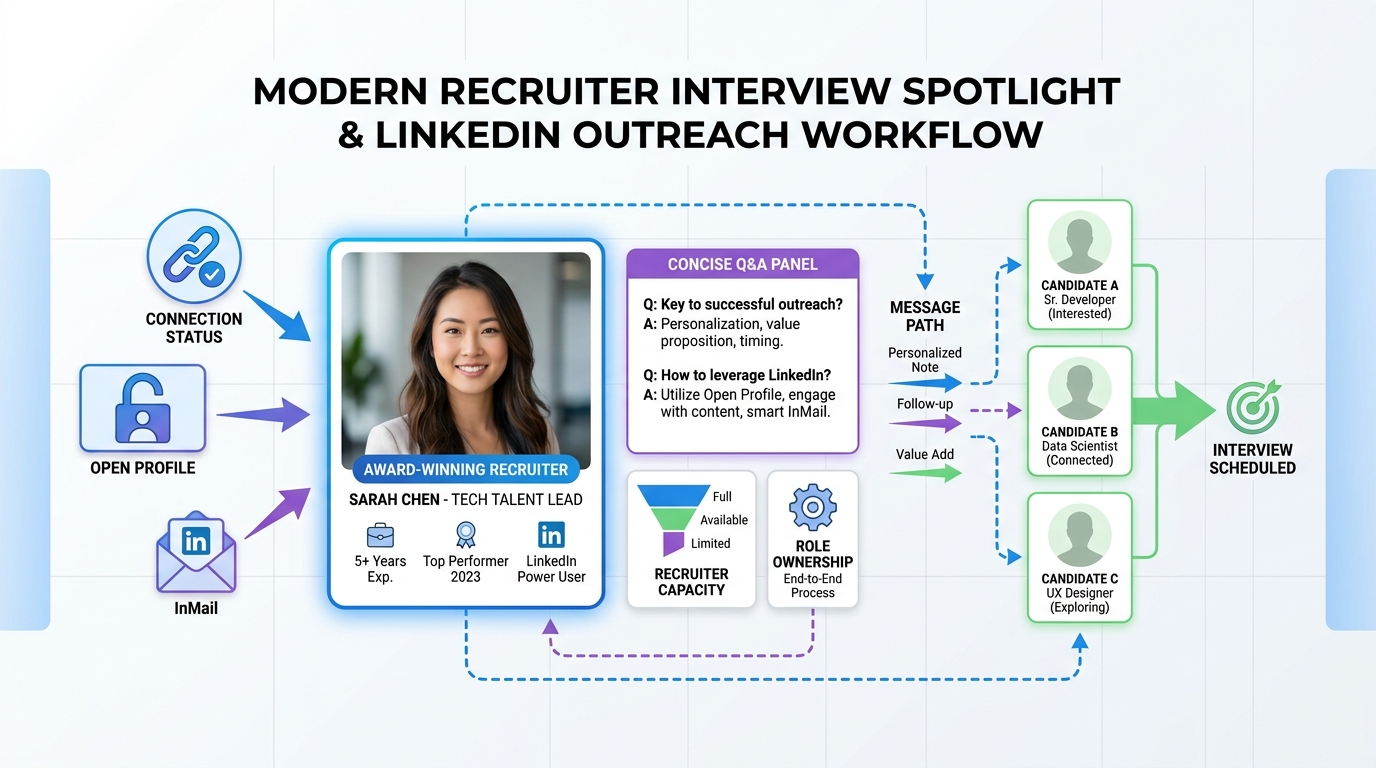
This guide helps recruiting teams use data-led contact paths and recruiter capacity logic to reach the right LinkedIn person faster.
That matters because outreach problems on LinkedIn are rarely just about finding a profile. In practice, the breakdown happens when a recruiter, agency owner, or in-house talent partner cannot tell which contact lane is available, who owns the role, or whether it makes sense to spend a paid message at all. The result is wasted InMail credits, duplicated outreach, slower response times, messy handoffs to hiring managers, and a weaker candidate experience when messages feel random instead of relevant.
In teams that want tighter control of first-touch outreach, tools such as StrategyBrain AI Recruiter are often discussed because they can automate repetitive LinkedIn communication, continue candidate conversations outside business hours, and collect resumes or contact details from interested people. The recruiter still has to make the real judgment call on fit, review the resume, and decide whether to move someone forward, but workflow support like this can reduce the noise around who replied, what was said, and which role the conversation belongs to.
The underlying issue looks very similar to the way strong HR leaders now run hiring operations: less instinct, more system design. In the reference interview, Jimmy Tristovski describes bringing an engineer's mindset into HR, measuring recruiter capacity down to the hour, tracking funnel conversion, and linking hiring effort to business outcomes. That is useful here because LinkedIn messaging is not just a networking task. It is part of a larger recruiting system where access rules, recruiter bandwidth, and role clarity all affect whether the right person gets contacted at the right time.
When a team starts modeling recruiter time instead of treating outreach as unlimited, a familiar scene appears. One recruiter is managing too many open roles, another is fielding inbound messages from candidates who contacted the wrong person, and a hiring manager wants faster movement on a priority requisition. At that point, the question is no longer just how to get in touch with recruiters on LinkedIn. It becomes a workflow question: which route is available, which message is worth sending, and how should limited outreach capacity be used.
Table of Contents
- Quick answer: the best way to reach recruiters on LinkedIn
- Why recruiter access is really a workflow issue
- How to contact recruiters on LinkedIn by access level
- LinkedIn recruiter subscription details explained clearly
- What recruiter capacity has to do with your message
- How to message a recruiter on LinkedIn step by step
- Where workflow tools fit alongside LinkedIn outreach
- What recruiters actually respond to
- Common mistakes that reduce reply rates
- FAQ
Quick answer: the best way to reach recruiters on LinkedIn
If you want the practical answer to how to get in touch with recruiters on LinkedIn, start with access, not subscriptions.
- If you are already a 1st-degree connection: use normal LinkedIn Messaging.
- If you are not connected: check for Open Profile, a job-linked message option, or InMail availability.
- If you found the recruiter through a job post: look for job-page contact routes such as Meet the hiring team.
- If you are deciding whether to pay for outreach: confirm that a paid option is actually necessary before using credits.
Most people do not need a recruiter subscription just to contact one recruiter. Recruiter subscriptions are mainly built for sourcing workflow and outreach volume. For candidates, the better approach is to identify the correct messaging lane and send a concise note tied to a real role or hiring context.
Why recruiter access is really a workflow issue
The reference interview's strongest lesson is that hiring works better when HR is run like a business function, not a loose collection of ad hoc tasks. That principle applies directly to LinkedIn outreach. When contact routes are unclear, teams lose time in ways that do not show up immediately: duplicate touches, internal rerouting, unnecessary InMail use, and poor handoffs between sourcers, recruiters, and hiring managers.
From a recruiting operations perspective, messaging access should be treated the same way you would treat funnel conversion or recruiter bandwidth. If one recruiter is overloaded and another owns a different function, the candidate who sends a vague note to the first visible profile may not get a useful response, even if they are qualified. So the real issue behind how to contact recruiters on LinkedIn is often matching the right person, channel, and moment.
Good LinkedIn outreach is not only about writing a better message. It is about choosing the correct route before you spend time or credits.
How to contact recruiters on LinkedIn by access level
The simplest way to understand how to contact recruiters on LinkedIn is to break it down by relationship status and profile eligibility.
If you are already connected
If the recruiter is a 1st-degree connection, standard LinkedIn Messaging is usually the cleanest option. No InMail is needed. This is why many experienced recruiters tell candidates to build a relevant network before they urgently need help. Existing connections create less friction and often lead to more contextual conversations.
For in-house teams, this matters operationally too. Recruiters and hiring managers with strong networks tend to receive more relevant inbound messages because people understand what they hire for.
If you are not connected
This is where most users start searching for how to message a recruiter on LinkedIn. If the regular message button is unavailable, your main options are:
- InMail for outreach outside your network
- Open Profile messaging if the recruiter is eligible
- Job-page contact flows linked to active openings
Not every non-connection requires a paid message. Many people spend too much time assuming there is only one route when there are multiple possible access paths.
If the recruiter has Open Profile
Open Profile can allow users to contact eligible Premium members without using paid InMail. That makes it one of the most overlooked free paths on LinkedIn. Before paying for outreach, review the profile carefully and confirm whether this option is available.
If you are contacting through a job post
Some of the best recruiter contact opportunities begin from a live job page, not from profile search. If the opening includes recruiter visibility or a supported message flow such as Meet the hiring team, use that context. Messages tied to a specific role are easier to route and easier for a recruiter to evaluate quickly.
LinkedIn recruiter subscription details explained clearly
When readers look for LinkedIn recruiter subscription details, they are often blending three different categories together: free messaging, Premium-style access, and recruiter-grade subscriptions. These are related but not interchangeable.
Free LinkedIn access
With a free account, you can generally message 1st-degree connections. Depending on profile eligibility or job-page design, you may also find limited ways to contact non-connections without paying. For many candidates, this is enough.
Premium-style access
Premium-style plans may expand networking and contact options depending on current LinkedIn features and eligibility. They can be useful if you regularly need broader access, but they do not override all connection and profile rules.
Recruiter Lite
Recruiter Lite is meant for recruiting workflow rather than ordinary job-seeker messaging. Based on current help documentation referenced in the research, it includes 30 InMail credits per month, with the option to purchase up to 70 additional credits. This can make sense for solo recruiters, smaller agencies, or hiring managers doing structured outbound sourcing.
LinkedIn Recruiter seats
Enterprise LinkedIn Recruiter seats are a separate category. Current help documentation referenced in the research indicates that these seats include 150 InMails. On some contracts, allocation may be pooled or controlled by administrators, and contract-level limits can affect how those credits are used.
What subscriptions do not solve
A subscription does not make every recruiter equally reachable. You still need the right lane: connection status, Open Profile, InMail availability, or a job-linked route. That is why the best answer to how to get in touch with recruiters on LinkedIn is usually a process answer, not a buying answer.
What recruiter capacity has to do with your message
One of the most useful ideas from the reference material is recruiter capacity modeling. At a practical level, this means recognizing that recruiters do not process outreach in a vacuum. They are balancing open roles, hiring manager requests, sourcing work, internal meetings, and follow-up priorities. When teams measure capacity and conversion rates, they can see where communication breaks down.
That has direct implications for candidates and for recruiting teams:
- Candidates should make messages easy to route by naming the role, function, or location.
- Recruiters should make profile ownership clearer so inbound messages go to the right person.
- Hiring leaders should avoid assuming more outreach always means better results if the team cannot process it well.
In other words, a recruiter ignoring a message is not always a sign of disinterest. Sometimes it reflects role ownership, capacity limits, or poor message targeting.
How to message a recruiter on LinkedIn step by step
If you need a practical workflow for how to message a recruiter on LinkedIn, use this sequence.
- Identify the right recruiter. Look for someone who hires in your function, location, or level.
- Check connection status. If you are already connected, use standard Messaging.
- Review the profile for Open Profile. This may create a free path.
- Check the job post. If you found them through a live role, use the job-linked context.
- Use InMail only if needed. Save paid outreach for situations where no other route exists.
- Open with relevance. Mention the role, specialization, or hiring context in the first line.
- Keep the note short. Recruiters scan messages quickly.
- Follow up carefully. Current help documentation referenced in the research notes a 24-hour wait before sending another InMail to the same candidate unless they reply sooner.
A message template that feels professional
Hello [Name], I found your profile while looking at [role/team/company area]. I work in [function] and have experience in [brief relevant area]. If you handle hiring for this space, I would appreciate the chance to connect and learn whether my background aligns with current or upcoming openings.
This format works because it gives the recruiter immediate context without forcing them to read your full story before deciding whether to respond.
Where workflow tools fit alongside LinkedIn outreach
Once outreach volume increases, the challenge shifts from messaging access to message management. That is where recruiting teams often look at supporting tools. In broad terms, three categories show up often in U.S. recruiting workflows: LinkedIn Recruiter for enterprise sourcing, Greenhouse for applicant tracking and coordination, and Lever for recruiting CRM plus ATS-style workflow management.
| Tool or category | Main strength | Typical drawback | Best fit | How it fits with LinkedIn outreach |
|---|---|---|---|---|
| LinkedIn Recruiter | Strong sourcing reach and recruiter search workflow | Can be more than a small team needs if the issue is only message handling | Mid-size to enterprise recruiting teams | Best when outbound sourcing volume is already high |
| Greenhouse | Structured hiring process and stakeholder coordination | Less useful as a direct LinkedIn contact method by itself | Process-heavy in-house teams | Useful after candidate contact enters formal hiring workflow |
| Lever | CRM-style relationship management plus recruiting process support | Still depends on good outreach discipline upstream | Teams balancing nurture and active hiring | Helps track conversations once they move beyond first touch |
In teams that spend significant time on repeated LinkedIn outreach, I have also seen interest in AI Recruiter style workflow support because it addresses a different gap: repetitive first-contact communication, after-hours replies, and resume or contact-detail collection from interested candidates. That does not replace recruiter judgment, and it should not. What it can do is reduce manual back-and-forth around basic role introduction and initial interest signals so recruiters can spend more time on actual evaluation.
My own view is that this kind of support is most useful when the pain point is message continuity rather than ATS administration. If your team loses track of LinkedIn replies, struggles with late-night candidate responses across time zones, or wastes recruiter time repeating the same opening explanations, then a workflow layer can help. If your problem is hiring-manager alignment or interview feedback discipline, an ATS or recruiting CRM may be the higher priority.
What recruiters actually respond to
Knowing how to get in touch with recruiters on LinkedIn is only half the job. The other half is sending something worth answering.
Lead with fit
Do not start with vague enthusiasm. Start with role fit, years of experience, specialization, market, or location. Recruiters triage relevance first.
Use real context
If you found the recruiter through a specific opening, mention that opening. If you work in a niche area, say which one. Context reduces sorting work for the recruiter.
Ask for one next step
Good recruiter messages ask for one simple outcome: connect, confirm fit, or clarify whether the team is hiring in that area. Messages with too many asks usually get skipped.
Respect recruiter bandwidth
This is where the reference material is especially useful. If recruiter bandwidth is finite and measurable, then message quality matters more than message length or persistence. A concise, targeted message is easier to process than a long generic introduction.
Common mistakes that reduce reply rates
- Assuming you need a recruiter subscription first. Often you do not.
- Messaging the wrong recruiter. Not every visible recruiter owns your function or geography.
- Using InMail when a free route exists. Check connection status and Open Profile first.
- Writing an entire cover letter. First contact should open a conversation, not complete the application.
- Ignoring role ownership. If you mention no role, no team, and no location, the recruiter has to do extra work to place you.
- Following up too aggressively. Repeated low-context messages usually hurt more than they help.
For recruiting teams, the mirror-image mistakes are just as important: unclear profile branding, weak ownership visibility, and no system for handling inbound LinkedIn conversations. Those process gaps create the same confusion candidates are trying to work around.
FAQ
Do I need a recruiter subscription to contact recruiters on LinkedIn?
No. If you are already connected, standard LinkedIn Messaging is usually enough. If you are not connected, check for Open Profile, job-linked messaging, or InMail access before assuming a subscription is necessary.
How do I contact recruiters on LinkedIn for free?
The main free methods are messaging existing 1st-degree connections and contacting eligible Open Profile users. In some cases, job-linked message paths may also be available.
What is the difference between Recruiter Lite and LinkedIn Recruiter?
Recruiter Lite is generally a smaller-scale sourcing subscription and, based on current help documentation referenced in the research, includes 30 InMail credits per month with the option to buy more. LinkedIn Recruiter is an enterprise product with broader recruiting workflow features and 150 InMails per seat according to the same referenced documentation.
How many InMails do recruiter subscriptions include?
Based on the referenced help documentation, Recruiter Lite includes 30 InMail credits per month, while LinkedIn Recruiter seats include 150 InMails. Enterprise contracts may also include pooled or admin-managed allocation rules.
How should I decide who to message?
Choose the recruiter most closely tied to your function, level, geography, or job posting. If there is a recruiter listed on the specific role, start there rather than messaging the first recruiter you find.
What should I say in a first message?
Keep it short and role-specific. Mention the role or function, add one or two lines about relevant fit, and ask for a simple next step such as connecting or confirming alignment.
Why do recruiters sometimes not reply?
Common reasons include role ownership mismatch, recruiter workload, low-context outreach, or a message that does not make clear how you fit. Silence does not always mean lack of interest.
Conclusion
If you want the clearest answer to how to get in touch with recruiters on LinkedIn, think like a recruiter operator for a moment. Start with the correct contact lane, confirm who actually owns the role, and make your message easy to process. That is more effective than assuming a paid subscription will solve everything.
That same logic also answers how to contact recruiters on LinkedIn and how to message a recruiter on LinkedIn. LinkedIn recruiter subscription details matter, especially for teams planning sourcing capacity, but relevance, routing, and timing matter more. When outreach is treated as part of a measurable hiring system rather than a random networking task, response quality usually improves for everyone involved.