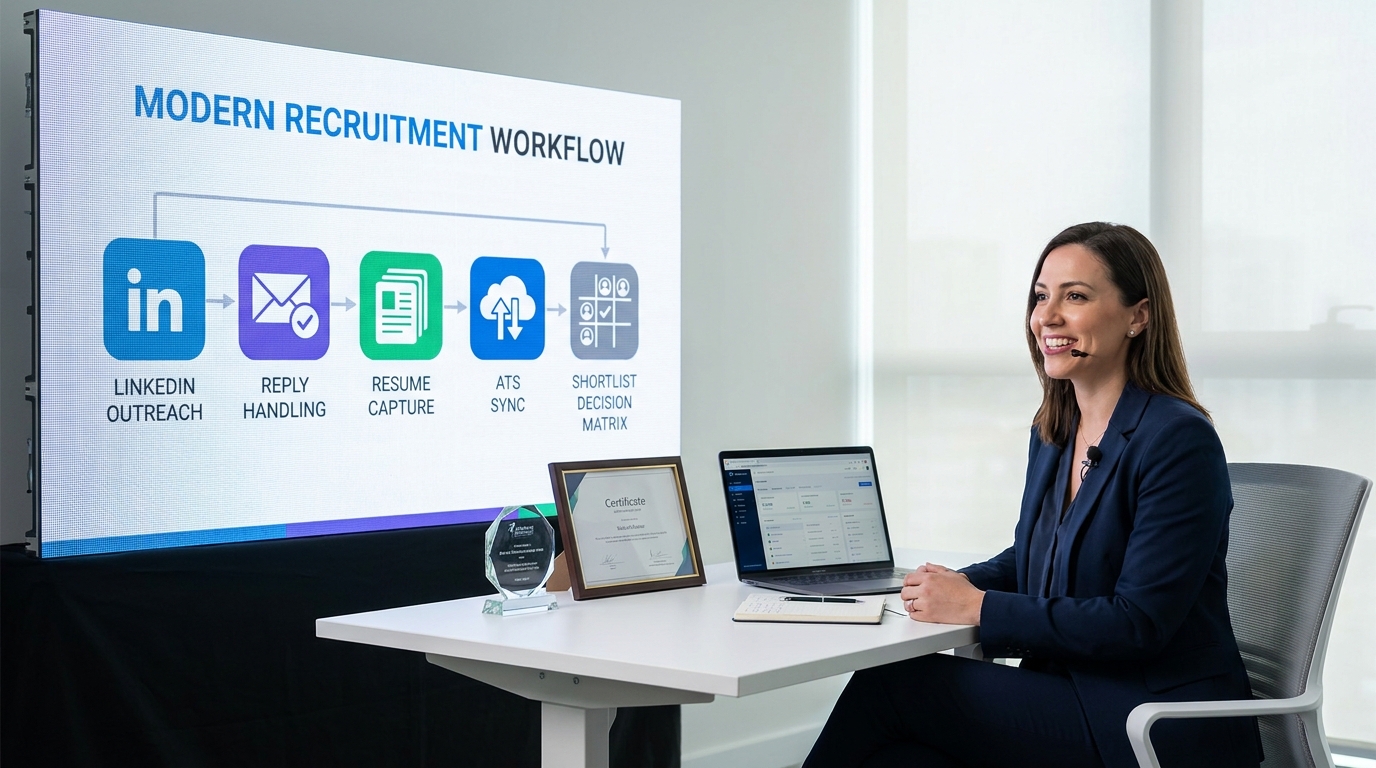
This guide helps recruiters apply decision-science and clear criteria to LinkedIn outreach so hiring choices become faster and cleaner.
That matters because most recruiting teams do not struggle with sending first messages. They struggle when search mode bleeds into choice mode: too many profiles saved, too many half-qualified conversations, too many replies scattered across inboxes, and too little clarity on who should move forward. For a solo headhunter, that means wasted hours and missed placements. For a small agency owner, it can mean uneven delivery, frustrated clients, and avoidable admin cost. For in-house talent teams, it often shows up as slower shortlist quality, weaker hiring-manager confidence, and outreach that feels busy without becoming decisive. A tool such as AI Recruiter can ease that pressure by automating repetitive LinkedIn messaging, handling after-hours candidate replies, and collecting resumes or contact details from interested people, while the recruiter still owns final judgment, CV review, and next-step decisions.
The logic is familiar to anyone who has watched a hiring process drift. A professional can start in one field, hit an unexpected turning point, pivot into a new discipline, and discover that better outcomes come from understanding how people actually decide. In recruitment, the same thing happens every day: recruiters open broad LinkedIn searches, build long target lists, send outreach, and then realize the real bottleneck is no longer sourcing. It is deciding, consistently, what good looks like before replies arrive.
That is why the most useful lesson here is not about message volume. It is about separating exploration from commitment. When recruiters define candidate criteria, outreach intent, and handoff rules early, they avoid the common trap of mixing broad search with late-stage evaluation. That is exactly where recruitment automation tools, especially linkedin sales automation tools, start to matter: not as shortcuts for spam, but as systems for cleaner judgment, better timing, and more reliable follow-through.
If you are comparing tools now, the practical question is not simply which platform sends more messages. It is which workflow helps your team move from searching to choosing without losing candidate quality, recruiter control, or hiring-manager trust. That is where the overlap between linkedin sales automation tools, the best sales automation tools, and broader lead automation software becomes useful for recruitment teams.
Quick answer: The strongest linkedin sales automation tools for recruiting combine LinkedIn outreach support, reply handling, structured follow-up, resume or contact capture, and ATS or CRM coordination. The best fit is the one that helps your team set clear criteria early, keep outreach personal, and move qualified candidates into the next step without manual chaos.
- Why recruitment teams borrow from sales automation
- Search mode vs choice mode in recruiting
- What to compare first in automation tools
- Best sales automation tools by recruiting use case
- Features that matter most for recruiters
- Workflow lessons from decision science
- How to choose lead automation software
- Common mistakes when teams automate LinkedIn outreach
- FAQ
Why recruitment teams borrow from sales automation
Recruitment teams are increasingly evaluating recruitment automation tools through a sales-tech lens because outbound sourcing now looks a lot like top-of-funnel pipeline work. Profiles are identified, segmented, enriched, contacted, tracked, and moved into a structured process. That is why interest in linkedin sales automation tools has expanded beyond sales departments.
But the real reason these tools matter is not automation for its own sake. It is decision quality. In hiring, every outbound workflow eventually runs into the same issue: broad search is easy to start, yet hard to convert into disciplined selection. Without systems, recruiters bounce between profile review, LinkedIn messaging, notes, spreadsheets, inboxes, and ATS updates. Work expands, but clarity does not.
That is where many of the best sales automation tools become relevant. They can create structure around repeatable actions such as sourcing, sequencing, reminders, inbox management, routing, and sync. In recruitment, though, those features only help if they support better judgment rather than just more activity.
Search mode vs choice mode in recruiting
One of the most useful ideas for recruiting leaders is the distinction between search mode and choice mode. In search mode, teams cast a wide net. They explore talent pools, compare possible backgrounds, test outreach angles, and keep options open. In choice mode, they need commitment. They decide whom to prioritize, whom to advance, and which conversations deserve recruiter time.
Problems begin when those two modes get mixed together. A recruiter keeps adding profiles without narrowing criteria. A hiring manager says the shortlist is too broad after outreach has already started. A sourcer sends messages before the team aligns on must-have experience. The result is familiar: more volume, less confidence.
This is also why lead automation software can be useful in recruiting. The word lead is borrowed from sales, but the operating logic is transferable. A candidate journey still needs stage definitions, routing rules, response handling, and qualification checkpoints. What changes is the relationship. Candidates are not generic leads, and recruitment requires more care around timing, tone, trust, and relevance.
In practice, the best recruitment workflows define evaluation criteria before campaigns scale. Automation can then support the process instead of exposing its weaknesses.
What to compare first in automation tools
If you are reviewing platforms, start with workflow fit rather than feature hype. Recruitment teams adapting outbound automation methods should compare tools in terms of control, visibility, and decision support.
| Evaluation Area | Why It Matters | Best For | Recruitment Advice |
|---|---|---|---|
| LinkedIn workflow support | Supports sourcing, outreach steps, and follow-up cadence | Outbound recruiters and sourcers | Check whether the workflow supports candidate conversations, not just prospect selling |
| Reply handling | Prevents missed responses and slow follow-up | Lean teams with high inbox volume | Prioritize visibility into who replied, what they asked, and what action comes next |
| Resume and contact capture | Reduces manual admin after interest is confirmed | Agency desks and in-house TA | Useful when recruiters lose time chasing basic follow-up information |
| ATS or CRM sync | Keeps records current and avoids duplicate entry | Ops-led teams | Test field mapping, deduplication, and ownership rules before rollout |
| Personalization controls | Improves message relevance | Recruiters hiring for niche roles | Use AI-assisted drafting carefully and keep human edits easy |
| Enrichment | Adds context for prioritization | Sourcing-heavy teams | Helpful when profile research is slowing down first outreach |
| Analytics | Shows reply trends and process gaps | Managers and recruiting ops | Focus on qualified responses and stage progression, not raw send counts |
| Multi-account management | Supports agencies or distributed teams | Staffing firms and larger organizations | Important when governance, permissions, and consistency matter |
| Workflow automation | Connects reminders, routing, and stage updates | Teams standardizing process | Only valuable if your team has already agreed on criteria and ownership |
For many hiring teams, this table is more useful than a generic ranking list. The best sales automation tools for an individual recruiter may be the wrong fit for an enterprise team that needs approvals, auditability, and consistent handoffs.
Best sales automation tools by recruiting use case
1. Best for solo recruiters doing LinkedIn sourcing
This category fits individual recruiters who need help turning profile searches into organized outreach. The strongest option here is usually a straightforward system with sequence support, reply visibility, and enough personalization control to avoid generic messaging.
In this use case, linkedin sales automation tools matter most when the recruiter already knows what a good candidate looks like and simply needs help executing consistently.
2. Best for agencies managing multiple desks
Agencies need more than message automation. They need clean account separation, inbox visibility, and better coordination across recruiters working similar talent pools. The best sales automation tools in this category usually support multi-user oversight and clearer workflow discipline.
This is also where always-on reply handling becomes attractive. In my own experience evaluating AI-assisted workflows, one of the most practical uses for AI Recruiter is not flashy copy generation but simple continuity: candidates reply after work, across time zones, or when the recruiter is busy, and the system can keep the conversation moving, answer routine role questions, and collect a resume or contact details from interested people before the recruiter reviews the record and decides what happens next.
3. Best for recruiting operations teams
Ops teams often care less about send volume and more about process design. For them, lead automation software becomes relevant because the priority is orchestration: routing, enrichment, sync, reminders, and handoff between sourcing and recruiter ownership.
If your current process breaks once replies begin, this category is often a better fit than lightweight outreach tools.
4. Best for enterprise teams needing governance
Enterprise recruiting teams usually need permissions, reporting, regional segmentation, and tighter system integration. Here, the real value of linkedin sales automation tools is process visibility. The benefit is not simply doing more outreach, but making outbound activity measurable and manageable across teams.
5. Best for multilingual or distributed hiring
Global hiring introduces time-zone gaps and language friction. Teams operating across markets often need tools that help sustain conversations when recruiters are offline. In these environments, the best sales automation tools are the ones that improve responsiveness without removing recruiter oversight.
Features that matter most for recruiters
When recruiters compare tools, long feature lists can distract from what actually improves delivery. The most useful capabilities are the ones that reduce friction at the exact points where search mode should become choice mode.
LinkedIn sourcing and list building
You need a clean way to move from search results to priority talent pools. That means organizing profiles by role, market, urgency, and campaign intent, not by ad hoc saves and exports.
Structured sequencing with recruiter control
Good automation supports consistent follow-up without forcing robotic outreach. Templates and AI assistance can help, but only if recruiters can quickly adapt copy to role context and candidate background.
Reply handling and conversation continuity
This is where many teams underinvest. Sending outreach is the easy part. Keeping conversations visible, timely, and organized is much harder. Tools that support round-the-clock message handling can reduce dropped responses, especially in distributed hiring.
Resume and contact capture
Once a candidate shows interest, the process should not collapse into manual chasing. Systems that gather resumes and contact details at the right moment can remove a surprising amount of admin work while leaving the recruiter responsible for actual screening.
ATS or CRM integration
This is often where lead automation software delivers the most operational value. If the workflow does not sync back into your recruiting system, the team ends up with more activity and less truth.
Analytics that reflect quality
The right reports show which outreach actually produces qualified conversations and where the process is breaking down. Recruiters do not need vanity metrics. They need feedback that improves judgment.
Workflow lessons from decision science
The opening lesson about search mode and choice mode is not abstract theory. It maps directly to real recruiting operations.
- Set criteria before the shortlist grows. If the team has not agreed on must-have experience, location constraints, compensation range, and outreach angle, automation only speeds up confusion.
- Reduce friction around the desired next step. A useful decision framework is to make actions easy, attractive, social, and timely. In recruiting terms, that means a candidate should understand why the role is relevant, what the next step is, and why replying now is worthwhile.
- Separate engagement from qualification. An automated workflow can identify interest and keep communication moving, but recruiters still need to review the profile, assess fit, and decide whether the candidate belongs in process.
- Design for real human behavior. Candidates reply late, ignore vague asks, hesitate when risk is unclear, and disengage when the process feels impersonal. Good automation respects that.
These lessons are why recruiting teams increasingly evaluate linkedin sales automation tools through a behavioral lens. The best systems do not just automate tasks; they support better timing, clearer choices, and more coherent next steps.
How to choose lead automation software
If you are selecting lead automation software for recruitment, start with operating reality rather than vendor demos.
- Map your current outbound workflow. Identify who sources, who sends first contact, who handles replies, and when records enter the ATS.
- Define the decision points. Agree on what moves a person from searched to contacted, from contacted to interested, and from interested to reviewed.
- Choose the smallest useful workflow first. Start with one role family, one desk, or one geography before scaling.
- Prioritize continuity over novelty. Better inbox handling and clearer handoffs often matter more than advanced AI features.
- Test recruiter adoption. A simpler system that gets used consistently beats a complex one that only operations understands.
- Audit risk and compliance. Review privacy expectations, access controls, and data handling before broad rollout.
If your team depends heavily on LinkedIn for outbound hiring, this evaluation becomes especially important. The right linkedin sales automation tools should support candidate experience and recruiter efficiency at the same time.
Common mistakes when teams automate LinkedIn outreach
- Defining candidate criteria too late. The team sources broadly, then argues about fit after outreach begins.
- Treating candidates like generic leads. Pipeline logic transfers, but relationship dynamics do not.
- Optimizing for volume over relevance. More sends rarely fix weak positioning.
- Ignoring reply operations. Outreach works only if follow-up is visible and timely.
- Skipping ATS planning. Without sync rules, admin work expands.
- Letting AI replace recruiter judgment. Automation can handle repetition, but not final fit assessment.
In my experience, the strongest outcomes come from disciplined pilots. When a team defines criteria early, uses automation to keep conversations moving, and preserves recruiter ownership over review and selection, results feel cleaner and more repeatable.
FAQ
What do linkedin sales automation tools do in recruiting?
They automate repetitive parts of LinkedIn outreach, such as sequencing, reminders, response handling, and workflow tracking. In recruiting, they are most useful when paired with clear candidate criteria and recruiter oversight.
Are the best sales automation tools suitable for talent acquisition teams?
Some are, especially when they support personalization, inbox visibility, and system sync. The best sales automation tools for recruiting are usually the ones that improve decision quality, not just activity volume.
How is lead automation software different from recruiting software?
Lead automation software is built around pipeline logic such as routing, scoring, follow-up, and stage movement. Recruiting software applies similar structure to candidate journeys, but with different expectations around trust, relevance, and evaluation.
Can AI handle candidate conversations without replacing recruiters?
Yes, if the workflow is designed properly. AI can help with repetitive messaging, after-hours replies, and information collection, while recruiters remain responsible for screening, judgment, and hiring decisions.
What should small agencies prioritize first?
Start with workflow clarity, reply management, and easy adoption. Small firms usually benefit more from consistency and visibility than from highly complex automation.
What matters most for in-house teams?
Integration, governance, and hiring-manager alignment matter most. In-house teams often need stronger handoffs and cleaner reporting across the recruiting process.
Conclusion
Recruiting teams do not need to copy sales workflows blindly to benefit from automation. What they can borrow is structure: clear criteria, consistent sequencing, cleaner handoffs, and better visibility into what happens after outreach begins. That is why linkedin sales automation tools have become relevant in hiring, and why the best sales automation tools and broader lead automation software categories now overlap with modern recruiting operations.
The smartest buying decision usually comes down to one test: does the tool help your team move from searching to choosing with less friction and better candidate relevance? If it does, automation becomes a support system for sound recruiting judgment rather than just another source of noise.