Choosing an interview scheduling app is easiest when you treat it as part of a complete recruiting workflow, not a standalone calendar link. In practice, the best setup is one that (1) confirms real candidate intent before you schedule, (2) prevents double booking with a shared calendar, and (3) keeps the process respectful and fast for candidates. After I joined FocusCore Japan’s Friday Book Club in Tokyo to discuss chapters from my books The Savage Truth and Recruit. The Savage Way, I left with a simple reminder: experienced recruiters adopt new ideas when those ideas remove friction. Below is the same principle applied to scheduling, including when a free room booking calendar or calendar software free is enough, and where StrategyBrain AI Recruiter can reduce the manual work that happens before scheduling.
The Tokyo Book Club moment that reframed scheduling
It turns out that Jonathan Cant and the team at FocusCore Japan in Tokyo are all fans of my first book, The Savage Truth. They now run a Friday Book Club to discuss chapters of my second book, Recruit. The Savage Way, as they work their way through it.
It was good fun to join their meeting last week and answer questions and debate both recruitment and rugby. More importantly, it was gratifying to see that even hardened, experienced recruiters like these are open to adopting new ideas, and thriving on growth.
That is exactly the mindset you need when you evaluate an interview scheduling app. The goal is not “new tech.” The goal is fewer avoidable messages, fewer missed handoffs, and fewer candidate drop offs caused by slow coordination.
What “good” looks like in an interview scheduling app
An interview scheduling app is software that automates the logistics of booking interviews, including availability collection, time zone handling, confirmations, and rescheduling. A strong tool is measurable in outcomes you can observe in a hiring week.
Minimum capabilities to insist on
- Time zone clarity so candidates and interviewers see the same meeting time without manual conversion.
- Rescheduling controls so changes do not trigger a chain of emails.
- Calendar sync so booked interviews appear in the interviewer’s calendar automatically.
- Buffer rules so interviewers are not booked back to back without breaks.
- Auditability so you can see who booked what and when, which matters for coordination and compliance.
Where “free” tools can be enough
If you are a small team, calendar software free options can cover the basics, especially when paired with a shared calendar and a simple process. The tradeoff is that you often need more manual discipline to avoid conflicts and to keep everyone aligned.
A practical scheduling workflow recruiters actually follow
Scheduling breaks when it starts too early. If you schedule before you confirm intent, you create churn: no shows, last minute cancellations, and wasted interviewer time. The workflow below is the one I see hold up best across teams.
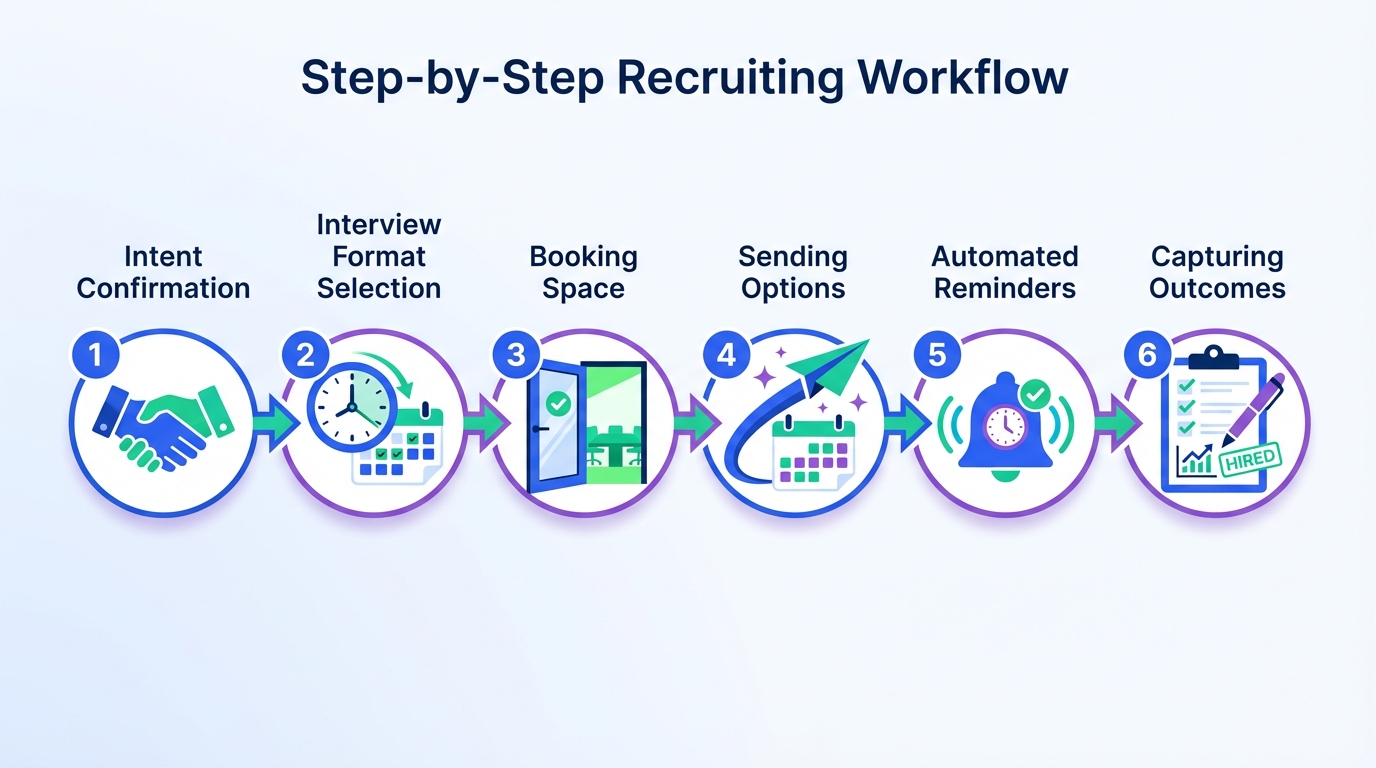
Step by step workflow
- Confirm intent by getting a clear yes to interview and collecting the basics you need to schedule, including location preferences and time constraints.
- Choose the interview format and lock the panel, including who must attend and who is optional.
- Reserve the room using a shared calendar or a free room booking calendar so the physical space is not the hidden constraint.
- Send scheduling options using your interview scheduling app, with buffers and time zone handling turned on.
- Confirm and remind with automated confirmations and reminders, plus a clear reschedule path.
- Capture outcomes immediately after the interview so the next step is not delayed by missing notes.
3 ways to run scheduling with different team sizes
Method 1: Interview scheduling app plus shared calendars (recommended for most teams)
This is the most reliable baseline because it reduces manual coordination while keeping the process transparent for candidates and interviewers.
- Best for: teams with multiple interviewers and frequent reschedules.
- Works well with: a shared room calendar and a shared interviewer availability calendar.
- Limitation: you still need a clean upstream process so you only schedule candidates who are genuinely ready.
Method 2: Calendar software free plus a free room booking calendar (best for very small teams)
If you are hiring occasionally, you can run a lightweight process with calendar software free and a free room booking calendar. The key is to standardize how you name events and how you block rooms.
- Best for: founders, small HR teams, and early stage companies with low interview volume.
- Strength: minimal cost and minimal setup.
- Limitation: higher risk of conflicts if people do not keep calendars current.
Method 3: High automation upstream, then schedule only qualified candidates (best for high volume)
For high volume hiring, the biggest scheduling win is not a prettier calendar. It is reducing the number of unqualified or uncommitted candidates who reach the scheduling stage. This is where StrategyBrain AI Recruiter can change the math because it automates the repetitive LinkedIn steps that happen before scheduling.
- Best for: teams that source heavily on LinkedIn and need faster throughput.
- Strength: fewer wasted interview slots because intent is confirmed earlier.
- Limitation: you still need recruiter review for final qualification, because AI Recruiter does not decide résumé fit.
Quick comparison table
| Approach | Setup effort | Cost | Best for | Main risk |
|---|---|---|---|---|
| Interview scheduling app plus shared calendars | Medium | Varies by vendor | Most recruiting teams | Scheduling too early without intent confirmation |
| Calendar software free plus free room booking calendar | Low | $0 | Low volume hiring | Manual errors and double booking |
| Automate LinkedIn outreach and qualification, then schedule | Medium | Varies by vendor | High volume LinkedIn sourcing | Over automation without recruiter review of résumés |
Common failure points and fixes
Failure 1: Too many messages to book one interview
Fix: move to an interview scheduling app that supports time zone handling, buffers, and automated reminders. Then standardize your interview types so you are not reinventing the meeting length each time.
Failure 2: Rooms are the hidden bottleneck
Fix: create a dedicated room calendar and treat it like inventory. A free room booking calendar can work if everyone uses it consistently and if naming conventions are enforced.
Failure 3: You schedule candidates who are not ready
Fix: confirm intent and collect the basics before you offer time slots. If LinkedIn is your main channel, consider upstream automation that can handle initial outreach and follow up so recruiters spend their time on review and decision making, not repetitive messaging.
Where StrategyBrain AI Recruiter fits before scheduling
In the FocusCore Japan discussion, what stood out was the willingness to adopt ideas that create growth. In modern recruiting, one of the highest leverage ideas is to automate the repetitive work that delays scheduling in the first place.
StrategyBrain AI Recruiter is built for LinkedIn hiring. It can automatically connect with candidates within your targeted search criteria, introduce the opportunity, answer common questions about the role and compensation, confirm interview interest, and collect résumés and contact information from interested candidates. That means your interview scheduling app is used later, when the candidate has already shown intent and you have the information needed to schedule cleanly.
What we see teams gain when upstream work is automated
- Faster scheduling readiness because interest and basic details are collected before the calendar link is sent.
- Better candidate experience because responses and follow ups can happen 24 hours a day in the candidate’s native language.
- More scalable operations because AI Recruiter supports managing more than 100 LinkedIn accounts for teams that need volume.
Important boundary
AI Recruiter can identify willingness to communicate or interview, but it does not determine whether a résumé fully matches job requirements. Recruiters still make the final qualification decision after reviewing the résumé.
FAQ
What is the fastest way to reduce interview scheduling back and forth?
Use an interview scheduling app with time zone handling, buffers, and automated reminders, and only send it after you confirm candidate intent. This prevents long email chains and reduces rescheduling churn.
Can I run scheduling with calendar software free tools?
Yes, calendar software free options can work for low volume hiring if your team keeps calendars accurate and follows a consistent naming and booking process. The main tradeoff is higher manual coordination and a higher risk of conflicts.
Do I need a free room booking calendar if we do mostly video interviews?
If interviews are fully remote, room booking is less critical. If you run any onsite or hybrid interviews, a free room booking calendar prevents last minute room conflicts that derail the schedule.
Where does StrategyBrain AI Recruiter fit in the scheduling process?
It fits before scheduling. It automates LinkedIn outreach, follow up, and early conversation, then confirms interview interest and collects résumés and contact details so recruiters schedule only candidates who are ready.
Does AI Recruiter replace recruiters?
No. It replaces repetitive LinkedIn tasks such as connecting, initial messaging, and collecting information. Recruiters still review résumés and make final qualification and hiring decisions.
How does AI Recruiter handle multilingual communication?
It can communicate in any global language and respond around the clock. This reduces delays caused by time zones and improves clarity for candidates who prefer their native language.
How does AI Recruiter handle data privacy and compliance?
According to the product information provided, it is designed to comply with privacy regulations in the EU, United States, and Canada, and customer provided data is not used to train AI models. Credentials are encrypted and stored independently per user with explicit authorization.
What should I measure to know if scheduling is improving?
Track time from candidate yes to booked interview, reschedule rate, no show rate, and interviewer utilization. Improvements usually show up first as fewer messages per booked interview and faster time to book.
Conclusion and next steps
Joining FocusCore Japan’s Friday Book Club reminded me that growth minded recruiters adopt systems that remove friction. The same applies to choosing an interview scheduling app: confirm intent first, prevent conflicts with shared calendars or a free room booking calendar, and automate reminders and rescheduling so candidates are not left waiting.
Next steps are simple. Map your current workflow, decide whether calendar software free tools are sufficient for your volume, and if LinkedIn sourcing is a major channel, consider using StrategyBrain AI Recruiter to automate outreach and early qualification so scheduling happens later and with better signal.