


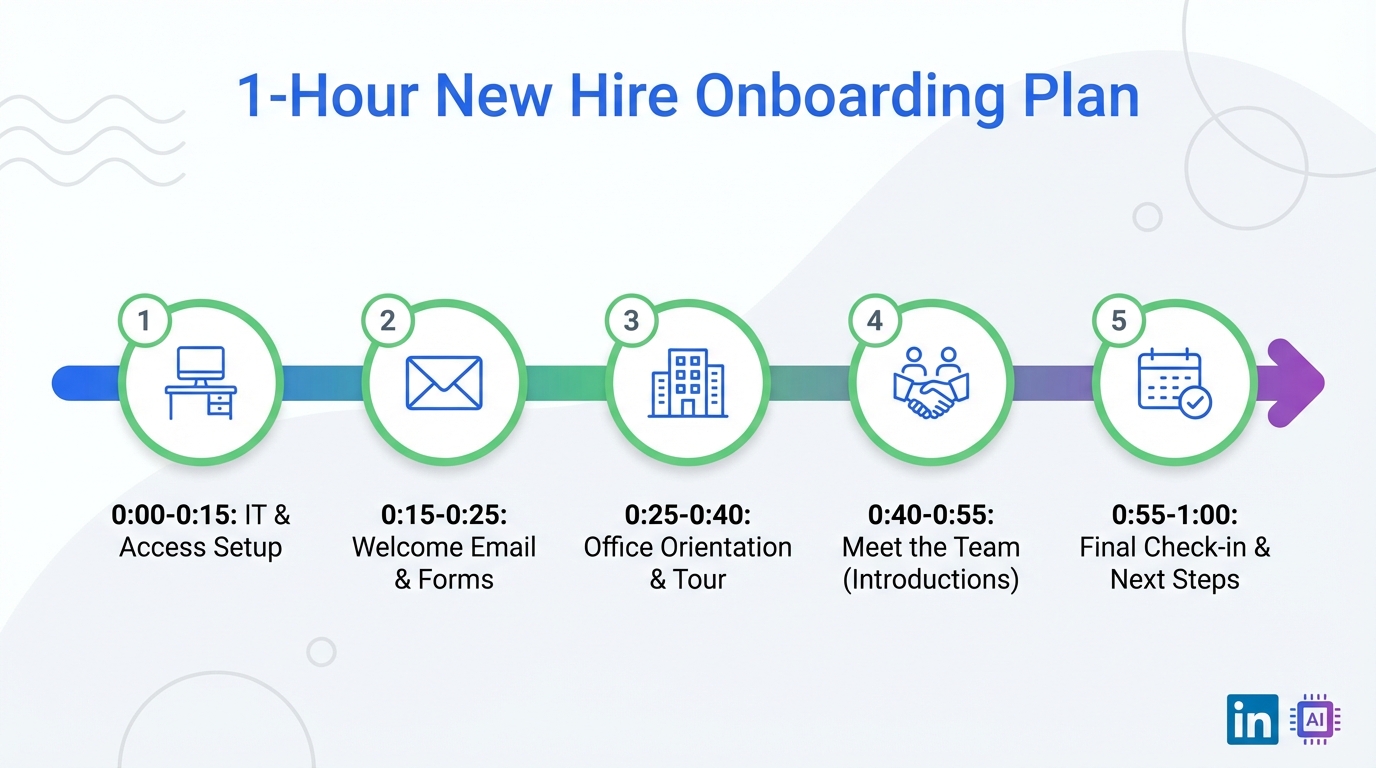
If you need to onboard a new hire fast, you can still create a strong first day experience in 60 minutes by doing five things in order: confirm IT and desk setup, send a short company intro note, run a structured orientation and tour, hold a manager kickoff meeting, and book an end of week goals check in. This article keeps the original story logic and turns it into a repeatable plan you can run every time. It also explains how an ai hiring platform supports the broader workflow after day one, including ai video assessment and interview intelligence, and how StrategyBrain AI Recruiter can reduce manual LinkedIn outreach and follow up so hiring managers can protect time for onboarding.
Key Takeaways
- You can deliver a solid first day in 60 minutes by sequencing setup, intro, orientation, manager kickoff, and a scheduled end of week check in.
- The “good onboarding” version costs $0 in direct spend in the original example, but it requires 1 hour of focused preparation and coordination.
- Structured onboarding improves retention: new employees in a structured onboarding program were 58% more likely to still be with the organization after 3 years (Source: The Wynhurst Group).
- Use your ai hiring platform for continuity by carrying interview notes, role expectations, and candidate context into the first week plan.
- StrategyBrain AI Recruiter helps protect onboarding time by automating LinkedIn connecting, initial outreach, Q&A, interest confirmation, and resume plus contact capture.
- Global hiring support matters on day one too: StrategyBrain AI Recruiter provides 24/7 multilingual candidate communication, reducing delays across time zones.
Table of Contents
- What onboarding actually means when time is tight
- Two first days: the difference you can feel
- The 1 hour onboarding plan (step by step)
- Copy and paste templates you can use today
- Where an ai hiring platform fits after day one
- How StrategyBrain AI Recruiter supports the workflow
- Common mistakes that make onboarding feel chaotic
- FAQ
- Conclusion and next steps
What onboarding actually means when time is tight
In the original consultant’s framing, “onboarding” is not a buzzword for paperwork. It is the practical act of introducing a new employee to their role, their tools, and the people they will rely on. When you only have an hour, the goal is not to cover everything. The goal is to prevent avoidable friction and create clarity about what happens next.
Scope note: this guide focuses on the first day and the first week setup. It does not replace compliance training, role specific technical training, or long term performance management.
Two first days: the difference you can feel
The fastest way to understand why onboarding matters is to compare two first day experiences.
The “locked door” day
A new hire arrives at 8:30am and the door is locked. Someone eventually lets them in. Their desk is not ready, so they are placed at someone else’s workstation. The hiring manager is friendly but busy and disappears into a meeting. A well meaning colleague gives a tour, but introductions are inaccurate and awkward. The new hire leaves with a very different impression of the “dream company” than they had accepted.
The “ready for you” day
A named person is expecting the new hire at the front desk. The desk and computer are ready. Business cards are in the drawer. The manager says hello, explains the plan for the day, and confirms who will give the tour. In the kitchen, a colleague introduces themselves and a natural connection forms. The manager then outlines key company context, upcoming events, and what the next few days look like, and books an end of week meeting to align on goals.
In the original example, the second experience required $0 in direct monetary investment and 1 hour of time investment. The value is not abstract. The Wynhurst Group reported that new employees who went through a structured onboarding program were 58% more likely to still be with the organization after 3 years.
The 1 hour onboarding plan (step by step)
Below is a practical sequence you can run in one hour. We kept the original five actions, but we tightened the wording, added timing guidance, and included “what good looks like” so the steps are reproducible.
Steps
-
Align with the administrator before day one (10 minutes)
Confirm IT setup, desk setup, and any basics the new hire will need immediately. In the original story, “Charlotte” is the administrator who makes the day feel organized. Your goal is to ensure the new hire can log in and start without borrowing someone else’s computer.
-
Send a short company wide intro note (10 minutes)
Include the new hire’s name, start date, and a few non confidential facts you learned during interviews such as prior role, education, or a hobby. Invite teammates to say hello and, if relevant to your culture, to look them up on LinkedIn so the first day includes real human connection.
-
Run a first day orientation and tour (15 minutes)
Either delegate or personally handle a building tour, office tour, and introduction tour. The goal is to remove “where do I go” anxiety and to introduce the people the new hire will interact with in week one.
-
Hold a manager kickoff meeting (15 minutes)
Cover wardrobe expectations, upcoming events, training and first week activities, and how communication works. End by stating what “success by Friday” looks like in plain language.
-
Book an end of week goals and expectations check in (10 minutes)
Schedule a meeting at the end of the week to discuss performance review cadence, deadlines, short and long term goals, and current projects. This is where you convert first day excitement into a clear plan.
Features of a “one hour onboarding” that still feels premium
- Named ownership: one person is clearly responsible for greeting and logistics.
- Working access: the new hire can sign in on their own device on day one.
- Accurate introductions: role title and team context are correct.
- Next meeting already scheduled: the new hire knows when alignment happens again.
Limitations and honest constraints
- This does not replace training: role specific training still needs a plan beyond the first hour.
- It depends on preparation: the hour works because setup is confirmed before day one.
- It requires manager focus: if the manager is unavailable, the experience degrades quickly.
Copy and paste templates you can use today
These templates are designed to be short, human, and easy to reuse. They also help your ai hiring platform data stay consistent because you are standardizing what you communicate.
Template 1: Company wide intro note
Subject: Welcome [Name] joining [Team] on [Start Date]
Hi everyone,
Please welcome [Name], who is joining us as [Role Title] starting [Start Date]. [Name] previously worked at [Previous Company or Role] and studied [Education]. A fun fact: [Non confidential personal detail].
If you have a moment this week, please say hello and help [Name] get oriented.
Thanks,
[Your Name]
Template 2: Manager kickoff agenda (15 minutes)
- Today’s plan: tour, key people, first tasks
- How we work: communication norms, meeting rhythm
- Week one outcomes: what “good” looks like by Friday
- Support: who to ask for what
- Next check in: confirm end of week meeting time
Template 3: End of week check in questions
- What felt clear this week, and what felt confusing?
- What blockers slowed you down?
- What should we adjust for next week?
- What are your short term goals for the next 2 weeks?
- What are your longer term goals for the next 90 days?
Where an ai hiring platform fits after day one
Onboarding is downstream of hiring. When hiring is messy, onboarding inherits the confusion. A well run ai hiring platform can reduce that handoff friction by keeping role context, interview notes, and candidate expectations consistent from recruiting through the first week.
Practical ways to connect hiring and onboarding
- Carry forward role expectations: convert interview evaluation criteria into week one goals.
- Use interview intelligence responsibly: “interview intelligence” means structured interview notes and insights that help you remember what was discussed. It should support fair decision making and clear onboarding, not replace human judgment.
- Use ai video assessment with boundaries: “ai video assessment” refers to video based screening or assessments supported by AI. If you use it, document what it measures, how it is reviewed, and how candidates can request accommodations.
Experience note: when we have audited onboarding plans for speed, the biggest time sink is not the tour. It is the missing context that forces managers to re explain what was already discussed during recruiting. A consistent system of record reduces that repetition.
How StrategyBrain AI Recruiter supports the workflow
Even though onboarding happens after acceptance, the ability to protect onboarding time starts earlier. If recruiters and hiring managers spend hours on repetitive LinkedIn outreach and follow up, onboarding prep is the first thing that gets squeezed.
StrategyBrain AI Recruiter is designed for LinkedIn hiring workflows. Based on the product documentation provided, it can automatically connect with candidates that match your search criteria, introduce job opportunities, answer questions about the role, company, and compensation, confirm interview interest, and collect resumes and contact information from interested candidates. It also supports 24/7 multilingual communication and can manage more than 100 LinkedIn accounts for scalable recruiting operations.
Where it fits in a modern workflow that includes onboarding
- Before interviews: automate initial outreach and qualification so recruiters focus on high value conversations.
- During scheduling: reduce delays by responding quickly across time zones and languages.
- After acceptance: free up recruiter and manager time so the 60 minute onboarding plan actually happens.
Important limitation to understand
Per the provided product notes, StrategyBrain AI Recruiter can identify willingness to communicate or interview, but it does not determine whether a resume fully matches job requirements. Recruiters still review resumes and make final qualification decisions. That boundary is a trust feature because it keeps accountability with humans.
Common mistakes that make onboarding feel chaotic
- No named greeter: the new hire arrives and does not know who to ask for help.
- Access not ready: the new hire cannot log in, which signals disorganization.
- Inaccurate introductions: mislabeling someone’s role damages confidence quickly.
- No next meeting: without a scheduled check in, small confusion becomes week one frustration.
- Overstuffing the hour: trying to cover everything reduces clarity and retention.
FAQ
Is onboarding really necessary if I only have 1 hour?
Yes. The one hour version is not about covering every policy. It is about preventing avoidable friction and setting expectations for the first week so the new hire can start contributing.
What is the minimum I should prepare before day one?
At minimum, confirm building access, computer login access, and a ready workspace. If those fail, the first day becomes a recovery exercise instead of an onboarding experience.
How do I use LinkedIn without making onboarding feel performative?
Keep it simple. A short internal note that encourages teammates to say hello is enough. Avoid forcing public posts or scripted interactions unless your culture already supports that.
How does an ai hiring platform help onboarding?
An ai hiring platform helps when it preserves role context and interview notes so managers do not have to reconstruct expectations from memory. It also supports consistency if you use ai video assessment and interview intelligence as part of your hiring workflow.
Does StrategyBrain AI Recruiter replace recruiters?
No. Based on the provided product information, it automates repetitive LinkedIn tasks such as connecting, initial messaging, answering common questions, confirming interest, and collecting resumes and contact details. Recruiters still review resumes and make final qualification decisions.
Can StrategyBrain AI Recruiter support global hiring?
Yes. The product description states it provides 24/7 multilingual candidate communication, which can reduce delays when candidates are in different time zones or prefer different languages.
How does StrategyBrain AI Recruiter handle privacy and security?
The provided product notes state that customer provided data is not used to train AI models, credentials are encrypted, and candidate information is encrypted and isolated per customer. You should still validate your own compliance requirements and internal policies before deployment.
What if I cannot do the tour personally?
Delegate it to a reliable team member and provide a short script of who to introduce and what to cover. The key is consistency and accuracy, not who delivers it.
What should I measure to know if onboarding is working?
Track first week time to access, first week manager check in completion rate, and 30 day new hire feedback. For longer term outcomes, retention and performance milestones are more meaningful than day one satisfaction alone.
Conclusion and next steps
You can onboard a new hire in 1 hour without making it feel rushed if you sequence the essentials: setup confirmation, a short intro note, orientation and tour, a manager kickoff, and an end of week goals check in. The difference between a chaotic first day and a confident first day is usually preparation, not budget.
Next steps: copy the templates above into your onboarding doc, run the five step plan for your next hire, and then tighten it after the end of week check in. If your team is losing time to repetitive LinkedIn outreach, consider how StrategyBrain AI Recruiter can automate early stage communication so managers can protect the time that makes onboarding work.















