


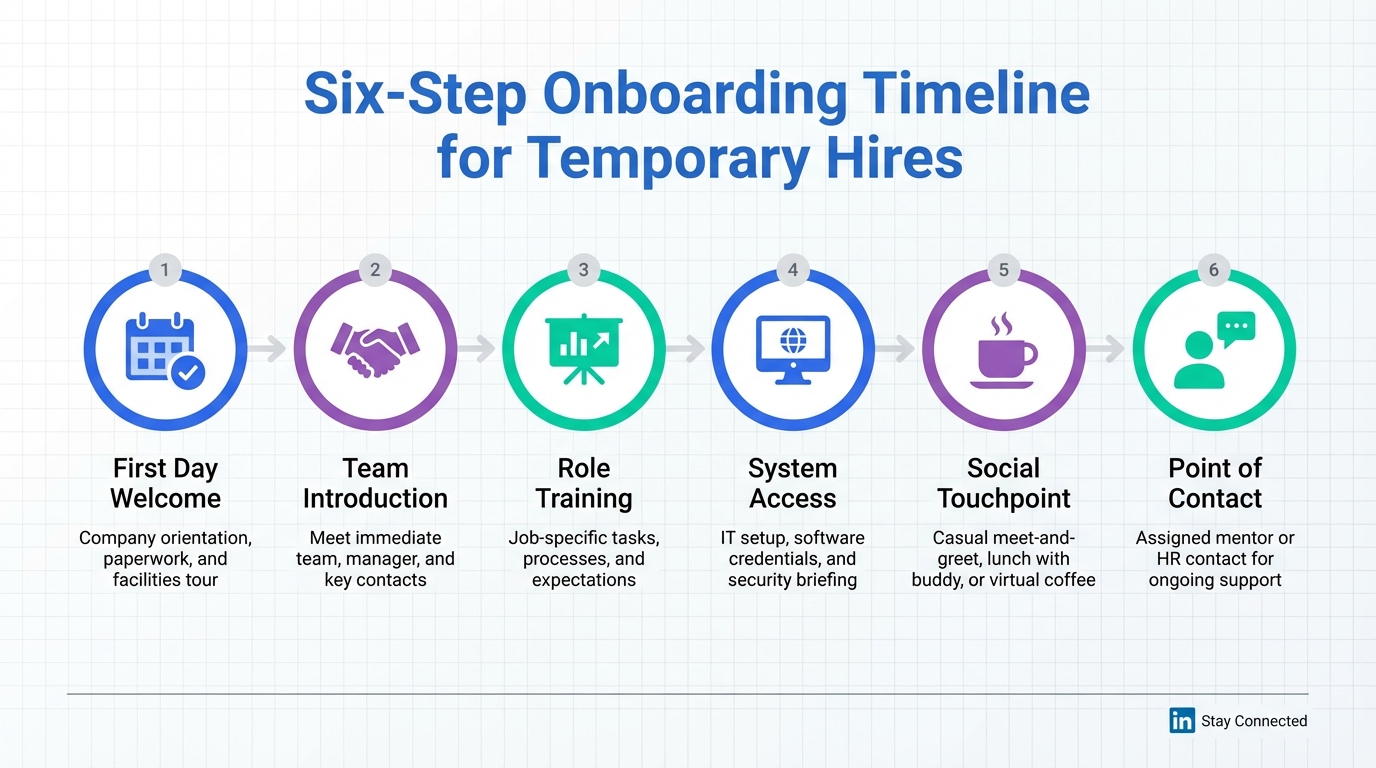
If you use ai resume screening tools and automated resume screening to hire temporary or contract talent, your onboarding process becomes part of your hiring funnel. The fastest improvement is to standardize six onboarding moments: first day welcome, team introduction, role training, system access readiness, a social touchpoint, and a clear point of contact. In our recruiting operations work, we have seen that temps who feel included ramp faster and are more likely to speak positively about your employer brand. This guide turns that idea into a repeatable playbook and shows where StrategyBrain AI Recruiter fits naturally by automating LinkedIn outreach and pre start coordination, collecting resumes and contact details, and answering candidate questions 24/7 in the candidate’s language.
Key Takeaways
- Temp onboarding is a hiring lever: a strong first week improves engagement and performance for contract workers.
- Six moments matter most: welcome, introductions, training, access readiness, social touchpoint, and a point of contact.
- Automated resume screening is not the finish line: it helps shortlist, but onboarding determines whether the hire succeeds.
- StrategyBrain AI Recruiter reduces pre start friction: it automates LinkedIn connecting, role introduction, Q&A, and resume collection so recruiters can focus on review and interviews.
- Multilingual 24/7 messaging helps global temp hiring: candidates get timely answers across time zones, reducing drop off before day one.
- Be careful with “how to trick ai resume screening” advice: optimizing clarity is fine, but misrepresentation can create compliance and performance risk.
Why onboarding matters when you use AI screening
AI resume screening tools help you sort applicants by matching skills, titles, and keywords to a job profile. That is useful, but it does not guarantee a productive contract assignment. For temporary hires, the first day and first week determine whether the person can start producing value quickly.
In the source material we reviewed, the author describes a company that invested in onboarding for a short term intern and saw positive feedback travel back into the market. That is a practical reminder that onboarding is not only an HR formality. It is also employer brand marketing, especially in temp and contract markets where word of mouth travels fast.
We also see a second order effect in modern pipelines. When automated resume screening speeds up selection, the bottleneck often moves to pre start coordination. Candidates still have questions about role scope, compensation, benefits, start date logistics, and how to submit documents. This is where an AI recruiting assistant can reduce delays without replacing human judgment.
The 6 onboarding essentials for temps and contractors
Below is a structured version of the onboarding essentials from the provided article, rewritten into a checklist you can operationalize. Each essential includes what to do, why it matters, and how it connects to an AI enabled recruiting workflow.
1) First day welcome that starts on time
What to do: If you tell a temp to arrive at a specific time, have a named person ready to greet them immediately. Avoid leaving them waiting and wondering who will pick them up.
Why it matters: The first 10 minutes sets the tone. A disorganized welcome signals that the assignment will be chaotic.
AI workflow note: Before day one, candidates often ask logistical questions. StrategyBrain AI Recruiter can handle routine Q&A in LinkedIn messages and confirm readiness while your team focuses on the actual onboarding plan.
2) Team introduction and a quick office tour
What to do: Introduce the temp to the team and give a short tour that covers practical basics such as restrooms, kitchen area, and where shared equipment is located. If your team is distributed, do the equivalent with a short virtual intro and a channel map.
Why it matters: The source material highlights a common failure mode. Temps are shown a desk and given tasks with no social context. That reduces engagement and makes the company forgettable.
AI workflow note: If you are hiring across regions, multilingual communication reduces misunderstandings. AI Recruiter supports 24/7 multilingual messaging so candidates can clarify expectations before they arrive.
3) Training that explains expectations and the bigger picture
What to do: Outline the assignment, define expectations, and explain how the work connects to business outcomes. Provide a short training plan that includes tools, processes, and success criteria.
Why it matters: Temporary workers often bring experience from many environments. When you share context, they can execute faster and may contribute useful insights.
AI workflow note: AI resume screening tools can surface relevant past experience, but the onboarding conversation is where you translate that experience into your environment. Keep that part human led.
4) Desk, computer, phone, and system access ready before arrival
What to do: Ensure the temp has a functional workstation and the required system access on day one. Provide a quick walkthrough of phone systems and login steps if needed.
Why it matters: The source material calls this a time suck. If a temp cannot access systems, you pay for idle time and the temp feels unproductive.
AI workflow note: Use a pre start checklist and confirm completion. AI Recruiter can help collect missing documents and contact details so IT and HR are not chasing information at the last minute.
5) A lunch or coffee invite that builds belonging
What to do: Depending on contract length, invite the temp for lunch or coffee. Use it to welcome them and to clarify role scope and priorities.
Why it matters: This small gesture increases belonging and makes it easier for the temp to ask questions early.
AI workflow note: Automation should not remove human warmth. Use AI to reduce admin work so you have time for these high trust moments.
6) A point of contact or work buddy
What to do: Assign a clear point of contact for questions. A buddy system works well for fast ramp up and reduces anxiety in a new environment.
Why it matters: Temps can feel isolated. A named person makes it safe to ask questions and prevents small blockers from becoming day long delays.
AI workflow note: AI Recruiter can qualify interest and collect resumes, but it does not replace the internal buddy relationship. Use AI for pre start coordination, then hand off to a human owner on day one.
How to implement the playbook in 7 steps
This is a practical implementation sequence we use to make onboarding repeatable. It is designed for teams that already rely on automated resume screening and want fewer drop offs between offer acceptance and day one.
-
Define a temp onboarding owner per assignment.
Pick one accountable person who coordinates HR, IT, and the hiring manager. This prevents “everyone thought someone else handled it.”
-
Send a pre start message that sets expectations.
Include start time, location or meeting link, dress code if relevant, and what to bring. Keep it short and specific.
-
Prepare access and equipment 24 hours before start.
Confirm laptop, credentials, and any required tools. If access depends on identity verification, schedule it in advance.
-
Plan the first 60 minutes.
Write a simple agenda: welcome, introductions, tour, and first task. A structured first hour reduces uncertainty.
-
Deliver role training with a “why” section.
Explain what success looks like in the first week and how the work connects to outcomes. This is where performance improves fastest.
-
Schedule a social touchpoint in week one.
Lunch or coffee is not fluff. It is a retention and engagement tool for short term hires.
-
Run a day three check in.
Ask what is blocked, what is unclear, and what tools are missing. Fixing issues on day three is cheaper than losing the assignment.
Where StrategyBrain AI Recruiter fits in the workflow
Many teams adopt ai resume screening tools to reduce time spent reading resumes. The next productivity gain often comes from reducing repetitive messaging and document chasing. That is the gap StrategyBrain AI Recruiter is designed to cover on LinkedIn.
What AI Recruiter automates
- Candidate outreach and connection based on your search criteria.
- Role introduction and Q&A about the role, company, compensation, and benefits using the information you provide.
- Interest confirmation to identify candidates who want to proceed.
- Resume and contact detail collection for candidates who opt in to move forward.
What stays human led
Based on the product information provided, AI Recruiter does not decide whether a resume fully matches job requirements. Recruiters still review resumes and make the final qualification decision. This division of labor is important for quality and for defensibility in hiring decisions.
Why this improves onboarding for temps
Temp hiring moves fast. When candidates wait too long for answers, they disengage. AI Recruiter’s 24/7 multilingual communication helps keep momentum, especially across time zones. It also reduces the risk that day one fails because a candidate did not know where to go, what to bring, or how to submit documents.
Compliance and data handling notes
According to the provided product details, StrategyBrain AI Recruiter is designed to comply with privacy regulations in the EU, United States, and Canada, and customer provided data is not used to train AI models. Candidate information is described as encrypted and isolated per customer environment. Treat this as a starting point and confirm your own legal and security requirements during procurement.
Quick comparison: manual vs automated pre start workflow
| Workflow area | Manual recruiter led | With StrategyBrain AI Recruiter | Best for |
|---|---|---|---|
| Initial LinkedIn outreach | Recruiter sends messages during business hours | Automated connecting and introductions | High volume sourcing |
| Candidate Q&A before day one | Back and forth replies, delays across time zones | 24/7 multilingual responses using your role details | Global temp hiring |
| Resume and contact collection | Recruiter requests and tracks documents manually | AI requests resumes and captures contact details | Reducing admin work |
| Final qualification | Recruiter reviews resume and decides | Recruiter reviews resume and decides | Quality control |
| Day one onboarding experience | Depends on manager preparation | Depends on manager preparation | Team integration |
Scope boundary: This table compares workflow responsibilities, not accuracy scores or pricing. No third party tool claims are included because they were not provided in the source material.
Common mistakes to avoid
- Treating temps “like a temp” by skipping introductions and context. The source material frames this as a missed opportunity for performance and employer brand.
- Letting access setup slip to day one which creates paid idle time and frustration.
- Over relying on automated resume screening and under investing in training and expectations.
- Chasing “how to trick ai resume screening” tactics instead of improving clarity. Candidates should describe real skills and outcomes. Misrepresentation can lead to poor performance and potential policy issues.
- Using automation without ownership which can create a cold experience. Automation should free time for human welcome and coaching.
FAQ
What are ai resume screening tools?
AI resume screening tools are systems that help recruiters sort and shortlist resumes by matching candidate information to job requirements. They typically support keyword and skill matching and may rank candidates for review.
Does automated resume screening replace onboarding?
No. Automated resume screening helps you decide who to interview, but onboarding determines how quickly a temp becomes productive and whether they feel included. The two processes solve different problems.
Is it okay to search for “how to trick ai resume screening”?
It is reasonable to learn how screening systems parse resumes so you can format information clearly. It is not advisable to misrepresent skills or experience, because it can lead to poor job fit and performance issues.
How does StrategyBrain AI Recruiter help before day one?
Based on the provided product information, it automates LinkedIn connecting and role introductions, answers candidate questions about the role and compensation using your inputs, confirms interest, and collects resumes and contact details for recruiter review.
Does AI Recruiter decide whether a candidate is qualified?
No. The provided product details state that AI Recruiter identifies willingness to communicate or interview, but the recruiter completes final qualification after reviewing the resume.
Can AI Recruiter communicate with candidates in different languages?
Yes. The provided product information describes 24/7 multilingual communication that uses the candidate’s native language to reduce misunderstandings and improve responsiveness.
What is the biggest onboarding improvement for temps?
Make day one predictable. Have someone ready to greet the temp, ensure system access works immediately, and provide a clear point of contact. Those three actions remove the most common early friction.
How do I measure whether temp onboarding is working?
Use operational signals you already track: time to first productive task, number of access issues in week one, and manager satisfaction after day three. Keep the measurement consistent across assignments.
Conclusion
If you rely on ai resume screening tools, the next competitive advantage is not only faster shortlisting. It is a temp onboarding system that makes people feel welcomed, equipped, and accountable from minute one. Start by standardizing the six essentials in this guide and implementing the 7 step rollout.
Then, reduce pre start friction by using StrategyBrain AI Recruiter to automate LinkedIn outreach, handle candidate Q&A 24/7 in the candidate’s language, and collect resumes and contact details for your review. That combination keeps the human parts of onboarding strong while removing repetitive work that slows hiring teams down.














