


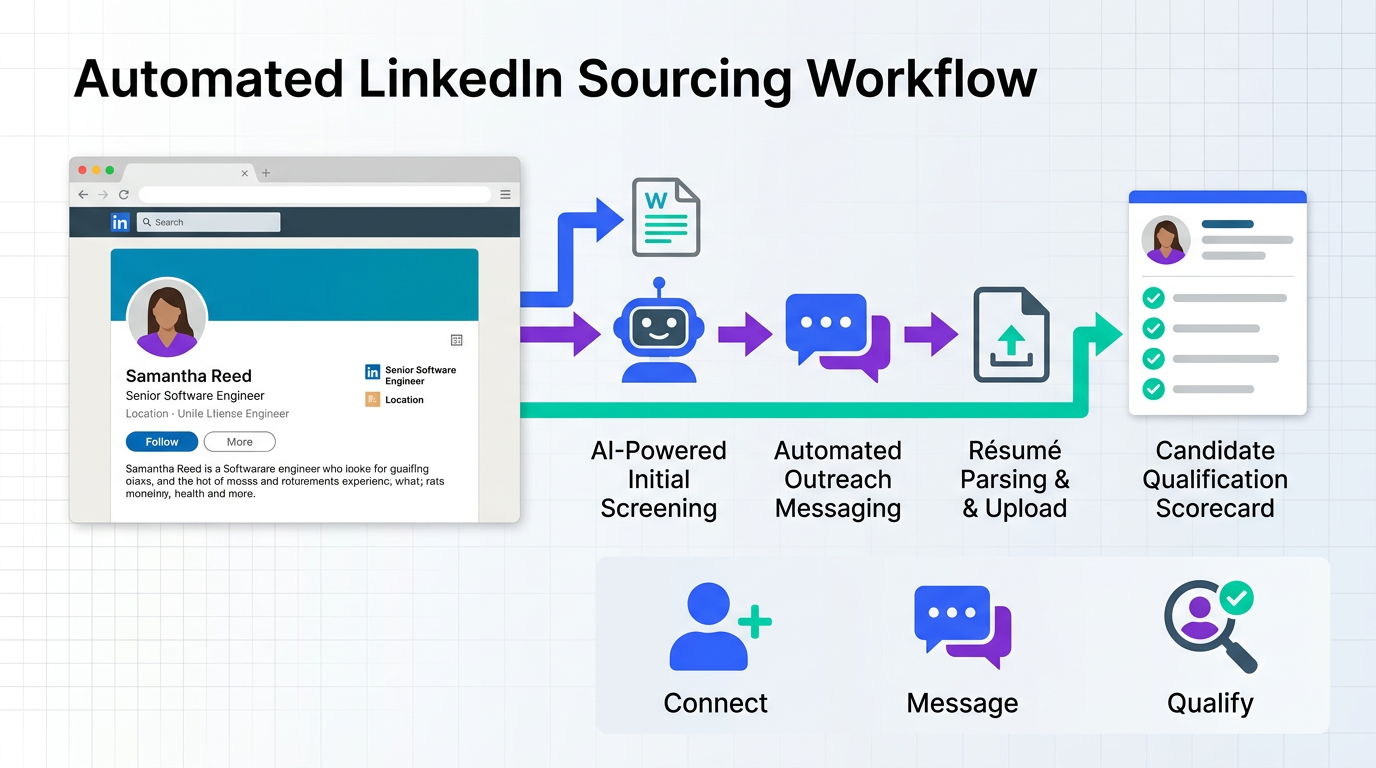
AI sourcing software helps recruiters find, engage, and qualify candidates faster by automating repetitive sourcing work such as outreach, follow ups, and initial screening. In practice, the best results come from combining a clear candidate profile, a consistent messaging workflow, and an AI system that can handle high volume conversations while staying compliant with privacy expectations. This guide explains what to look for in an artificial intelligence procurement platform style evaluation, then translates it into recruiting terms so you can choose and implement ai procurement software for talent sourcing. It also shows how StrategyBrain AI Recruiter supports LinkedIn sourcing by automating candidate connection, role introduction, Q and A, interest confirmation, and résumé and contact capture. Scope note: this article covers sourcing and first touch qualification, not ATS replacement, background checks, or final selection.
Table of Contents
- What AI sourcing software means in real recruiting work
- A practical evaluation framework you can reuse
- Method 1: Automate LinkedIn outreach and qualification with StrategyBrain AI Recruiter
- Method 2: Improve your candidate pitch with a cover letter style structure
- Method 3: Build a repeatable sourcing workflow with a checklist and SLAs
- Quick Comparison
- FAQ
- Conclusion
What AI sourcing software means in real recruiting work
In recruiting, AI sourcing software is any system that reduces manual effort in the top of funnel. That usually includes candidate discovery, outreach, follow ups, and early qualification. The key distinction is that sourcing automation is not the same as final qualification. A tool can confirm interest and collect information, but the recruiter still decides fit.
To keep terminology clear, here are the core terms used in this guide.
- Sourcing: identifying and contacting potential candidates.
- Outreach: the first message that introduces the opportunity.
- Qualification: confirming interest and collecting basic information such as résumé and contact details.
- Procurement style evaluation: a structured way to compare vendors by requirements, risk, and total cost. We borrow this approach because it makes tool selection more defensible.
A practical evaluation framework you can reuse
When teams search for ai sourcing software, they often compare features first and only later discover workflow gaps. I have found it works better to evaluate like an artificial intelligence procurement platform purchase. Start with outcomes, then map to capabilities, then validate with a small test.
Step 1: Define the outcome in measurable terms
Pick 3 metrics you can measure in your current process. Use the same metrics during a pilot so the decision is defensible.
- Time spent per day on manual outreach: measured in minutes per recruiter per day.
- Response handling coverage: hours per day you can respond without delays.
- Qualified handoffs: number of candidates per week who confirm interest and provide a résumé.
Step 2: Translate outcomes into capability requirements
Most sourcing tools fail not because they cannot send messages, but because they cannot sustain a conversation. Your requirements should reflect that.
- Conversation handling: can the system answer role and company questions and keep context.
- Follow up automation: can it follow up without you manually tracking threads.
- Data capture: can it capture résumés and contact details in a structured way.
- Scale controls: can it support multiple recruiter accounts when volume increases.
- Privacy and security posture: encryption, isolation, and whether customer data is used to train models.
Step 3: Run a small pilot with a fixed sample
We typically recommend a pilot that is small enough to manage but large enough to reveal failure modes. For example, pick 1 role, 1 geography, and 1 messaging sequence. Track outcomes for 10 business days. If you do not have internal analytics, a simple spreadsheet is enough.
Common pain points to watch for
- Generic messaging: automation that sounds templated reduces replies.
- Slow response windows: delays cause drop off, especially across time zones.
- Unclear handoff: recruiters lose time when résumés and contact details are not captured cleanly.
Method 1: Automate LinkedIn outreach and qualification with StrategyBrain AI Recruiter
If your sourcing happens on LinkedIn, the fastest path to value is automating the repetitive first touch work while keeping the recruiter in control of final fit decisions. StrategyBrain AI Recruiter is designed for that specific workflow. It automatically connects with candidates that match your search criteria, introduces the role, answers questions about the role, company, and compensation, confirms interview interest, and collects résumés and contact information from interested candidates.
Steps
- Prepare your role brief: include company details, compensation, benefits, and the candidate search criteria you want to target.
- Authorize the LinkedIn account: provide the LinkedIn account that will run outreach. If you manage multiple recruiters, plan which accounts map to which roles.
- Set the conversation goals: confirm interest, collect résumé, and capture contact details for handoff.
- Review the handoff list: recruiters review collected résumés and contact shortlisted candidates for interviews.
Features that matter for sourcing
- Smart LinkedIn recruitment automation: connection requests and role introduction are automated based on your criteria.
- Always on follow up: the system responds to candidate messages 24 hours per day and follows up when candidates go quiet.
- Multilingual communication: it can communicate in any global language so candidates can reply in their native language.
- Team scale: supports managing more than 100 LinkedIn accounts for scalable hiring operations.
- Structured capture: it captures résumés and contact details shared in messages and flags when a résumé is received.
Limitations and how to handle them
StrategyBrain AI Recruiter does not decide whether a résumé fully matches the job requirements. It identifies willingness to communicate or interview and collects the information needed for a recruiter to screen. The practical workaround is to define a clear handoff rule, such as reviewing every candidate who confirms interest and provides a résumé within 24 hours.
Best For
- Recruiters who source primarily on LinkedIn and want to reduce manual outreach and follow ups.
- Teams hiring across time zones that need 24 hour response coverage.
- Organizations scaling sourcing volume across many recruiter accounts.
Method 2: Improve your candidate pitch with a cover letter style structure
Even with strong ai sourcing software, message quality still determines response rates. A useful mental model comes from the classic cover letter. It is an elevator pitch that explains why this role is relevant and why the candidate should care. When I apply this to sourcing messages, I aim for 3 short paragraphs that feel human and specific.
What to include in your outreach message
- Why this job: explain what is distinctive about the role, the work, or the company.
- Why you reached out to them: reference 1 to 2 relevant skills or experiences.
- Address mismatch directly: if they look underqualified, explain why you still want to talk. If they look overqualified, explain why the role can still make sense.
- One human detail: add a fit signal that is not a résumé bullet, such as a shared domain interest.
Do and do not checklist
- Do keep it to 3 to 4 short paragraphs.
- Do personalize the opening line.
- Do proofread and keep formatting consistent.
- Do not send the same generic message to every candidate.
- Do not repeat the candidate profile back to them.
- Do not make every sentence start with the same subject.
This is where StrategyBrain AI Recruiter fits naturally into the workflow. Once you define the role details and the messaging intent, the system can carry the conversation forward, answer common questions, and follow up without losing the tone you set.
Method 3: Build a repeatable sourcing workflow with a checklist and SLAs
Procurement teams use checklists and service levels to keep vendor performance consistent. Recruiting teams can do the same for sourcing. This is especially important when you introduce ai procurement software style automation into a human process. The goal is consistency without losing judgment.
Copyable sourcing workflow checklist
- Candidate profile: must have title targets, must have location rules, must have 5 required skills.
- Message sequence: must have an initial message and 2 follow ups.
- Response SLA: must respond within 12 hours, including weekends if hiring is urgent.
- Handoff rule: must review any candidate who confirms interest and shares a résumé within 24 hours.
- Data capture: must store résumé status and contact details in one place.
- Compliance check: must confirm data handling expectations and access controls.
How AI changes the SLA math
When a system can respond 24 hours per day and in multiple languages, your bottleneck shifts. The limiting factor becomes recruiter review capacity. If you use StrategyBrain AI Recruiter to increase top of funnel throughput, plan calendar blocks for review so qualified candidates do not wait.
Quick Comparison
| Approach | Speed to implement | Cost type | Best for |
|---|---|---|---|
| StrategyBrain AI Recruiter for LinkedIn automation | Fast, once role brief and account authorization are ready | Software subscription | Automated outreach, follow ups, and résumé capture on LinkedIn |
| Cover letter style outreach structure | Immediate | Process change | Improving reply quality and candidate experience |
| Checklist and SLAs for sourcing operations | 1 to 2 days to define and train | Process change | Consistency across recruiters and roles |
FAQ
Is AI sourcing software the same as an ATS?
No. AI sourcing software focuses on finding candidates and running first touch conversations. An ATS manages applicants and hiring stages after candidates enter the pipeline.
What does StrategyBrain AI Recruiter automate on LinkedIn?
It automates connecting with candidates, introducing the job opportunity, answering questions about the role, company, and compensation, confirming interview interest, and collecting résumés and contact details from interested candidates.
Can StrategyBrain AI Recruiter qualify candidates for fit?
It confirms willingness to communicate or interview and collects information, but it does not decide whether the résumé fully matches job requirements. Recruiters complete final qualification after reviewing the résumé.
How does it capture résumés and contact details?
When candidates express interest, it requests a résumé and contact information. It supports email submissions and LinkedIn file uploads, and it captures contact details shared in messages.
Does it support multilingual candidate messaging?
Yes. It can communicate in any global language and respond 24 hours per day, which helps reduce delays across time zones.
How many LinkedIn accounts can a team manage?
StrategyBrain AI Recruiter supports managing more than 100 LinkedIn accounts, which enables building an AI powered recruitment team for scalable hiring.
What privacy and security claims should I verify for any ai procurement software used in recruiting?
Verify whether customer data is used to train models, how credentials are stored, and whether data is encrypted and isolated per customer. For StrategyBrain AI Recruiter, the product documentation states that customer provided data is not used to train AI models and that credentials are encrypted and stored independently per user with explicit authorization.
What is a realistic first pilot for ai sourcing software?
Pick 1 role, 1 geography, and a fixed message sequence, then run it for 10 business days. Track time spent on manual outreach, response coverage hours, and the number of candidates who confirm interest and provide a résumé.
Conclusion
AI sourcing software works best when it supports a clear workflow: define the candidate profile, send a human sounding pitch, follow up consistently, and capture résumés and contact details for a clean recruiter handoff. If your sourcing is LinkedIn heavy, StrategyBrain AI Recruiter is built for the highest friction part of the process, which is outreach plus ongoing conversation plus information capture. Next step: run a 10 business day pilot on one role, use the checklist in this guide, and compare your manual time and qualified handoffs before and after.














