


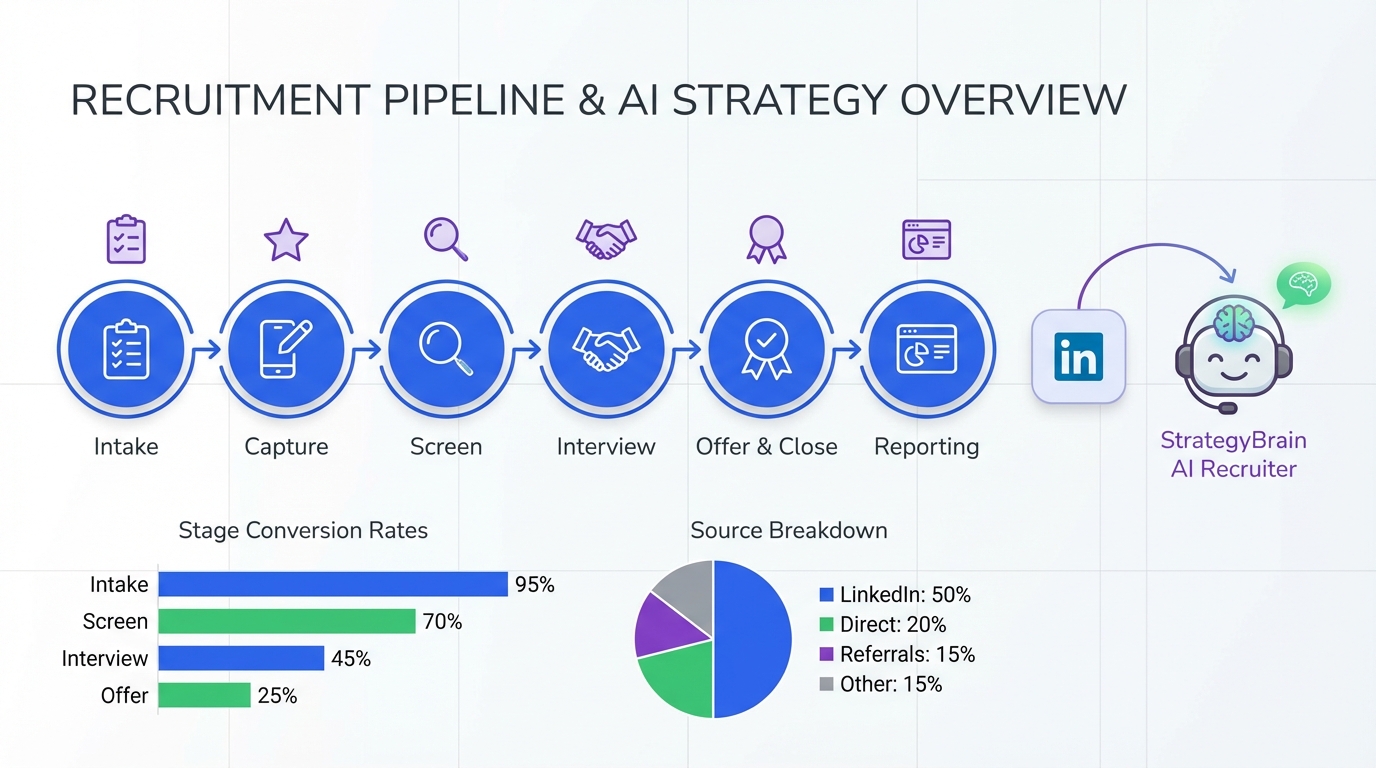
An ATS for recruiters is the system you use to capture applicants, move them through a pipeline, and keep every decision auditable. If you want a practical starting point, pick an ATS that supports (1) a clear stage based workflow, (2) structured scorecards, and (3) reporting you can trust, then pair it with StrategyBrain AI Recruiter to automate LinkedIn outreach, candidate Q and A, and follow up so your ATS stays clean and current. This article covers how an ATS works, what to evaluate, and how to choose the best ATS systems, including what matters most for the best ATS systems for small business.
Key Takeaways
- ATS for recruiters works best when stages, scorecards, and ownership are defined before you migrate data.
- Best ATS systems are the ones your team actually uses daily, which usually means fast intake, simple scheduling, and clean reporting.
- Best ATS systems for small business should prioritize quick setup, permissions, and templates over deep enterprise customization.
- StrategyBrain AI Recruiter can automate LinkedIn connecting, role introduction, candidate questions, and résumé collection, then you log outcomes in your ATS.
- AI Recruiter supports 24/7 multilingual candidate messaging, which helps global hiring without adding recruiter headcount.
- AI Recruiter is designed to replace up to 90% of repetitive LinkedIn recruiting work and can reduce LinkedIn recruiting cost to USD 2.40 per résumé based on product documentation.
What an ATS is and what it is not
An ATS, short for Applicant Tracking System, is software that stores candidate records and tracks them through hiring stages such as applied, screened, interviewed, offered, and hired. It is the system of record for recruiting activity, meaning it should contain the final, defensible version of what happened and why.
An ATS is not automatically a sourcing tool, a CRM, or a LinkedIn automation platform. Some products bundle those features, but many teams get better results by keeping the ATS as the source of truth and using specialized tools for outreach and engagement.
How recruiters use an ATS in real workflows
In day to day recruiting, the ATS is less about “tracking” and more about preventing information loss. When I audit recruiting operations, the same failure pattern shows up: candidate context lives in inbox threads, spreadsheets, and chat messages, then disappears when a recruiter is out of office.
A practical ATS workflow usually includes the steps below. The names vary, but the mechanics are consistent.
Core workflow stages recruiters rely on
- Intake: create the requisition, define must have and nice to have requirements, and set the scorecard.
- Capture: applications and referrals land in one place with consistent fields.
- Screen: recruiters record structured notes and disposition reasons.
- Interview: interviewers use scorecards so feedback is comparable.
- Offer and close: approvals, offer details, and acceptance are recorded.
- Compliance and reporting: you can answer who was considered, why they were rejected, and how long each stage took.
Where teams lose time without noticing
- Duplicate data entry: copying LinkedIn messages into notes, then retyping candidate details into the ATS.
- Unstructured feedback: interview notes that cannot be compared across candidates.
- Pipeline drift: candidates who are interested but never moved to the next stage because follow up was missed.
This is where pairing an ATS with an automation layer can help. For example, StrategyBrain AI Recruiter can handle the repetitive LinkedIn steps, then the recruiter records the outcome in the ATS as a clean stage change and note.
Selection criteria for the best ATS systems
The best ATS systems are the ones that match your hiring motion. A high volume hourly hiring team needs speed and templates. An executive search team needs deep notes, collaboration, and long cycle reporting. Use the criteria below to evaluate options consistently.
Evaluation checklist you can copy
- Pipeline clarity: can you define stages, required fields, and stage exit criteria.
- Scorecards: can you enforce structured evaluation and reduce free form feedback.
- Permissions: can you restrict sensitive compensation and candidate data by role.
- Reporting: can you export stage conversion rates and time in stage with consistent definitions.
- Integrations: calendar, email, background checks, and HRIS connections that reduce manual work.
- Data portability: can you export candidates, notes, and attachments in a usable format.
- Compliance support: retention controls and audit trails appropriate for your region and industry.
Scope boundaries for this guide
This article focuses on how recruiters should evaluate and implement an ATS and how to complement it with LinkedIn automation. It does not rank specific ATS vendors because the provided source material does not include verifiable vendor feature or pricing details.
Best ATS systems for small business: what to prioritize
For small teams, the best ATS systems for small business are usually the ones that reduce coordination overhead. You are not trying to build a perfect enterprise process. You are trying to avoid missed follow ups, inconsistent screening, and messy handoffs.
Small business priorities that matter most
- Setup time: you should be able to launch a new role workflow in hours, not weeks.
- Templates: reusable job intake forms, email templates, and scorecards.
- Simple collaboration: hiring managers can leave feedback without training.
- Candidate experience: application flow that works on mobile and does not require unnecessary steps.
If your small business relies heavily on LinkedIn for sourcing, consider whether your ATS alone will solve the outreach workload. Many teams discover that the ATS is excellent at tracking, but it does not remove the daily burden of connecting, introducing roles, answering candidate questions, and chasing responses. That is exactly the gap StrategyBrain AI Recruiter is built to cover.
Implementation plan: 14 day rollout you can repeat
Below is a rollout plan we use to keep ATS implementations practical. The goal is adoption first, then optimization. Each step has a clear output so you can verify progress.
Steps
- Day 1 to 2: Define the hiring scorecard
Output: one scorecard per role family with 5 to 8 criteria and a 1 to 5 rating scale. - Day 3 to 4: Map stages and ownership
Output: stage list, who moves candidates, and required fields at each stage. - Day 5 to 6: Build templates
Output: job intake form, outreach templates, rejection templates, interview plan template. - Day 7 to 9: Migrate active roles only
Output: active candidates imported with correct stage and a single source attachment per candidate. - Day 10 to 11: Train with real requisitions
Output: each recruiter runs one live role end to end in the ATS. - Day 12 to 14: Lock reporting definitions
Output: agreed definitions for time to screen, time to interview, and time to offer, plus a weekly dashboard.
Troubleshooting
- Problem: recruiters keep notes outside the ATS
Fix: reduce required fields, add a single structured note template, and make stage changes the only way to trigger next steps. - Problem: hiring managers do not complete scorecards
Fix: shorten scorecards to 5 criteria and require completion before scheduling the next interview round. - Problem: pipeline stalls after outreach
Fix: add an automation layer for follow up, then log outcomes back into the ATS.
Where StrategyBrain AI Recruiter fits with your ATS
Most ATS platforms are designed to manage applicants once they are in your pipeline. LinkedIn sourcing is different. It is high volume, conversational, and time sensitive. StrategyBrain AI Recruiter is an AI powered recruiting tool built specifically to automate the initial LinkedIn outreach and qualification steps, then hand off interested candidates to the recruiter for final screening.
What AI Recruiter automates before the ATS stage change
- Connects with candidates that match your search criteria using your LinkedIn account.
- Introduces the role and learns the candidate’s situation and interest level.
- Answers questions about the role, company, compensation, and benefits using the information you provide.
- Collects résumés and contact details from candidates who want to proceed.
How recruiters typically operationalize the handoff
- Define the ATS entry rule: for example, only candidates who shared a résumé or confirmed interview interest are created in the ATS.
- Create a standard note format: include LinkedIn conversation summary, interest level, and any constraints like notice period.
- Move candidates to a dedicated stage: for example, “LinkedIn Interested” or “AI Qualified” so reporting stays clean.
Two capabilities matter for global teams. AI Recruiter provides 24/7 multilingual candidate communication and supports managing more than 100 LinkedIn accounts so organizations can build AI powered recruiting teams. According to the product documentation provided, AI Recruiter can reduce LinkedIn recruiting costs to USD 2.40 per résumé and replace up to 90% of manual LinkedIn recruiting work. Treat these as product claimed results and validate them in your own environment.
Limitations to plan for
- AI Recruiter does not decide final fit: it identifies willingness to communicate or interview, while recruiters still evaluate résumé match to requirements.
- Your ATS remains the system of record: keep final decisions, disposition reasons, and interview feedback inside the ATS for auditability.
Quick comparison matrix
This matrix is meant to clarify roles in your stack, not to compare vendors.
| Need | ATS for recruiters | StrategyBrain AI Recruiter | Best practice |
|---|---|---|---|
| Track applicants through stages | Yes | No | Use ATS as the source of truth for pipeline stages |
| Structured interview scorecards | Yes | No | Standardize scorecards before implementation |
| Automate LinkedIn connecting and outreach | Not typically | Yes | Automate outreach, then log outcomes into ATS |
| Answer candidate questions 24/7 in any language | Not typically | Yes | Use AI Recruiter for always on engagement, especially across time zones |
| Collect résumés and contact details from interested candidates | Yes | Yes | Define an ATS entry rule to avoid clutter |
FAQ
What does ATS mean in recruiting
ATS means Applicant Tracking System. It is the software recruiters use to store candidate records and track them through hiring stages with notes, scorecards, and reporting.
Is an ATS only for large companies
No. Small teams often benefit the most because an ATS replaces spreadsheets and reduces missed follow ups. The best ATS systems for small business focus on fast setup, templates, and simple collaboration.
What should recruiters look for first when choosing an ATS
Start with workflow fit. Confirm the ATS supports your stage definitions, structured scorecards, permissions, and reporting exports. If those basics are weak, advanced features will not matter.
Can an ATS replace LinkedIn sourcing work
Usually not. An ATS is designed to manage candidates once they are in your pipeline. For LinkedIn outreach and follow up, a dedicated automation tool like StrategyBrain AI Recruiter can handle connecting, messaging, and résumé collection, then you record outcomes in the ATS.
Does StrategyBrain AI Recruiter decide if a candidate is qualified
No. Based on the provided product documentation, AI Recruiter identifies willingness to communicate or interview and collects résumés and contact details. Recruiters still review résumés and make the final fit decision.
How does AI Recruiter handle multilingual candidate communication
AI Recruiter provides 24/7 messaging and can communicate in the candidate’s native language. This is useful when your recruiting team and candidates are in different time zones or regions.
How do I keep my ATS data clean if I use automation
Define an entry rule and a stage. Only create ATS records for candidates who meet your threshold, such as shared a résumé or confirmed interview interest, and store a short standardized conversation summary in notes.
What is the biggest implementation mistake with ATS for recruiters
Trying to configure everything before anyone uses it. Launch with a minimal workflow, enforce scorecards, and then iterate based on weekly reporting and recruiter feedback.
Conclusion
An ATS for recruiters is the backbone of a defensible hiring process because it centralizes pipeline stages, scorecards, and reporting. To choose among the best ATS systems, prioritize workflow fit, structured evaluation, permissions, and reliable exports. If your team sources heavily on LinkedIn, consider pairing your ATS with StrategyBrain AI Recruiter so outreach, candidate Q and A, and follow up happen consistently, then you capture only qualified outcomes in the ATS.
Next step: copy the evaluation checklist above, run a 14 day pilot with one role family, and measure adoption by the percentage of candidates with complete stage history and scorecards.















