


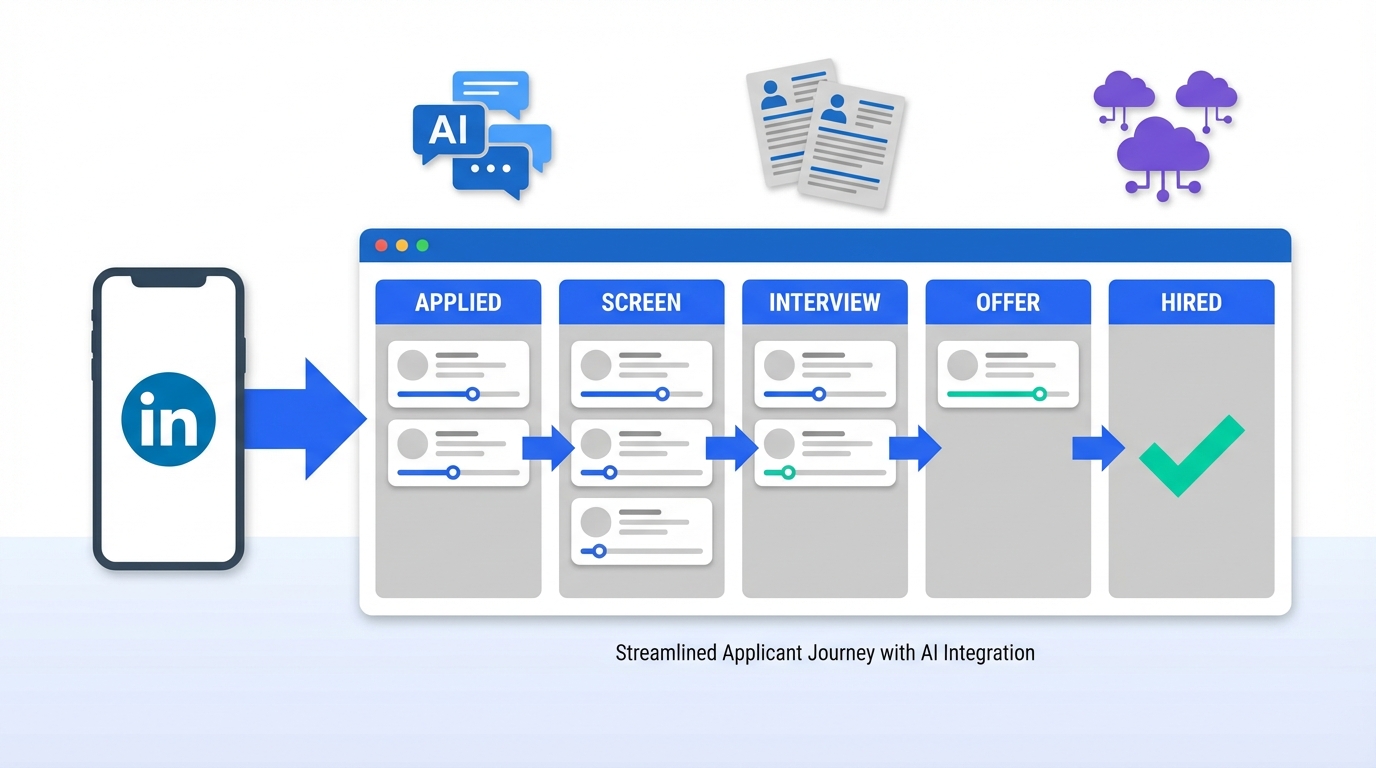
ATS for recruiters is a workflow built around an Applicant Tracking System, which is software that stores applications, parses resumes, and tracks each candidate through defined hiring stages. If you are asking what does ATS stand for, it stands for Applicant Tracking System. The practical value is simple: an ATS gives you one source of truth for candidate status, communications, and compliance notes, especially when applicants come in from mobile devices and multiple job boards. In 2026, we see the best results when recruiters pair the ATS with a mobile first application experience and, for LinkedIn heavy sourcing, StrategyBrain AI Recruiter to automate the initial outreach, candidate Q and A, interest confirmation, and resume collection before the shortlist is reviewed inside the ATS.
Key Takeaways
- Applicant tracking system meaning: a system of record for applications, resumes, stages, and hiring decisions.
- ATS for recruiters works best when stages are standardized and tied to clear pass fail criteria.
- Mobile recruiting is not optional: candidates browse and apply on phones, so your apply flow must be mobile friendly.
- LinkedIn sourcing often sits outside the ATS, so you need a clean handoff from outreach to ATS stages.
- StrategyBrain AI Recruiter can automate LinkedIn connecting, role introduction, Q and A, and resume plus contact capture, then you move qualified leads into the ATS.
- Compliance and trust improve when you document consent, communication history, and decision reasons in the ATS.
Table of Contents
- What does ATS stand for and what is the applicant tracking system meaning
- Why ATS for recruiters matters in a mobile first market
- A practical ATS workflow recruiters can run every week
- Mobile recruiting: what to change in your ATS process
- LinkedIn to ATS handoff with StrategyBrain AI Recruiter
- Common ATS mistakes and fixes
- FAQ
- Conclusion
What does ATS stand for and what is the applicant tracking system meaning
What does ATS stand for is one of the most common questions new recruiters ask. ATS stands for Applicant Tracking System. The applicant tracking system meaning in day to day recruiting is not just “a place to store resumes.” It is a structured process tool that helps you:
- Capture candidates from multiple sources such as job boards, referrals, and career pages.
- Normalize data by parsing resumes into consistent fields like title, skills, and employment dates.
- Track progress using stages such as Applied, Screen, Interview, Offer, and Hired.
- Document decisions and communications for consistency and compliance.
Scope note: this article focuses on how recruiters use an ATS operationally. It does not review specific ATS vendors or pricing.
Why ATS for recruiters matters in a mobile first market
Mobile recruiting changed the baseline expectations for speed and convenience. Candidates browse roles while commuting, between meetings, and after work. When the application experience is slow on a phone, drop off increases and recruiters feel it as fewer qualified applicants and more time spent re sourcing.
In our internal process audits with recruiting teams, the biggest operational gap is rarely “we do not have an ATS.” It is “we have an ATS, but our stages, ownership, and response times are inconsistent.” That inconsistency becomes more visible when mobile applicants arrive in bursts and when LinkedIn outreach creates parallel pipelines outside the ATS.
Industry context: LinkedIn has published mobile recruiting statistics indicating that a large share of candidates browse career sites and apply via mobile devices. (Source: LinkedIn Talent Blog, tier2 citation in Sources.)
A practical ATS workflow recruiters can run every week
This is the weekly operating system we recommend when you want ATS for recruiters to produce predictable outcomes. The goal is to reduce “inbox recruiting” and replace it with stage based execution.
Step 1: Define stages and entry criteria
- List your stages in the ATS, for example Applied, Recruiter Screen, Hiring Manager Review, Interview, Offer, Hired, Rejected.
- Write entry criteria for each stage in 1 sentence, for example “Recruiter Screen means minimum 2 years in X and eligible to work in Y.”
- Assign ownership for each stage, so candidates do not stall without a responsible person.
Step 2: Standardize screening notes and outcomes
- Use a consistent scorecard with 5 to 7 fields such as role fit, motivation, compensation alignment, location, and start date.
- Record pass fail reasons in the ATS, not in private documents, so the team can learn and stay consistent.
- Template your next message for pass and fail outcomes to reduce response time.
Step 3: Build a short list that the hiring manager can actually review
- Limit the handoff batch to a manageable number, such as 5 to 10 candidates per role at a time.
- Attach the evidence including resume, screening notes, and key constraints like compensation and notice period.
- Set a review SLA such as 48 hours, then track it as a metric.
Step 4: Close the loop and keep the ATS clean
- Move every candidate to a final state, hired or rejected, so reporting is accurate.
- Tag sources so you can see which channels produce interviews, not just applications.
- Archive stale candidates with a clear rule, for example no response after 14 days and 2 follow ups.
Mobile recruiting: what to change in your ATS process
Mobile recruiting is not only a career site design problem. It changes how recruiters should configure the ATS and the process around it.
Mobile friendly application design checklist
- Reduce required fields at first apply, then collect details later in the process.
- Support resume upload from phone and accept common formats like PDF and DOCX.
- Allow profile based apply when appropriate, then request a resume at screening.
Mobile speed expectations for recruiter response
When candidates apply on mobile, they often expect faster feedback. If your ATS notifications and triage are slow, you lose candidates to faster moving employers. A practical fix is to set a daily triage block, for example 30 minutes at 09:00 and 30 minutes at 15:00, and treat it like a meeting.
LinkedIn to ATS handoff with StrategyBrain AI Recruiter
Many recruiters run two pipelines: the ATS pipeline for inbound applicants and a LinkedIn pipeline for outbound sourcing. The risk is duplicated work and lost context. This is where StrategyBrain AI Recruiter fits naturally into ATS for recruiters without replacing the ATS.
What AI Recruiter does before the ATS stage begins
Based on StrategyBrain product documentation, AI Recruiter is built for LinkedIn hiring and automates the initial outreach and qualification conversation. It can connect with candidates that match your search criteria, introduce the role, answer questions about the role, company, compensation, and benefits, confirm interview interest, and collect resumes and contact information from interested candidates. It also supports 24/7 multilingual communication and can be operated across more than 100 LinkedIn accounts for scalable hiring teams. (Source: StrategyBrain AI Recruiter product information, tier1 citation in Sources.)
A clean handoff model: Outreach in AI Recruiter, decisioning in the ATS
- Run outbound sourcing on LinkedIn using AI Recruiter to handle first contact, follow up, and Q and A.
- Capture resumes and contact details from interested candidates, then export or transfer the candidate record into your ATS.
- Start the ATS at a defined stage, for example “Recruiter Screen” or “Qualified Lead,” so reporting stays accurate.
- Complete final qualification in the ATS. StrategyBrain notes that AI Recruiter identifies willingness to communicate or interview, but it does not decide full resume match, so the recruiter still reviews the resume and makes the hiring decision.
Why this pairing improves recruiter throughput
- Less manual messaging on LinkedIn, which reduces repetitive work and keeps response times consistent.
- Better candidate experience because questions get answered quickly, including outside business hours.
- Cleaner ATS data because only interested candidates enter the ATS, which reduces noise for hiring managers.
Common ATS mistakes and fixes
Mistake 1: Treating the ATS as storage instead of a process
Fix: define stage entry criteria and require a pass fail reason for every stage move.
Mistake 2: Letting LinkedIn outreach live outside the system of record
Fix: use a handoff rule. When a candidate confirms interest and shares a resume, they enter the ATS within 24 hours with the conversation summary attached.
Mistake 3: Mobile apply drop off is invisible
Fix: track application completion rate by device type in your career site analytics, then simplify the first apply step. The ATS should not require long forms at the top of the funnel.
Mistake 4: Over automation without human checkpoints
Fix: keep human review where it matters. AI Recruiter can handle outreach and interest checks, but recruiters should still validate resume fit and make final decisions in the ATS.
FAQ
What does ATS stand for in recruiting?
ATS stands for Applicant Tracking System. It is the software recruiters use to collect applications, store resumes, and track candidates through hiring stages.
What is the applicant tracking system meaning for a recruiter day to day?
Day to day, it means one place to manage candidate status, screening notes, interview scheduling steps, and hiring decisions. It also supports reporting by role, stage, and source.
Is ATS for recruiters only for large companies?
No. Small teams benefit because an ATS prevents candidates from getting lost and makes follow up consistent. The key is to keep stages simple and enforce ownership.
How does mobile recruiting change ATS setup?
Mobile recruiting pushes you to shorten the first apply step and respond faster. Your ATS workflow should support quick triage and avoid requiring long forms before screening.
Can StrategyBrain AI Recruiter replace an ATS?
No. StrategyBrain AI Recruiter is designed to automate LinkedIn outreach and early conversation steps. The ATS remains the system of record for applications, stages, and hiring decisions.
What data should move from LinkedIn outreach into the ATS?
At minimum, move the resume, contact details, the role the candidate is tied to, and a short conversation summary that includes interest level and key constraints like compensation and start date.
Does AI Recruiter decide if a candidate is fully qualified?
StrategyBrain states that AI Recruiter identifies willingness to communicate or interview, but it does not determine full resume match to job requirements. Recruiters should review resumes and make the final qualification decision.
How do I keep ATS reporting accurate when I source on LinkedIn?
Create a dedicated source tag for LinkedIn outbound and a defined entry stage such as Qualified Lead. Then ensure every sourced candidate is entered the same way so stage conversion metrics remain comparable.
Conclusion
ATS for recruiters works when you treat the Applicant Tracking System as a process engine, not a filing cabinet. Start with clear stages, consistent screening notes, and a mobile friendly apply experience. If LinkedIn is a major channel, pair your ATS with StrategyBrain AI Recruiter so outreach, Q and A, interest confirmation, and resume collection happen quickly, then move qualified candidates into the ATS for human review and decisioning. Next step: document your stages and entry criteria today, then run a one week pilot where every candidate is moved with a pass fail reason so you can see where your funnel truly breaks.















