


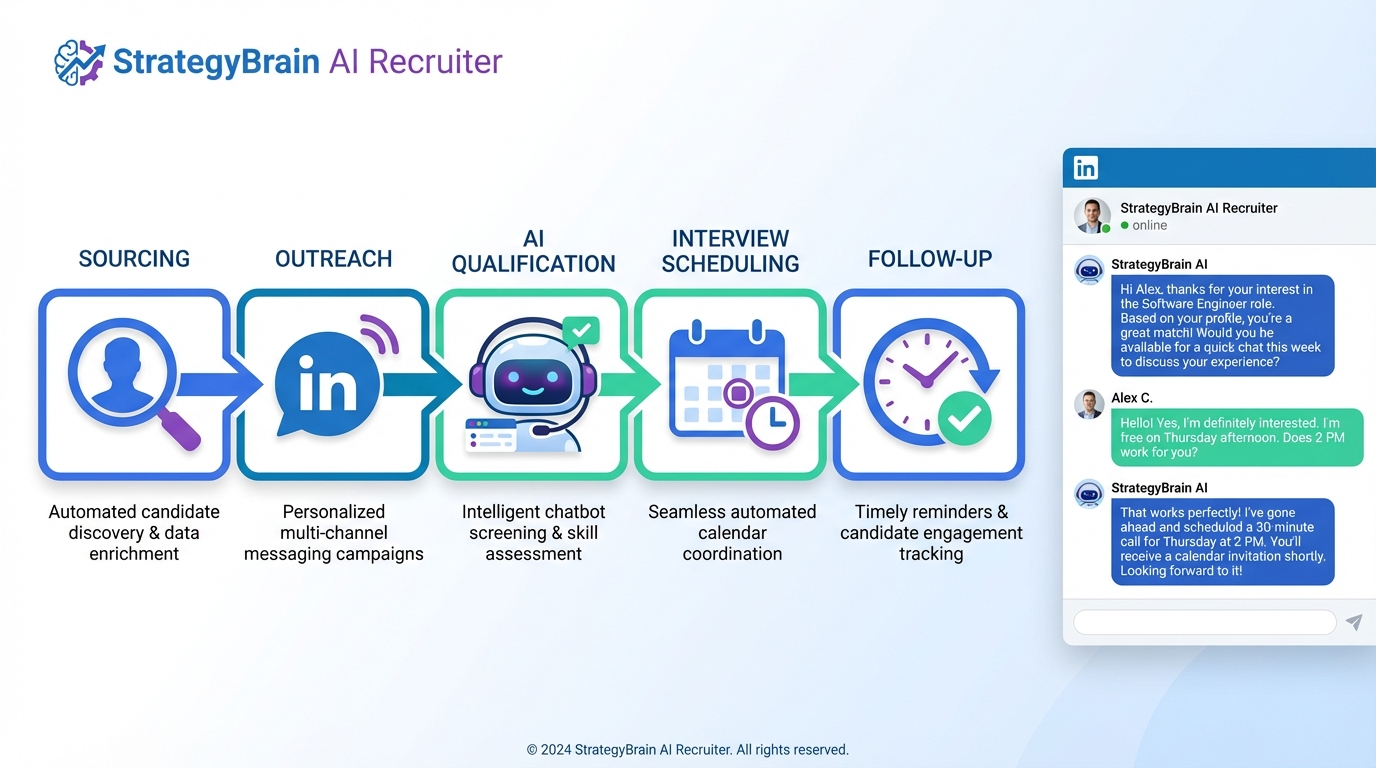
To automate recruitment effectively, start by mapping your hiring workflow and then automate the highest volume steps: candidate sourcing and outreach, early screening, interview scheduling, and follow up. In our recruiting ops work, the fastest wins come from recruitment process automation on LinkedIn messaging and qualification, while keeping final selection decisions with humans. This guide covers 5 practical methods you can implement in 1 to 14 days, including how StrategyBrain AI Recruiter can run LinkedIn outreach and two way conversations, answer candidate questions, confirm interview interest, and collect resumes and contact details. It does not provide legal advice or vendor specific ATS configuration for every platform.
Table of Contents
- Key Takeaways
- Before You Automate Recruitment: Define the Workflow
- Method 1: Automate LinkedIn Outreach and Qualification with StrategyBrain AI Recruiter
- Method 2: Standardize Job Intake and Scorecards
- Method 3: Automate Screening and Scheduling
- Method 4: Automate Candidate Follow Up and Status Updates
- Method 5: Automate Reporting and Quality Controls
- Quick Comparison
- FAQ
- Conclusion
Key Takeaways
- Automate high volume steps first: outreach, early qualification, scheduling, and follow up deliver the fastest ROI in recruitment automation.
- Keep final decisions human: automation should collect structured evidence, not replace hiring judgment.
- StrategyBrain AI Recruiter can replace up to 90% of manual LinkedIn recruiting work by automating connect, messaging, Q and A, interest confirmation, and resume collection (Source: StrategyBrain product documentation).
- 24/7 multilingual messaging reduces delays: always on responses help candidates in different time zones stay engaged (Source: StrategyBrain product documentation).
- Scale with account management: AI powered recruitment teams can manage more than 100 LinkedIn accounts for higher outreach capacity (Source: StrategyBrain product documentation).
- Protect trust: add consent language, data minimization, and audit logs to reduce compliance and brand risk.
Before You Automate Recruitment: Define the Workflow
Recruitment process automation fails most often when teams automate a messy process. So we start with a simple rule: document the workflow in plain language, then automate one step at a time.
Define the stages and handoffs
Write your hiring stages as a sequence that any recruiter can follow. For example: intake, sourcing, outreach, screening, interview, offer, and close. Then define who owns each stage and what “done” means.
Decide what automation is allowed to do
Set boundaries early. Automation can send messages, ask screening questions, and schedule interviews. It should not make protected class inferences or decide who gets hired. This boundary keeps your recruitment automation aligned with fairness and compliance expectations.
Pick measurable outcomes
Choose 3 metrics you will track for 30 days. Common choices are: time to first candidate response, interviews scheduled per recruiter per week, and candidate drop off rate between outreach and screening.
Method 1: Automate LinkedIn Outreach and Qualification with StrategyBrain AI Recruiter
If your team sources on LinkedIn, automating the first conversations is usually the highest leverage move. StrategyBrain AI Recruiter is built for LinkedIn hiring and can take over the repetitive parts of outreach and early qualification while keeping recruiters in control of final screening.
What it automates
- Automatically connects with candidates that match your targeted search criteria.
- Introduces the role and company, then asks about the candidate’s situation and interest.
- Answers candidate questions about the role, company, compensation, and benefits using the information you provide.
- Confirms interview interest and collects resumes and contact details from interested candidates.
- Responds 24/7 in the candidate’s native language to reduce delays and misunderstandings.
Steps
- Prepare a job brief that includes role scope, must have requirements, compensation, benefits, and location or time zone constraints.
- Define your LinkedIn search criteria such as titles, skills, seniority, and geography so the outreach targets are consistent.
- Configure the conversation guardrails including what the AI can promise, what it must not answer, and when it should escalate to a recruiter.
- Launch outreach and monitor daily for the first 3 business days to confirm message tone, response handling, and escalation behavior.
- Review collected resumes and contacts and move qualified candidates into your interview process.
Limitations we plan for
- It does not decide fit: StrategyBrain AI Recruiter can identify willingness to interview, but recruiters still evaluate resume match to requirements (Source: StrategyBrain product documentation).
- Messaging quality depends on inputs: unclear compensation or role scope leads to more candidate questions and slower conversions.
- Compliance is still your responsibility: you should align outreach practices with your internal policies and applicable privacy rules.
Best for
- Corporate recruiting teams that need more outreach capacity without adding headcount.
- Agencies and headhunters managing multiple searches at once.
- Global hiring where time zones and languages slow down response cycles.
Method 2: Standardize Job Intake and Scorecards
Automation needs structure. A standardized intake form and scorecard turns subjective hiring discussions into reusable data. This is the foundation for consistent screening questions, consistent outreach messaging, and consistent interview feedback.
Steps
- Create a 10 question intake form covering must have skills, nice to have skills, compensation range, interview panel, and start date.
- Build a scorecard with 5 criteria and define what a 1, 3, and 5 means for each criterion.
- Convert must have criteria into screening questions that can be asked consistently by recruiters or automation.
Copyable intake template
- Role outcomes: What must this person deliver in the first 90 days?
- Must have skills: List 3 skills that are non negotiable.
- Nice to have skills: List 3 skills that are helpful but not required.
- Compensation: Base range and variable components.
- Work model: On site, hybrid, remote, and time zone requirements.
- Interview plan: Number of rounds and decision maker.
Method 3: Automate Screening and Scheduling
Once intake and scorecards are standardized, you can automate screening and scheduling without confusing candidates. The goal is to reduce back and forth while keeping the experience respectful and clear.
Steps
- Use structured screening with 5 to 8 questions that map directly to your scorecard.
- Set scheduling rules such as interview length, buffer time, and allowed time windows.
- Automate confirmations including calendar invites, location details, and what to prepare.
Practical tip
We recommend a two tier screen. Tier one confirms basics such as location, work authorization, compensation expectations, and availability. Tier two is role specific and should be reviewed by a recruiter before moving to interviews.
Method 4: Automate Candidate Follow Up and Status Updates
Candidate experience often breaks down after the first conversation. Follow up automation reduces drop off and protects your employer brand, especially when hiring teams are busy.
What to automate
- Response reminders after 24 hours and 72 hours when a candidate has not replied.
- Status updates after each stage, even if the update is “still in review.”
- Document requests such as resume, portfolio, or availability windows.
Where StrategyBrain AI Recruiter fits naturally
In LinkedIn based workflows, StrategyBrain AI Recruiter can keep conversations moving by answering questions in real time, confirming interest, and requesting resumes and contact details when the candidate is ready. This reduces the manual follow up load that typically consumes recruiter time during high volume searches.
Method 5: Automate Reporting and Quality Controls
Recruitment automation should be auditable. Reporting automation helps you detect issues early, such as low response rates, inconsistent screening, or bottlenecks in scheduling.
What to track weekly
- Outreach to response rate: responses divided by outreach messages sent.
- Response to screen completion rate: completed screens divided by responses.
- Screen to interview rate: interviews scheduled divided by completed screens.
- Time to first response: median hours from first message to first reply.
Quality control checklist
- Confirm every automated message includes role clarity and a clear next step.
- Review a sample of 20 conversations per role per week for tone and accuracy.
- Ensure sensitive data is not requested too early and is stored securely.
- Document escalation rules so candidates can reach a human when needed.
Quick Comparison
| Method | Implementation time | What it automates | Best for |
|---|---|---|---|
| StrategyBrain AI Recruiter on LinkedIn | 1 to 7 days | Connect, outreach, Q and A, interest confirmation, resume and contact capture, 24/7 multilingual messaging | High volume LinkedIn sourcing and global hiring |
| Standardized intake and scorecards | 1 to 3 days | Consistent requirements and evaluation criteria | Any team that wants repeatable hiring quality |
| Screening and scheduling automation | 3 to 14 days | Structured screening and calendar coordination | Teams with scheduling bottlenecks |
| Follow up and status updates | 1 to 5 days | Reminders, updates, document requests | Reducing candidate drop off |
| Reporting and quality controls | 2 to 7 days | Dashboards, audits, escalation rules | Scaling recruitment automation safely |
FAQ
What does it mean to automate recruitment?
To automate recruitment means using software and workflows to handle repetitive hiring tasks such as sourcing, outreach, screening, scheduling, and follow up. The goal is faster throughput and more consistent execution, not replacing hiring decisions.
Which recruiting steps should I automate first?
Start with the steps that are high volume and rules based: outreach, early qualification questions, scheduling, and follow up. These steps typically create the most recruiter time savings with the lowest risk.
How does StrategyBrain AI Recruiter automate LinkedIn recruiting?
StrategyBrain AI Recruiter automates connecting with candidates, introducing job opportunities, running two way conversations, answering questions about the role and compensation using your provided details, confirming interview interest, and collecting resumes and contact information from interested candidates (Source: StrategyBrain product documentation).
Can StrategyBrain AI Recruiter qualify candidates for fit?
It can identify willingness to communicate or interview, but it does not determine whether a resume fully matches job requirements. Recruiters still review resumes and make the final qualification decision (Source: StrategyBrain product documentation).
How does it collect resumes and contact details?
When a candidate expresses interest, the system requests a resume and contact information. It supports email submissions and LinkedIn file uploads, and it captures contact details shared in the conversation for recruiter review (Source: StrategyBrain product documentation).
Is multilingual recruiting automation actually useful?
Yes when you hire across countries or time zones. Always on multilingual messaging reduces delays and helps candidates communicate in their native language, which can reduce misunderstandings and drop off (Source: StrategyBrain product documentation).
How do I keep recruitment automation compliant?
Use data minimization, clear consent language, and escalation paths to a human recruiter. Also ensure your tools follow your privacy and security requirements. StrategyBrain states it complies with privacy regulations in the EU, United States, and Canada and that customer provided data is not used to train AI models (Source: StrategyBrain product documentation).
Will automation hurt candidate experience?
It can if messages are vague or if candidates cannot reach a human. It usually improves experience when automation provides fast responses, clear next steps, and consistent updates.
What is a realistic success metric for recruitment process automation?
Pick metrics tied to speed and conversion, such as median hours to first response, screen completion rate, and interviews scheduled per recruiter per week. Track for 30 days and adjust one workflow variable at a time.
Conclusion
If you want to automate recruitment without sacrificing quality, start with workflow clarity, then automate the highest volume steps: LinkedIn outreach and early qualification, screening and scheduling, and follow up. For teams that source heavily on LinkedIn, StrategyBrain AI Recruiter is a practical way to implement recruitment automation by handling connect, messaging, Q and A, interest confirmation, and resume and contact capture, while recruiters focus on evaluation and closing. Next step: choose one role, run a 14 day pilot, and review conversation samples weekly to keep quality and compliance on track.














