


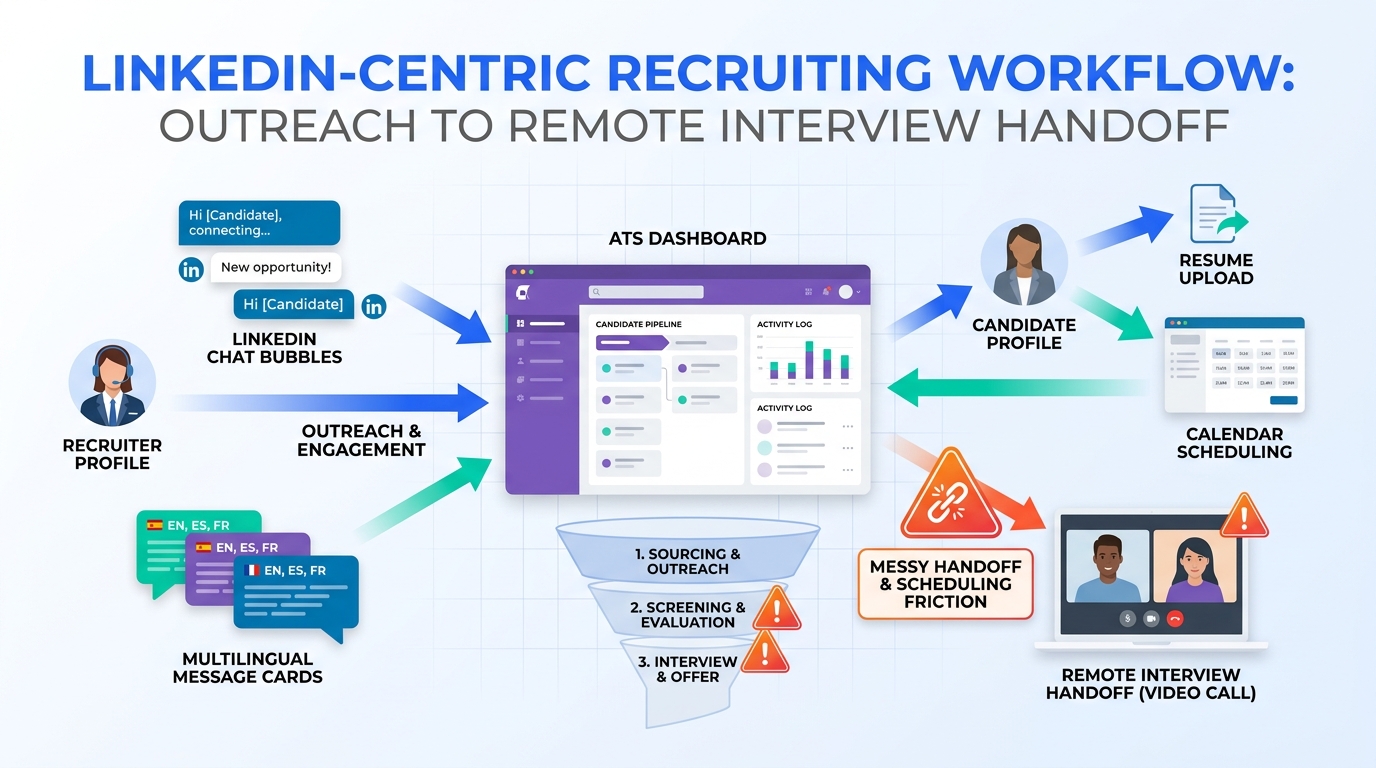
When remote interviews expose messy handoffs, this article helps recruiters judge automatiser linkedin safely to prevent slower shortlists and weaker candidate experience.
That distinction matters more than most teams admit. Small agencies lose hours chasing candidate replies across LinkedIn, email, calendars, and spreadsheets; solo recruiters lose momentum when after-hours messages pile up; in-house talent teams risk weak candidate experience when outreach is fast but handoff, scheduling, and interview readiness are sloppy. The damage is not only operational. It shows up in lower response quality, slower shortlists, irritated hiring managers, and candidates who quietly decide the company feels disorganized.
One workflow that has helped me reduce that friction is using StrategyBrain AI Recruiter as a support layer around LinkedIn outreach, not as a replacement for recruiter judgment. In practice, its strongest value in this scenario is continuous follow-up outside office hours, multilingual candidate communication when geography expands the search, and structured collection of resumes or contact details from interested prospects. I still handle final fit assessment, resume review, and the decision about who moves to interview.
The reason this matters becomes obvious in virtual hiring. A candidate can do everything right for a video interview: install the meeting software in advance, test the link, check whether the home Wi-Fi is stable enough for HD video, move out of the bedroom, clear the background, and position a light in front of their face instead of sitting against a bright window. Yet the interview can still feel uneven if the recruiting team has not prepared its own process with the same discipline.
I have seen this happen when a recruiter is toggling between a LinkedIn thread, a calendar invite, and an ATS record seconds before the call, trying to confirm whether the candidate sent a resume, whether the correct video link went out, and whether the hiring manager knows this person is joining from another time zone. The candidate is making virtual eye contact and trying to stay composed; the recruiter is improvising. That is the moment where a search for automatiser linkedin stops being about speed alone and becomes a broader question about recruitment automation tools, interview readiness, and whether your stack behaves more like an automated prospecting system or a real recruiting workflow.
That opening scenario sets the frame for this article. If remote interviews expose every weak handoff in your funnel, the real job of recruitment automation is to make sourcing, candidate communication, scheduling, and stage tracking feel coordinated long before the call starts. The sections below look at what recruiters should automate, what should stay human-led, how to borrow selectively from systems built to automate sales, and where LinkedIn-centered workflows need tighter controls.
Table of Contents
- What recruitment automation tools actually fix
- Why interview readiness is an automation problem too
- What automatiser linkedin should mean in recruiting
- What can be automated across the hiring funnel
- Why the ATS still has to lead
- My experience using AI support around LinkedIn sourcing
- What recruiting can borrow from an automated prospecting system
- Recruitment automation software categories compared
- How to choose the right stack
- Common mistakes teams make
- A practical rollout plan
- FAQ
What recruitment automation tools actually fix
Recruitment automation tools are useful when they remove coordination failure, not when they simply increase activity. Recruiters rarely struggle because they cannot send enough messages. They struggle because information sits in too many places, follow-up timing is inconsistent, scheduling gets manual, and candidate records become incomplete right when stakeholders need clarity.
In day-to-day recruiting operations, that means better tools should help with:
- Sourcing workflow: keeping candidate discovery, notes, and ownership organized
- Engagement workflow: managing follow-up logic, reminders, and message continuity
- Screening workflow: routing interested prospects into a consistent review path
- Scheduling workflow: reducing missed handoffs between recruiter, candidate, and hiring manager
- Reporting workflow: turning activity into pipeline visibility instead of spreadsheet cleanup
The most experienced teams separate workflow automation from reckless activity automation. That distinction is especially important when LinkedIn is part of the sourcing mix.
Why interview readiness is an automation problem too
The virtual interview article behind this discussion focused on candidate setup: know the software beforehand, test the connection, stage the background, verify audio and video equipment, do a dry run, and make eye contact by looking at the camera instead of your own preview. On the candidate side, that is practical interview advice. On the recruiting side, it also reveals something important: remote hiring punishes process gaps that in-person recruiting used to hide.
When a candidate downloads the conferencing app early and checks bandwidth, they are reducing avoidable friction. Recruiters should hold themselves to the same standard. If your team has not confirmed the meeting workflow, centralized the latest resume, logged the LinkedIn conversation, or aligned the hiring manager on who is showing up and why, then the problem is not candidate readiness. It is workflow design.
That is why I often include virtual interview readiness inside a broader automation audit. Poor lighting and weak microphones can hurt a conversation, but a recruiter-led failure to sync records, send the right invite, or capture candidate context does more long-term damage.
Key insight: In modern recruiting, the quality of a virtual interview often reflects the quality of the workflow that prepared it.
What automatiser linkedin should mean in recruiting
For recruiters, automatiser linkedin should mean building a compliant operating layer around LinkedIn sourcing rather than automating prohibited actions directly inside the platform. In plain terms, use LinkedIn for discovery and conversation starts, then move the process into systems that handle tracking, coordination, documentation, and next steps properly.
That means safer automation choices usually include:
- Moving sourced prospects into internal workflows for review and prioritization
- Triggering reminders, task ownership, and follow-up timing outside LinkedIn
- Capturing resumes and contact details once candidates express interest
- Syncing outreach context with your ATS or system of record
- Supporting multilingual communication when searches cross borders or time zones
It should not mean blind connection requests, scraping, or uncontrolled message blasting. Those tactics can damage trust even before compliance concerns appear.
Why candidate experience matters here
A recruiter who over-automates LinkedIn often forgets the candidate is already evaluating the company. If the first interaction feels generic, the scheduling follow-up is delayed, and the interview invite arrives with missing context, the damage starts before screening. The virtual interview setup story makes this visible: candidates can arrive prepared and still conclude the employer is not.
What can be automated across the hiring funnel
Recruiting teams often reduce automation to outreach sequences, but the real value is broader. The best process gains usually come from linking sourcing, qualification, scheduling, and reporting so that no stage relies on memory alone.
Sourcing and talent identification
Automation can support search organization, ownership assignment, candidate tagging, note capture, and follow-up reminders after initial LinkedIn contact. For retained search, agency recruiting, and in-house sourcing, this avoids duplicate outreach and makes long-cycle pipelines easier to revisit.
Candidate communication
Message support can help recruiters maintain momentum, especially when replies arrive after work hours or from other regions. The important limit is that automation should support continuity, not impersonate final hiring judgment. Recruiters still need to decide whether interest is real, whether background is relevant, and how to personalize the next step.
Resume and contact capture
Once a candidate signals interest, one of the easiest places to improve process is collecting resume files and direct contact details cleanly. That removes the awkward stage where useful candidates sit in a message thread but never enter the structured workflow.
Interview scheduling and preparation
This is where the reference article's logic translates almost directly. Just as candidates are advised to test the conferencing platform, recruiters should standardize the meeting invite, confirm software access in advance, verify time zones, and make sure the interviewers have the right profile and resume before the call. Automation helps by turning these into repeatable steps rather than last-minute memory tasks.
Reporting and stage control
Once stage changes, outreach results, and interview outcomes are logged consistently, leaders can see where a process breaks: sourcing quality, hiring manager lag, scheduling delays, or poor conversion after first contact.
Why the ATS still has to lead
If your applicant tracking system is not the system of record, adding more outreach technology usually creates a faster version of the same chaos. A strong ATS gives one place for requisitions, candidate status, feedback, and reporting. Everything else should connect to that center.
The advantages are practical:
- Recruiters know which candidate record is current
- Hiring managers see the same stage definitions
- Interview logistics stop living in inboxes
- Source data becomes more trustworthy
- Candidate follow-up feels less improvised
That foundation matters even more when LinkedIn is your top sourcing channel. Without it, the recruiter ends up doing manual reconciliation between message history, files, meeting links, and hiring team feedback.
My experience using AI support around LinkedIn sourcing
In my own recruiting work, the most helpful use of AI Recruiter has not been replacing recruiter conversations end to end. It has been absorbing the repetitive middle layer that usually causes delay: replying when a candidate answers late, keeping outreach active across time zones, and gathering the next piece of information needed to move someone into a real review process.
What stood out to me with StrategyBrain AI Recruiter was that it could keep communication moving in multiple languages and continue when I was offline, while I still retained the final call on shortlist quality. That matters in searches where good candidates reply outside your working hours and lose momentum if nobody responds until the next day.
I also found the resume and contact capture step useful in exactly the kind of remote-interview scenario described earlier. If a candidate is interested, getting their materials into a structured handoff before scheduling cuts down on those pre-interview scrambles where recruiters are still chasing files or direct contact details minutes before a call. The tool can reduce that admin burden, but it does not remove the need for a recruiter to review the resume, decide fit, and brief the hiring manager properly.
For teams exploring LinkedIn-heavy workflows, you can review the platform overview at this page and its broader recruiting use cases on the official site. The practical lesson is simple: AI support works best when it handles repetition and continuity, while the recruiter keeps ownership of judgment and candidate quality.
What recruiting can borrow from an automated prospecting system
The phrase automated prospecting system comes from sales, and there is useful overlap. Both recruiting and sales involve finding the right people, sequencing contact, tracking replies, and maintaining pipeline discipline. That is why many teams looking to automate sales workflows recognize similar mechanics in proactive recruiting.
Still, the transfer only works up to a point. Recruiting is not just conversion math. Candidates are assessing the role, the employer, and the professionalism of the process at the same time.
| Area | Sales-style automated prospecting system | Recruiting automation approach |
|---|---|---|
| Primary goal | Book meetings and create pipeline | Create qualified talent flow and support hiring decisions |
| Message logic | Often volume-first | Context-first and role-specific |
| Qualification step | Lead fit and interest | Interest, relevance, timing, and interview readiness |
| Workflow center | CRM | ATS plus sourcing and scheduling systems |
| Risk of over-automation | Lower reply quality | Candidate trust loss and broken interview handoffs |
Borrow the discipline, not the tone. Sequence design, record hygiene, and response tracking are transferable. Treating candidates like outbound prospects all the way through is not.
Recruitment automation software categories compared
Most teams do not need one perfect tool. They need a stack that keeps ownership clear and data connected. A practical comparison starts with categories rather than feature marketing.
| Category | What it helps automate | Best use case | Main caution |
|---|---|---|---|
| ATS | Stages, requisitions, feedback, reporting | Core hiring operations | Weak adoption ruins everything else |
| LinkedIn support tools | Sourcing workflow, follow-up continuity, candidate capture | Proactive search teams | Must stay compliant and recruiter-led |
| Scheduling tools | Interview booking, reminders, reschedules | High interview volume | Needs clean calendar and stage logic |
| Analytics tools | Conversion tracking, bottleneck visibility | Operations maturity | Bad source data makes reports misleading |
The remote interview lens is useful here. Ask which category reduces avoidable failure before the interview even starts.
How to choose the right stack
When evaluating recruitment automation tools, I recommend using the same logic a well-prepared candidate uses before a virtual interview: confirm the environment, test the connection, remove obvious friction, and rehearse the handoff points.
1. Check the workflow before features
Map how prospects move from LinkedIn discovery to recruiter review, to scheduling, to interview, to feedback. If that path is unclear, no feature set will rescue it.
2. Test the handoffs that usually fail
Look at resume capture, time-zone coordination, meeting invite accuracy, and hiring manager briefing. These are the recruiting equivalents of testing your camera and microphone before a call.
3. Decide what should stay human-led
Final fit judgment, nuanced outreach, compensation discussion, and sensitive candidate communication should remain with recruiters.
4. Review compliance boundaries
If the intent behind your search is automatiser linkedin, ask exactly what the software automates, where it operates, and whether the workflow is built around supported practices.
5. Make sure the ATS remains the source of truth
If candidate data lives in message threads and browser tabs instead of a clean record, your automation layer is not solving the real problem.
- Must-have: ATS ownership, scheduling clarity, candidate record quality, reporting visibility
- Nice-to-have: multilingual follow-up, deeper sequencing logic, enrichment support
- Watch-outs: generic outreach, poor sync, weak recruiter control, unclear compliance posture
Common mistakes teams make
They optimize first contact and ignore interview readiness
The virtual interview setup example makes this obvious. Teams work hard on outreach volume and then stumble on the meeting itself because invites, candidate files, and interviewer context were not prepared properly.
They apply automate sales logic too literally
Trying to automate sales patterns directly in recruiting usually increases message quantity faster than candidate quality.
They confuse responsiveness with qualification
An interested candidate is not automatically a qualified candidate. Tools can help continue the conversation and capture information, but recruiters still need to evaluate resumes and make the shortlist decision.
They add tools before fixing process ownership
If nobody owns stage movement, feedback deadlines, or scheduling quality, automation only scales ambiguity.
A practical rollout plan
- Document your current workflow. Start at LinkedIn sourcing and end at interview feedback.
- List where the process breaks. Focus on late replies, missing resumes, poor handoffs, and scheduling confusion.
- Stabilize your ATS. Make sure it is the real record of candidate status.
- Add AI-supported communication carefully. Use it for continuity, multilingual coverage, and information capture where helpful.
- Standardize interview preparation. Treat software access, link accuracy, time zones, and candidate materials like a required checklist.
- Train recruiters and hiring managers. A tool cannot compensate for unclear ownership.
- Review outcomes monthly. Measure response quality, stage movement, interview no-show patterns, and handoff reliability.
FAQ
What does automatiser linkedin mean for recruiters?
It should mean automating the workflow around LinkedIn sourcing, such as follow-up, candidate capture, scheduling coordination, and ATS sync, rather than risky direct automation inside the platform.
Can recruitment automation tools improve virtual interviews?
Yes. They can reduce the operational failures that often undermine remote interviews, including missing resumes, bad handoffs, unclear scheduling, and inconsistent communication.
How is an automated prospecting system different from recruiting automation?
An automated prospecting system is usually designed to create sales pipeline. Recruiting automation uses some of the same mechanics, but it must protect candidate trust and support hiring decisions, not just conversion activity.
Should recruiters automate sales-style outreach?
Only selectively. Teams can borrow sequence discipline from efforts to automate sales, but candidate communication requires more context and care than standard outbound selling.
What should remain human-led in a LinkedIn-heavy recruiting process?
Resume review, final qualification, interview decision-making, stakeholder calibration, and sensitive candidate conversations should remain with the recruiter.
Where can AI support help most?
It is most useful in repetitive LinkedIn-adjacent tasks such as after-hours follow-up, multilingual communication, and collecting resumes or contact details from interested candidates before a recruiter reviews the next step.
Conclusion
If you arrived here searching for automatiser linkedin, the practical answer is not to force LinkedIn into a bot channel. It is to build a recruiting workflow that stays prepared the way strong virtual interview candidates stay prepared: software known in advance, connections tested, environment cleaned up, and handoffs rehearsed.
That is what good recruitment automation tools actually deliver. They help recruiters source faster, communicate more consistently, and reach the interview stage without preventable confusion. Used carefully, AI support around LinkedIn can extend responsiveness and reduce admin load. Used carelessly, it just scales noise.
For most teams, the winning model is simple: keep recruiter judgment at the center, let the ATS hold the process together, and use automation to remove the repetitive gaps that candidates and hiring managers notice first.














