


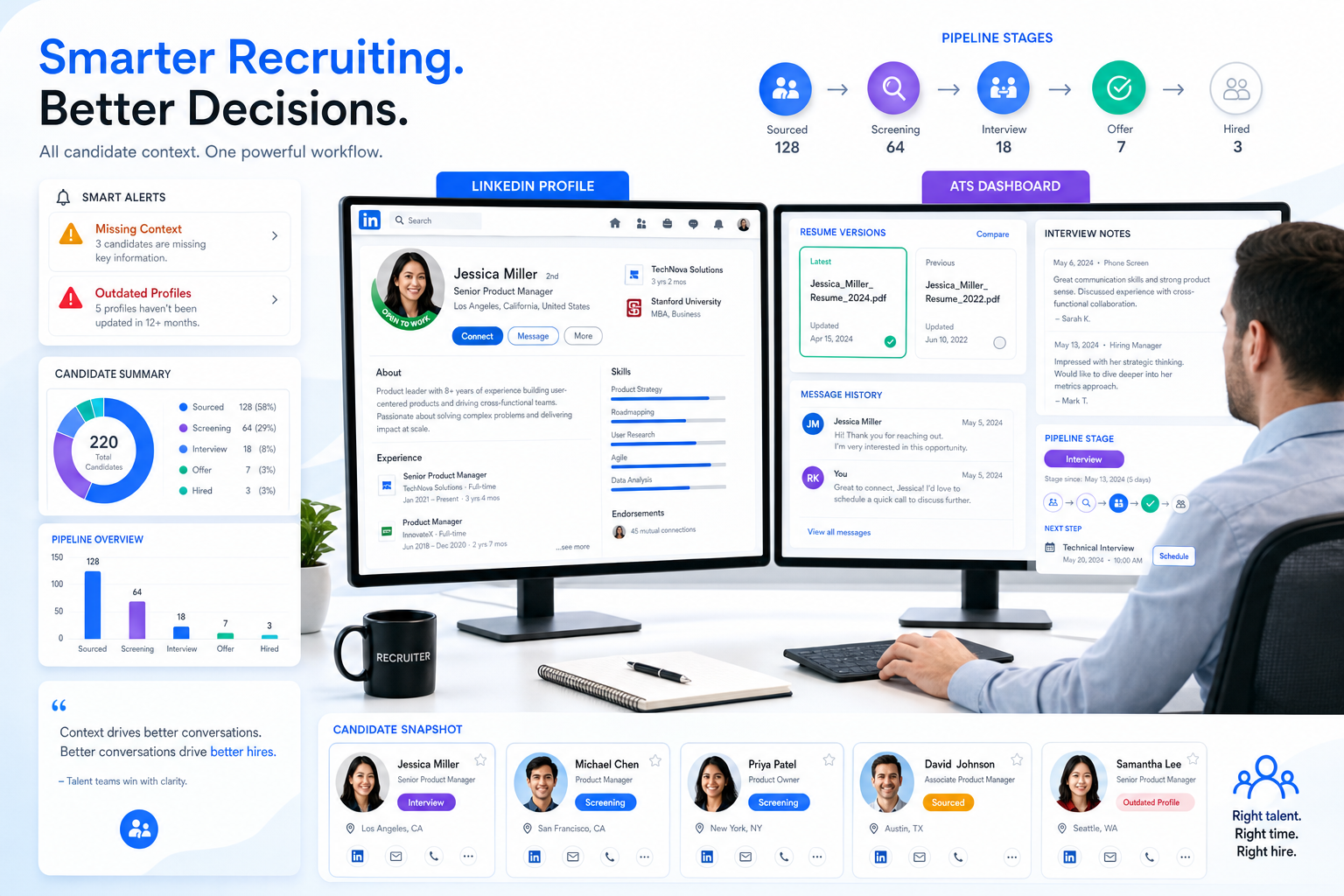
See how headhunters can judge an ats recruitment tool by whether it prevents resume confusion, missed context, and weaker screening decisions.
That standard matters because recruiting errors rarely start with a dramatic system failure. More often, they begin with small quality misses: a rushed outreach message, a candidate record with missing context, interview notes that do not match the resume, or a hiring manager reviewing an outdated version of a profile. For a solo recruiter, that costs time and credibility. For a boutique search firm, it can weaken client trust. For an in-house talent team, it slows hiring and creates avoidable candidate drop-off.
In my own workflow, I have seen AI help most when it handles repetitive communication without taking final judgment away from the recruiter. That is where StrategyBrain AI Recruiter fits: it can automate LinkedIn outreach, keep candidate conversations moving across time zones, and collect resumes or contact details from interested people while the recruiter still decides who is genuinely qualified, which resume is strong, and who should move to interview.
The reason this matters becomes obvious when you look at how first impressions are actually formed. Candidates are judged before any interview starts, and recruiters make their first call long before a handshake too. A resume with weak grammar, inconsistent tense, informal shorthand, or careless spelling can quickly signal poor attention to detail. In one 2018 survey of 379 recruiters, hiring managers, and HR professionals, 80% said spelling or grammar mistakes were the biggest resume deal-breaker.
Now put that into a real recruiting sequence. A recruiter opens a newly received resume, compares current-role bullets written in past tense with an older LinkedIn profile written differently, then skims experience lines broken into dense paragraphs instead of clear bullet points. Next comes the manual follow-up: clarify the candidate's current situation, verify whether the resume version is the latest one, and decide whether this person deserves a hiring manager review at all. That single document problem turns into a workflow problem.
If your team is comparing the best recruiting software, this is exactly the lens to use. The right platform is not just a place to store resumes. It should help your team capture cleaner candidate data, preserve message history, support structured review, and reduce the admin burden created when candidate materials are inconsistent. That is where the search for the best applicant tracking options connects directly with daily recruiting quality, not just feature lists.
- Why recruiting quality starts before the interview
- What an ATS recruitment tool actually does
- How to evaluate the best recruiting software
- Applicant tracking system features and benefits
- Best applicant tracking by hiring scenario
- Where AI support helps recruiters most
- Pricing and buying considerations
- Common ATS buying mistakes
- How to choose the right system
- FAQ
Why recruiting quality starts before the interview
Recruiters do not evaluate candidates in a vacuum. They evaluate written materials, message responsiveness, profile consistency, and whether information is easy to verify. That is why document quality and workflow quality are more connected than many software demos suggest.
A candidate may look strong on paper, but if their resume uses the wrong tense for current responsibilities, reads too casually, or hides achievements inside long paragraphs, the recruiter has to spend extra time interpreting instead of assessing. If the ATS does not make it easy to compare resume versions, store message history, or keep sourcing and screening in one place, the system amplifies that friction.
In other words, the best recruiting software supports better judgment by reducing avoidable ambiguity. It helps the recruiter spend time on fit, not on detective work.
What an ATS recruitment tool actually does
An ats recruitment tool is the operating system for your hiring process. At minimum, it organizes job posting, candidate intake, screening, interview coordination, feedback, offers, and reporting. Stronger platforms also support sourcing workflows, candidate communication, compliance controls, and integrations with calendars, HR systems, assessments, and background screening.
That broader definition matters because many buyers still think of an ATS as a resume filing cabinet. In practice, recruiters need much more than storage. They need one place to see who has replied, which resume is current, whether hiring manager feedback is complete, and where each candidate stands.
From a practitioner's perspective, the everyday value is straightforward:
- Recruiters get one system of record
- Hiring managers get a clearer review process
- HR leaders get consistency and reporting
- Candidates get fewer communication gaps
Those are the practical advantages that usually matter more than broad claims about innovation.
How to evaluate the best recruiting software
When teams search for the best applicant tracking system, the smartest starting point is not a leaderboard. It is a short evaluation framework based on the kind of recruiting work your team actually does.
| Evaluation Area | What to Check | Why It Matters |
|---|---|---|
| Candidate quality control | Can recruiters compare profiles, resumes, notes, and message history easily? | Helps reduce misreads and duplicate review work |
| Workflow clarity | Are stages, owners, and next steps obvious? | Prevents candidates from going stale |
| Communication support | Can the team centralize outreach, follow-up, and status updates? | Improves candidate experience and handoffs |
| Hiring manager usability | Is review and feedback simple for non-recruiters? | Adoption falls if managers avoid the system |
| Reporting | Can leadership see bottlenecks, source quality, and pipeline movement? | Supports better operational decisions |
| Integrations | Does it connect with your HRIS, calendars, assessments, and screening tools? | Reduces manual work later |
| Governance | Are permissions, retention, and audit needs covered? | Important for risk control and compliance |
I would add one more filter from experience: ask whether the system helps recruiters evaluate candidate materials cleanly, not just move them quickly. Speed matters, but speed without review discipline creates more downstream confusion.
Applicant tracking system features and benefits
Anyone researching applicant tracking system features and benefits will see long vendor checklists. In real recruiting work, only a handful of features consistently shape team performance.
1. Structured candidate profiles
Good systems turn scattered applicant information into something usable. Recruiters should be able to review resumes, contact details, notes, activity history, and stage movement in one place.
Benefit: less time reconciling conflicting information and more confidence in screening decisions.
2. Resume handling and searchability
Resume parsing is useful, but the bigger value is whether the information remains searchable, readable, and comparable across the funnel. A platform should help recruiters work around the reality that resumes are often inconsistently written.
Benefit: faster shortlisting and cleaner records.
3. Job posting and requisition control
Publishing jobs is basic, but consistency matters. The software should keep role details aligned across channels and reduce version confusion.
Benefit: fewer posting errors and smoother launch of open roles.
4. Communication workflows
This is one of the most useful features in any ats recruitment tool. Recruiters need templates, reminders, centralized message history, and stage-based follow-up to avoid losing context.
Benefit: stronger candidate experience and better recruiter continuity.
5. Interview scheduling and collaboration
If scheduling and feedback are fragmented, recruiters become coordinators instead of talent partners. The system should simplify handoffs between recruiter, candidate, and interviewer.
Benefit: shorter cycle times and less admin pressure.
6. Reporting and funnel visibility
Leaders need to know where hiring slows down, which sources convert, and where workload is accumulating.
Benefit: better planning and more credible recruiting conversations with business stakeholders.
7. Integrations
The best systems do not work alone. They connect with surrounding tools so recruiters are not copying data from inboxes, calendars, screening tools, and HR platforms into the ATS by hand.
Benefit: lower administrative drag.
8. Permissions, retention, and audit controls
Candidate data is sensitive. Buyers should review how a system handles access, retention, data isolation, and oversight.
Benefit: a more defensible and manageable recruiting operation.
Key insight: The best applicant tracking systems are rarely the ones with the longest feature list. They are the ones that make candidate review, communication, and coordination consistently easier.
Best applicant tracking by hiring scenario
There is no universal answer to the question of the best recruiting software. Fit depends on hiring context.
Small businesses with occasional hiring
Smaller teams usually need simplicity first. If hiring volume is modest, ease of setup and usability matter more than deep customization.
- Prioritize fast adoption
- Focus on posting, pipeline visibility, and communication basics
- Avoid overbuying complex modules
Growing companies with repeat hiring
As volume rises, consistency becomes more important than convenience alone. Teams usually need stronger approvals, scorecards, reporting, and integration depth.
- Prioritize workflow standardization
- Check reporting flexibility
- Review role-based permissions
- Confirm onboarding or HR integrations
Search firms and agency teams
Agencies often need an ATS plus stronger sourcing and relationship workflows. Searchability, outreach continuity, and talent pooling matter more here than in a basic in-house setup.
- Prioritize sourcing history and communication tracking
- Review search and tagging closely
- Check whether recruiter workflows support proactive outreach
Operationally complex organizations
Larger or regulated employers often need governance, permissions, and integration architecture to be part of the core decision.
- Prioritize auditability and data controls
- Involve IT and HR operations early
- Map retention and security requirements before selection
The practical point is simple: the best applicant tracking choice depends on workflow fit, not general market reputation.
Where AI support helps recruiters most
AI can help recruiting teams, but only if it is deployed against the right problems. In my experience, the most useful applications are repetitive outreach, candidate response handling, basic information capture, and after-hours continuity. Those are tasks where speed helps, but a human recruiter should still control qualification and final movement.
That is why I see value in using AI Recruiter alongside an ATS rather than expecting the ATS to solve every sourcing problem on its own. When I tested this style of workflow, the useful part was not some abstract promise of intelligence. It was practical support: interested candidates could reply on LinkedIn at odd hours, the conversation could continue without waiting for me to come online, and resumes or contact details could be collected before I reviewed them personally. For teams hiring across regions, the multilingual and always-on communication piece can also remove delays that otherwise stretch sourcing cycles.
Just as important, the recruiter still owns the judgment call. AI can move a conversation forward and gather materials, but it should not be the final authority on whether a resume is strong, whether tense inconsistencies matter, whether a profile matches the brief, or whether a candidate should advance.
For agency recruiters and headhunters especially, that division of labor makes sense: automation handles repetitive LinkedIn touchpoints, while the recruiter handles qualification, relationship reading, and shortlist quality.
Pricing and buying considerations
Pricing comparisons in recruiting software are often less straightforward than they look. Buyers should evaluate cost structure, not just headline cost.
Questions worth asking
- Is pricing based on seats, open jobs, employee count, or usage?
- Are implementation, support, or integrations extra?
- Do automation and reporting require a higher tier?
- How will costs change if hiring volume doubles?
There is also a workflow cost that does not always appear on the quote. A cheaper system that forces recruiters to manually reconcile resume versions, outreach history, and scheduling steps may cost more in practice than a better-fitting platform.
If your team also relies heavily on LinkedIn sourcing, consider the ATS and sourcing layer together. In some setups, an ATS handles structured candidate management well, while a tool like StrategyBrain AI Recruiter handles high-volume outreach and response collection more effectively than the ATS alone.
Common ATS buying mistakes
Most disappointing software decisions follow a familiar pattern. Teams either buy for surface features or ignore where recruiting friction really happens.
- Choosing based on feature volume instead of workflow fit. More features do not guarantee better execution.
- Ignoring candidate quality control. If the system makes resume review and profile comparison harder, recruiters lose time.
- Overlooking hiring manager usability. If managers avoid the platform, recruiters end up chasing feedback manually.
- Skipping integration review. Manual work usually hides here.
- Underestimating reporting needs. Teams often learn too late that they cannot answer basic funnel questions.
- Assuming AI replaces judgment. Good recruiting still depends on human evaluation.
- Treating compliance and retention as side issues. They should be reviewed early, not after selection.
These mistakes matter because they undercut the actual benefits of an ATS: clarity, consistency, accountability, and better use of recruiter time.
How to choose the right system
If you are actively evaluating the best recruiting software, I recommend a practical selection process.
- Map your current workflow. Document sourcing, screening, interview, feedback, and offer steps.
- Identify where candidate information breaks down. Look for resume inconsistency, missing notes, slow follow-up, or duplicate records.
- Define must-have functionality. Tie requirements to actual process pain, not generic wish lists.
- Separate ATS needs from sourcing needs. Some teams need both structured pipeline management and LinkedIn automation support.
- Test recruiter usability. The system should make screening easier, not busier.
- Test hiring manager usability. Feedback should be fast and intuitive.
- Review governance early. Permissions, retention, and data security matter before launch.
- Check reporting with real examples. Ask how you would track bottlenecks, source quality, and response timing.
That process usually leads to a better decision than browsing generic top-software rankings. It also helps teams decide whether they need a standalone ATS, a broader recruiting suite, or an ATS paired with a sourcing automation layer.
FAQ
What is an ATS in recruiting?
An ATS is software that helps teams manage hiring workflows from job posting through screening, interviews, offers, and reporting. A modern ats recruitment tool is much more than a resume database.
What are the most important applicant tracking system features and benefits?
The most useful features usually include candidate profiles, resume handling, communication workflows, scheduling, reporting, integrations, and permissions. The main benefits are better organization, faster coordination, stronger visibility, and less manual admin.
What is the best applicant tracking system for recruiters?
The best applicant tracking system for recruiters is the one that fits hiring volume, sourcing model, team structure, and reporting needs. Recruiters usually benefit most from systems that improve review quality and daily workflow, not just those with the most features.
How does AI fit into recruiting software?
AI is most useful when it supports repetitive tasks such as outreach, follow-up, and information capture. Recruiters should still control final qualification, resume review, and hiring decisions.
Can an ATS improve candidate quality?
Indirectly, yes. The right ATS improves how candidate information is captured, reviewed, and shared. It will not make weak applicants stronger, but it can reduce missed details, slow follow-up, and inconsistent evaluation.
Conclusion
The search for the best recruiting software should begin with how recruiters actually work: reviewing imperfect resumes, reconciling profile details, following up across channels, and keeping hiring managers aligned. That is why an ats recruitment tool should be judged by more than job posting or database size.
If the platform helps your team maintain cleaner candidate records, support faster communication, and make better screening decisions, it is doing the real job of recruiting software. That is also the clearest way to evaluate applicant tracking system features and benefits and choose a system your team will use with confidence.















