


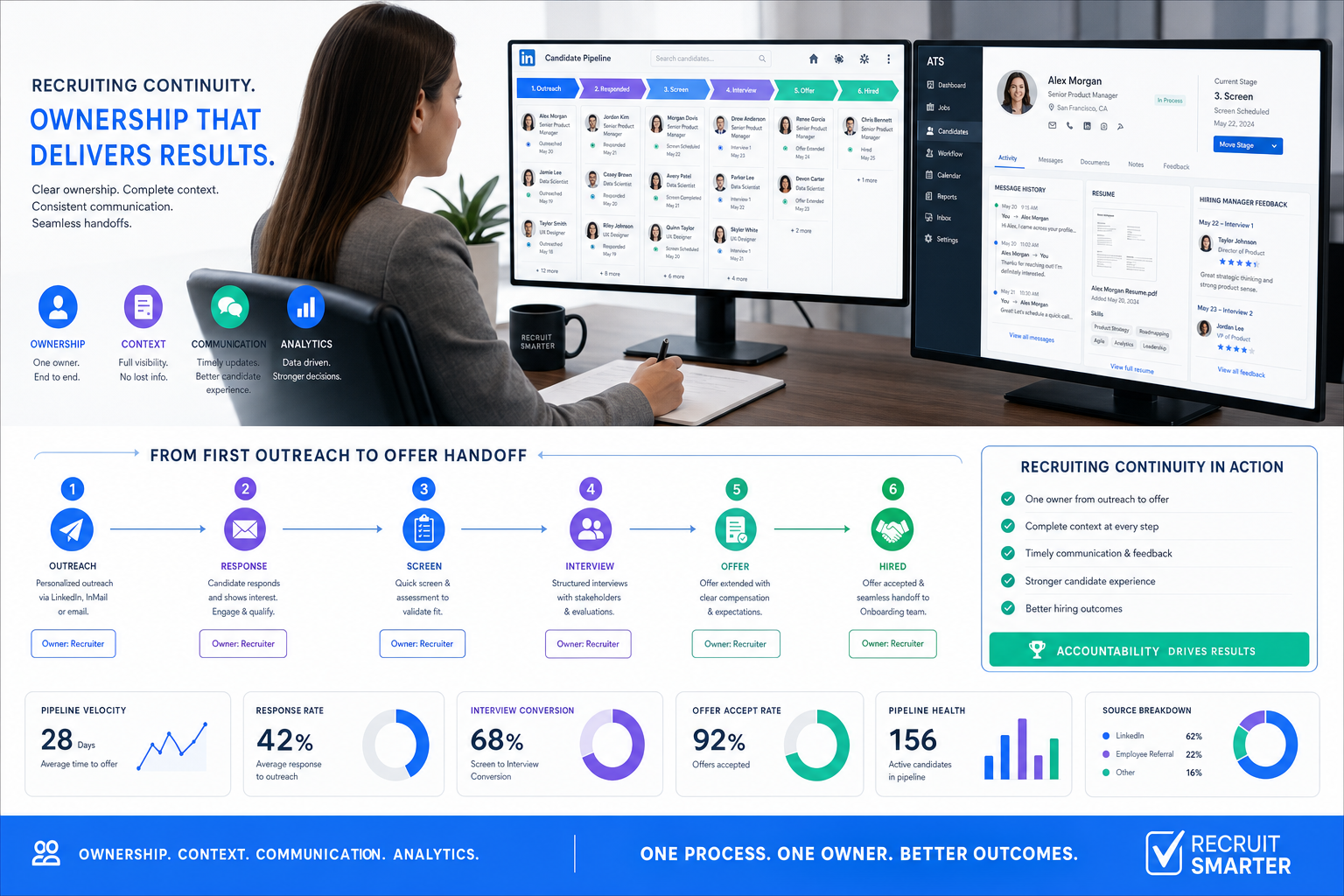
When ATS recruitment tool choices expose weak ownership and lost candidate context, this article helps recruiters judge fit, avoid rollout mistakes, and protect hiring speed.
That standard matters because most hiring slowdowns are not caused by a lack of software at all. They come from weak ownership, scattered communication, poor handoff between recruiter and hiring manager, and too little context on what a role actually requires. For a solo headhunter, that means time lost chasing updates and rebuilding candidate trust. For a small agency owner, it means consultants working hard but producing uneven delivery. For an in-house talent team, it means slower hiring, weaker candidate experience, and less confidence from the business.
In my own workflow, I have used AI Recruiter as support when those gaps start with outreach and follow-up rather than final selection. Its value is practical: it can keep LinkedIn conversations moving, respond across time zones, and collect resumes or contact details from interested candidates while I still make the final judgment on fit, resume quality, and next-step decisions. That kind of support is especially useful when a recruiter needs better continuity, not less human accountability.
The clearest way to see this is to start from the candidate side. A job seeker does not really evaluate an agency by logo or size first. They ask whether the consultant has enough recruiting experience, whether that person has a visible professional track record, and whether the recruiter actually understands the employer rather than just forwarding a vacancy. In practice, the candidate is testing for something many teams forget to measure internally: who owns the search, who knows the role well enough to represent it fairly, and who stays accountable from first contact to offer.
Then the process gets more revealing. The recruiter interviews the candidate, spends time understanding skills and target roles, offers resume or interview guidance, prepares them for employer conversations, and later helps them evaluate an offer. If any of that context lives only in inboxes, LinkedIn messages, or one consultant's memory, service quality becomes inconsistent fast. That is exactly where the search for the best recruiting software begins: not with a feature list, but with the need to support accountable communication, preserve context, and turn good recruiter judgment into a repeatable system. From there, evaluating applicant tracking system features and benefits and comparing modern recruitment ats systems becomes much more meaningful.
Practical takeaway: The best recruiting software is the one that helps recruiters stay credible with candidates, informed with clients, and consistent across every hiring handoff.
Table of Contents
- Why the Candidate-Side View Matters in ATS Selection
- What an ATS Recruitment Tool Should Actually Control
- The Real Decision Criteria Behind Better Recruiting Software
- Applicant Tracking System Features and Benefits That Matter Most
- Where AI and LinkedIn Workflow Support Fit
- How to Compare Recruiting Software in Practice
- Which Recruitment ATS Systems Fit Different Teams
- Common Buying and Rollout Mistakes
- FAQ
Why the Candidate-Side View Matters in ATS Selection
Recruiters often evaluate software from the inside out: posting speed, pipeline stages, approvals, dashboards. Those things matter, but they miss a basic truth from day-to-day recruiting. Candidates notice process quality long before leadership sees a report. They can tell when a consultant knows the role, when a recruiter is simply relaying messages, or when no one truly owns the search.
That candidate-side perspective creates a better buying lens. If your software cannot help recruiters document role context, maintain communication history, share feedback clearly, and stay accountable through offer stage, the process will feel fragmented even if the dashboard looks modern.
In agency recruiting especially, this shows up in familiar ways:
- Weak role understanding: the recruiter has not spoken deeply enough with the employer and cannot position the opportunity well
- Poor continuity: candidate updates are lost between consultant, sourcer, account manager, and hiring manager
- Thin preparation: interview coaching, feedback, and next-step expectations are handled inconsistently
- Offer-stage friction: negotiation details and candidate concerns are not recorded in one reliable place
For in-house teams, the same issue appears differently. A recruiter may understand the role well, but the hiring manager feedback loop is slow, status updates are unclear, and the candidate experience feels transactional. Either way, the process weakness is the same: context is not being carried forward reliably.
What an ATS Recruitment Tool Should Actually Control
An ats recruitment tool should do more than collect applications. At its best, it becomes the operating layer that keeps context, accountability, and workflow visible from requisition opening to final hire.
That means the system should help control five things that recruiters deal with every day:
- Candidate records: resumes, notes, message history, and status should live in one place.
- Workflow ownership: everyone should know who is responsible for the next action.
- Role context: hiring criteria, manager expectations, and search priorities should not disappear after kickoff.
- Collaboration: recruiters, coordinators, hiring managers, and agency partners should work from shared information.
- Decision traceability: feedback, rejections, approvals, and offers should be documented clearly.
When those basics are missing, recruiters compensate with memory, spreadsheets, chat threads, and inbox folders. That may work for a few searches, but it becomes fragile as soon as volume increases or multiple stakeholders join the process.
| Hiring Need | What Good Software Supports | What Happens Without It |
|---|---|---|
| Role alignment | Shared intake notes and searchable requisition context | Recruiters represent the job inconsistently |
| Candidate continuity | Visible outreach, replies, and stage movement | Candidates repeat themselves and lose trust |
| Manager collaboration | Feedback capture and reminder workflows | Decisions stall and interviews drift |
| Offer handling | Status visibility and decision history | Negotiation details get lost or delayed |
The Real Decision Criteria Behind Better Recruiting Software
The reference point from experienced recruiters is simple: candidates and clients both want a consultant who knows the market, understands the role, stays communicative, and remains accountable. Software should reinforce those standards, not weaken them.
So before comparing products, ask the same practical questions you would ask when judging a strong recruiter:
1. Does the system support experienced judgment rather than hide it?
A recruiter with market knowledge still needs room to evaluate nuance. Software should surface relevant information quickly, not force every decision through rigid forms or opaque automation.
2. Can you research activity and history easily?
Just as job seekers often look for a recruiter's digital footprint, recruiting teams should be able to see role history, candidate touchpoints, feedback patterns, and source activity without hunting across tools.
3. Who remains accountable during the search?
This is one of the most overlooked buying questions. If the recruiter owns candidate relationships but another person owns client intake and someone else owns scheduling, the system must keep accountability visible. Otherwise, searches feel disjointed.
4. Does the workflow help recruiters actually learn the candidate?
A good recruiter spends meaningful time understanding strengths, motivations, and likely fit. Your software should make those insights easy to capture, search, and reuse, not bury them in unstructured notes.
5. Can the team support candidates through interviews and offer stage?
Interview prep, feedback, team dynamic notes, compensation concerns, and next-step guidance are not side details. They are central to quality recruiting, especially in retained search, agency placement, and hard-to-fill roles.
This is where many buyers finally see the gap between a basic database and a true recruiting platform. The best tools preserve recruiter craft while improving process consistency.
Applicant Tracking System Features and Benefits That Matter Most
When teams search for applicant tracking system features and benefits, they usually want to know which capabilities genuinely improve recruiting operations instead of just expanding the software menu. The most valuable features are the ones that protect context, reduce admin work, and improve response quality.
Job posting and requisition control
Good recruiting software should make job creation, approval, and publishing easy to manage. But the bigger benefit is consistency. If every role opens with structured intake and standardized posting details, recruiters start with cleaner information.
Candidate profile management
This includes resume parsing, contact capture, communication history, and searchable records. The benefit is not only speed. It is continuity. Recruiters can pick up a conversation or revisit a prior applicant without reconstructing everything manually.
Pipeline management
Stages should reflect your actual recruiting flow, not an abstract template. Recruiters need bulk actions, ownership visibility, and clear stalled-candidate alerts. Hiring managers need a simple way to review progress without becoming system experts.
Interview scheduling and coordination
Scheduling delays are often blamed on calendar complexity, but the deeper issue is weak handoff. Strong tools reduce back-and-forth while keeping everyone aligned on timing, participants, and status changes.
Communication tools
Email templates, reminders, and shared communication logs help teams move faster. The real benefit is quality control. When candidates ask for updates or clarification, recruiters can respond with full context instead of relying on memory.
Reporting and analytics
Useful reporting should show where the process slows down, which sources convert, and where candidate drop-off happens. It should also help answer a tougher operational question: are recruiters getting enough information early enough to represent the role well?
Permissions and governance
As teams grow, governance becomes essential. Different stakeholders need different levels of access, and regulated or cross-regional hiring often requires stronger process controls.
Integrations
ATS data should flow cleanly into HRIS, onboarding, or communication tools where needed. The value is less duplicate data entry and fewer broken handoffs after offer acceptance.
| Feature Area | Main Benefit | Why It Matters in Real Recruiting |
|---|---|---|
| Structured intake | Better role clarity | Helps recruiters position openings accurately |
| Communication history | Stronger continuity | Prevents candidate frustration and internal confusion |
| Stage automation | Less manual admin | Frees recruiter time for evaluation and stakeholder management |
| Analytics | Better operational visibility | Shows where accountability or speed is breaking down |
Where AI and LinkedIn Workflow Support Fit
AI has become part of the recruiting software conversation, but its real value depends on where your bottlenecks live. If the main issue is outbound sourcing, after-hours reply volume, multilingual communication, or resume collection from interested prospects, AI support can be useful. If the issue is poor intake discipline or weak hiring manager feedback, AI will not fix the underlying process by itself.
In my own use, the best fit for AI Recruiter has been early-stage LinkedIn workflow support. It helps keep candidate outreach moving, continues conversations when candidates reply outside normal hours, and gathers resumes and contact details from people who want to move forward. That is especially relevant for agency consultants and in-house recruiters who lose momentum when manual follow-up starts piling up.
What I like operationally is that it does not replace the recruiter's final judgment. I still review the resume, assess actual fit, decide whether the role is right for the candidate, and choose whether to advance them. For recruiters who care about staying accountable, that distinction matters.
Relevant AI support areas in modern recruitment ats systems often include:
- Outreach continuity: keeping candidate conversations active across time zones
- Interest confirmation: identifying whether a prospect wants to continue the conversation
- Resume and contact capture: collecting materials from interested candidates in a structured way
- Workflow automation: reducing repetitive status updates, reminders, or message steps
For recruiters who rely heavily on LinkedIn, tools like AI Recruiter workflow support can reduce the drag between first outreach and recruiter review. The key is to use that support where speed matters most, while keeping screening standards and candidate evaluation under human control.
How to Compare Recruiting Software in Practice
Most software comparisons go wrong because teams judge products in the abstract. A better method is to test each system against a familiar recruiting sequence: intake, outreach, candidate qualification, interview coordination, feedback, and offer management.
Use a practical scorecard built around these questions:
- Can a recruiter understand the full role context quickly?
- Can the team see who owns the next action?
- Can candidate communication be tracked without manual reconstruction?
- Can hiring managers participate with low friction?
- Can the system support both speed and judgment?
- Can the software handle your real volume without turning every step into admin work?
| Evaluation Area | What to Test | Warning Sign |
|---|---|---|
| Usability | Post a role, review applicants, move stages | Recruiters need workarounds immediately |
| Context retention | Find intake notes, feedback, prior contact history | Important details are hidden or fragmented |
| Candidate experience | Check messaging, status updates, scheduling flow | Communication feels delayed or generic |
| Collaboration | Collect manager feedback and approvals | Too much reliance on email and side channels |
| Automation | Review triggers, reminders, and candidate handling rules | Automation creates more auditing than time savings |
| Analytics | Pull time-to-hire and stage-conversion reports | Reports exist but cannot guide weekly decisions |
If you want a realistic test, ask your demo team to run one complete search scenario. They should open a requisition, add intake notes, review inbound candidates, capture outbound interest, schedule interviews, and produce a manager-ready pipeline summary. That sequence reveals far more than a polished product tour.
Which Recruitment ATS Systems Fit Different Teams
Not all recruitment ats systems solve the same problem. The right fit depends on how your team wins work, manages candidate relationships, and hands information across the hiring process.
Small agency teams
Smaller firms usually need speed, visibility, and low admin overhead. The best setup is often one that keeps candidate history organized, supports outreach continuity, and makes consultant accountability clear.
What to prioritize: searchable candidate records, communication visibility, easy pipeline movement, and lightweight reporting.
Solo recruiters and independent headhunters
For individual recruiters, every missed follow-up has an immediate cost. A lean ATS paired with workflow support for sourcing and messaging can be effective, especially when the recruiter remains the final evaluator.
What to prioritize: outreach support, simple stage tracking, resume capture, and minimal setup friction.
In-house talent acquisition teams
Corporate teams usually need stronger hiring-manager collaboration, structured approvals, and better reporting. Their software must support cross-functional visibility as much as recruiter speed.
What to prioritize: intake discipline, interview coordination, stakeholder reminders, and offer-stage tracking.
Enterprise and regulated hiring environments
Larger organizations need stronger governance, role-based permissions, audit visibility, and more formal workflows. They also need software that can preserve context across multiple business units.
What to prioritize: permissions, workflow control, reporting depth, and integration quality.
Common Buying and Rollout Mistakes
Even strong software underperforms when teams buy from the wrong assumptions. The most common mistakes usually connect back to the same opening problem: teams focus on features before they define what accountable recruiting should look like in their environment.
- Buying for headline features instead of process fit: the tool looks impressive but does not match daily recruiter work
- Ignoring candidate-side quality: communication and preparation remain inconsistent even after rollout
- Letting automation outrun ownership: tasks move, but no one really owns the candidate relationship
- Skipping real workflow tests: demos stay superficial and hide friction
- Underestimating intake quality: poor role definition weakens every downstream stage
- Assuming AI can replace recruiter judgment: it can support speed, but not final fit evaluation
One practical fix is to document your current process in the same sequence a candidate experiences it: first contact, qualification conversation, role explanation, interview prep, feedback, and offer handling. Then mark where information gets lost or delayed. That exercise usually clarifies which applicant tracking system features and benefits your team truly needs.
FAQ
What is an ATS recruitment tool?
An ATS recruitment tool is software that helps recruiters manage applicants, hiring stages, communication history, and team workflow in one system. Its main value is creating consistency and visibility across the hiring process.
How is the best recruiting software different from a basic ATS?
A basic ATS may store applicants and stage movement, while the best recruiting software usually supports broader workflow needs such as communication, scheduling, analytics, integrations, and automation. The difference is often operational depth, not just feature count.
Which applicant tracking system features and benefits matter most?
The most important features usually include structured intake, candidate record management, pipeline control, communication logging, interview coordination, reporting, and permissions. The biggest benefits are better accountability, less manual work, clearer collaboration, and stronger candidate experience.
How do recruitment ATS systems help agency recruiters?
They help agency teams keep candidate histories organized, manage multiple searches at once, document client context, and maintain communication continuity. That is especially valuable when consultants need to move quickly without losing ownership of the relationship.
Where does AI fit in the recruiting workflow?
AI is most useful in repetitive, high-volume tasks such as outreach continuity, interest confirmation, and message handling. It works best when recruiters still control final screening, resume review, and advancement decisions.
Can LinkedIn outreach support work alongside an ATS?
Yes. Many recruiters use ATS software as the system of record and layer in LinkedIn workflow support to keep sourcing conversations active. In that setup, outreach automation supports speed while the ATS preserves process visibility and decision history.
Conclusion
The search for the best recruiting software gets easier when you stop treating it as a feature race and start treating it as a service-quality decision. The right ats recruitment tool should help recruiters stay accountable, preserve context, communicate clearly, and move candidates through the process without losing trust.
If you evaluate software through the same lens a strong candidate uses to judge a strong recruiter, the buying process becomes much sharper. Does the system help your team understand the role, remain responsible through the search, prepare people properly, and keep every handoff visible? If the answer is yes, you are likely looking at software that can improve both recruiter performance and hiring outcomes.














