


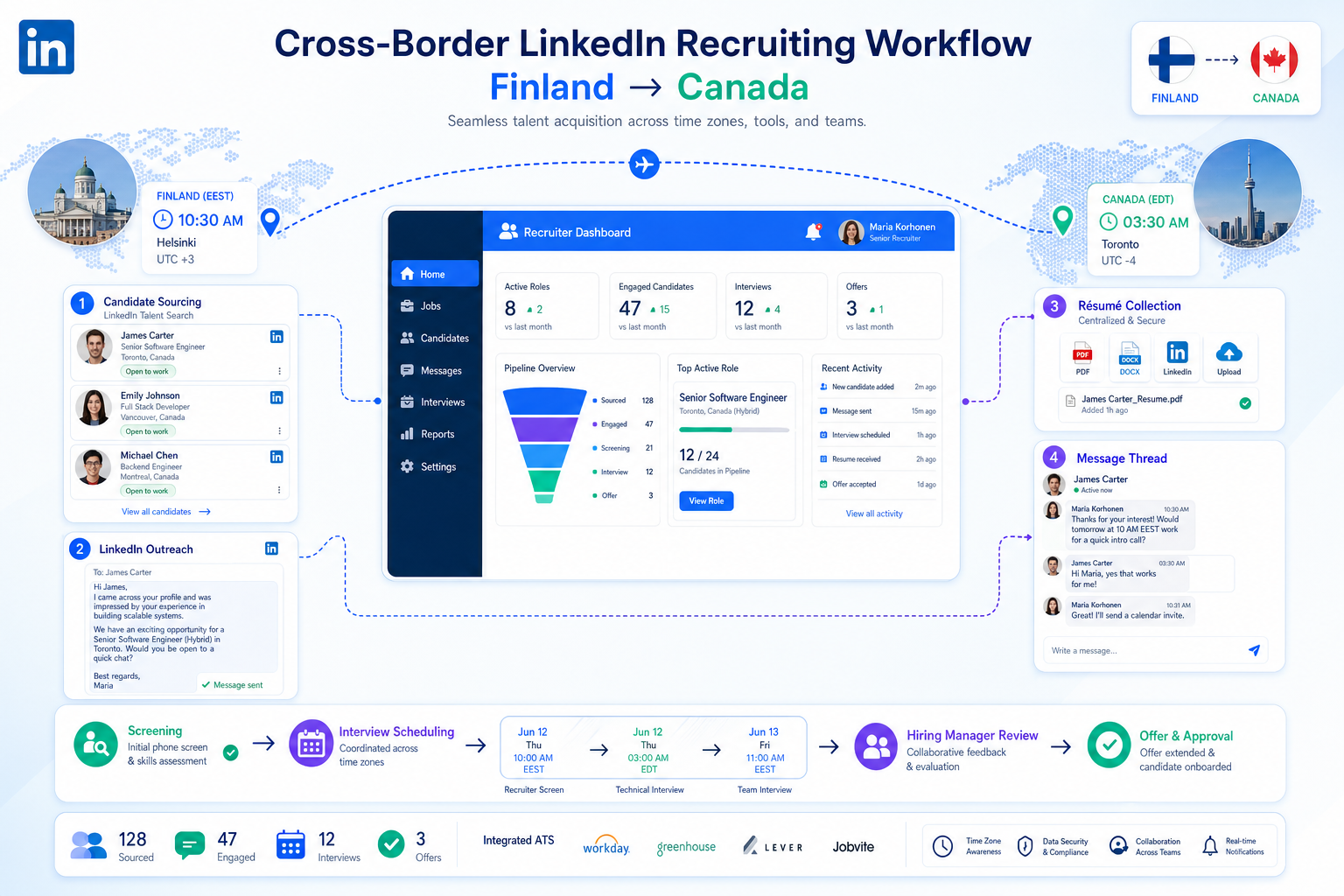
When cross-border hiring stalls, this article helps headhunters judge hiring tools by recruiter speed, candidate context, and fewer missed placements.
That standard matters because recruiting rarely breaks on feature count alone. It breaks when a recruiter is juggling outreach, résumé collection, interview coordination, and hiring-manager follow-up across time zones, while a founder, sales leader, or HR head is pushing to enter a new market quickly. For small agencies, that means wasted recruiter hours and missed placements. For in-house teams, it means slower launches, inconsistent candidate handling, and visible strain on employer brand when follow-up becomes patchy.
In my own workflow, tools that actually help are the ones that remove repetitive top-of-funnel work without taking judgment away from the recruiter. That is where StrategyBrain AI Recruiter can be useful in a broader stack: it can automate LinkedIn outreach, keep candidate conversations moving after hours, and collect résumés or contact details from interested prospects, while the recruiter still reviews the profile, evaluates fit, and decides who moves forward. If your bottleneck is early engagement in distributed searches, that kind of support is more practical than adding another passive database.
A good example comes from a 2025 expansion story involving a Finnish company entering Canada. The commercial leader had a clear growth target, a headquarters team in Europe, and a need to build a local field sales presence fast. After launching the Canadian subsidiary and exhibiting at an industry expo in Alberta, the team began adding dealers quickly, but that momentum immediately created a hiring challenge: interviews had to be run from Finland, local talent had to be sourced in Canada, and the business needed people on the ground who understood the market rather than just generic applicants in a pipeline.
That is the kind of hiring moment where recruiting software becomes either operational infrastructure or dead weight. When a company is opening a new geography, adding channel partners, and trying to preserve standards across continents, the best recruiting software is not simply an ATS with storage. It is a set of hiring tools that supports local hiring judgment, recruiter speed, and clean collaboration. That is especially relevant for teams comparing recruitment technology tools or looking for fast hiring solutions for tech teams and other growth functions under real time pressure.
Quick takeaway: The best recruiting software helps recruiters keep searches moving across markets, stakeholders, and stages without sacrificing candidate quality or human review.
Table of Contents
- Why business context matters when choosing hiring tools
- What recruiting software actually includes
- Best recruiting software by hiring situation
- Key features that hold up in real recruiting work
- Applicant tracking system benefits and limits
- Pricing models and cost trade-offs
- Implementation lessons from growth hiring
- How to choose the right hiring tools
- FAQ
Why Business Context Matters When Choosing Hiring Tools
One of the most useful lessons from cross-border hiring is that software selection should start with the business move, not the demo. In the expansion example above, the real issue was not “which platform has the most automation.” The issue was whether the recruiting setup could support a local market launch while keeping headquarters aligned on standards, candidate quality, and hiring speed.
That same pattern shows up in tech hiring, agency recruiting, and growth-stage internal TA. A recruiting team may be opening a new region, replacing underperforming reps, building an engineering pod, or scaling dealer, field, or account coverage. Each case changes what the best recruiting software needs to do. The context determines whether you need a basic ATS, stronger sourcing workflows, multilingual communication support, or better recruiter-hiring manager coordination.
From experience, this is where many buying processes go off track. Teams compare interfaces before they agree on what the hiring motion actually is. If you are adding headcount in one office, your needs are different from a team coordinating interviews across continents. If you are sourcing passive engineers, your needs are different from processing inbound applicants for support roles. The strongest hiring tools fit the hiring motion first and the feature list second.
What Recruiting Software Actually Includes
Recruiting software is the broader category of technology used to run, structure, and improve hiring. It usually includes applicant tracking, candidate communication, interview scheduling, sourcing support, reporting, collaboration, and increasingly some form of automation or AI assistance.
Many teams use terms like hiring tools, talent acquisition platform, recruiting system, and recruitment technology tools as if they mean exactly the same thing. They overlap, but it helps to separate the core from the extensions:
- Applicant tracking system: manages applicants, jobs, stages, feedback, and reporting.
- Recruiting CRM or sourcing layer: supports prospecting, outreach history, and talent pools.
- Automation layer: reduces repetitive tasks such as reminders, scheduling prompts, and message sequences.
- AI support: may help with résumé summaries, outreach, candidate communication, or workflow recommendations.
For many teams, the ATS is still the center of gravity. But in practice, the best recruiting software often combines ATS structure with sourcing and communication support. That matters most when hiring is not purely inbound.
Where AI-assisted outreach fits
For outbound-heavy searches, especially on LinkedIn, an AI layer can be more useful than another reporting dashboard. I have seen this most clearly when recruiters are handling high volumes of initial outreach but still need to preserve response quality and recruiter control. In that setting, AI Recruiter usage experience becomes relevant because it addresses a narrow but expensive gap: repetitive prospect engagement. It can introduce roles, respond across time zones, and gather contact details from interested candidates, while the recruiter remains responsible for actual qualification and shortlist decisions.
That is not a replacement for core recruiting software. It is a practical complement when your ATS records activity well but does not create enough qualified conversations on its own.
Best Recruiting Software by Hiring Situation
There is no universal winner. The right setup depends on the hiring environment, the market pressure, and who needs visibility.
| Hiring Situation | Best-Fit Software Type | What Matters Most | Typical Buyer |
|---|---|---|---|
| Early-stage growth | Lightweight ATS with collaboration features | Ease of use, fast setup, simple workflows | Startups and lean internal teams |
| Cross-border expansion | ATS plus sourcing and communication support | Local talent reach, coordination across time zones, clean handoffs | International growth teams |
| Technical hiring | Sourcing-led recruiting stack with structured evaluation | Passive candidate engagement, technical interview workflow, speed | Engineering recruiters and tech leaders |
| Agency and search work | CRM-forward recruiting platform | Talent pools, outreach history, flexible pipelines | Headhunters and staffing firms |
| High-volume hiring | Automation-heavy recruiting platform | Bulk actions, screening rules, scheduling efficiency | Operational recruiting teams |
| Enterprise TA | Integrated suite with governance controls | Permissions, compliance, analytics, interoperability | Large HR organizations |
Cross-border growth teams
The expansion story from Finland into Canada is useful because it highlights a common blind spot: once a business move succeeds commercially, hiring complexity escalates immediately. A team may gain dealers, customers, or channel partners faster than it can add local talent. In that environment, the best recruiting software helps recruiters capture candidate information cleanly, keep communication moving, and align remote leadership with local hiring realities.
That is also where recruiters need more than a static database. They need systems that let them source, engage, record, and compare candidates without losing the context of why the role exists in the first place.
For fast-growing tech teams
Teams searching for fast hiring solutions for tech teams usually face a similar coordination problem with a different talent profile. Engineering hiring often requires outbound sourcing, multiple interviewers, structured feedback, and fast response times to prevent candidate drop-off. The most useful hiring tools here combine passive-candidate workflows with scorecards, scheduling efficiency, and strong visibility for recruiters and hiring managers.
If your recruiters spend their day chasing interview availability and manually replying to interested prospects at night, the stack is underpowered in exactly the wrong place.
For agencies and headhunters
Agency recruiters need software that supports active search, not just requisition administration. Candidate rediscovery, segmentation, communication history, and list management matter just as much as formal pipeline stages. In this model, an ATS alone is rarely enough.
This is also where AI-supported LinkedIn workflows can help. For headhunters running several searches at once, AI Recruiter can reduce repetitive outreach activity and keep after-hours candidate responses from going stale. The recruiter still decides whether the background is strong enough, whether the brief has changed, and whether the candidate belongs in the shortlist.
Key Features That Hold Up in Real Recruiting Work
Demos tend to over-reward novelty. Real recruiting rewards control, speed, and consistency. The features below matter because they keep work moving when hiring pressure is high.
1. Applicant tracking and stage discipline
A good system should make it easy to post roles, move candidates through stages, gather feedback, and keep records current. In cross-market hiring, this is how teams avoid losing visibility between local recruiting activity and central leadership review.
2. Sourcing and talent pool management
If your best hires are not applying directly, sourcing capability matters. That includes search organization, prospect tagging, outreach tracking, and rediscovery. For agency work and technical hiring, this is foundational.
3. Candidate communication support
Communication is where many hiring processes quietly fail. Candidates go cold, recruiters miss reply windows, and hiring managers never see the volume of back-and-forth required to create momentum. Software that improves message flow, follow-up consistency, and recruiter response coverage can meaningfully improve throughput.
For LinkedIn-heavy work, this is one of the few areas where specialized support can make a noticeable difference. The AI Recruiter workflow is relevant here because it can maintain initial conversations in a candidate’s language, answer common role questions, and collect details from interested prospects. In my view, its value is operational rather than magical: it protects recruiter time while keeping human selection where it belongs.
4. Interview scheduling and stakeholder alignment
When a manager sits in one country and the candidate is in another, scheduling friction compounds quickly. Good hiring tools reduce the amount of manual chasing recruiters and coordinators do. That matters for candidate experience, but it also matters for internal credibility when leadership expects fast hiring.
5. Structured evaluation support
Software should help teams compare candidates consistently. Scorecards, interviewer guidance, and standardized feedback improve signal quality, especially when occasional interviewers are involved. For sales hiring, technical hiring, and multi-manager hiring alike, structure improves decisions.
6. Integrations and workflow fit
If calendars, HR systems, assessments, and communication tools do not connect cleanly, recruiters become human middleware. The best recruiting software reduces duplicate entry and scattered records.
7. Governance and human override
As more recruitment technology tools add automation, buyers should ask where the decision boundary sits. Can recruiters review outputs? Can hiring teams audit what happened? Can the system explain why a recommendation appeared? These are not edge questions anymore.
Key insight: Automation improves recruiting only when the handoff between system support and recruiter judgment is explicit.
Applicant Tracking System Benefits and Limits
Because many software searches start with ATS research, it helps to be precise about what an ATS solves well and where it stops.
Main applicant tracking system benefits
- Centralized candidate records: one place for résumé history, communication notes, and stage status.
- Process consistency: recruiters and hiring managers follow a shared path.
- Collaboration visibility: stakeholders can see who is waiting on what.
- Reporting structure: easier review of funnel movement and bottlenecks.
- Reduced admin: fewer manual reminders and status updates.
These benefits become very obvious when a team outgrows spreadsheets or email-led hiring. In the market-expansion scenario, for example, an ATS helps headquarters understand what is happening locally without forcing recruiters to produce endless side reports.
Where ATS alone may fall short
An ATS stores and organizes. It does not always generate enough candidate flow, especially in outbound-led hiring. If your issue is reaching passive talent, keeping candidate conversations active across time zones, or building a local team from another country, you may need additional sourcing or communication support around the ATS.
That is why buyers comparing the best recruiting software should ask a simple question: are we trying to document hiring better, or are we trying to create more hiring momentum? Many teams need both, but not from the same layer of the stack.
Pricing Models and Cost Trade-Offs
Pricing is rarely straightforward in this category, and cost should be evaluated against recruiter time, process delay, and stack complexity rather than subscription price alone.
| Pricing Model | How It Usually Works | Best For | Common Trade-Off |
|---|---|---|---|
| Per seat | Cost scales with recruiter or admin users | Small teams and focused internal TA | Can limit access for coordinators or occasional users |
| Tiered by company size | Price rises with headcount or plan level | Growing businesses | May bundle features you will not use yet |
| Usage-based | Cost tied to jobs, candidate volume, or activity | Variable hiring environments | Forecasting is harder |
| Enterprise custom | Negotiated package with controls and service layers | Large organizations | Comparison is slower and less transparent |
One practical lesson from outbound recruiting is that a low-priced ATS may still be expensive if it leaves recruiters doing hours of repetitive sourcing follow-up manually. On the other hand, adding a specialized automation layer only makes sense if it removes a real bottleneck. Buyers should be disciplined about that distinction.
Implementation Lessons From Growth Hiring
Good software decisions still fail in implementation. The expansion example is helpful again because it shows that hiring complexity often arrives as a side effect of business momentum. That means implementation needs to support real operating conditions, not an idealized workflow map.
Start with the hiring motion
Document why the role exists, who needs visibility, where approvals happen, and which parts of the funnel are local versus centralized. A company building a Canadian field team from Finland needs a different setup from a domestic team hiring in one office.
Define ownership clearly
Who owns outreach? Who reviews incoming résumés? Who confirms interview readiness? Who decides when a candidate is actually shortlisted? Without explicit ownership, even good hiring tools become record systems instead of operating systems.
Test candidate communication paths early
Do not wait until rollout to discover that response management is fragmented. If recruiters rely heavily on LinkedIn and after-hours replies are common, test that motion early. This is one place where I have found value in pairing a core ATS with StrategyBrain AI Recruiter. It helped keep initial conversations active and gather candidate details while recruiters focused on fit assessment and stakeholder calibration.
Set rules for AI-assisted work
Be explicit about where automation stops. Recruiters should review résumé relevance, confirm shortlist quality, and decide next steps. Leadership should know whether a message was automated, whether communication is recorded centrally, and how exceptions are handled.
How to Choose the Right Hiring Tools
If you are building a shortlist, use this sequence instead of jumping straight into vendor demos.
- Define the business trigger. Are you entering a market, scaling a function, fixing process inconsistency, or reducing recruiter admin?
- Identify the real bottleneck. Is the gap in sourcing, response time, candidate tracking, scheduling, or hiring-manager alignment?
- Separate core system needs from support-layer needs. Decide what belongs in the ATS and what may require complementary tools.
- Evaluate against your hiring motion. A distributed search, tech team buildout, and agency desk do not need the same setup.
- Check integration reality. Make sure calendars, messaging tools, assessments, and HR systems work together.
- Review governance. Ask how AI-generated actions are reviewed, logged, and overridden.
- Run a realistic scenario. Use a live role with real hiring stages, not a generic demo flow.
For teams seeking fast hiring solutions for tech teams, the shortlist should emphasize passive candidate engagement, interview coordination, and structured evaluation. For agencies, the emphasis is often on sourcing efficiency and candidate relationship continuity. For cross-border growth teams, the deciding factor is often whether software can preserve local hiring signal while keeping remote stakeholders aligned.
FAQ
What is the difference between recruiting software and an ATS?
An ATS is usually the core system that tracks applicants, jobs, and hiring stages. Recruiting software is the broader category, which may also include sourcing, candidate communication, automation, analytics, and AI-assisted workflows.
What are the most important hiring tools for a growing team?
Most growing teams need a reliable ATS first, then add sourcing, scheduling, and communication support based on actual bottlenecks. The right mix depends on whether hiring is mainly inbound or outbound.
Why do cross-border hiring teams need more than basic applicant tracking?
Because distributed hiring adds time-zone issues, local-market sourcing, and more stakeholder coordination. A basic ATS may document the process well but still leave gaps in outreach, communication, and speed.
What matters most in fast hiring solutions for tech teams?
Strong passive-candidate workflows, recruiter-hiring manager alignment, efficient scheduling, and structured technical feedback matter most. Speed helps only if the evaluation quality remains high.
How should recruiters use AI in hiring without losing control?
Use AI for repetitive work such as first-touch outreach, response handling, reminders, or summarization. Keep human review for shortlist decisions, résumé evaluation, and final movement through the process.
Where does StrategyBrain AI Recruiter fit in a recruiting stack?
It fits best as a support layer for LinkedIn-heavy outbound recruiting. It can help automate initial candidate communication, maintain follow-up across time zones, and collect résumés or contact details from interested prospects, while recruiters make the actual hiring decisions.
Conclusion
The best recruiting software is not the one with the longest feature sheet. It is the system, or combination of systems, that matches how your team actually hires under pressure. The market-expansion example makes that clear: when a company is building a local team from another continent, recruiting success depends on more than storing applicants. It depends on speed, coordination, visibility, and preserving judgment where it matters.
If you are evaluating hiring tools now, start with your business context, then work backward into software requirements. That approach leads to better decisions than generic top-10 lists, especially when comparing modern recruitment technology tools for distributed growth, agency search, or technical hiring.















