


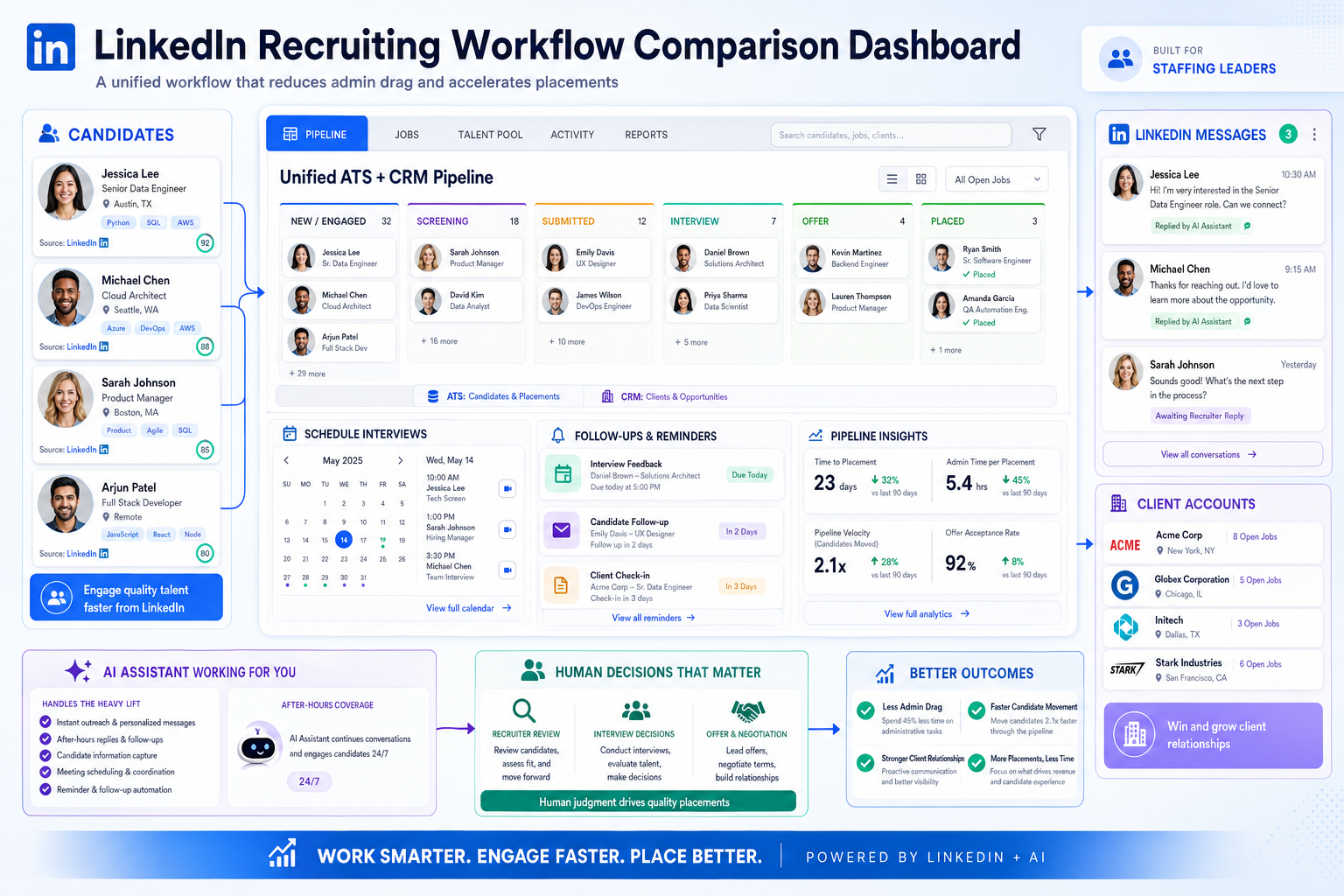
See how staffing leaders can assess recruitment agency software to cut admin drag, fix follow-up gaps, and avoid workflow mismatch.
That sounds obvious until you look at how many recruiting teams still lose time to inbox triage, manual scheduling, disconnected notes, and side spreadsheets. For a solo recruiter, that means slower response times and missed follow-up with warm talent. For a small agency owner, it means uneven desk performance and poor visibility into what is actually driving placements. For enterprise recruiting leaders, it shows up as inconsistent data, harder handoffs, and weaker accountability across teams.
One practical way I have reduced that friction is by using StrategyBrain AI Recruiter to handle repetitive LinkedIn outreach, after-hours candidate replies, and early interest checks while I keep control of shortlist review, resume evaluation, and interview decisions. In my experience, that kind of support helps most when recruiters are spending too much of the day chasing messages instead of moving qualified people through the process.
The productivity problem itself is not new. A widely discussed concern since the late 2000s has been that technology was supposed to make work faster, yet many teams became more distracted as smartphones, email, and constant notifications took over the day. In recruiting, you can see it in real time: a consultant opens a requisition, starts replying to candidate messages, jumps into meeting scheduling, searches old notes for a client update, and then realizes the most important follow-up from the previous evening is still buried in a crowded inbox.
That is the real selection issue behind the best recruiting software question. Good recruitment agency software is not just a database for applicants. It is the operating layer that helps recruiters stay on task, manage communication, coordinate meetings, and keep candidate and client context in one place. And if your business also depends on contract staffing software capabilities or the controls expected from enterprise staffing software, the productivity gains only hold when the full workflow is connected.
- The best recruiting software for agencies improves productivity by reducing switching between tools, not by adding more dashboards.
- Recruiters need ATS and CRM workflows that support search, outreach, scheduling, follow-up, and client updates in one system.
- Contract-focused firms should treat timesheets, approvals, payroll links, and invoicing as productivity tools, not back-office extras.
- Enterprise teams need software that scales communication, governance, reporting, and user controls without slowing desk execution.
Table of Contents
- Why Productivity Is the Right Starting Point
- What Is Recruitment Agency Software?
- Why Agencies Need More Than a Standard ATS
- Best Recruiting Software Comparison Framework
- Must-Have Features for Agency Recruiting
- What Contract Staffing Software Should Do
- What Enterprise Staffing Software Should Do
- Using AI to Protect Recruiter Productivity
- How to Evaluate Applicant Tracking System Benefits
- Pricing, Implementation, and Buying Advice
- Common Selection Mistakes
- FAQ
Why Productivity Is the Right Starting Point
When staffing leaders compare the best recruiting software, they often begin with features. I usually start one step earlier: where does recruiter time actually disappear?
That framing matters because recruiting productivity rarely breaks down in one dramatic place. It leaks away through many small actions: checking email too often, rescheduling interviews manually, retyping candidate notes, chasing missing contact details, searching multiple systems for client context, and updating stages late because the recruiter is already onto the next conversation.
The older productivity discussion around technology still applies here. Digital tools can either sharpen work or fragment it. In recruiting, a platform earns its place when it simplifies the day rather than multiplying tabs, reminders, and duplicate records. That is why agency buyers should assess software by workflow discipline as much as by feature count.
In practice, the strongest systems do the same things good recruiters try to do manually: keep priorities visible, preserve context, reduce unnecessary task switching, and make follow-up hard to miss.
What Is Recruitment Agency Software?
Recruitment agency software is built for firms that manage both candidate relationships and client delivery. At minimum, it should combine applicant tracking with recruitment CRM functions so recruiters can move from job order to candidate shortlist to client communication without leaving the core workflow.
That is different from a standard in-house ATS. A corporate hiring team usually works for one employer filling its own roles. An agency must track multiple clients, many open jobs, repeated outreach, business development notes, submissions, interviews, placements, and long-term talent relationships at the same time.
So when someone asks what the best recruiting software is, the practical answer depends on whether the platform supports how staffing desks really operate. If it only tracks applicants but does not support recruiter communication, client history, or assignment follow-up, it will struggle in an agency setting.
Why Agencies Need More Than a Standard ATS
A standard ATS can hold job and candidate records, but agencies need more than storage. They need workflow support.
Think about the tools highlighted in broader productivity discussions: task managers help people stay organized, calendar tools reduce scheduling friction, collaboration systems keep teams aligned, and reminder tools stop important work from going stale. In staffing, recruiters do not want six separate apps stitched together to achieve that outcome. They want one environment that covers search, outreach, submissions, interview coordination, and account follow-up.
This is where the real advantages of applicant tracking system adoption become visible. A strong applicant tracking system for recruiters reduces duplicate entry, keeps activity visible, and gives managers a cleaner view of what is moving and what is stalled. Those are meaningful applicant tracking system benefits because they affect speed, consistency, and placement quality.
In my experience, the most valuable improvement is not flashy automation. It is having one operational record of the search. When candidate communication, client notes, and next steps live in separate places, recruiter discipline drops and reporting becomes unreliable.
Best Recruiting Software Comparison Framework
Use business model first, vendor language second. That is the safest way to compare the best recruiting software.
| Use Case | What Matters Most | Why It Matters |
|---|---|---|
| Agency recruiting | ATS + CRM, sourcing workflow, outreach history, submissions, client activity tracking | Keeps desk work and account delivery in one operating system |
| Contract staffing | Timesheets, approvals, payroll integration, invoicing, assignment margin visibility | Protects billing accuracy and assignment control after placement |
| Enterprise staffing | Scalability, permissions, security, integrations, analytics, multi-team controls | Supports complexity across offices, brands, and service lines |
| Direct hire | Search speed, pipeline visibility, interview coordination, placement tracking | Helps recruiters move quickly without losing follow-up quality |
| Temp staffing | High-volume flow, onboarding steps, scheduling, compliance tracking | Reduces breakdowns in fast-moving transactional work |
This framework also prevents a common buying error: selecting a polished talent acquisition platform that looks strong in demos but lacks the workflow depth recruiters need once the day gets busy.
Must-Have Features for Agency Recruiting
The best recruitment agency software should support the same productivity habits good recruiters rely on manually: clear priorities, fast access to context, dependable follow-up, and minimal rework.
1. Unified ATS and recruitment CRM
Recruiters should be able to move from a candidate record to a client record, job order, submission history, and communication trail without jumping across systems. If the workflow feels fragmented, adoption usually falls.
2. Strong applicant tracking and pipeline visibility
A capable applicant tracking system for recruiters should show where each candidate stands and what needs to happen next. That means clear stage movement, aging visibility, and easy updates for active recruiters.
3. Candidate relationship management
Agency recruiting is not just about active applicants. Searchable talent pools, reminders, communication history, and segmentation all matter because experienced recruiters fill many roles from relationships built long before the requisition opened.
4. Communication and scheduling support
The reference productivity logic applies directly here. Email clutter, scheduling back-and-forth, and missed reminders are some of the biggest hidden drains on recruiter output. Software should make it easier to manage outreach, organize follow-up, and coordinate interviews without manual tracking everywhere else.
5. Reporting and activity analytics
Managers need reporting on submissions, interviews, placements, source quality, desk activity, and client pipeline. Better systems also reveal where task switching or process delays are slowing delivery.
6. Integrations
Recruiters still use email, calendars, payroll systems, onboarding tools, and communication platforms. Integrations matter because they reduce context loss between actions. Weak integrations usually force recruiters back into side processes.
7. Ease of use under pressure
Usability matters most when a recruiter has ten open searches, several candidate replies arriving after hours, and multiple clients asking for updates. If updating the system feels slower than using memory or inbox search, data quality will deteriorate quickly.
What Contract Staffing Software Should Do
Contract staffing software has to protect productivity after the placement as well as before it. That is where many front-office tools fall short.
Timesheets and time capture
Hours worked need to move through the process cleanly. If recruiters, workers, supervisors, and finance teams all depend on different tools or manual handoffs, admin load rises fast.
Approvals and audit trail
Approval workflows should show who approved what and when. This protects both speed and accountability, especially when assignment volume increases.
Payroll integration
Manual re-entry between staffing workflow and payroll is a classic productivity drain. Strong payroll links reduce correction work and lower the chance of pay or billing errors.
Invoicing support
Approved time should flow into invoicing with as little friction as possible. When billing lags, profitability suffers even if recruiting performance is strong.
Assignment-level financial visibility
Margin tracking at assignment level helps managers see whether busy desks are also healthy desks. That is not just a finance question. It affects job prioritization and account decisions.
If contract business is a major part of your revenue, evaluate back-office workflow with the same seriousness as sourcing and CRM features. Otherwise, you may improve recruiter activity while leaving operations overloaded.
What Enterprise Staffing Software Should Do
Enterprise staffing software must preserve productivity across complexity. Large organizations do not simply need more features; they need control without gridlock.
Scalability across teams
Enterprise systems should support many users, multiple divisions, and high data volume while keeping the recruiter experience usable. A platform that slows down under complexity creates hidden productivity costs.
Security and permissions
Candidate data, compensation data, client records, and internal notes require disciplined access rules. Security is part of operational fit, not just legal review.
Deeper analytics
Enterprise buyers need reporting that compares offices, teams, specialties, and service lines. One of the strongest advantages of applicant tracking system deployment at scale is that leaders can diagnose process drag with real activity data instead of assumptions.
Integration breadth
Large staffing businesses usually connect recruiting to payroll, onboarding, finance, communication, and BI environments. Enterprise value depends heavily on how well those systems work together.
Workflow variation with shared standards
Direct hire, temp, and contract teams may need different workflows, but the organization still needs common data definitions and reporting logic. Good enterprise staffing software supports both flexibility and governance.
Using AI to Protect Recruiter Productivity
AI is most useful in recruiting when it protects attention, not when it pretends to replace recruiter judgment.
That is why I see value in a tool like AI Recruiter for the specific moments that usually break focus: repetitive LinkedIn outreach, candidate replies that arrive across time zones, and the early back-and-forth needed to confirm whether someone is open to a conversation. Used carefully, that support can keep the desk moving while the recruiter still owns shortlist decisions, resume review, and final qualification.
In my own workflow, the benefit is less about novelty and more about continuity. When I tested StrategyBrain AI Recruiter, the useful part was not simply sending more messages. It was maintaining prompt follow-up after normal working hours, keeping initial outreach from going stale, and collecting candidate contact details or resumes from interested people so I could spend my time on real assessment rather than repeated first-touch admin.
That is also where AI fits naturally into the productivity themes from the reference discussion. Digital tools help when they simplify scheduling, reminders, communication, and task handling. In recruiting, the right AI-supported workflow should do the same: remove repetitive motion, preserve responsiveness, and leave the recruiter in charge of the decision that matters.
Practical takeaway: If a recruiting tool saves time only by pushing work into another system or another person’s inbox, it is not improving productivity. It is relocating it.
How to Evaluate Applicant Tracking System Benefits
To assess applicant tracking system benefits, test the system against actual recruiter behavior rather than abstract vendor claims.
- Track task switching. How often does a recruiter move between email, calendar, spreadsheets, LinkedIn, notes, and the ATS to complete one submission?
- Review follow-up discipline. Can the system reliably surface reminders, stalled candidates, and unanswered client steps?
- Test search-to-submission speed. How quickly can a recruiter find relevant talent, contact them, confirm interest, and prepare a shortlist?
- Check communication coverage. Does the workflow support outreach, scheduling, replies, and note capture without extra tools doing all the heavy lifting?
- Validate process depth. Does the platform support direct hire, temp, and contract work where needed, or only early-stage funnel activity?
- Assess reporting trust. Can leaders rely on the data enough to use it in planning, coaching, and forecasting?
- Measure adoption risk. Will experienced recruiters actually use it when the desk gets busy?
This is the clearest way to identify the real advantages of applicant tracking system adoption. Good software reduces process leakage and protects consistent execution.
Pricing, Implementation, and Buying Advice
Pricing usually depends on user count, workflow breadth, add-on modules, and integration complexity. But price alone is a poor decision filter in staffing.
For contract staffing software, value depends heavily on whether time capture, approvals, payroll handoff, invoicing, and assignment tracking are truly supported. For enterprise staffing software, pricing needs to be weighed against analytics depth, admin controls, security needs, and implementation effort across teams.
Before buying, ask practical questions:
- What workflow is native, and what depends on extra modules or outside tools?
- How much admin work is required to maintain permissions, pipelines, templates, and reporting?
- Can recruiters and operations teams work from the same system without duplication?
- How strong are the integrations with email, calendar, payroll, onboarding, and communication tools?
- What does the rollout look like for a firm your size?
- How easily can data be exported or migrated later?
My rule is simple: never evaluate software cost separately from workflow fit. Cheap platforms become expensive when recruiters have to compensate for them every day.
Common Selection Mistakes
Most buying mistakes happen because teams evaluate the demo experience rather than the workday experience.
Choosing a generic ATS for agency work
If the platform was designed mainly for in-house hiring, it may not handle submissions, client tracking, or recruiter workflow well enough.
Ignoring productivity drains outside the ATS
Email overload, scheduling friction, and weak follow-up discipline often do more damage than missing features on a comparison sheet.
Underestimating contract operations
Placing contractors is one thing; supporting time, billing, and payroll cleanly is another. Many teams realize this too late.
Buying for scale without governance
Large organizations sometimes focus on recruiter convenience first and discover later that permissions, analytics, and controls are not mature enough.
Overrating AI as a replacement for process
AI can improve sourcing, messaging, and responsiveness, but it still depends on strong workflow design and clear ownership of final decisions.
Skipping real usability testing
Software should be tested by recruiters doing normal desk work, not just by project owners watching a demo environment.
FAQ
What is recruitment agency software?
Recruitment agency software is typically a combination of ATS and CRM capabilities that helps staffing firms manage candidates, clients, jobs, submissions, interviews, placements, and follow-up in one system.
How is recruitment agency software different from a standard ATS?
A standard ATS is often built for one employer hiring for itself. Recruitment agency software supports recruiters working across multiple clients, repeated candidate outreach, account management, and desk-based delivery.
What should contract staffing software include?
It should support sourcing and pipeline management plus timesheets, approvals, payroll integration, invoicing, and assignment-level financial visibility.
What matters most in enterprise staffing software?
Scalability, permissions, integrations, analytics, security, and support for multiple team workflows are usually the key buying criteria.
Can AI improve recruiter productivity?
Yes, especially for repetitive outreach, after-hours messaging, and early interest checks. But recruiters should still own resume review, qualification, and final hiring decisions.
Does the best recruiting software always include back-office tools?
No. Some platforms are stronger in front-office recruiting while others extend further into staffing operations. Buyers should confirm whether back-office support is native, integrated, or separate.
Final Thoughts
The best recruiting software is the one that protects productive recruiter behavior under real pressure. That usually means recruitment agency software that unifies candidate tracking, client context, communication, and follow-up rather than scattering them across tools.
If your business runs on assignment volume, your contract staffing software needs to support what happens after the placement, not just before it. And if you are buying at scale, enterprise staffing software should give you governance and analytics without making everyday execution slower.
The broad lesson from years of productivity technology still holds: more tools do not automatically create better work. The right system reduces distraction, shortens handoffs, and gives recruiters a cleaner path from first outreach to finished placement.















