


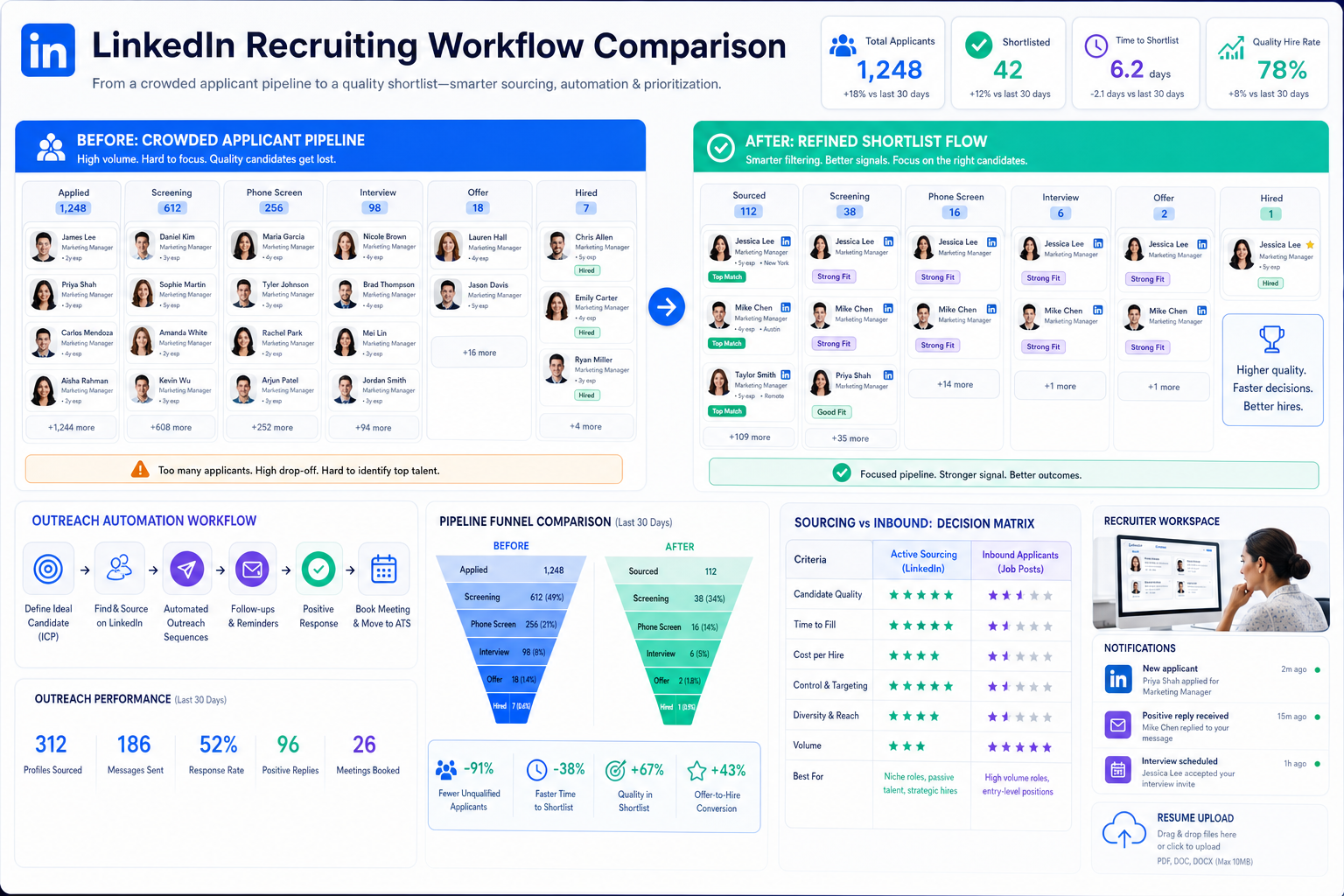
When applicant volume hides candidate quality, this article helps recruiting leaders judge recruiting and applicant tracking software by flow fit.
That sounds obvious until you are the one sorting through a crowded pipeline filled with applicants who looked relevant at posting stage but stall out in review. For small search firms, solo recruiters, and internal talent teams, the cost is not just time. It shows up in slower shortlist delivery, delayed hiring manager feedback, more manual follow-up, weaker candidate experience, and less confidence that the process is reaching the people you actually want to hire.
One reason I now pair core ATS discipline with outreach automation is that it reduces the gap between sourcing effort and ATS execution. In my own workflow, AI Recruiter has been most useful when I need continuous candidate follow-up, multilingual messaging, and automatic collection of resumes and contact details from interested prospects. It helps with the repetitive top-of-funnel work, while the recruiter still owns final judgment, resume evaluation, shortlist quality, and the next hiring decision.
A familiar hiring pattern sits behind this. Many teams still recycle an old posting, push it to a job board, and expect volume to solve the search. That approach often does create volume, but not necessarily fit. In specialized hiring, especially in functions like finance, the real problem begins after the resumes arrive: someone has to review the pile, separate the plausible from the irrelevant, and keep the right people moving before interest cools.
The other issue is access. Strong candidates often do not spend much time applying through open postings because their network already brings them opportunities. Recruiters who work from relationships know this instinctively, but the software question is what comes next: how do you combine sourcing, outreach, and recruitment applicant tracking in one workable system? That is why the best recruiting software conversation should start with recruiting and applicant tracking software, then move into workflow fit, applicant tracking system pricing, and how your team actually captures talent beyond inbound applications.
Table of Contents
- Why ATS selection starts with candidate flow, not features
- What recruiting and applicant tracking software actually does
- What job-board volume vs recruiter access teaches you
- How to define the best recruiting software for your use case
- Practical comparison framework
- Features that matter most in recruitment applicant tracking
- How applicant tracking system pricing usually works
- ATS vs recruiting CRM
- How to choose software without overbuying
- Common selection mistakes
- FAQ
Why ATS selection starts with candidate flow, not features
When people ask about the best recruiting software, they often mean one of two very different problems. The first is administrative: they need a better place to post jobs, move applicants through stages, and gather feedback. The second is strategic: they are attracting plenty of applications, but not enough of the right ones. The reference point from real recruiting practice is simple: high applicant volume is not the same as high candidate quality, and software should be judged accordingly.
That distinction matters because many ATS evaluations are still run as feature comparisons when they should be run as workflow comparisons. If your hiring model depends heavily on job ads, then posting reach and review speed matter most. If your hiring model depends on recruiter networks, passive outreach, and shortlist precision, then the best recruiting software is the one that keeps sourced candidates, active applicants, recruiter follow-up, and hiring manager decisions connected without forcing your team back into spreadsheets.
Key insight: The strongest recruiting and applicant tracking software does not just organize applications; it helps recruiters manage the tradeoff between candidate volume and candidate quality.
What recruiting and applicant tracking software actually does
An applicant tracking system, or ATS, is the operating hub for active hiring. It is the part of your recruiting software stack that handles open roles and the candidates attached to them. Good recruiting and applicant tracking software gives recruiters one place to manage job postings, organize active candidates, move people through stages, coordinate interviews, collect team feedback, and report on hiring progress.
For recruiters, the value is not just data storage. The practical gains show up in day-to-day execution: fewer side spreadsheets, clearer ownership, faster movement between stages, and better visibility into where decisions stall. For hiring managers, the benefit is structure. They can review candidates in context, compare scorecards, and respond before the process loses momentum.
Core workflows an ATS should support
- Job distribution: posting roles and managing requisitions
- Pipeline management: tracking applicants and sourced candidates by stage
- Screening: organizing resumes, screening questions, and review steps
- Interview coordination: scheduling, scorecards, and feedback collection
- Candidate communication: status updates, outreach records, and handoffs
- Reporting: source tracking, time-to-hire, funnel conversion, and bottlenecks
If a platform is weak across these basics, it may still look polished in a demo, but it will not feel like the best recruiting software once real hiring pressure hits.
What job-board volume vs recruiter access teaches you
The most useful lesson from day-to-day search work is that hiring channels create different operational problems. Job boards can produce large response volumes. That helps when you need fast market exposure, but it also creates the classic needle-in-a-haystack issue. Your team spends energy on triage, not selection.
Relationship-led recruiting solves a different problem. It gives access to candidates who may never apply on their own, especially stronger performers who are already employed and only respond when the opportunity is relevant. But that model creates another operational demand: every message, reply, resume, and next step must be captured cleanly. Otherwise, access turns into chaos.
This is where I have found targeted automation useful. When I tested StrategyBrain AI Recruiter alongside a standard ATS process, the gain was not that it replaced recruiter judgment. It did not. The value was that it kept outreach active after hours, handled initial candidate conversations in the candidate's language when needed, and brought interested people back with resumes and contact details so I could review them inside a structured workflow. That is especially helpful when your problem is not a lack of applicants, but a lack of timely engagement with the right ones.
So when you assess the best recruiting software, ask one foundational question before anything else: is your main pain too many applicants to sort, or too little access to high-fit candidates? Your answer changes which software design matters most.
How to define the best recruiting software for your use case
There is no universal winner. The right fit depends on hiring volume, process complexity, and whether your recruiting model leans more on inbound applications, direct sourcing, or a blend of both.
Best for small teams with occasional hiring
If your company hires in bursts, prioritize ease of setup, simple approvals, and transparent applicant tracking system pricing. Smaller teams usually need adoption more than deep configuration. A clean ATS that managers can use quickly is often better than a highly customizable platform that becomes admin-heavy.
Practical takeaway: Ask how easily hiring managers can review candidates from email or a lightweight dashboard. In smaller teams, manager friction hurts outcomes more than missing advanced automation.
Best for growing companies with repeat hiring
Growth-stage teams need more than a place to store resumes. They benefit from reusable workflows, interview kits, stage automation, and stronger reporting. This is where recruiting and applicant tracking software starts affecting hiring speed in a meaningful way.
Practical takeaway: Evaluate whether the system can support different functions without becoming messy. Sales, operations, and finance hiring often require different screening logic, but the reporting still needs to roll up cleanly.
Best for search firms and recruiter-led sourcing teams
Agency and search workflows usually depend on finding people who are not actively applying. In that environment, recruitment applicant tracking needs to handle sourced candidates as cleanly as inbound applicants. It also needs to preserve communication history and handoffs, because speed matters once a passive candidate signals interest.
Practical takeaway: Check whether the system can record outreach, import candidate details quickly, and move sourced talent into the same review process as applicants. If not, recruiters will create workarounds.
Best for high-volume or distributed hiring
Teams handling large applicant flow need bulk actions, fast filtering, reliable source tracking, and clear permissions. In high-volume recruiting, workflow speed matters more than cosmetic design.
Practical takeaway: Test how many clicks it takes to reject, move, or contact groups of candidates. Weak workflow design shows up immediately under volume.
Best for structured enterprise hiring
Enterprise teams typically need more approvals, stronger governance, deeper reporting, and wider integration support. The applicant tracking system for recruiters in this setting must work for both central talent teams and local hiring stakeholders.
Practical takeaway: Do not judge enterprise software on breadth alone. Ask whether permissions, dashboards, and reporting are actually usable in a live operating rhythm.
Practical comparison framework
Before you sit through demos, use a comparison model grounded in recruiting outcomes rather than feature theater.
| Comparison area | What to look for | Why it matters |
|---|---|---|
| Core ATS workflow | Job posting, stages, interview coordination, feedback collection | This is the foundation of recruiting and applicant tracking software |
| Candidate flow quality | Support for both inbound applicants and sourced candidates | Separates resume volume from real hiring progress |
| Best for | Company size, role mix, hiring volume, process complexity | Prevents choosing for the wrong operating model |
| Starting price | Entry price, pricing unit, free trial, custom quote | Supports buyer intent around applicant tracking system pricing |
| Automation | Reminders, stage moves, outreach follow-up, approvals | Reduces manual recruiter work |
| Reporting | Time-to-hire, source quality, conversion, bottlenecks | Shows whether the system improves outcomes |
| Integrations | Calendar, HRIS, job boards, sourcing and communication tools | Prevents duplicate work and broken handoffs |
| Implementation fit | Setup time, training, admin burden | Determines whether the team will adopt it |
Features that matter most in recruitment applicant tracking
Not every feature deserves equal weight. In practice, a smaller group of capabilities drives recruiter throughput, hiring manager responsiveness, and reporting trust.
1. Pipeline visibility
Recruiters need to see where every candidate sits and what action is blocked. This is one of the most important applicant tracking system benefits because it turns hiring from inbox chasing into stage-based execution.
2. Candidate screening and review workflows
The best recruiting software helps teams review quickly without losing consistency. That includes resumes, screening questions, scorecards, and simple manager feedback collection. Strong recruitment applicant tracking should make evaluation cleaner, not heavier.
3. Interview coordination
Interview scheduling and feedback loops are frequent bottlenecks. A good applicant tracking system for recruiters reduces missed handoffs and unclear ownership.
4. Reporting and source tracking
If your starting problem is too much weak-fit volume or too little access to stronger candidates, reporting needs to show that clearly. Time-to-hire, source quality, conversion by stage, and pipeline aging are more useful than decorative dashboards.
5. Support for sourced and passive candidates
This is where many teams feel the difference between a basic ATS and a stronger recruiting system. If you rely on networks, direct outreach, or recruiter-led search, the software must handle candidates who did not begin as applicants. That means better import, communication logging, and transition into formal review.
6. Integrations and workflow continuity
The ATS rarely works alone. It typically connects with calendars, HR systems, job distribution tools, and sourcing channels. If you use outreach support tools such as AI Recruiter, the practical question is whether interested candidates can be collected, reviewed, and advanced without recreating records manually across multiple systems.
How applicant tracking system pricing usually works
Applicant tracking system pricing is often confusing because vendors package similar capabilities in very different ways. To compare options fairly, normalize by hiring context rather than by headline price alone.
Common ATS pricing models
- Per user, per month: often works for teams with stable recruiter seats
- Flat monthly subscription: easier for smaller teams that want budgeting clarity
- Per job opening: may fit occasional hiring, but can become expensive as requisitions increase
- Custom annual enterprise contract: common for larger organizations with broader support needs
| Pricing model | Best for | Main advantage | Main caution |
|---|---|---|---|
| Per user per month | Dedicated recruiting teams | Clear link between seats and cost | Costs rise with recruiter growth |
| Flat monthly | Small to midsize teams | Simple budgeting | Advanced features may be tier-limited |
| Per job opening | Occasional hiring | Feels flexible at low usage | Scales poorly with many open roles |
| Custom annual contract | Enterprise hiring environments | Can align with complex requirements | Less transparent pricing |
What to ask beyond the starting price
- Is the listed price a real working plan or a limited entry tier?
- Do hiring manager seats affect cost?
- Are implementation, support, or integrations priced separately?
- Are sourcing or communication features included or extra?
- Are reporting and automation locked behind higher tiers?
- Can you test the workflow before a full contract?
Practical advice: compare annual cost using your realistic recruiter seat count, open role volume, and expected manager participation. That will tell you more than a headline monthly number.
ATS vs recruiting CRM: know the difference before you buy
An ATS manages active applicants tied to open roles. A recruiting CRM supports relationship-building with passive or future candidates. This distinction matters because many teams start with an access problem, not an administration problem.
If your biggest challenge is organizing open jobs and keeping interview activity moving, start with recruiting and applicant tracking software. If your challenge is reaching candidates who will not apply through a posting, CRM-like sourcing and outreach capability becomes more important. In many real teams, you need both, but you should know which problem is primary.
The job-board-versus-network lesson applies here again. If top talent tends to move through relationships rather than postings, then your software evaluation should reflect that reality. Otherwise, you will buy an ATS optimized for intake volume when your real issue is candidate access and follow-up discipline.
How to choose software without overbuying
- Map your actual hiring path. Document intake, sourcing, application review, interviews, offers, and reporting.
- Define your main bottleneck. Is it applicant overload, weak-fit volume, poor manager follow-through, or lack of access to stronger candidates?
- Separate must-haves from extras. For most teams, essentials are workflow structure, communication, reporting, and integrations.
- Test a real scenario. Use one open role, one applicant pipeline, and one sourced-candidate workflow during the demo.
- Normalize applicant tracking system pricing. Compare annual cost across the same usage assumptions.
- Check reporting usefulness. Make sure leaders can see source quality, stage conversion, and bottlenecks without manual cleanup.
- Assess adoption risk. Even strong software fails if admins cannot maintain it or managers avoid using it.
In my experience, teams make better choices when they test software against the exact problem that opened the search. If the issue is too much low-fit volume, prioritize filtering and review speed. If the issue is missing passive talent, evaluate how well the system supports recruiter-led sourcing and follow-up. I have used AI Recruiter in active sourcing workflows precisely for that second case: keep conversations moving, capture interest and resumes, then bring only review-ready candidates into the main hiring process.
Common mistakes teams make when choosing the best recruiting software
Choosing for feature count instead of fit
A long feature list does not fix a mismatch between your hiring model and the software's design.
Assuming more applicants means better hiring
The reference lesson is important here. Resume floods can create work without improving shortlist quality.
Ignoring the hiring manager experience
If managers cannot review quickly, good candidates go stale and recruiter effort gets wasted.
Comparing prices without normalizing the model
A lower visible starting price can still create a higher annual cost once seats, integrations, and reporting tiers are added.
Blurring ATS and sourcing requirements
If your team depends on passive candidates, make sure your evaluation includes how sourced prospects enter and move through the system.
Expecting automation to replace recruiter judgment
Automation can handle outreach, response capture, and repetitive follow-up, but recruiters still need to assess resume quality, fit, and stakeholder alignment.
FAQ
What is recruiting and applicant tracking software?
Recruiting and applicant tracking software is the system recruiters use to manage open roles and active candidates. It usually supports job posting, application intake, screening, interview coordination, feedback collection, and reporting in one workflow hub.
How does applicant tracking system pricing usually work?
Applicant tracking system pricing commonly follows a per-user monthly model, a flat subscription, a per-job-opening structure, or a custom annual enterprise contract. To compare options fairly, review annual cost, feature limits, and implementation expenses alongside the starting price.
What features matter most in recruitment applicant tracking?
The most important features are typically pipeline visibility, screening workflows, interview coordination, candidate communication, source tracking, and integrations. Teams that rely on direct sourcing should also check support for passive candidates and outreach continuity.
What is the difference between an ATS and a recruiting CRM?
An ATS manages active applicants attached to current openings, while a recruiting CRM is designed for relationship-building with passive candidates and future talent pools. If your priority is current hiring execution, ATS capability comes first. If your priority is candidate access, CRM capability matters more.
How should search firms evaluate the best recruiting software?
Search firms should evaluate whether the software supports recruiter-led sourcing as well as applicant tracking. That means clean candidate import, communication history, fast shortlist management, and reporting that distinguishes applicant volume from real candidate quality.
Conclusion
Choosing the best recruiting software is really about choosing the right recruiting and applicant tracking software for your hiring model. Start with the real problem: too many weak-fit applicants, too little access to top talent, or too much manual follow-up in between.
If you anchor your evaluation to candidate flow, recruiter workload, hiring manager responsiveness, and transparent applicant tracking system pricing, you will make a better decision than you would by chasing feature breadth alone. That is especially true when your hiring success depends on both structured recruitment applicant tracking and disciplined outreach beyond the job board.















