


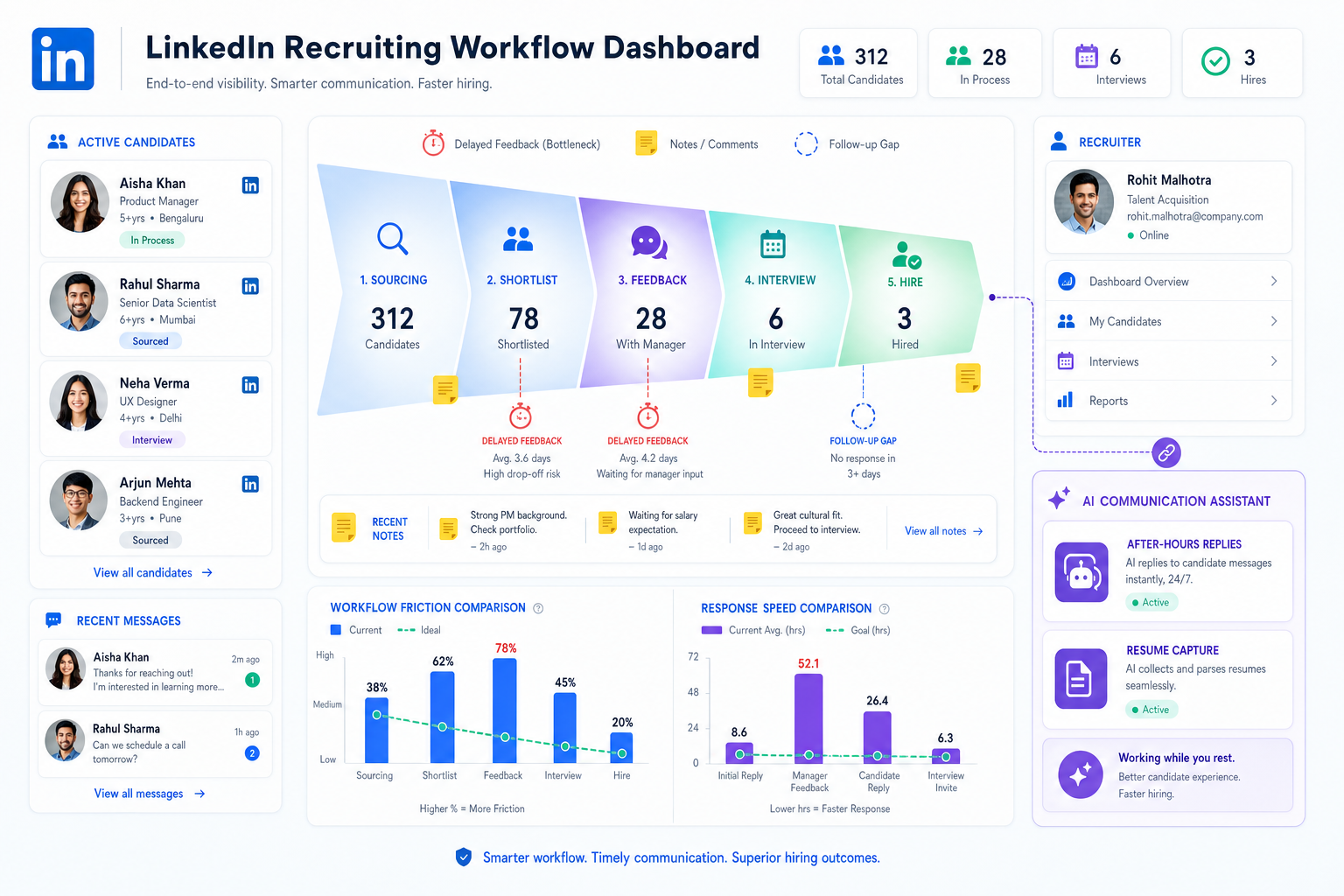
Choose hiring systems by diagnosing workflow friction, feedback delays, and follow-up gaps before they cost recruiters stronger shortlists.
That matters because many recruiting problems do not start with sourcing volume alone. They start when recruiters, hiring managers, coordinators, and interviewers react differently to pressure, leave feedback in scattered places, delay next steps, or overfocus on the most frustrating stakeholder instead of the actual bottleneck. For a small search firm, that means slower shortlist delivery and weaker client confidence. For an internal talent team, it means missed candidates, repeated admin work, and more visible process breakdowns in front of the business.
In my own workflow, I have found that StrategyBrain AI Recruiter is most useful when the real problem is inconsistent follow-up rather than final judgment. Its always-on candidate messaging, multilingual communication, and automatic collection of resumes and contact details help prevent conversations from stalling while recruiters are offline or juggling multiple reqs. That said, the recruiter still has to make the real call on fit, review the resume, and decide whether a hiring candidate should move forward.
The dynamic is familiar from any workplace with mixed personalities. In a diverse team, not everyone works the same way, and not every difficult interaction means someone is bad at their job. But when one person constantly criticizes, another avoids decisions, and a third goes silent after an interview round, the recruiter is left managing emotional drag on top of hiring delivery. If you react to every frustrating behavior instead of pausing and controlling your own response, the process usually gets noisier rather than better.
That is exactly why software selection deserves a wider lens than feature checklists. The best recruiting software is not only about posting jobs or storing applicants. It is about choosing hiring systems that help teams stay disciplined when personalities clash, communication slips, and the applicant hiring process depends on timely action from several people at once.
Table of Contents
- Why hiring systems fail even when the team has software
- What counts as the best recruiting software today?
- Quick comparison: common layers inside hiring systems
- Must-have features in the best recruiting software
- Control the response, not every personality
- Why candidate experience matters as much as recruiter efficiency
- When an ATS is enough and when add-ons help
- Best fit by team size and hiring volume
- How to choose without overbuying
- Common mistakes buyers make
- FAQ
Why hiring systems fail even when the team has software
Many teams think they have a tooling problem when they actually have a response problem. A recruiter sends a shortlist, a hiring manager delays feedback, an interviewer criticizes every profile, and a coordinator chases calendars through email. On paper, the company has recruiting software. In practice, the workflow is still fragmented.
The reference point worth keeping in mind is simple: there is rarely one perfect answer for handling difficult people at work, but there is one thing you can control consistently—your response. In recruiting operations, that principle translates directly into system design. Good hiring systems reduce the damage caused by slow replies, scattered notes, unnecessary gossip, and reactive decision-making. They give teams one place to move candidates forward instead of letting each personality create its own process.
That is also why I do not recommend evaluating software only by demo polish. If your current stack cannot absorb everyday friction between recruiters and stakeholders, then the tool is not supporting the real work. The best recruiting software should make process discipline easier when people are busy, inconsistent, or occasionally difficult to work with.
What counts as the best recruiting software today?
The market uses overlapping labels: ATS, recruiting platform, talent acquisition software, recruiting CRM, sourcing system, and broader hiring systems. For most buyers, the useful definition is practical rather than academic.
Recruiting software is the set of tools that carries an applicant hiring workflow from approved role to accepted offer. That usually includes job posting, application intake, resume storage, stage movement, interviewer feedback, communication records, and reporting. Some teams also need sourcing, nurture campaigns, scheduling automation, assessments, or analytics.
If your current process still depends on inboxes, side spreadsheets, and memory, then your software stack is not functioning as a system. The strongest setups reduce ambiguity for recruiters while making it easier for every hiring candidate to get timely movement, clearer communication, and fewer duplicated requests.
Quick comparison: common layers inside hiring systems
One of the most practical ways to compare the best recruiting software is to separate tools by what part of the workflow they own.
| Software Layer | Primary Job | Best For | What to Watch |
|---|---|---|---|
| Applicant Tracking System | Owns jobs, applicants, stages, feedback, and records | Any team needing a central workflow | Poor stage discipline makes reports unreliable |
| Recruiting CRM | Manages prospects, talent pools, and nurture communication | Proactive recruiting teams | Useful only if recruiters actively source and re-engage |
| Sourcing Tools | Find and organize potential candidates | Hard-to-fill or specialist roles | Can create noise if follow-up is weak |
| Scheduling Tools | Automate interview booking | High-volume interview environments | Helpful when calendar coordination slows decisions |
| Assessment Tools | Standardize evaluation steps | Roles needing consistent skills checks | Only valuable when aligned to real job needs |
| Communication Automation | Keeps outreach and follow-up moving | Lean teams, global hiring, LinkedIn-heavy workflows | Recruiters still need to review fit and decide next steps |
| Analytics Tools | Measure funnel speed, source quality, and bottlenecks | Mature TA teams | Data quality matters more than dashboard appearance |
In my experience, teams using LinkedIn outreach at scale often benefit from pairing their ATS with a communication layer such as AI Recruiter. I have used it to keep candidate replies moving outside business hours, collect resumes from interested prospects, and avoid losing momentum across time zones. What it does not replace is recruiter judgment. You still need a human to evaluate whether the profile supports the role.
Must-have features in the best recruiting software
When buyers ask about the best recruiting software, I usually pull the conversation away from feature overload and back toward operating reliability. Most hiring systems should be judged by whether they cover the real workflow consistently.
1. Requisition and job posting control
Your system should handle approvals, role ownership, and posting distribution cleanly. If different stakeholders are working from different versions of the same role, confusion starts before any candidate applies.
2. Structured resume capture and candidate organization
This is where an ATS still earns its place. Recruiters need searchable profiles, clear statuses, and one source of truth for every hiring candidate. Without that, hiring teams fall back into inbox management.
3. Screening workflow support
Good software helps the team screen consistently, whether through intake questions, review queues, scorecards, or disposition reasons. The goal is not just storing applicants. It is making movement through the funnel easier to manage.
4. Interview scheduling and centralized feedback
If multiple interviewers are involved, scheduling and feedback become the first serious breakdown point. The system should make it easy to book, collect input, and expose delays quickly.
5. Communication continuity
This is one area buyers often underestimate. Even a strong ATS can leave gaps if outreach, follow-up, or after-hours replies go stale. For LinkedIn-heavy workflows, I have seen value in using StrategyBrain AI Recruiter to handle repetitive messaging, answer candidate questions about the role, and capture contact details while I focus on shortlist quality and stakeholder alignment.
6. Collaboration and accountability
The best recruiting software gives recruiters, coordinators, and hiring managers a defined place to act. If people can avoid the system easily, they usually will.
7. Compliance records and reporting
Any mature applicant hiring process needs traceable movement, documented decisions, and clean reporting. That matters for audits, internal reviews, and leadership trust.
Control the response, not every personality
The difficult-coworker lens is more useful in recruiting than it may sound at first. In most workplaces, you cannot remove every frustrating personality from the process. What you can do is design workflows that reduce the operational impact.
For example, if one hiring manager delays feedback, the system should show exactly where the stall occurred. If an interviewer tends to criticize endlessly, structured scorecards can limit vague commentary. If a recruiter is tempted to spend all day talking about a difficult stakeholder, clean status visibility can redirect attention toward candidate movement instead.
That mirrors the strongest lesson from difficult workplace interactions: pause before reacting. In hiring operations, software should support that pause. It should help you replace emotional friction with visible process steps, assigned actions, and shared records.
Practical takeaway: The best recruiting software helps teams absorb normal workplace friction without letting that friction derail hiring decisions.
Why candidate experience matters as much as recruiter efficiency
Recruiting teams sometimes evaluate software only from the recruiter seat. That is a mistake. A clunky application, delayed updates, repetitive questions, or chaotic scheduling can push qualified people out of the funnel long before the team reaches a decision.
For the hiring candidate, the process feels clear or frustrating based on a few moments: how long the application takes, whether someone replies quickly, whether interview steps are organized, and whether they have to repeat information. Candidate-facing friction often begins when internal stakeholders behave inconsistently and the system does not compensate.
This is where communication support matters. When I have used AI Recruiter in outreach-heavy searches, the biggest gain was not replacing the recruiter. It was preserving momentum during the hours when candidates finally answered but the team was unavailable. Interested people could ask questions, confirm interest, and send resumes without waiting for the next business day. That kind of continuity can strengthen the early applicant hiring experience without removing human review from the process.
- For candidates: clearer updates, fewer dead ends, easier follow-up
- For recruiters: less manual chasing, better records, fewer missed replies
- For hiring managers: faster visibility into active pipelines and bottlenecks
When an ATS is enough and when add-ons help
Not every team needs a broad recruiting stack. In many companies, an ATS is enough if hiring volume is moderate, most applicants come from inbound channels, and the team mainly needs structure and collaboration.
An ATS is usually enough when:
- You hire for a manageable number of roles at once
- Most applicants come from job postings or referrals
- Your process is stable and easy to standardize
- You mainly need tracking, feedback, and basic reporting
Add-ons become more useful when:
- Your recruiters actively source and nurture passive talent
- You rely heavily on LinkedIn conversations to generate pipeline
- You need multilingual or after-hours response coverage
- You run high-volume interview scheduling
- You need deeper analytics or role-specific assessments
The main caution is not to buy complexity too early. A disciplined ATS process often beats a larger stack with low adoption. Add automation where it solves a real delay, such as candidate communication or resume collection, not just because it sounds advanced.
Best fit by team size and hiring volume
There is no universal winner in the best recruiting software category. The better question is which hiring systems fit your operating environment.
Small teams and independent recruiters
Smaller teams usually need simplicity first: role tracking, resume organization, feedback collection, and basic candidate communication. If one recruiter handles most of the process, reducing manual admin matters more than deep customization.
Growing companies
As hiring expands, approval flows, manager participation, and reporting discipline become more important. This is often where teams discover that software has to support behavior, not just record it.
High-volume hiring
In volume environments, speed and consistency matter more than perfect customization. Look for systems that reduce triage effort, improve scheduling, and make stage drop-off visible fast.
Global or LinkedIn-led search teams
If much of your workflow depends on outbound messages, time zones, or multilingual communication, a communication layer can matter as much as the ATS core. In that context, I have seen StrategyBrain AI Recruiter fit best as a support tool for headhunters, lean in-house teams, and recruiters who want replies and resume capture to continue while they focus on selection and client or manager conversations.
How to choose without overbuying
The strongest buying process starts with your actual workflow, not a vendor demo. Before comparing tools, map how a role moves from approval to hire and identify where people—not just steps—cause the most friction.
- Define the hiring pattern. Occasional hiring, constant hiring, and high-volume hiring need different systems.
- Find the real stall points. Is the biggest issue sourcing, slow manager feedback, scattered records, or candidate drop-off?
- Separate core workflow from support workflow. Decide what belongs in the ATS and what should be handled by adjacent tools.
- Test for manager adoption. Many implementations fail because hiring managers never use the system consistently.
- Review candidate-facing moments. Look at application flow, communication speed, and ease of next steps.
- Check whether the tool reduces personality-driven chaos. The software should make poor response habits easier to spot and harder to hide.
If you use LinkedIn heavily, this is also where communication automation should be tested realistically. Can the tool keep candidate conversations moving, answer common role questions, collect resumes, and pass control back to the recruiter cleanly? That handoff matters more than any flashy messaging claim.
Common mistakes buyers make
- Confusing category labels with actual fit. Two tools can both sit inside recruiting software while solving very different problems.
- Buying for edge cases. Optimize for the 80 percent of hiring work you do repeatedly.
- Ignoring stakeholder behavior. Software cannot fix every difficult coworker, but it should contain the damage.
- Overfocusing on candidate volume. Many teams lose good people because follow-up is weak, not because sourcing is low.
- Expecting analytics without process discipline. Bad status hygiene ruins good dashboards.
- Adding tools before using the core well. Most teams should fully stabilize ATS workflows before expanding the stack.
FAQ
What is the difference between recruiting software and hiring systems?
Recruiting software usually refers to individual tools such as an ATS, CRM, or scheduling platform. Hiring systems is the broader operational view of how those tools work together to support the full recruiting workflow.
What features matter most in the best recruiting software?
The essentials are job posting, applicant tracking, stage management, feedback collection, communication support, reporting, and collaboration. The right extras depend on sourcing model and hiring complexity.
When is an ATS enough on its own?
An ATS is often enough when hiring volume is manageable, most candidates come from inbound channels, and the team mainly needs structure, visibility, and consistency.
When should teams add communication automation?
It becomes more useful when recruiters depend on outbound messaging, global hiring, after-hours replies, or LinkedIn-heavy workflows where response timing affects pipeline quality.
Can automation replace recruiter judgment?
No. Automation can help with outreach, candidate questions, follow-up, and resume capture, but recruiters still need to evaluate fit, review resumes, and decide who moves forward in the applicant hiring process.
Are hiring systems worth it for small businesses?
Yes, if the setup matches real hiring needs. Small businesses usually benefit from simple systems that centralize applicants, feedback, and communication without adding too much process weight.
Conclusion
The best recruiting software is rarely the one with the longest feature list. It is the one that helps your team maintain momentum when people are busy, inconsistent, or difficult to work with. Strong hiring systems create structure for recruiters, protect the candidate experience, and make the applicant hiring process easier to manage under normal workplace friction.
If you are comparing options now, start with your real workflow: where decisions slow down, where communication goes missing, and where a serious hiring candidate is most likely to drop out. That is the clearest path to choosing software that fits your team instead of becoming one more tool that everyone works around.














