


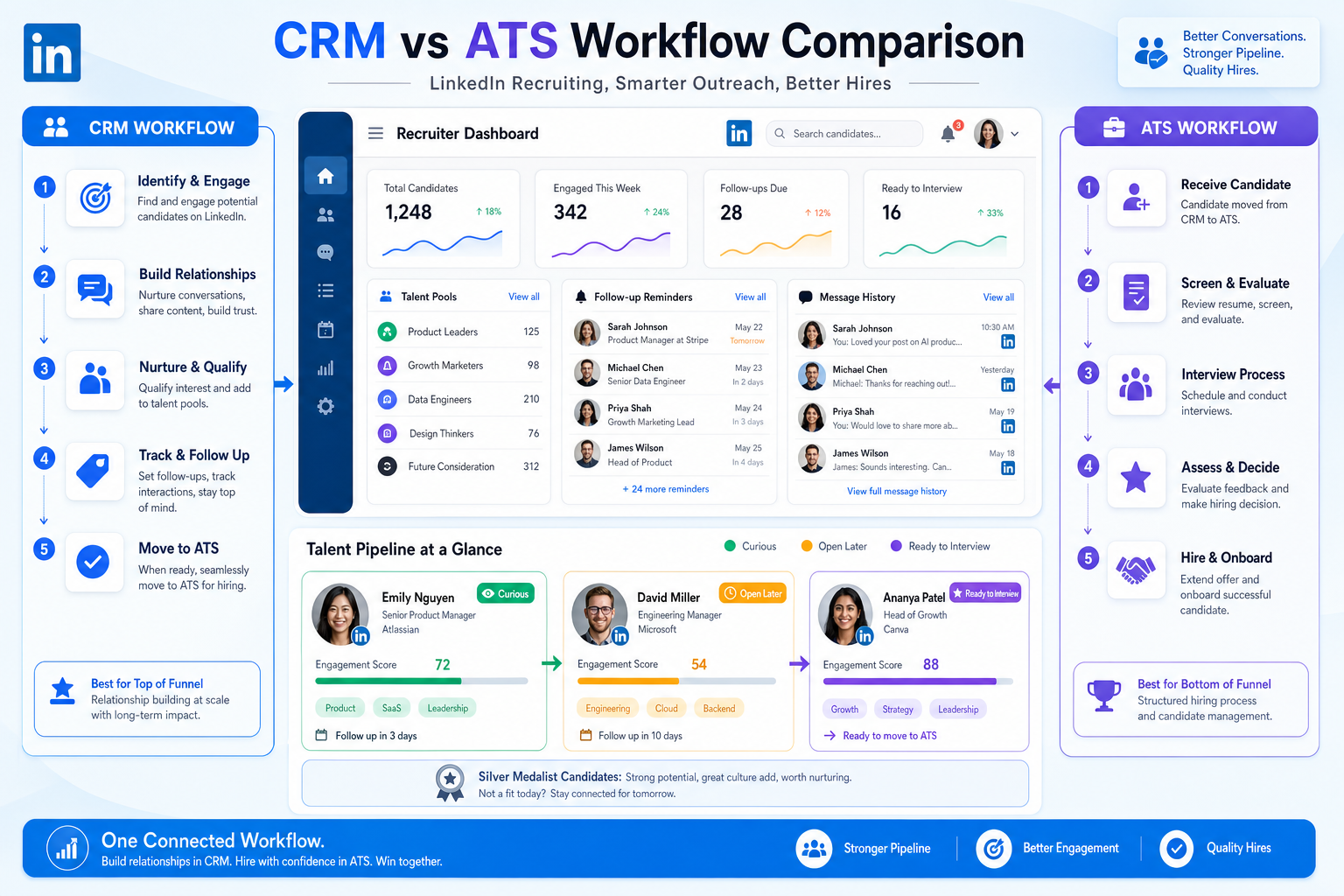
This candidate crm guide helps headhunters judge whether lost follow-ups and silver-medalist drop-off come from CRM gaps or ATS limits.
That distinction matters in daily recruiting because most strong candidates are not sitting in an ATS waiting to be processed. They are employed, selective, and often reasonably satisfied where they are. When a firm lacks a usable relationship system, recruiters lose track of prior outreach, repeat cold approaches, miss after-hours replies, and let solid silver-medalist candidates disappear between searches. For small and midsize search firms, that means wasted sourcing hours, slower shortlist delivery, avoidable reputation damage, and fewer warm conversations when a client needs speed.
In my own workflow, an AI-supported outreach layer helped most when the bottleneck was not finding names but keeping conversations alive consistently. Used carefully, StrategyBrain AI Recruiter can handle repetitive LinkedIn follow-up, keep replying across time zones, and collect resumes or contact details from interested candidates while the recruiter stays responsible for final judgment, CV review, and whether someone should move forward. That kind of support is useful when candidate interest shifts faster than a human desk can manually track.
The practical reason goes back to a familiar recruiting reality. A widely cited LinkedIn Talent Trends 2014 survey of more than 18,000 professionals across 26 countries found that only 27 percent described themselves as very satisfied in their jobs, yet even satisfaction did not equal loyalty because more than half of active candidates still said they were satisfied where they were. At the same time, only 15 percent said they had no interest in discussing new opportunities. In other words, recruiters were never dealing with a simple split between unhappy job seekers and unavailable talent; they were dealing with a large middle group willing to listen if the opportunity and timing made sense.
That listening window creates real desk work. A recruiter sees a previous LinkedIn reply, checks old notes on compensation questions, sends a follow-up tied to a new opening, waits for an evening response, then has to record whether that person is merely curious, open to a call, or ready to share a resume. Without a system built for relationship history and re-engagement, those signals get trapped in inboxes, spreadsheets, and individual memory. The result is not just admin friction; it is weak candidate management in recruitment at the exact moment interest becomes actionable.
That is why the best recruiting software conversation should begin before application stage. If professionals often change jobs for nuanced reasons and many are open to hearing about the right move, then a candidate crm becomes central to how recruiters organize intent, timing, outreach history, and future-fit pools. The rest of this guide looks at how that logic should shape your evaluation of the best candidate relationship management software, how it differs from ATS buying, and what experienced recruiters should actually test before making a shortlist.
Table of Contents
- Why Job-Change Motivation Should Shape Software Choice
- What a Candidate CRM Really Does
- ATS vs CRM: Where the Workflow Actually Breaks
- What to Look for in the Best Candidate Relationship Management Software
- My Workflow Experience Using AI Support With a CRM Motion
- Choosing by Team Type: In-House vs Agency
- A Practical Buying Framework for Best Recruiting Software
- Common Mistakes Recruiters Make When Buying
- FAQ
Why Job-Change Motivation Should Shape Software Choice
When recruiters evaluate software purely around applicant processing, they overlook how career moves actually happen. Good candidates rarely move because of one message alone. They move because the timing changes, the role is more relevant, the compensation or growth path becomes more attractive, or a previous conversation is reactivated at the right moment.
That is the useful lesson from the survey data above. If only a minority of professionals are very satisfied, if many active candidates are still broadly satisfied in their current jobs, and if only a small minority are completely closed to hearing about opportunities, recruiting turns into a relationship discipline rather than a posting discipline.
For software selection, that changes the question from Can this tool track applicants? to Can this tool help my team manage candidate interest over time? That is the more useful lens for the best recruiting software category when your real challenge is keeping future-fit talent warm.
- People may be satisfied and still open to moving.
- Passive candidates often need multiple relevant touchpoints.
- Prior applicants and silver medalists are frequently underused assets.
- Timing signals matter as much as sourcing volume.
- Recruiters need searchable relationship history, not just stage history.
Key insight: The strongest recruiting stack is built around candidate intent and timing, not only requisition control.
What a Candidate CRM Really Does
A candidate crm is the part of the recruiting system designed to help you build, track, segment, and reactivate relationships with prospects before they become applicants or after a specific process ends. In recruiter terms, it is where you preserve context: who replied, what they cared about, when they wanted to revisit, what role family fit them, and how warm the relationship actually is.
This is the practical core of candidate management in recruitment. Instead of restarting every search from scratch, the recruiter keeps a usable network of former applicants, referrals, sourced prospects, event leads, and passive talent that can be searched and re-engaged when demand returns.
A strong recruiting CRM usually supports:
- Talent pools by skill, geography, level, or client/account need
- Tags and segmentation based on interest, timing, industry, or readiness
- Outreach workflows for email, messaging, and follow-up reminders
- Nurture sequences for passive candidates who are not ready today
- History visibility so recruiters do not repeat cold outreach blindly
- Reporting on engagement, source quality, and pool health
The best systems in this category feel less like storage and more like operating memory for the desk.
ATS vs CRM: Where the Workflow Actually Breaks
Most teams shopping for the best recruiting software are comparing tools that solve different problems. An ATS is built to process active applicants through interviews, feedback, approvals, and offers. A CRM is built to maintain and activate relationships before application or between openings.
The distinction matters because the pain point tells you what to buy first. If hiring falls apart after someone applies, fix applicant workflow. If hiring falls apart because recruiters keep rebuilding pipelines and losing candidate intent signals, the missing piece is often CRM capability.
| Question | ATS is stronger when... | Candidate CRM is stronger when... |
|---|---|---|
| Main problem | Applicants are stuck in process | Qualified people are not being re-engaged |
| Timeline | Current requisition | Current and future roles |
| Core activity | Track stages and decisions | Build and nurture talent pools |
| Best for | Compliance, interviews, offers | Outreach, segmentation, passive pipelines |
| Reporting focus | Stage conversion and req progress | Engagement, pool quality, source-to-hire patterns |
In practice, many teams need both. The applicant tracking layer protects process discipline. The CRM layer protects relationship continuity. When software vendors blur the line, ask one blunt question: does this system help recruiters recover warm opportunity conversations months later, or does it mostly help them manage current applicants?
What to Look for in the Best Candidate Relationship Management Software
When comparing the best candidate relationship management software, feature lists often look similar. What separates workable systems from shelfware is whether the tool supports the actual moments that matter in recruiting: the first reply, the delayed follow-up, the candidate who is interested but not available yet, and the silver medalist who should not be lost.
1. Strong re-engagement workflow
If professionals are often open but not ready now, your system should make it easy to revisit them later with context intact. Look for searchable notes, previous conversation history, reminders, and status fields that reflect recruiting reality rather than rigid sales logic.
2. Segmentation that recruiters will actually use
Good candidate management in recruitment depends on usable segmentation. The tool should let recruiters sort by skill set, market, role family, target compensation range, client relevance, and readiness without heavy admin.
3. Messaging and campaign flexibility
The best recruiting software in this area supports scale without making every message sound bulk-generated. Look for personalized email or messaging workflows, templates that can be edited quickly, and simple follow-up sequencing.
4. ATS handoff quality
The ideal handoff is clean: once a passive candidate becomes active, the recruiter should not lose notes, message history, or ownership context. Broken handoffs create duplicate entry and recruiter resistance.
5. Analytics that reflect recruiter questions
Useful reporting includes engagement by pool, re-engagement conversion, source quality, and whether prior applicants are actually being reused. Vanity metrics alone do not help a desk run better.
6. Candidate experience support
A CRM should help your team respond in a timely, respectful way. That means shared visibility, follow-up prompts, and enough history that candidates do not feel they are being approached cold by the same firm twice.
| Feature Area | Why It Matters | What to Test |
|---|---|---|
| Re-engagement tools | Turns past effort into future pipeline | Reminders, notes, searchable history, readiness tracking |
| Segmentation | Makes pools actionable | Tags, filters, saved searches, dynamic lists |
| Messaging | Supports consistent outreach | Personalization, sequencing, channel flexibility |
| ATS handoff | Prevents duplicate work | Sync quality, stage visibility, data continuity |
| Analytics | Improves desk decisions | Pool health, source quality, reactivation results |
| Candidate experience | Protects brand and trust | Response consistency, message history, ownership clarity |
My Workflow Experience Using AI Support With a CRM Motion
I have found that AI support is most useful when it sits inside a clear recruiter-owned process rather than trying to replace recruiter judgment. In searches where LinkedIn outreach volume was high and candidate replies arrived outside normal working hours, AI Recruiter was helpful for repetitive first-touch and follow-up communication, especially when candidates asked basic role questions before deciding whether to send a resume.
What I liked in that setup was simple: the system could keep the conversation moving, respond consistently, and capture contact details or resumes from genuinely interested people while I stayed focused on shortlist quality. That division of labor matters. A recruiter still has to judge fit, review the CV, decide whether motivation is real, and determine whether the person belongs in a current process, a future pool, or nowhere at all.
For teams doing LinkedIn-heavy sourcing, the bigger lesson is not automation for its own sake. It is that a CRM motion works better when no reply gets lost. If a candidate answers after hours, asks about compensation, or says they may reconsider after a quarter-end project, those signals need to be captured cleanly. That is where a combination of relationship software and tools like AI Recruiter conversation workflows can support continuity.
I would still caution against over-automation. If every touchpoint sounds generic, candidate trust drops fast. The win comes when automation handles repetition and the recruiter handles interpretation.
Choosing by Team Type: In-House vs Agency
The right CRM setup depends on who is doing the hiring and how often the same talent patterns repeat.
In-house talent acquisition teams
Internal TA teams usually need stronger integration, governance, and long-term visibility by department, location, and hiring plan. They benefit most when recurring roles create a need to keep interested talent communities warm over time.
- Best fit for repeated hiring by job family
- Useful for employer brand and nurture campaigns
- Needs close ATS alignment and shared visibility
- Values reporting on pipeline readiness, not just req status
Agency and search firms
Agencies depend even more on relationship memory. They need to know which candidate was approached for which client, what objections came up, whether compensation was the blocker, and who may be viable for a similar assignment later. In that environment, candidate management in recruitment lives or dies on search reuse.
- Best fit for desks handling multiple concurrent mandates
- Useful when recruiters revisit the same talent markets often
- Needs fast search, flexible tagging, and ownership clarity
- Benefits from AI-supported follow-up in LinkedIn-heavy workflows
Smaller recruiting teams
Smaller teams should resist buying complexity they will not maintain. If the team mainly needs better recall of prior conversations, lightweight segmentation and clean follow-up may matter more than enterprise dashboards.
A Practical Buying Framework for Best Recruiting Software
If you are building a shortlist for the best recruiting software, score tools against the workflow problem exposed in the opening of this article: good professionals are often open to the right move, but their signals are easy to lose unless the system preserves motivation, timing, and prior context.
- Can it manage candidate interest, not just candidate records?
If the system cannot reflect nuance like curious, open later, compensation-sensitive, or location-bound, it will not support real-world recruiting well.
- Can recruiters find and reuse prior conversations quickly?
A desk should be able to recover past outreach, objections, and readiness without hunting across inboxes and spreadsheets.
- Does it support segmented re-engagement?
If many professionals are willing to discuss opportunities, the software should help you contact the right subset with the right message.
- How well does it hand off to active hiring?
The move from passive prospect to active applicant should be smooth and well documented.
- Will recruiters actually use it every day?
A candidate crm only works when the interface and workflow support recruiter habits rather than fight them.
- Can it work alongside AI-supported sourcing or messaging?
If your desk uses LinkedIn heavily, the system should not break when replies, resumes, and contact details are captured through supported outreach tools.
Simple scorecard
| Criteria | Priority | Question to Ask |
|---|---|---|
| Relationship depth | High | Can we track motivation and timing, not just names? |
| Re-engagement | High | How easily can we reactivate past applicants and sourced prospects? |
| Segmentation | High | Can we create talent pools recruiters will really use? |
| ATS connection | High | Will active-process handoffs stay clean? |
| Messaging support | Medium | Can we communicate at scale without losing relevance? |
| AI workflow compatibility | Medium | Can this fit our LinkedIn outreach and follow-up motion? |
| Reporting | Medium | Will leaders see pipeline health, not just process counts? |
Common Mistakes Recruiters Make When Buying
Confusing candidate volume with candidate readiness
A larger database is not a stronger pipeline. If the system does not preserve motivation and timing, list size becomes a false comfort.
Buying around demos instead of desk behavior
Many tools look polished in a walkthrough but add work in live use. Ask recruiters to test searching old conversations, tagging future-fit talent, and re-engaging past finalists.
Over-prioritizing requisition workflow
That matters, but it will not fix pipeline rebuilding. If your team constantly starts from zero, the gap is upstream.
Ignoring after-hours and cross-time-zone communication
Candidate interest often appears outside the recruiter's working window. If your workflow cannot keep those conversations moving, interest cools before the next manual touch.
Automating without recruiter oversight
Tools can support outreach and admin, but final fit judgment, relationship tone, and shortlist decisions still belong to the recruiter.
FAQ
What does candidate CRM mean in recruiting?
A candidate CRM is software used to build and manage relationships with prospects, prior applicants, referrals, and passive talent over time. It is designed for ongoing engagement, reactivation, and pipeline building rather than only active applicant processing.
How is a candidate CRM different from an ATS?
An ATS manages applicants inside a live hiring process. A candidate CRM manages relationships before application and between openings. Many recruiting teams need both because they solve different workflow problems.
Why does candidate motivation matter when choosing recruiting software?
Because strong candidates are often not actively applying. They may be satisfied in their current role but still open to the right move. Software needs to capture those signals and help recruiters return at the right time.
What features matter most in the best candidate relationship management software?
Look for re-engagement tools, segmentation, messaging workflows, ATS handoff quality, usable analytics, and strong history visibility. The best systems help recruiters act on prior conversations instead of losing them.
Can AI tools help with candidate relationship management?
They can help with repetitive outreach, follow-up, and response continuity, especially in LinkedIn-heavy workflows. But recruiters should still make the final decisions on fit, candidate quality, and next steps.
Do smaller search firms need a candidate CRM?
Often yes, especially if they recruit repeatedly into similar markets. Even a lighter CRM setup can reduce duplicated sourcing and improve reuse of past conversations.
Conclusion
The best recruiting software for relationship-driven hiring starts with an honest view of how professionals change jobs. Many are not desperate to leave, but plenty are willing to listen when the role, timing, and follow-up are right. That makes a candidate crm more than a nice-to-have for teams that rely on passive talent.
If your recruiting pain sits upstream of application, the right buying question is not which tool has the most screens. It is which system best supports real candidate management in recruitment: preserving context, segmenting talent, re-engaging at the right moment, and connecting warm conversations to active hiring without losing history.
That is also the right lens for comparing the best candidate relationship management software. Choose the platform that fits recruiter behavior, protects candidate intent signals, and helps your team turn interest into timely conversations instead of starting every search cold.














