


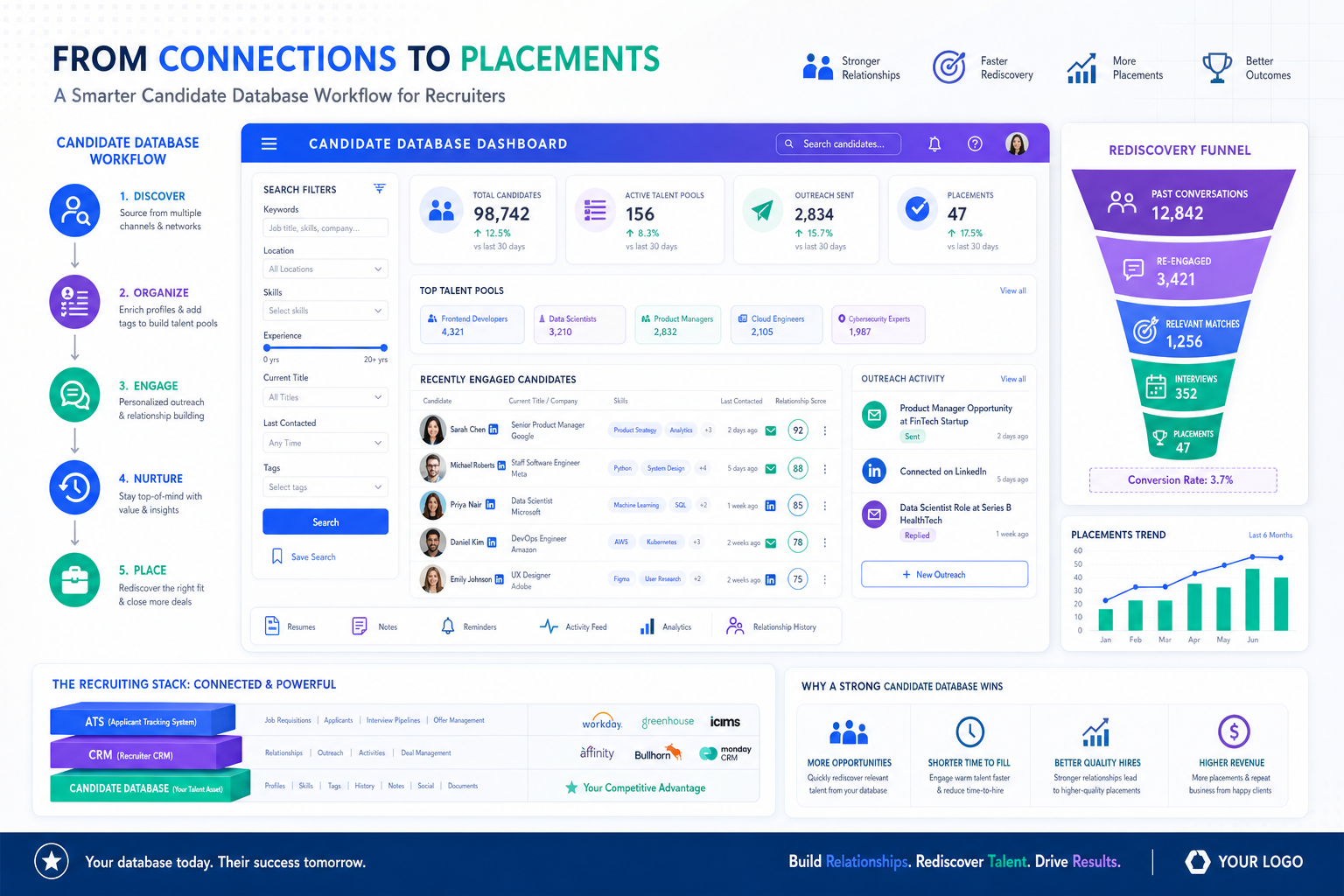
This article shows recruiters how to judge a candidate database for recruiters so past outreach becomes placements, not lost leads.
That matters because many of the strongest candidates are not applying anywhere. They already have jobs, they are only loosely open to change, and they rarely sit in your inbox waiting to be reviewed. When recruiters rely on job ads and scattered notes alone, the cost shows up fast: slower shortlists, duplicated outreach, missed follow-ups, weaker client confidence, and a database full of resumes nobody can rediscover when a similar search lands again.
In my own sourcing workflow, tools that support always-on outreach and response handling can reduce that drag, which is where StrategyBrain AI Recruiter stands out as a practical support layer. I have found it most useful for repetitive LinkedIn outreach, after-hours candidate replies, and collecting resumes or contact details from people who show real interest, while the recruiter still handles final resume review, fit judgment, and interview decisions.
The passive-candidate problem is not theoretical. In real recruiting, the strongest person for a role often already has one, which means the visible market is only the surface layer. A recruiter may start with public resumes, job boards, or LinkedIn profiles, then quickly realize the shortlist is too shallow. The next move is not another job post. It is reaching back into prior conversations, trusted networks, and sector-specific relationships to locate people who were never active applicants in the first place.
That is exactly why buying the best recruiting software is really a search-and-rediscovery decision. If your system cannot support passive sourcing, relationship history, and a usable candidate database for recruiters, then even solid free resume search features or the ability to look at resumes for free will not solve the harder problem: turning surface-level candidate visibility into repeatable placements.
Table of Contents
- What is the best recruiting software?
- Why passive talent changes the software decision
- What to look for in a candidate database for recruiters
- Feature comparison table
- ATS vs recruiting CRM vs candidate database
- How recruiters actually search active and passive resumes
- Where AI-supported outreach helps recruiters
- Free resume search and what free access really means
- Common software selection mistakes
- FAQ
What Is the Best Recruiting Software?
The best recruiting software is usually the platform that combines applicant tracking, recruiting CRM, sourcing support, resume capture, advanced search, and reporting in one workflow. For recruiters, the practical goal is not just storing applicants. It is building a candidate database for recruiters that lets you source, tag, segment, re-engage, and shortlist people without restarting every search from zero.
That answer becomes even more important when you recruit passive candidates. Recruiters who work retained search, specialist staffing, executive search, or hard-to-fill roles know that posting and waiting rarely reaches the strongest market. Software has to support deeper market mapping, not just applicant intake.
Key insight: The best recruiting software is the system that helps recruiters move from visible talent to hidden talent, then back to the right people again when a similar role opens.
Why Passive Talent Changes the Software Decision
A lot of software demos are built around inbound applicants. That is useful, but it is incomplete. In many searches, the best fit is already employed, not actively applying, and only reachable through disciplined sourcing, messaging, referrals, or old relationship history.
That creates a meaningful difference between basic recruiters and more search-driven ones. Some teams still operate in a "post and wait" mode: publish the role, search obvious databases, hope the right person appears. More effective recruiters go further. They use public signals as starting clues, then search networks, past outreach threads, prior finalists, referral paths, and niche market relationships to get beyond the most visible layer of the market.
Software should reflect that reality. If the platform only manages open applications, it helps with administration but not necessarily with actual talent discovery. If it supports passive outreach, segmentation, notes, reminders, and rediscovery, it becomes an actual recruiting engine.
For that reason, I usually advise buyers to ask a simple question early: will this system help recruiters find people who are not currently applying? If the answer is weak, it may still be an acceptable ATS, but it is unlikely to be the best recruiting software for search-heavy teams.
What to Look for in a Candidate Database for Recruiters
When evaluating software, judge the database before the interface. Recruiters live or die by retrieval. A polished screen matters less than whether the system helps you find a nearly perfect passive candidate six months after the first conversation.
1. Resume parsing that creates usable records
A resume database only works if resumes become searchable profiles. Skills, titles, locations, employers, certifications, and contact details should be captured in structured fields. Otherwise, the platform becomes a file cabinet rather than a working candidate database for recruiters.
Test this carefully. If the software stores documents but fails to parse inconsistent formats well, passive candidate rediscovery becomes much harder later.
2. Search that works beyond exact keywords
The strongest systems support Boolean logic, structured filters, and increasingly semantic or natural-language search. That matters because passive candidates are often not labeled exactly the way a requisition is written. Recruiters need flexibility to search title families, adjacent skills, geography, industry, and engagement history together.
This is one place where free resume search claims can be misleading. Free access may let you browse profiles, but if search logic is shallow, it will not help much on specialist roles.
3. Relationship history tied to the profile
For passive talent, history matters. You want to know whether someone replied before, declined because of timing, asked to reconnect later, or was once a final-stage candidate. A strong candidate database for recruiters keeps that context visible inside the candidate record.
Without that history, recruiters repeat the same outreach mistakes, contact people at the wrong time, or fail to pick up promising relationships where they left off.
4. Tags, segmentation, and talent pools
Good software lets recruiters create talent pools such as silver medalists, finance leaders, contract-ready analysts, bilingual sales talent, or regional engineering pipelines. This is where passive sourcing starts to compound over time.
My advice is simple: establish tag discipline early. Loose naming conventions are one of the fastest ways to ruin search quality.
5. Outreach support without giving up recruiter judgment
Search-heavy recruiters need software that can support outreach, reminders, sequencing, and response capture. In some teams, that includes AI-supported messaging workflows. I have personally found StrategyBrain AI Recruiter useful when the task is repetitive LinkedIn outreach at scale, especially when candidate replies come in after hours or across time zones. It can keep early conversations moving, answer common role questions, and gather resumes from interested people, while I still decide who is actually worth advancing.
6. Reporting that shows whether sourcing is compounding
Database quality is not just about volume. Look for reporting on source mix, response trends, recruiter activity, rediscovery rates, and re-engagement results. If a platform cannot tell you whether old talent is being reused effectively, it is hard to judge whether the system is helping your team or just centralizing information.
Feature Comparison Table for Best Recruiting Software
Use the table below as a practical buying framework.
| Evaluation Area | What Good Looks Like | Why It Matters for Passive Search |
|---|---|---|
| Candidate database | Structured profiles, parsing, duplicate control | Turns resumes into reusable talent records |
| Advanced search | Boolean, semantic search, multi-filter search | Finds adjacent and previously contacted talent faster |
| Recruiting CRM | Notes, reminders, nurture history, segmentation | Keeps passive-candidate relationships usable over time |
| Sourcing support | Profile capture, browser tools, outreach integration | Helps recruiters move from surface market to deeper market |
| Pipeline management | Custom stages, collaboration, tasks | Prevents sourced talent from falling out of process |
| AI-supported outreach | Message handling, qualification support, resume capture | Reduces repetitive sourcing admin while preserving recruiter review |
| Analytics | Source quality, re-engagement, conversion visibility | Shows whether passive sourcing is paying off |
| Integrations | Email, calendar, job boards, sourcing channels | Prevents context loss across recruiter workflows |
| Free access model | Clear limits on searches and profile views | Avoids confusion around free resume search offers |
If you are comparing systems side by side, weight search quality, CRM depth, and data retrieval more heavily than cosmetic workflow features.
ATS vs Recruiting CRM vs Candidate Database
These terms often blur together, but they solve different recruiting problems.
Applicant tracking system
An ATS manages active hiring workflows: applied, screened, interviewed, offered, hired. It is useful for process control and stakeholder visibility.
Recruiting CRM
A recruiting CRM supports relationship-building before and beyond an active application. That is especially important for passive candidates, former finalists, referrals, and long-cycle specialist searches.
Candidate database for recruiters
A candidate database for recruiters is the searchable foundation under both. It is where resumes, parsed fields, notes, segments, outreach history, and search filters come together. If that foundation is weak, both ATS and CRM performance suffer.
A practical test: if your team often says, "We know we spoke to someone like this before, but we cannot find them," the real issue is usually database design, search quality, or data discipline.
How Recruiters Actually Search Active and Passive Resumes
Recruiters do not simply read every resume that exists in the system. They search, refine, revisit, and compare. For passive hiring, that process usually looks like this:
- Start with the visible market. Review current applicants, obvious public profiles, and active database matches.
- Expand into adjacent profiles. Search title variations, transferable skills, and nearby sectors.
- Check relationship history. Review who replied before, who asked for future contact, and who reached final stages in past searches.
- Use segment-based narrowing. Search within talent pools, not just across the entire database.
- Re-engage selectively. Prioritize people based on relevance, timing, and prior interaction quality.
This workflow explains why many teams misunderstand what it means to look at resumes for free. Seeing resumes is easy. Searching the right population with the right context is the real work.
Where AI-Supported Outreach Helps Recruiters
Recruiters who source passive talent often spend a surprising amount of time on repetitive communication rather than judgment-heavy work. That includes sending first messages, following up across time zones, replying to routine questions, and collecting contact details or resumes from interested people.
That is the part of the workflow where I have seen StrategyBrain AI Recruiter fit naturally. In practice, I treat it as a support layer for LinkedIn-heavy sourcing rather than a replacement for recruiting judgment. It can keep introductions moving, communicate outside normal office hours, and capture interested-candidate resumes, but I still review the profile, assess the actual match, and decide whether the person belongs in the shortlist.
For search firms and independent headhunters, that can be particularly useful when the market is global or response timing matters. For internal recruiters, it can help prevent warm leads from going cold just because replies arrive after the workday ends. The point is not to automate hiring decisions. The point is to reduce manual friction so the recruiter can spend more time on calibration, submission quality, and candidate evaluation.
If your workflow depends heavily on LinkedIn sourcing, it is worth reviewing the LinkedIn recruiting workflow notes here and the main AI Recruiter overview to see whether that support layer fits your process.
Free Resume Search and What Free Access Really Means
This area creates a lot of confusion. Yes, versions of free resume search exist, but not all free access models are equally useful.
Common free-access models
- Free trial: temporary access to core features
- Freemium plan: permanent but limited access
- Limited profile views: only a certain number of resumes can be opened
- Surface-level sourcing: basic discovery without deeper CRM or ATS functionality
If your goal is simply to look at resumes for free, a basic option may be enough for evaluation. If your goal is to build a recruiting process, it usually is not. Recruiters need to search, save, tag, message, revisit, and report on talent. Free viewing alone does not create a usable recruiting system.
Before relying on a free model, ask:
- How many searches are included?
- How many resume views are allowed?
- Can recruiters tag and segment candidates?
- Is parsing included?
- Can outreach history be stored?
- Can data be exported later?
Common Software Selection Mistakes
Choosing for applicant intake instead of talent rediscovery
If you only evaluate how candidates apply, you may miss the real leverage point: can recruiters find good people again later?
Ignoring passive-candidate workflow
If a large share of your placements come from sourced candidates, prior finalists, referrals, or relationship networks, your software should reflect that. Otherwise the system supports admin work better than recruiting work.
Overestimating AI
AI can support outreach, response handling, and early data collection. It should not replace recruiter judgment, hiring-manager calibration, or actual resume evaluation.
Confusing free access with operational usefulness
Being able to look at resumes for free may help you test a market, but it does not mean your team can build a repeatable workflow from that access alone.
FAQ
What is a candidate database for recruiters?
A candidate database for recruiters is a searchable collection of resumes, parsed candidate profiles, notes, tags, engagement history, and segments that helps recruiters rediscover and organize talent over time.
Why does passive hiring matter when choosing recruiting software?
Because many strong candidates are not active applicants. If your software only supports inbound applications, it may not help enough with sourcing, relationship management, or re-engagement.
Do free resume search tools really exist?
Yes, but they vary widely. Some are trials, some are capped freemium plans, and some only allow limited profile views. Always check the actual search and workflow limits.
Can I look at resumes for free and still run a serious recruiting process?
You can explore that way, but a serious process usually needs more than free viewing. Parsing, tagging, segmentation, outreach history, and pipeline tracking are what make the workflow usable.
What is the difference between an ATS and a recruiting CRM?
An ATS manages active applicants in open roles. A recruiting CRM helps build and maintain relationships with passive candidates, former applicants, and future-fit talent.
Where does AI-supported outreach fit into recruiting?
It fits best in repetitive communication tasks such as first outreach, follow-up, after-hours replies, and collecting resumes or contact details from interested candidates. Recruiters should still make final fit decisions.
Conclusion
The best recruiting software is not just where applications land. It is the system that helps recruiters move beyond the visible market, build a dependable candidate database for recruiters, and return to the right passive talent when timing changes.
If you are evaluating options, test the software the way recruiters actually work. Search for past candidates, check whether relationship history is usable, see how easy it is to re-engage passive talent, and verify what free resume search really includes before assuming you can look at resumes for free at meaningful scale. That is where the strongest systems separate themselves from basic applicant storage tools.















