


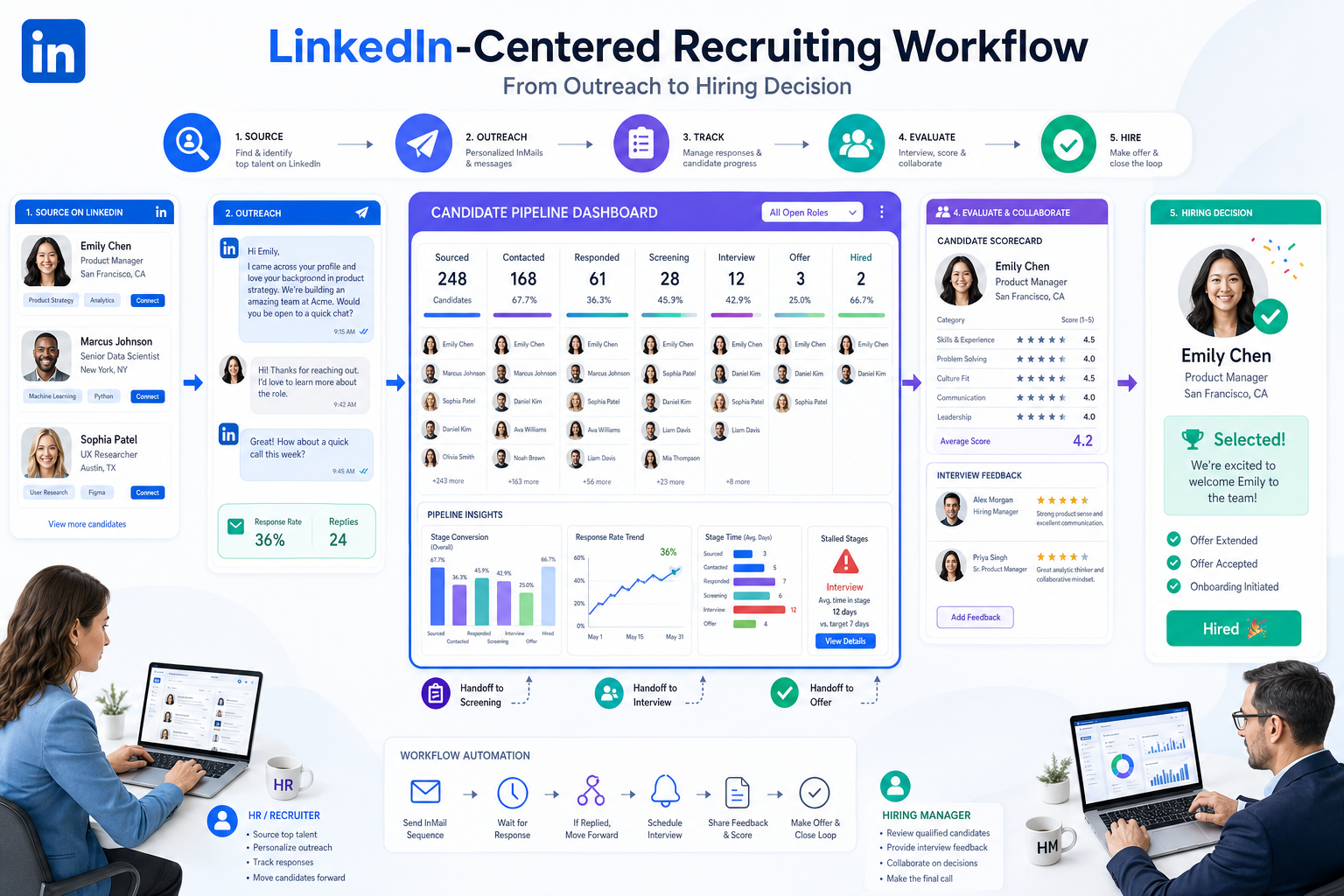
When urgent hiring starts stalling, this article helps HR leaders evaluate a candidate tracking tool that prevents missed candidates and handoff loss.
That alignment breaks down faster than most teams expect. A recruiter may know where the strongest passive prospects came from, an HR lead may know which roles are business-critical, and a hiring manager may know what success looks like in the seat, yet the search still stalls because outreach sits in one place, applicant reviews in another, and feedback arrives late or not at all. The cost is not only time. It shows up in missed candidates, slower decisions, awkward candidate follow-up, and a hiring process that feels less credible than the company intends.
In that gap between outreach and decision, I have found that AI Recruiter can help with the front end of the workflow, especially when a team is doing repeated LinkedIn outreach, handling after-hours replies, or trying to keep conversations moving across time zones. Its automated outreach, multilingual candidate messaging, and résumé collection reduce repetitive handoffs, while the recruiter still owns the final judgment on fit, résumé review, and whether a candidate should move forward.
That matters because recruitment is not a single action. It usually starts with a business need, then moves through sourcing, headhunting, outreach, response tracking, and evaluation. In the reference framework behind this article, the distinction is important: sourcing identifies people, headhunting engages them directly, and talent acquisition connects those efforts to long-term workforce goals. In real hiring, those are not abstract definitions. They are consecutive tasks, often handled by different people, with different expectations and different risks when information does not carry forward.
Once a team has to post the role, search for passive talent, track who replied, decide whether internal or external support is needed, and keep the process tied to business priorities, the software question becomes clearer. The best recruiting software is not just a place to store applicants. It is the system that connects candidate outreach with structured decision-making, which is why a strong candidate tracking tool, an applicant tracking system for small companies, and practical ats systems for small business all belong in the same buying conversation.
Practical takeaway: Small teams usually do best with recruiting software that supports the full chain from sourcing visibility and candidate communication to interview feedback and final hiring decisions, without forcing enterprise-level setup.
- Why recruiting software must support the full recruitment chain
- What a candidate tracking tool should actually do
- When a small company needs an ATS instead of spreadsheets
- How to evaluate the best recruiting software
- Best-fit software by hiring workflow
- Feature checklist for small recruiting teams
- Standalone ATS vs broader HR platform
- Implementation advice from a recruiter workflow perspective
- Common buying mistakes
- FAQ
Why Recruiting Software Must Support the Full Recruitment Chain
One of the most useful reminders from experienced recruiting operators is that hiring does not begin when an application lands in the inbox. It begins earlier, when the company clarifies what role it needs, whether the search should rely on inbound applicants or direct outreach, and how urgent or specialized the hire really is.
That is why software selection often goes wrong. Buyers compare tools as if recruiting were only about applicant storage, when the real workflow often includes five connected decisions:
- Defining the hiring need in business terms, not just a job title.
- Sourcing talent through databases, networks, referrals, or research.
- Headhunting passive candidates for roles that job ads will not fill well.
- Tracking conversations and applications in one visible process.
- Making structured hiring decisions based on timely feedback.
For a lean recruiting team, the best recruiting software supports this chain rather than only one segment of it. If your front-end outreach happens in isolated tools and your evaluation process lives elsewhere, the handoff problem becomes the real bottleneck.
That is also where I have seen StrategyBrain AI Recruiter fit best: not as a replacement for ATS discipline, but as a way to keep top-of-funnel LinkedIn activity from collapsing under manual repetition. In practice, it helps when recruiters need to start conversations, answer basic candidate questions, collect résumés, and keep communication active outside normal working hours before those prospects are moved into a structured review process.
What a Candidate Tracking Tool Should Actually Do
A candidate tracking tool is the operating system for hiring workflow. In most small and midsize environments, that means an ATS, even if the team still uses more informal language to describe it.
At a minimum, a good system should connect four realities of modern recruitment:
- Applicants and passive prospects are both part of the funnel.
- Recruiters, hiring managers, and executives need different views of the same search.
- Communication history matters as much as résumé storage.
- Speed without process discipline creates avoidable errors.
In other words, the value of a candidate tracking tool is not just recordkeeping. It is workflow continuity. If a recruiter reaches out to a passive candidate, receives interest, collects a résumé, and then loses context when the person enters the formal process, the team has broken the chain that recruiting software is supposed to protect.
That is why the seed phrase matters here. A candidate tracking tool should not only track candidates after they apply. It should preserve context from first contact to final disposition, especially when the search includes headhunting or direct sourcing.
When a Small Company Needs an ATS Instead of Spreadsheets
Small companies often delay ATS adoption because spreadsheets feel flexible and cheap. The problem is that spreadsheets handle records better than they handle recruiting motion. Once a team is posting jobs, sourcing passive candidates, coordinating interviews, and collecting hiring-manager feedback, a spreadsheet becomes a lagging summary of work happening elsewhere.
An applicant tracking system for small companies becomes worth considering when any of these conditions are true:
- You are hiring for more than one department at the same time.
- You rely on both job postings and direct outreach.
- More than two interviewers participate in the process.
- Candidate updates regularly fall behind reality.
- Hiring managers need reminders, scorecards, or structured visibility.
These are the real reasons teams buy ats systems for small business. It is usually less about advanced analytics and more about preventing process leakage.
From a recruiter’s perspective, the shift often happens when passive candidate work becomes harder to manage manually. I have used AI Recruiter to keep LinkedIn conversations active and to gather candidate materials more consistently, but that only works well when there is also a reliable ATS behind it. Otherwise, you simply move the chaos forward faster.
How to Evaluate the Best Recruiting Software
The phrase best recruiting software only becomes useful when you attach it to hiring context. In my experience, small teams should judge options through five lenses that mirror the real recruiting chain.
1. Can it support both inbound and outbound recruiting?
If your hires depend partly on direct outreach, not just applications, make sure the system can preserve source data, communication history, and stage movement clearly. This is especially important in specialized hiring where headhunting plays a real role.
2. Does it match your real level of process maturity?
A growing team may need structure without complexity. The best applicant tracking system for small companies should add consistency without creating an admin project no one has time to run.
3. Is it usable for hiring managers, not just recruiters?
This is where many tools look good in demos and fail in practice. Managers must be able to review profiles, submit feedback, and understand next steps without training fatigue.
4. Will it reduce handoff loss?
Recruiting often fails between stages rather than inside them. Check whether the system keeps together outreach notes, résumé review, scheduling status, scorecards, and final decisions.
5. Can it scale with your search mix?
A team doing mostly posted jobs needs different support from a team doing frequent sourcing and headhunting. Evaluate based on the search types you actually run, not the generic company size label.
If you want a simple evaluation model, ask this question during demos: Can this system hold the full story of a hire, from first market contact to accepted offer, without making users jump between disconnected tools?
Best-Fit Software by Hiring Workflow
Instead of naming a universal winner, it is more useful to match software style to recruiting workflow.
| Hiring workflow | Best-fit software profile | What to avoid |
|---|---|---|
| Occasional hiring from posted jobs | Lightweight ATS with clear stages, basic posting, simple feedback collection | Heavy configuration and enterprise workflow layers |
| Repeat hiring across several departments | ATS with stronger reporting, role templates, scorecards, and scheduling support | Tools that become messy once multiple managers join |
| Searches that depend on passive candidates | System that preserves source, outreach context, and recruiter notes well | Applicant-only tools with weak prospect handling |
| Lean teams using LinkedIn heavily | ATS plus outreach support to keep messaging and résumé collection moving | Manual workflows that rely on inbox memory |
| Companies choosing internal vs external support by role | Software with visibility across priority, ownership, and stage status | Tools that hide accountability across stakeholders |
This framework comes directly from how recruitment strategy actually works. Different searches require different methods. Software should help you shift between them without losing discipline.
Feature Checklist for Small Recruiting Teams
For most buyers evaluating ats systems for small business, these are the features that matter most.
| Feature | Why it matters operationally | Who benefits most |
|---|---|---|
| Job posting | Keeps openings visible and reduces duplicate admin work | Recruiters, HR |
| Pipeline visibility | Shows where applicants and prospects are stuck | Recruiters, hiring managers |
| Candidate timelines | Preserves context from outreach to decision | Recruiters, HR |
| Communication tracking | Prevents missed follow-up and inconsistent candidate experience | Recruiters |
| Interview scheduling support | Reduces avoidable delays between stages | Recruiters, coordinators |
| Scorecards | Makes evaluation more consistent and comparable | Hiring managers, interviewers |
| Interview kits | Improves quality of interviewer preparation | Managers, panelists |
| Automation | Handles reminders, stage updates, and repetitive process steps | Recruiters, HR |
| Reporting | Supports process review and hiring accountability | HR leaders, recruiters |
| Integrations | Connects email, calendar, and downstream HR tools | Everyone |
If your workflow includes regular LinkedIn sourcing, I would also separate two questions that buyers often blend together: who should manage first-contact volume, and where should final process control live? My view is that an ATS should remain the source of truth, while outreach-heavy work can be supported by specialized tools like AI Recruiter when the team needs around-the-clock replies, multilingual conversations, and more consistent résumé capture. That setup is useful because it preserves recruiter judgment instead of pretending software should decide fit on its own.
Standalone ATS vs Broader HR Platform
This decision usually comes down to the size of the operational problem.
Choose a standalone ATS when:
- Your immediate pain is applicant and candidate process control.
- You need to improve recruiting faster than the rest of the HR stack.
- Your team wants simple implementation and clearer adoption.
- You already have acceptable systems for onboarding or employee records.
Choose a broader HR platform when:
- You are replacing multiple HR systems at once.
- Recruiting and onboarding need tight continuity.
- Your team has the bandwidth for a broader rollout.
- You want one operating layer across people operations.
For many small employers, the right first move is still a focused candidate tracking tool. The recruitment strategy lesson is straightforward: solve the most urgent workflow problem first, then expand the stack when the process is mature enough to benefit from it.
Implementation Advice From a Recruiter Workflow Perspective
Software launches fail less because of missing features than because the team never agrees on the operating model. Before implementation, define the following:
- What kinds of searches you actually run — posted roles, sourced roles, confidential searches, or a mix.
- Who owns each handoff — recruiter, hiring manager, coordinator, or HR lead.
- What information must follow the candidate — source, outreach history, résumé, notes, scorecards, and decision rationale.
- What response-time standards matter — candidate follow-up, manager feedback, stage movement.
- Which metrics are operationally useful — not every report is worth building on day one.
My advice is to launch with one clean workflow and a small number of required fields. Then refine based on real usage. A simple system that recruiters and managers actually use will outperform a sophisticated setup abandoned after training.
Where outreach volume is a real issue, I have seen good results from pairing a lean ATS rollout with AI Recruiter conversation workflows for early candidate engagement. The practical benefit is that initial LinkedIn communication stays active while the human recruiter focuses on qualification, stakeholder alignment, and offer-stage judgment.
Common Mistakes When Buying Recruiting Software
Confusing recruitment strategy with software features
If your team has not decided when to rely on job ads, sourcing, or direct headhunting, no feature list will fix the confusion. Strategy has to come first.
Buying for hypothetical future scale
Many teams overbuy. The best recruiting software for a small team is often the one that fits current search complexity with room for moderate growth, not enterprise theater.
Ignoring passive-candidate workflow
If hard-to-fill roles are part of your reality, software must support more than applicants. It must also hold the record of sourcing, outreach, and recruiter contact history.
Making recruiter usability the only test
Managers are part of the system, whether the team likes it or not. Weak manager adoption is one of the fastest ways to lose process integrity.
Expecting automation to replace judgment
Automation can reduce repetitive work. It should not be treated as a substitute for recruiter evaluation, hiring-manager calibration, or decision quality.
FAQ
Is a candidate tracking tool the same as an ATS?
Usually yes. In most business hiring contexts, a candidate tracking tool refers to an applicant tracking system that manages candidate records, stages, communication, and hiring workflow.
What is the best applicant tracking system for small companies?
The best option depends on whether your process is mostly inbound, heavily sourcing-based, or a mix of both. Most small teams should prioritize ease of use, clear stage management, communication tracking, scorecards, and low admin overhead.
Are ats systems for small business worth it?
Yes, once hiring involves recurring roles, several stakeholders, or regular direct outreach. The value usually comes from better visibility, cleaner handoffs, and fewer dropped candidates.
How does sourcing differ from headhunting in recruiting workflow?
Sourcing is the research step that identifies potential candidates. Headhunting is the direct outreach step that engages them, often privately and often for harder-to-fill roles.
Should a small team combine outreach automation with an ATS?
Often yes, if the team does meaningful outbound recruiting. The ATS should remain the source of truth for process control, while outreach support can help reduce repetitive front-end work and keep candidate communication moving.
Conclusion
The best recruiting software is the system that supports how recruitment actually happens: defining need, finding talent, engaging prospects, tracking movement, and making better hiring decisions. For most small teams, that means choosing a reliable candidate tracking tool that can function as an applicant tracking system for small companies without bringing unnecessary complexity.
If you are comparing ats systems for small business, do not ask only which tool has the most features. Ask which one protects the full recruiting chain with the least friction. That question usually leads to a better choice than any generic best-of list.















