


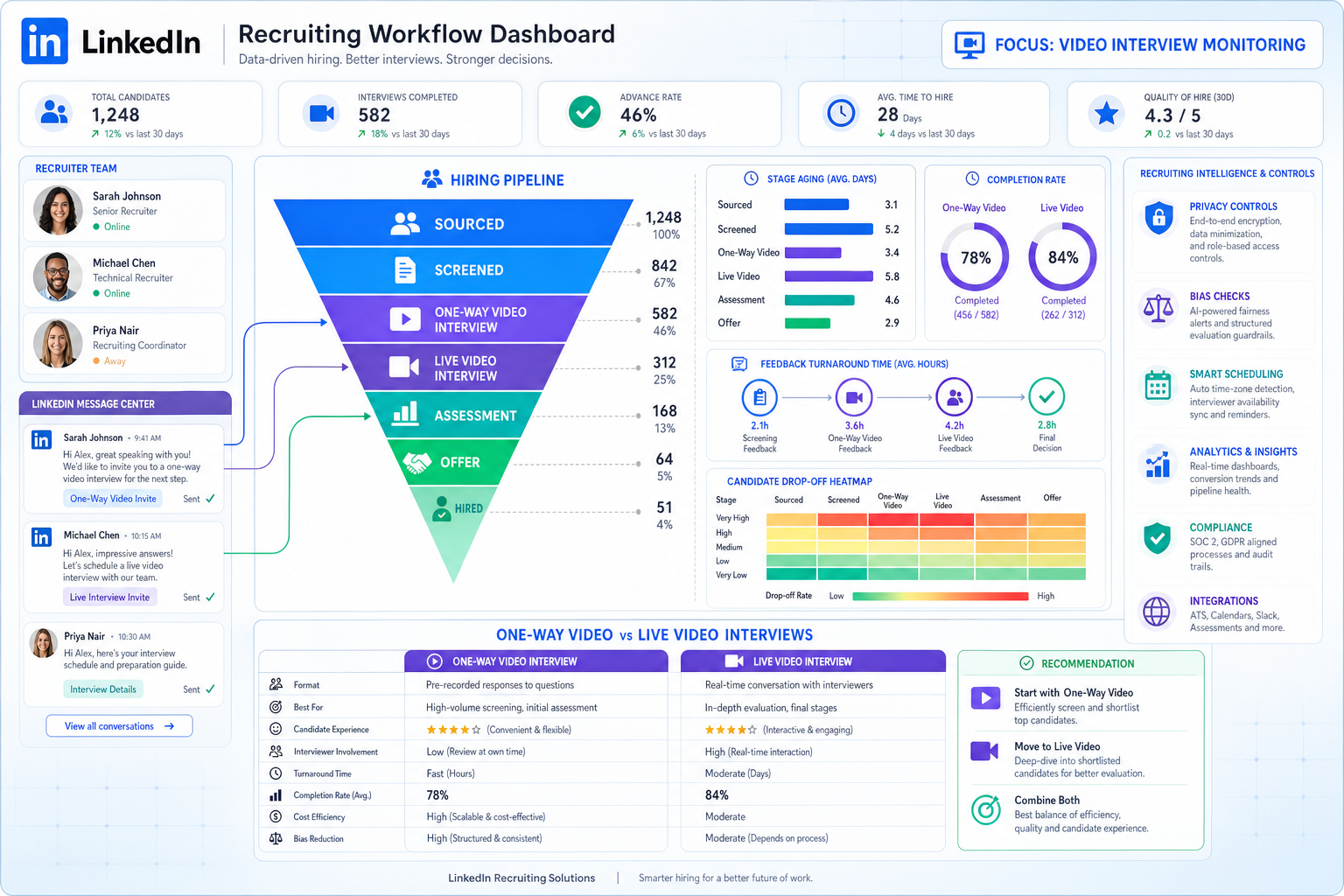
Use this recruitment monitoring guide to spot video-interview bottlenecks, compare software honestly, and avoid blind hiring delays.
That difference matters more than most buying teams expect. When recruiter activity, candidate communication, interview scheduling, and stage movement live in separate tools, the damage shows up quickly: slower follow-up, weak handoffs to hiring managers, poor visibility into where candidates drop out, and more subjective decision-making in moments that already carry risk. For a solo recruiter, that means missed momentum. For a small agency owner, it means lower desk productivity and harder coaching. For an in-house hiring lead, it means extra time explaining delays that the team cannot actually see in the data.
In my own workflow, I have found that StrategyBrain AI Recruiter is most useful when the problem starts with communication gaps rather than final selection. Its always-on candidate messaging, multilingual follow-up, and automated collection of resumes and contact details can keep early-stage outreach and response handling from stalling. That helps create cleaner records for recruitment monitoring, while the recruiter still owns the final resume review, judgment call, and next interview decision.
A good example is video interviewing, where speed and reach are obvious, but the process can become less trustworthy if the underlying workflow is messy. Over the last decade, video interviews split into two practical models: one-way recorded answers to standardized questions and live remote conversations. Both save travel and widen access to talent, especially for out-of-town candidates, but both also create a new operational burden. Someone still has to track who completed a recording, who needs a live follow-up, how feedback is captured, and whether the process is helping the team assess fit rather than just filtering people faster.
The tension is not only about convenience versus candidate experience. Video interviews also raise familiar recruiting concerns around depersonalization, privacy, and bias tied to visible characteristics. In a live search, that means recruiters may review a recording, chase hiring manager feedback, compare it with a later video call, and then justify why a candidate should advance despite uneven reactions from stakeholders. When software cannot monitor those steps clearly, the team does not just lose time; it loses defensible process quality. That is exactly why the best recruiting software should be judged by how well it supports recruitment monitoring, reliable recruitment metrics, and usable recruitment metrics examples inside the actual hiring workflow.
- The best recruiting software is not just an applicant database; it should make recruitment monitoring usable day to day.
- Video interviewing is a strong test case for software evaluation because it exposes coordination, bias, privacy, and feedback-tracking problems quickly.
- The most useful dashboards show both workflow activity and outcomes, including stage aging, time to hire, source of hire, offer acceptance, and candidate drop-off.
- Automation can reduce response delays and admin load, but recruiters still need to own final evaluation and fairness checks.
Table of Contents
- Why recruitment monitoring matters more than feature lists
- Why video interviewing is a real software stress test
- What the best recruiting software should include
- Best recruiting software by hiring environment
- Which recruitment metrics matter most?
- Recruitment metrics examples every dashboard should show
- How to choose recruiting software without overbuying
- Common mistakes when buying recruiting software
- FAQ
Why recruitment monitoring matters more than feature lists
If you are evaluating the best recruiting software, it helps to start with a simple question: can your team see what is happening while the process is still in motion? That is the core of recruitment monitoring. It is the practice of tracking recruiting activity, pipeline movement, feedback flow, and hiring outcomes in a way that supports action now, not just reporting later.
Recruiters often discover the gap when a process gets more complex than a standard application review. Video screening, multi-step interview loops, cross-border hiring, and high-volume sourcing all create more data points and more room for inconsistency. If the system records candidates but does not help the team monitor stage transitions, delays, and decision quality, it becomes a storage tool rather than an operating system.
That is where the practical value of a strong applicant tracking setup shows up. Structured candidate records, activity logs, shared feedback, and repeatable reporting are not glamorous features, but they are what make recruiting more coachable and more defensible.
Why video interviewing is a real software stress test
Video interviewing is one of the clearest ways to test whether software actually supports recruiting operations. Its adoption rose sharply in the early 2010s, and the format has remained common ever since, especially in distributed hiring. In practice, teams tend to use one of two models: recorded responses to standard questions or live remote interviews. Both can reduce travel burdens and expand geographic reach, but both also put pressure on workflow discipline.
In a clean process, a recruiter can invite the candidate, track completion status, schedule the next step, collect interviewer feedback, and compare outcomes across roles or locations. In a weak process, those actions get split across calendars, email threads, separate notes, and ad hoc spreadsheets. That is when subjective impressions become harder to challenge and candidate experience becomes harder to protect.
The reference point here is useful because it highlights both sides of the tradeoff. Video can improve speed and access. It can also make candidates feel unknown if the process becomes overly transactional, especially with one-way interviews. And because video exposes visible characteristics immediately, privacy and bias concerns need active governance rather than generic policy statements.
For software buyers, the lesson is practical: if a platform claims strong analytics, test it against a video-interview workflow. Ask whether the system can show completion rates, stage aging after recorded interviews, feedback turnaround time, and conversion from video screen to live interview or offer. If it cannot, your team will struggle to trust the data behind hiring decisions.
What the best recruiting software should include
Most teams expect the best recruiting software to include applicant tracking, interview coordination, collaboration, and reporting. That baseline is fair, but it is not enough. The better comparison asks whether each capability improves recruitment monitoring.
| Capability | What it does | Why it matters for recruitment monitoring |
|---|---|---|
| Applicant tracking | Organizes candidates by role, stage, and status | Creates consistent process data for pipeline visibility |
| Interview workflow support | Handles scheduling, reminders, and interviewer coordination | Reduces silent delays between screening and decision stages |
| Video interview tracking | Tracks recorded and live interview completion | Helps teams compare outcomes and follow-up speed |
| Automation | Supports repetitive communication and admin tasks | Improves response times and data consistency |
| Analytics dashboards | Displays recruiter, pipeline, and hiring trend data | Turns activity into usable recruitment metrics |
| Reporting tools | Builds recurring and ad hoc reports | Lets leaders review outcomes without rebuilding spreadsheets |
| Collaboration features | Centralizes feedback and approvals | Makes bottlenecks visible instead of anecdotal |
| Privacy and access controls | Limits who sees sensitive candidate information | Supports more responsible handling of recordings and notes |
In day-to-day recruiting, I also see value in using StrategyBrain AI Recruiter alongside a structured ATS workflow when the top of funnel is message-heavy. It can keep candidate conversations moving across time zones, answer routine role questions, and collect resumes before interest cools off. What I like operationally is not the automation by itself, but the fact that it reduces the manual backlog that often distorts recruitment monitoring at the earliest stages.
Best recruiting software by hiring environment
Search intent around best recruiting software usually mixes education with vendor evaluation, so a useful article should separate tools by use case rather than pretend one setup fits everyone.
1. Small teams that need structure quickly
Smaller teams usually need simple workflows, fast adoption, and dashboards that answer obvious questions. The most valuable recruitment metrics here are often time to hire, source of hire, and candidate drop-off. If reporting is too complex, it will not be used.
2. High-volume hiring teams
Volume hiring creates more scheduling pressure, more screening steps, and more demand for automation. This is where video interviewing often becomes attractive, and where weak monitoring causes real damage. Teams need to see where completion rates fall, where feedback lags, and whether the process is screening effectively or just creating more admin work.
3. Agency and search workflows
Agency recruiters need stronger visibility into submissions, client feedback cycles, recruiter activity, and placement conversion. Standardized reporting matters because two recruiters can look equally busy while producing very different outcomes. Monitoring has to connect activity with results.
4. Enterprise hiring with governance requirements
Larger organizations need segmented reporting, role-based permissions, stronger audit trails, and more careful control over candidate data. Video interviewing makes these needs easier to see because stored recordings, evaluation notes, and multi-stakeholder decisions require better oversight than email-based hiring ever did.
Which recruitment metrics matter most?
Not every team should track every possible KPI. Good recruitment monitoring starts by choosing metrics that support actual decisions. The strongest software helps define those metrics clearly and display them inside the workflow.
Key insight: A recruiting dashboard is only useful if it helps someone change behavior before the requisition gets older and the candidate loses interest.
These recruitment metrics matter in most software evaluations:
- Time to hire: How quickly a candidate moves from entry to accepted offer or decision.
- Time to fill: How long a role stays open.
- Source of hire: Which channels produce hires, not just applications.
- Offer acceptance rate: How often strong finalists actually say yes.
- Candidate drop-off: Where applicants disengage.
- Interview-to-offer ratio: Whether interviews are calibrated well.
- Stage aging: How long candidates sit at each point in the funnel.
- Feedback turnaround time: How quickly interviewers complete evaluations.
- Quality of hire: A longer-term measure tied to post-hire performance and retention.
Video workflows make stage aging and feedback turnaround especially important. A candidate who completes a recorded interview and hears nothing for days will often assume the company is disorganized or uninterested. That is both a process issue and a brand issue.
Recruitment metrics examples every dashboard should show
When teams ask for recruitment metrics examples, they usually need more than a KPI glossary. They need examples that connect numbers to recruiting action.
| Recruitment metric | What it tells you | How recruiters should use it |
|---|---|---|
| Time to hire | How fast candidates move to decision | Spot delays in screening, scheduling, or approvals |
| Time to fill | How long roles stay open | Set hiring expectations and workload priorities |
| Source of hire | Which channels deliver hires | Shift attention away from low-yield sources |
| Offer acceptance rate | How often offers are accepted | Check process speed, market alignment, and candidate engagement |
| Candidate drop-off | Where candidates leave the process | Reduce friction in applications, scheduling, or assessments |
| Interview-to-offer ratio | How efficient interviews are | Calibrate screening and interviewer alignment |
| Recorded interview completion rate | How many invited candidates finish the task | Evaluate whether the video step is creating avoidable friction |
| Feedback turnaround time | How fast interview feedback is submitted | Coach hiring managers and reduce pipeline stalls |
| Stage aging after video screen | How long candidates wait after the video step | Prevent promising candidates from going cold |
In practice, definitions matter as much as the dashboard itself. If one recruiter starts time to hire from first outreach and another starts from application date, comparisons become unreliable. That is why software selection should include metric governance, not just chart design.
How to choose recruiting software without overbuying
Choosing the right platform is less about chasing the longest feature list and more about matching software to your actual operating model.
- Map your real workflow first. Include sourcing, screening, video interviews, stakeholder feedback, and offer steps. If the workflow is not visible on paper, the software demo will be too easy to manipulate.
- Define your must-have dashboards before any demo. If recruitment monitoring matters, ask to see recruiter activity, pipeline stage aging, feedback turnaround, and source reporting by role.
- Test a video-interview scenario. This quickly reveals whether the platform handles candidate communications, completion tracking, feedback capture, and privacy controls well.
- Review collaboration behavior. Great recruiting software fails in practice if hiring managers still work outside the system.
- Evaluate automation carefully. Messaging support and reminders are useful, but humans should still own final screening judgment and hiring decisions.
- Check reporting flexibility. Recruiters need operational views, managers need trend views, and leadership needs summary views with context.
If outreach volume is a known bottleneck, I would also test whether AI Recruiter can support the early communication layer without creating a separate reporting mess. In my experience, the biggest win is not replacing recruiter judgment. It is keeping candidate replies, language-specific conversations, and resume collection moving while I focus on shortlist quality and stakeholder calibration.
How recruitment monitoring helps different stakeholders
For recruiters
Recruiters need clear visibility into active pipelines, stage aging, candidate responsiveness, and conversion rates. Monitoring helps them prioritize work and show where process delays are actually happening.
For hiring managers
Hiring managers benefit from easier feedback submission, cleaner status visibility, and fewer coordination gaps. This matters even more when video interviews create extra review steps.
For talent operations and HR leaders
Operations teams need standard definitions, cleaner governance, and reporting that scales. Recruitment monitoring turns process complaints into evidence.
For agency leaders
Desk managers and agency owners need to compare recruiter effort with outcomes. That means tracking submissions, interviews, placements, and funnel efficiency in a consistent way.
Common mistakes when buying recruiting software
Buying for features instead of workflows
A long feature list can still hide a weak process design. Always test against a real recruiting sequence, especially one that includes remote or video steps.
Ignoring candidate experience in automated stages
One-way interviews, delayed follow-up, and poor communication can make a process feel cold. Monitoring should include signs of disengagement, not just internal productivity.
Treating analytics as decoration
Some systems present attractive charts that do not help a recruiter act. If the dashboard cannot tell you where this week’s bottleneck sits, it is not operational enough.
Letting metric definitions drift
Even the best recruiting software cannot solve inconsistent definitions. Standardize how your team calculates time to hire, drop-off, and stage completion.
Underestimating privacy and bias controls
Video workflows make this risk more visible, but the principle applies everywhere. Candidate data, interview recordings, and assessment notes need controlled access and clear handling standards.
FAQ
What does recruiting software do?
Recruiting software helps teams manage sourcing, applicant tracking, interview coordination, communication, and reporting. The best systems also support recruitment monitoring so teams can see pipeline health and decision speed while hiring is still underway.
How is recruiting software different from an ATS?
An ATS is usually the workflow core that stores candidate records and stage status. Recruiting software is a broader category that can include automation, analytics, scheduling, and communication support around that core.
Why does video interviewing matter when comparing recruiting software?
Because it exposes whether the platform can handle more than record-keeping. Video workflows test completion tracking, feedback collection, privacy handling, coordination speed, and candidate experience all at once.
Which recruitment metrics matter more for small teams?
Small teams usually get the most value from time to hire, source of hire, candidate drop-off, and stage aging. Those metrics support daily prioritization without creating reporting overload.
What are useful recruitment metrics examples for a dashboard?
Strong recruitment metrics examples include time to hire, time to fill, source of hire, offer acceptance rate, interview-to-offer ratio, candidate drop-off, and feedback turnaround time. If your process uses video interviews, add recorded interview completion rate and aging after the video stage.
Can automation improve recruiting without replacing recruiter judgment?
Yes. Communication automation, reminders, and resume collection can reduce admin delays, while recruiters still handle final evaluation, shortlist decisions, and stakeholder alignment.
Conclusion
The best recruiting software is not the one with the loudest demo or the longest feature page. It is the platform that makes recruitment monitoring dependable under real hiring pressure, especially when workflows involve remote collaboration, video interviews, or high message volume.
If you are comparing options, start with your actual process, your required dashboards, and the recruitment metrics your team needs to manage weekly. Use video interviewing as a stress test, insist on clear metric definitions, and look for practical recruitment metrics examples that help recruiters act instead of just report. That approach usually leads to a much better software decision.















