


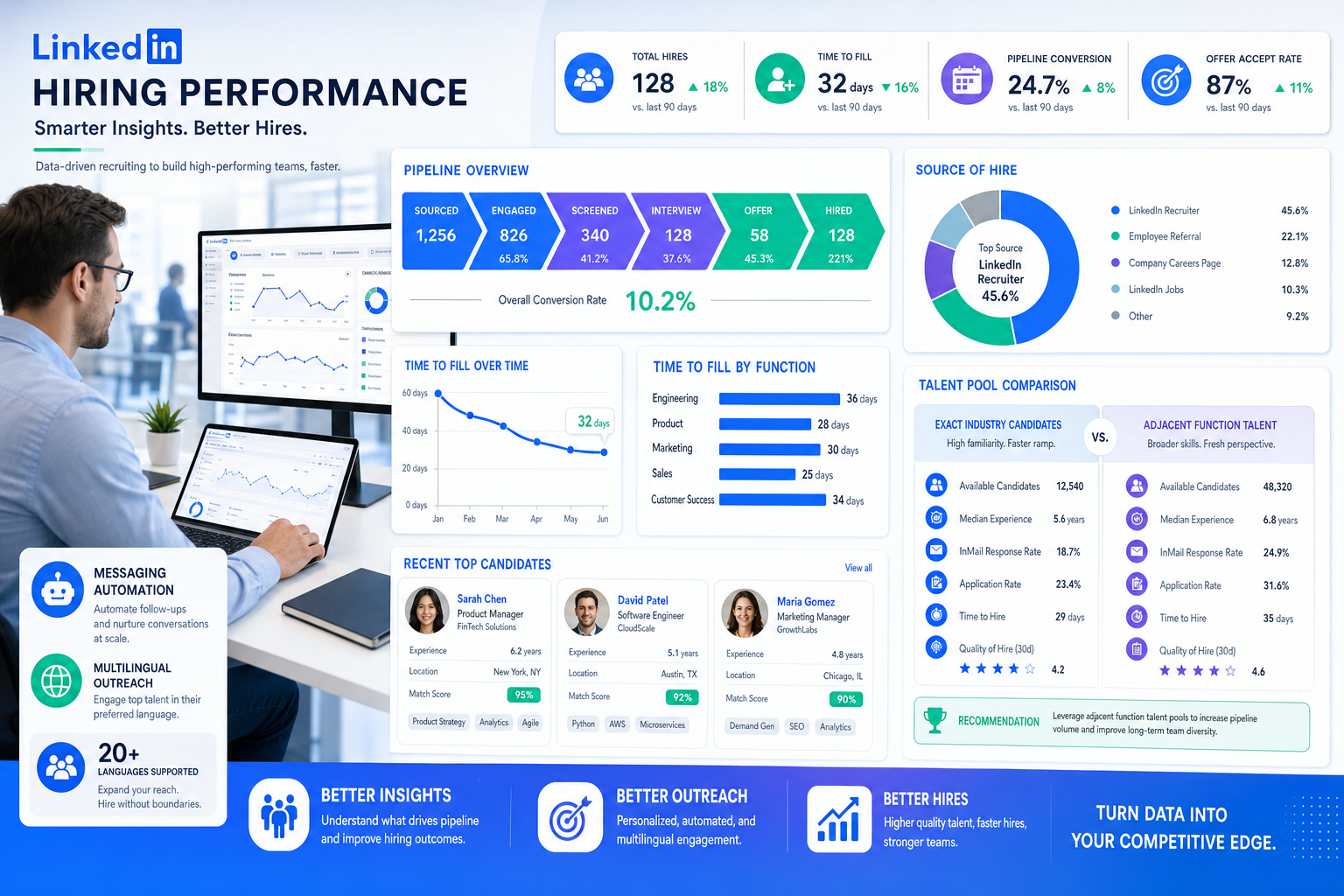
This article shows recruiters how recruitment monitoring exposes narrow search briefs, weak sourcing, and preventable pipeline stalls.
That distinction matters more than many teams admit. When a search is defined too narrowly around direct industry background, recruiters lose time, candidate flow shrinks, hiring managers become frustrated, and good prospects from adjacent sectors never get a serious look. For a solo recruiter, that means more manual follow-up and weaker placement odds. For a small agency owner, it can mean slower fills, harder client conversations, and revenue pressure. For an internal talent team, it often turns into overloaded recruiters, delayed interviews, and reporting that explains the problem only after the pipeline has already thinned out.
In that situation, I have found StrategyBrain AI Recruiter useful as support rather than as a substitute for recruiter judgment. When a search needs to widen beyond the obvious background, it helps keep candidate outreach moving through automated LinkedIn messaging, after-hours follow-up, and multilingual communication across regions, while the recruiter still makes the final call on résumé review, shortlist quality, and next-step decisions. That matters because broadening a search only works if you can actually sustain the outreach, capture responses, and keep records clean enough for real recruitment monitoring.
A useful example comes from an executive search situation where leadership initially wanted direct subject experience above all else. The position looked straightforward on paper, but once the obvious candidates had been exhausted, the search stopped progressing. The recruiter had to revisit the role by asking a different question: not only who had done this exact work before, but who had handled a similar level of operational complexity, price point, and process discipline in another setting. In the original situation, a company building custom trailers eventually became more interested in someone who had led comparable custom project work elsewhere and brought lean manufacturing expertise, even without trailer-specific history.
That kind of pivot is exactly where many systems fail recruiters. If your recruiting software only tracks applicants as names in stages, it will not help you compare adjacent talent pools, monitor source quality, or show whether broadening the brief is improving results. The best recruiting software for recruitment monitoring should help teams test decisions like subject versus function experience, review recruitment metrics examples that reveal whether the wider search is working, and maintain a recruiting metrics template that turns those judgments into repeatable operating practice.
Table of Contents
- Why recruitment monitoring starts with the search brief
- Subject expertise vs function experience in hiring decisions
- Why the best recruiting software matters for metrics visibility
- Core recruiting metrics every team should understand
- Recruitment metrics examples by category
- How to build a recruiting metrics template that teams will actually use
- How often to review recruiting metrics
- What to look for in the best recruiting software
- Where AI-supported workflow support helps most
- Common recruitment monitoring mistakes
- FAQ
Why recruitment monitoring starts with the search brief
Most articles about the best recruiting software begin with features. In practice, experienced recruiters usually start one step earlier: with the quality of the search definition itself. Recruitment monitoring is not only about counting applicants, interviews, or hires after a process is underway. It is also about checking whether the original brief is so rigid that the funnel never has a fair chance to perform.
That is why monitoring must begin with the assumptions behind the role. If the hiring team insists on exact industry lineage, the recruiter should be able to see whether that choice is producing enough viable candidates, reasonable stage movement, and acceptable time-to-fill trends. If not, the system should make it easier to test a broader market view. In real operations, some of the most expensive recruiting delays come not from poor sourcing effort but from poor search framing.
Good software supports that discipline by making the funnel visible from the start. It should help recruiters compare candidate sources, review progression by background type, and flag when a narrow search is creating avoidable stagnation. Without that visibility, teams tend to rely on anecdote, memory, or status meetings that are heavy on opinion and light on evidence.
Subject expertise vs function experience in hiring decisions
One of the most practical lessons from executive search is that direct subject matter experience is valuable, but not always decisive. Leaders naturally like candidates who know the sector, terminology, customers, and operating realities from day one. In many situations, that preference is sensible. Industry familiarity can reduce onboarding time and shorten the path to contribution.
But strict adherence to that standard can limit the talent pool more than necessary. Function experience can be just as important, and sometimes more important, when the role depends on transferable judgment. A strong operator may not come from the exact same product category yet still bring relevant strengths in team leadership, process improvement, deadline management, public-facing communication, or change execution.
From a recruiting perspective, that distinction should not remain a vague debate. It should become a measurable part of recruitment monitoring. If the team broadens the brief to include adjacent industries, what happens to applicant quality, interview conversion, offer acceptance, and time in stage? The best recruiting software should help answer that with data rather than instinct.
This is also where I have seen workflow support make a difference. On searches where the candidate pool had to expand beyond the obvious sector, I used AI Recruiter to maintain volume and response speed on LinkedIn while I focused on judgment calls. The useful part was not replacing evaluation. It was keeping outreach active across time zones, capturing candidate replies and contact details, and reducing the repetitive back-and-forth that usually appears once you start testing adjacent backgrounds. Recruiters still need to assess whether a résumé truly reflects transferable ability, but the workflow becomes easier to sustain when the communication layer is not entirely manual.
Why the best recruiting software matters for metrics visibility
Many teams think they need the best recruiting software because they want job posting, résumé storage, or interview coordination. Those capabilities matter, but they are not what separates average tools from strong ones. The real difference is whether the software supports recruitment monitoring well enough to help the team make better decisions when the search strategy changes.
If your system cannot reliably show movement across sourcing, screening, interview, offer, and hire stages, your team will struggle to understand whether a bottleneck comes from recruiter activity, hiring manager responsiveness, or an overly narrow brief. If source tracking is weak, you cannot tell whether adjacent-industry outreach is actually improving the funnel. If reporting depends on spreadsheet exports and manual updates, the data will lag the operation.
For recruiting teams, this matters in three ways:
- Operational control: Recruiters can see where action is needed today.
- Decision quality: Hiring managers can review facts instead of relying on preference alone.
- Planning confidence: HR leaders can forecast progress with more discipline.
In short, the best recruiting software should collect data automatically, organize it by stage, and present it clearly enough that teams can judge not only how fast they are hiring, but whether they are searching in the right places.
Core recruiting metrics every team should understand
When teams search for recruitment metrics examples, they often find long lists. In practice, a smaller set of well-understood metrics is more useful than an oversized scorecard. Below are the metrics I would expect most teams to review as part of a healthy recruitment monitoring routine.
Time to fill
Definition: The number of days between opening a role and having it filled.
Formula: Date role filled minus date role opened.
Why it matters: This shows how long the business is carrying the vacancy. It becomes especially informative when segmented by role type, business unit, or search strategy.
Time to hire
Definition: The number of days between a candidate entering the process and accepting the offer.
Formula: Offer acceptance date minus candidate application or sourcing entry date.
Why it matters: This shows process speed from the candidate side and can reveal whether delays are happening after strong talent has already been identified.
Cost per hire
Definition: The total recruiting cost required to make one hire.
Formula: Total recruiting costs divided by total hires.
Why it matters: Cost becomes more meaningful when paired with quality and source performance. A lower-cost channel is not automatically better if it produces weak conversion or poor fit.
Source of hire
Definition: The channel that produced the final hire.
Formula: Count hires by source over a defined period.
Why it matters: Source data helps recruiters decide whether referrals, direct applicants, outbound sourcing, talent pools, or adjacent-market outreach are producing the best outcomes.
Quality of hire
Definition: A measure of whether a new hire performs well and meets expectations.
Formula: This varies by organization, often using early performance, retention, and hiring manager satisfaction.
Why it matters: This prevents teams from optimizing only for speed. It is especially important when broadening searches beyond exact industry experience.
Offer acceptance rate
Definition: The percentage of offers accepted by candidates.
Formula: Accepted offers divided by total offers made x 100.
Why it matters: Weak acceptance rates can point to compensation gaps, slow decisions, poor candidate experience, or weak alignment before offer stage.
Recruitment metrics examples by category
A useful way to organize recruitment metrics examples is by category. This keeps the dashboard balanced and prevents teams from over-weighting one dimension of performance.
1. Speed metrics
- Time to fill
- Time to hire
- Stage turnaround time
- Days in status by pipeline stage
Practical takeaway: If speed is worsening, do not assume the recruiter is the issue. Narrow briefs, scheduling delays, or weak feedback discipline often explain more than raw activity levels do.
2. Cost metrics
- Cost per hire
- Agency spend per hire
- Advertising spend by source
Practical takeaway: Cost data is useful only when tied to actual hiring outcomes and source quality.
3. Quality metrics
- Quality of hire
- Hiring manager satisfaction
- Early retention indicators
Practical takeaway: If your organization cannot measure long-term performance well yet, start with structured post-hire feedback and compare it over time.
4. Sourcing metrics
- Source of hire
- Source-to-interview conversion
- Source-to-offer conversion
Practical takeaway: This is where broadening from subject experience to function experience becomes measurable rather than theoretical.
5. Productivity metrics
- Requisitions per recruiter
- Submissions per recruiter
- Interviews scheduled per week
- Hires per recruiter over a defined period
Practical takeaway: Productivity should be interpreted carefully. High activity does not always mean effective hiring.
6. Candidate experience metrics
- Application completion rate
- Candidate drop-off rate by stage
- Interview no-show rate
- Response time to candidates
Practical takeaway: Candidate friction often rises when searches expand into new markets or geographies, so response speed and communication consistency matter more than teams expect.
| Metric Category | Main Question | Best Use |
|---|---|---|
| Speed | How fast are we moving? | Spot bottlenecks and delays |
| Cost | What is hiring costing us? | Control spend and compare channels |
| Quality | Are we hiring well? | Connect recruiting activity to outcomes |
| Sourcing | Where do strong hires come from? | Improve channel mix |
| Productivity | How is the team operating? | Balance workloads and output |
| Candidate Experience | Where are candidates dropping out? | Reduce friction and improve conversion |
How to build a recruiting metrics template that teams will actually use
Searches around recruiting metrics template usually come from people who need a usable structure, not another glossary. The most useful template is one that supports weekly recruiter reviews, hiring manager updates, and executive summaries without drowning everyone in the same report.
A strong recruiting metrics template should be simple enough to maintain and specific enough to trigger action. Whether you use a spreadsheet, CSV export, a BI layer, or reporting inside the recruiting software itself, the same design principles apply.
Recommended dashboard sections
- Open roles summary: role count, aging roles, priority requisitions.
- Funnel overview: applicants, screened, interviewed, offers, hires.
- Search-brief indicators: narrow-market roles, broadened-market roles, adjacent-background pipelines.
- Speed indicators: time to fill, time to hire, stage delays.
- Source performance: source volume, conversion, source of hire.
- Quality signals: offer acceptance rate, manager feedback, early quality proxy.
- Candidate experience: drop-off points, response speed, no-show trends.
Here is a practical recruiting metrics template structure:
| Audience | Metrics to Show | Why It Matters |
|---|---|---|
| Recruiters | Stage volume, aging candidates, response times, source conversion | Supports daily action and prioritization |
| Hiring Managers | Open roles, pipeline health, interview turnaround, background mix | Improves decision speed and keeps the search realistic |
| Executives | Time to fill, cost per hire, source of hire, acceptance rate, quality trends | Connects hiring to business planning |
Practical advice: If the search strategy itself is under debate, include one field that identifies whether a role is being run as exact-match only or broadened to adjacent function experience. That simple distinction often explains more about funnel behavior than another generic KPI does.
How often to review recruiting metrics
One of the most useful distinctions in recruitment monitoring is cadence. Not every metric belongs in the same review cycle.
Daily or weekly monitoring
- New applicants by role
- Stage progression
- Aging candidates
- Interview scheduling delays
- Candidate response times
- Drop-off points
- Response volume from broadened outreach campaigns
Why: These are operational signals that help recruiters act before a delay becomes a failed search.
Monthly or quarterly review
- Time to fill trends
- Cost per hire
- Source of hire
- Offer acceptance rate
- Quality of hire proxies
- Performance of exact-match vs broadened-market searches
Why: These are better for evaluating search strategy, budget use, and recruiting effectiveness over time.
The best recruiting software should support both views: immediate operating control for recruiters and slower trend analysis for leaders.
What to look for in the best recruiting software
If your goal is stronger recruitment monitoring, evaluate software through an analytics and workflow lens, not just a feature checklist.
1. Clean stage-by-stage pipeline tracking
You need reliable movement across sourcing, application, screening, interview, offer, and hire stages. Without clean stage logic, your metrics become untrustworthy.
2. Automated reporting and dashboards
Manual exports create delay and version confusion. Look for reporting that updates without heavy administrative work.
3. Source attribution
If you cannot trust source data, you cannot learn whether adjacent markets or new sourcing channels are working.
4. Customizable views by audience
Recruiters, hiring managers, and leaders need different views of the same process.
5. Flexible fields for search strategy
Your system should let you tag roles or candidates by search assumptions, such as exact-industry fit versus transferable function experience.
6. Historical trend analysis
You should be able to compare periods and identify repeated bottlenecks, not just current backlog.
7. Practical export options
Even good dashboards will not remove every spreadsheet need. Clean exportable data still matters for custom reporting and planning.
Key insight: The best recruiting software is the system that turns changing search assumptions into visible, usable recruitment monitoring.
Where AI-supported workflow support helps most
When recruiters broaden a search beyond obvious industry matches, the workload usually increases before results improve. You may need to contact more adjacent candidates, answer more context-setting questions, and manage more variable response patterns. That is the stage where workflow support can make a practical difference.
My own experience with StrategyBrain AI Recruiter was strongest in exactly that gap between sourcing logic and recruiter judgment. I used it to keep LinkedIn outreach moving while I focused on evaluating whether function experience would actually transfer into the role. The platform handled repetitive first-touch communication, collected candidate details from interested people, and kept conversations active outside normal working hours. On geographically broader searches, the multilingual capability also reduced avoidable delay when candidates preferred to reply in their own language.
What it did not do, and should not be expected to do, was make the final hiring assessment for me. I still reviewed résumés, checked whether the candidate’s project scope truly matched the role, and decided who advanced. That division of labor is important. For recruitment monitoring, automation is most helpful when it preserves recruiter time for evaluation while keeping the communication layer consistent enough to generate clean pipeline data.
For teams that rely heavily on LinkedIn sourcing, the product details at this overview and the broader StrategyBrain site are relevant mainly because they show where recruiter effort can be reduced without giving up control of qualification.
Common recruitment monitoring mistakes
Even experienced teams get recruitment monitoring wrong. Most failures come from reporting habits and search discipline, not from lack of effort.
- Tracking too many metrics: More numbers rarely create more clarity.
- Reviewing only lagging outcomes: By the time the report arrives, the pipeline issue is already expensive.
- Ignoring the search brief: A role defined too narrowly can damage every downstream metric.
- Using one report for every audience: Recruiters and executives need different levels of detail.
- Measuring speed without quality: Fast hiring is not a win if transferable ability was never assessed properly.
- Separating metrics from action: A dashboard should change decisions, not just decorate meetings.
Practical advice: If your team feels overwhelmed, simplify first. Focus on a few core metrics, define them consistently, and review whether the search assumptions behind the role are helping or hurting the funnel.
FAQ
What are recruiting metrics?
Recruiting metrics are measurable indicators that show how a hiring process is performing. They help teams evaluate speed, cost, quality, sourcing, productivity, and candidate experience. In recruitment monitoring, they are reviewed regularly to identify bottlenecks and improve decisions.
Which recruiting KPIs matter most?
For most teams, the core set includes time to fill, time to hire, cost per hire, source of hire, quality of hire, and offer acceptance rate. If your searches often depend on transferable ability, it also helps to compare metrics between exact-match and broadened-market roles.
How do you calculate recruiting metrics?
Most use straightforward formulas. Time to fill is the number of days between role opening and fill date. Offer acceptance rate is accepted offers divided by total offers made x 100. Clear definitions matter because inconsistent calculations weaken recruitment monitoring.
What are good recruitment metrics examples for sourcing analysis?
Useful recruitment metrics examples for sourcing include source of hire, source-to-interview conversion, source-to-offer conversion, and candidate response rate by channel. These become especially valuable when you are testing adjacent industries or broader talent pools.
What should be included in a recruiting metrics template?
A practical recruiting metrics template should include open roles, pipeline stages, speed metrics, source performance, offer outcomes, and candidate experience indicators. If search strategy is a recurring issue, add a simple field showing whether the role is exact-match only or open to transferable function experience.
How can recruiting software improve recruitment monitoring?
The best recruiting software improves recruitment monitoring by automating data capture, organizing pipeline stages, supporting source attribution, and making it easier to compare outcomes across role types and sourcing choices. It should help teams see not only where hiring slows down, but whether the search itself is too narrow.
Conclusion
The conversation about the best recruiting software should begin with visibility, not feature volume. If a platform helps your team practice better recruitment monitoring, test whether function experience is outperforming strict industry fit, review useful recruitment metrics examples, and maintain a workable recruiting metrics template, it is already solving a meaningful recruiting problem.
For most teams, that means choosing software that supports cleaner stage tracking, better source visibility, stronger search-strategy reporting, and less manual communication overhead. When those pieces are in place, recruiters spend less time defending opinions and more time making sound hiring judgments.















