


When recruiter follow-up slows, this article helps hiring leaders judge best recruitment apps by resume review speed and candidate loss risk.
That matters because recruiting delays rarely stay operational for long. For a solo headhunter, a missed follow-up can cool an interested candidate. For a small agency owner, scattered resume handling can mean weaker consultant output and more manual checking. For an in-house talent team, poor tracking turns into slow hiring-manager feedback, uneven candidate experience, and a process that feels opaque to everyone involved.
In my own workflow, tools that reduce the handoff gap between candidate interest and recruiter review have been the most useful. That is where StrategyBrain AI Recruiter can help: it automates initial LinkedIn outreach, keeps conversations moving after hours, and collects resumes or contact details from interested candidates so they do not sit buried in inboxes. The recruiter still makes the final judgment on fit, reads the resume, and decides who moves forward, but the admin drag between outreach and first review is materially lower.
Think about the candidate-side moment that starts this whole chain. Someone applies to a finance role with a resume they believe is strong, then waits and wonders whether the document landed anywhere useful or just disappeared into a queue. Behind the scenes, the first thing that usually happens is not a phone call. The resume is captured in a database, tied to a specific opening, and surfaced to the recruiter responsible for that requisition.
Then comes the first real decision point. A recruiter gets the alert, opens the profile, and screens it against the role's non-negotiables, not just broad experience. If the profile looks viable, outreach follows to confirm interest and schedule next steps; if not, the record often remains in the system for future openings. That simple three-step path, database to first look to recruiter contact, is exactly why buyers searching for the best recruiting software, the best hiring app, or even the top 10 recruiting apps are really trying to solve one problem: how to make resume capture, review, and follow-up work reliably at scale.
Quick definition: Recruiting software is the operating system for moving candidates from application or outreach to interview and hire. In practice, the best recruitment apps combine applicant tracking, recruiter alerts, communication history, scheduling support, and enough mobility to keep decisions moving when recruiters are away from their desks.
Table of Contents
- Why process fit matters more than feature count
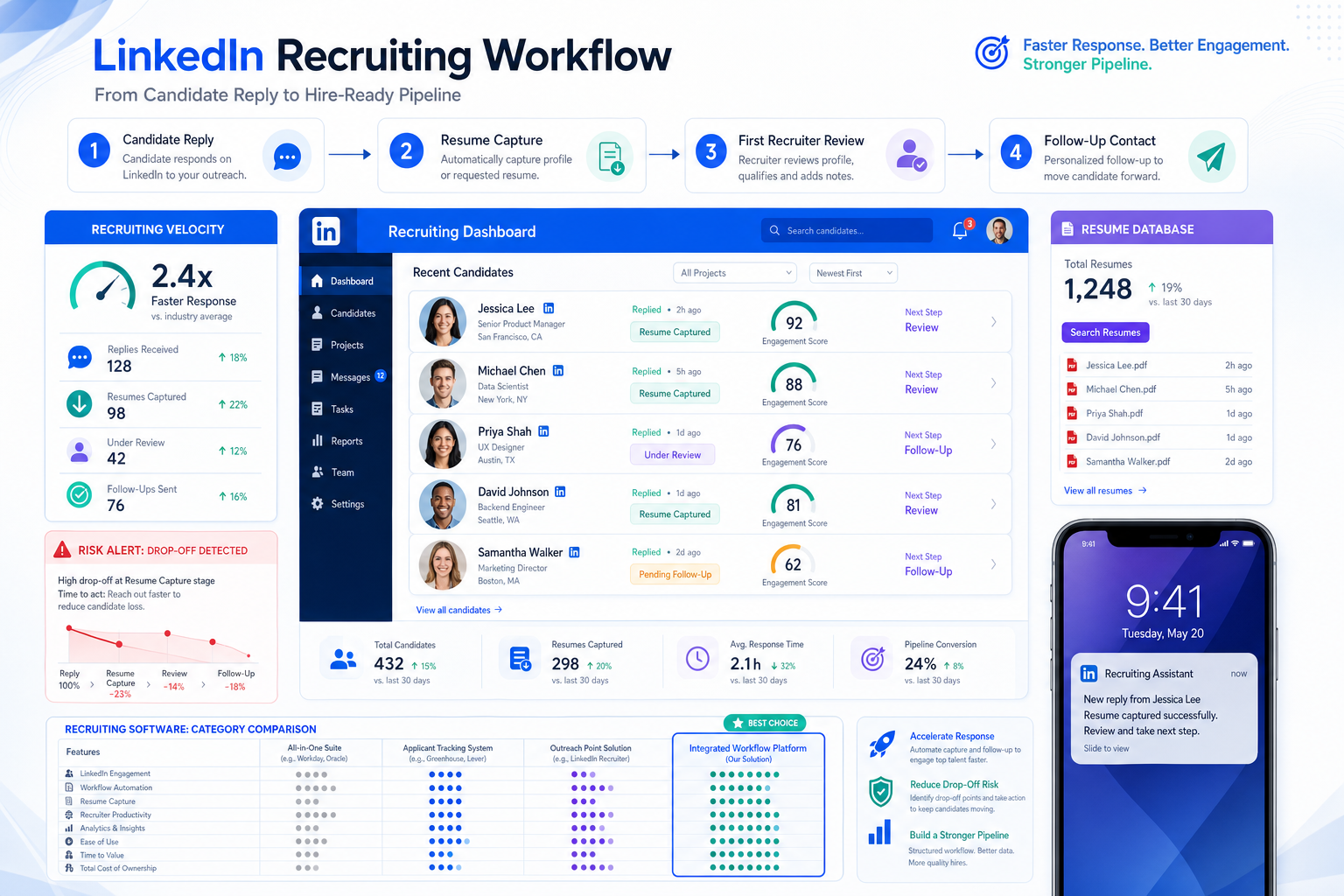
- From resume submission to first recruiter review
- Quick comparison of recruiting software categories
- What makes the best recruiting software
- Top 10 recruiting apps and software types
- Which system fits which hiring scenario
- Why ATS discipline still matters
- How to choose the best hiring app
- Common buying mistakes
- FAQ
Why Process Fit Matters More Than Feature Count
Experienced recruiters do not start by asking which platform has the longest feature list. They start by asking what has to happen after a resume arrives or after a sourced candidate replies. If your real bottleneck is first review speed, recruiter notification, or contact continuity, then a bloated platform can underperform a simpler one with cleaner workflow control.
That candidate waiting after application is a useful reality check. The hiring team may be thinking about dashboards, automation, and permissions. The candidate is thinking about whether a human will actually see the resume and whether silence means rejection, delay, or disorganization. Good software closes that perception gap.
That is also why software evaluation should mirror the actual recruiting chain: capture, first look, outreach, review, scheduling, collaboration, and reporting. If a system is weak at the first three steps, later-stage analytics will not save the process.
From Resume Submission to First Recruiter Review
The reference process above is deceptively simple, but it is one of the best ways to evaluate software.
1. Resume capture must be dependable
When a candidate applies, the record should land in a searchable, structured database tied to the right job and source. If resumes live across email folders, spreadsheets, and direct messages, recruiters lose time before evaluation even starts.
2. The right recruiter needs a fast first look
Once an application or sourced reply arrives, the assigned recruiter should be notified quickly and able to screen against required skills, location, seniority, and softer fit signals. The best recruitment apps make that first pass faster without stripping away recruiter judgment.
3. Outreach must happen while interest is still warm
If a candidate looks aligned, the next step is contact, usually to confirm continued interest and move toward a screening conversation. This is where delay hurts most. In active markets, waiting too long can damage candidate trust or push talent toward another opportunity.
In my own testing of LinkedIn-heavy workflows, that handoff has often been the messiest part. StrategyBrain AI Recruiter is useful here because it can keep candidate conversations active, answer role-level questions, and collect resume or contact details before I step in for the actual fit decision. I still read the profile myself and decide whether the person belongs in process, but I am no longer relying on manual follow-up to keep every early conversation alive.
Quick Comparison of Recruiting Software Categories
Most teams shopping for the best recruiting software are comparing software categories more than individual tools. The table below is the more practical starting point.
| Software Type | Best For | Core Strength | Main Limitation |
|---|---|---|---|
| SMB recruiting software | Small teams with steady hiring | Simple setup and all-in-one workflows | May lack deeper enterprise controls |
| Enterprise ATS platform | Large organizations | Governance, scale, analytics, integrations | Longer rollout and more admin overhead |
| Agency recruiting software | Search firms and staffing teams | Pipeline management and client collaboration | Not always ideal for internal HR use |
| High-volume hiring app | Hourly or frontline recruiting | Speed, automation, screening, messaging | Less depth for niche or executive hiring |
| Mobile-first hiring app | Recruiters working on the go | Fast review, messaging, and approvals | Desktop workflows may still be stronger |
| AI-assisted recruiting software | Teams reducing manual admin | Sourcing support and screening automation | Needs close process oversight |
For most buyers, the question is not whether they need an ATS, a recruiting app, or a hiring app. It is whether the system supports the resume-to-review chain cleanly enough to keep candidates moving.
What Makes the Best Recruiting Software in Real Hiring Operations
The strongest systems usually perform well on a few operational basics rather than trying to impress with everything at once.
1. Job posting distribution
The best recruitment apps make it easy to publish roles broadly without forcing repetitive manual posting. Better distribution supports cleaner top-of-funnel activity and more consistent applicant flow.
2. Applicant tracking and pipeline visibility
An applicant tracking system for recruiters should show exactly where each candidate stands, who owns the next action, and which stage is slowing down. One of the clearest applicant tracking system benefits is simply that no one has to guess what happened after resume receipt.
3. Candidate sourcing support
Modern recruiting software often helps teams search, organize, and rediscover talent. That matters when the best candidate is not a new applicant but someone already known to the team.
4. Interview scheduling
Scheduling remains one of the biggest avoidable drains on recruiter time. The best hiring app should reduce back-and-forth and make stage progression easier to manage.
5. Hiring-team collaboration
Recruiters need hiring managers and interviewers to act inside one process. Software should make feedback easy to submit and hard to ignore.
6. Automation and admin reduction
Good automation removes repetitive work such as reminders, status changes, message prompts, and early-stage follow-up. The point is not replacing recruiter judgment. The point is preserving recruiter time for actual evaluation.
7. Analytics and reporting
Leaders need visibility into conversion, delays, source mix, and recruiter workload. Even a small team benefits from knowing whether the bottleneck is applicant quality or process execution.
8. Candidate experience
Candidates notice long forms, poor communication, and unclear status. Software cannot fix a weak hiring culture, but it can reinforce a disciplined one.
Top 10 Recruiting Apps and Software Types Reviewed by Use
Instead of ranking brands, it is more useful to review the software models behind most shortlists. That keeps the article aligned with actual buyer intent behind searches like top 10 recruiting apps.
- All-in-one recruiting software for small businesses
Best for lean HR teams that need job posting, tracking, scheduling, and communication in one place. Often the best starting point after spreadsheets.
Not ideal when: You need advanced permissions or highly complex approval chains.
- Enterprise ATS platform
Best for large organizations that need standardization across departments, regions, or business units. Usually strongest on governance and integrations.
Not ideal when: Your team needs speed and simplicity more than control layers.
- Agency recruiting app
Best for recruiters balancing client demands and candidate pipelines at the same time. Stronger on fast search delivery and relationship management.
Not ideal when: You are an internal talent team with no client-facing workflow.
- High-volume hiring software
Best for hourly, seasonal, or rapid-growth recruiting where quick review and quick contact matter most.
Not ideal when: Roles require deep, consultative assessment.
- Mobile-first recruiting app
Best for recruiters and managers who need to review, approve, and message candidates away from their desks. This category is central to the best hiring app conversation.
Not ideal when: Your team relies on highly complex desktop configuration work.
- AI-assisted sourcing and screening tool
Best for reducing repetitive search and early outreach tasks. Useful when recruiter bandwidth, not hiring strategy, is the main constraint.
Not ideal when: Your team has unclear hiring criteria.
- Collaborative hiring platform
Best where interviewer feedback discipline is a recurring problem. These systems help centralize decision input.
Not ideal when: One recruiter and one manager handle most decisions.
- Recruitment CRM-style software
Best for pipeline building before a role officially opens. Helpful for repeat hiring and talent communities.
Not ideal when: You only need simple applicant tracking.
- Campus and early-career recruiting system
Best for event-heavy recruiting, cohort hiring, and structured communication across similar candidate groups.
Not ideal when: Campus recruiting is a minor channel.
- Structured-evaluation workflow platform
Best for teams trying to improve consistency, accountability, and process hygiene through more disciplined evaluation steps.
Not ideal when: Leadership expects software to fix strategic hiring problems by itself.
Which System Fits Which Hiring Scenario
The most practical answer to what is the best recruiting software depends on the hiring environment.
Best for small businesses
Small teams need visibility fast. Their best recruitment apps usually combine ease of launch with enough structure to stop candidate loss and manual chase work.
Best for enterprise recruiting
Enterprise buyers usually prioritize reporting, permissions, workflow consistency, and integration readiness. The best hiring app here is typically part of a broader governed platform.
Best for agency recruiting
Agencies need speed, candidate reuse, and strong ownership visibility. Their applicant tracking system benefits are tied to responsiveness and consultant productivity.
Best for high-volume hiring
When the problem is review speed and candidate drop-off, automation and bulk communication become more valuable than highly customized niche workflows.
Best for mobile-first teams
When managers approve candidates between meetings or recruiters work across events and travel, mobile execution stops being a nice extra and becomes part of the core process.
Why ATS Discipline Still Matters
Many buyers use recruiting software and ATS as if they are different purchases, but in practice an ATS is the process backbone. If candidate ownership is unclear, first review is delayed, and communication history is fragmented, no amount of sourcing add-ons will fully solve the problem.
- Clear candidate tracking: Teams can see status, history, and next steps in one place.
- Better accountability: Managers and interviewers are prompted within the same workflow.
- Faster execution: Scheduling, communication, and approvals move with less friction.
- Improved reporting: Funnel issues become visible instead of anecdotal.
- Stronger candidate experience: Applicants face less silence and less confusion.
- Reduced admin burden: Recruiters spend more time judging fit and less time updating records.
These are the applicant tracking system benefits that matter whether you are evaluating a lightweight app or an enterprise platform.
How to Choose the Best Hiring App or Recruiting Software
Good selection starts with process mapping, not vendor demos.
Step 1: Define your hiring model
Clarify whether you are running low-volume search, agency recruiting, enterprise coordination, or high-volume hiring. That single answer narrows the field quickly.
Step 2: Identify the real bottleneck
If the biggest issue is what happens after an application arrives, prioritize capture, alerts, first review, and recruiter follow-up. If the issue is later-stage delay, focus on scheduling and collaboration.
Step 3: Test the day-to-day user experience
Watch how recruiters review candidates, how managers give feedback, and how easily the system supports action on mobile. Demo polish often hides workflow friction.
Step 4: Review integration needs
Hiring should not end in a messy handoff. Consider how the software connects with HR systems, onboarding tools, and job distribution channels.
Step 5: Check tradeoffs honestly
Every system has context where it performs best and context where it does not. Shortlists improve when buyers admit those tradeoffs early.
Step 6: Use a practical scorecard
| Evaluation Area | Why It Matters |
|---|---|
| Resume capture and tracking | Prevents candidate loss at the top of the funnel |
| Job distribution | Supports consistent applicant flow |
| Sourcing support | Improves talent discovery and reuse |
| Scheduling | Speeds process execution |
| Collaboration | Improves hiring-manager participation |
| Automation | Reduces repetitive admin |
| Analytics | Helps diagnose funnel issues |
| Mobile usability | Enables action away from the desk |
| Candidate experience | Protects communication quality |
| Integration readiness | Supports operational continuity |
If LinkedIn sourcing is a meaningful part of your process, I would also test how well the platform works alongside tools like AI Recruiter. In my experience, this is especially useful when candidates reply after hours, when multilingual communication matters, or when recruiters need early resume collection before they can conduct a proper fit review themselves.
Common Mistakes Teams Make When Buying Recruitment Software
- Buying for the demo, not the workflow. If the tool looks polished but slows the first recruiter review, it will frustrate users quickly.
- Confusing labels with capabilities. Recruiting software, ATS, and hiring apps overlap heavily. Workflow coverage matters more than category naming.
- Overbuying for future complexity. Many small teams perform better with a cleaner system.
- Ignoring candidate communication gaps. Delayed outreach can damage both conversion and reputation.
- Skipping mobile evaluation. If key decisions happen outside the office, mobile support matters.
- Expecting automation to replace recruiter judgment. Automation should support contact and admin, while recruiters still own qualification and next-step decisions.
FAQ
What is recruiting software?
Recruiting software helps teams attract, track, screen, communicate with, and hire candidates. It often includes applicant tracking, job posting, scheduling, collaboration, analytics, and mobile functions.
What are the best recruitment apps for small teams?
Usually the best options for small teams are simple systems that combine posting, tracking, scheduling, and communication without heavy administrative overhead.
What is the best hiring app?
The best hiring app depends on whether your team values speed, governance, collaboration, mobile access, or sourcing support most. The right answer is always tied to workflow fit.
How is recruiting software different from an ATS?
An ATS is usually the core workflow system that tracks applicants through hiring stages. Recruiting software can include the ATS plus sourcing, CRM functions, automation, reporting, and mobile access.
Why do recruiters care so much about first review speed?
Because candidate interest fades quickly. Slow first review and slow follow-up can lead to lost applicants, weaker trust, and delayed hiring decisions.
Can AI help without replacing the recruiter?
Yes. AI can support repetitive outreach, keep candidate communication active, and collect resumes or contact details. Recruiters should still make the final assessment on fit and progression.
Final Takeaway
The best recruiting software is the one that handles the most fragile part of hiring well: what happens right after a candidate applies or replies. If resumes are captured cleanly, the right recruiter gets a fast first look, and outreach happens before interest cools, the rest of the process has a much better chance of working.
That is the real standard behind the best recruitment apps, the best hiring app, and any credible list of the top 10 recruiting apps. Start with the workflow from resume submission to recruiter contact, then choose the system that supports that chain with the least friction.















