


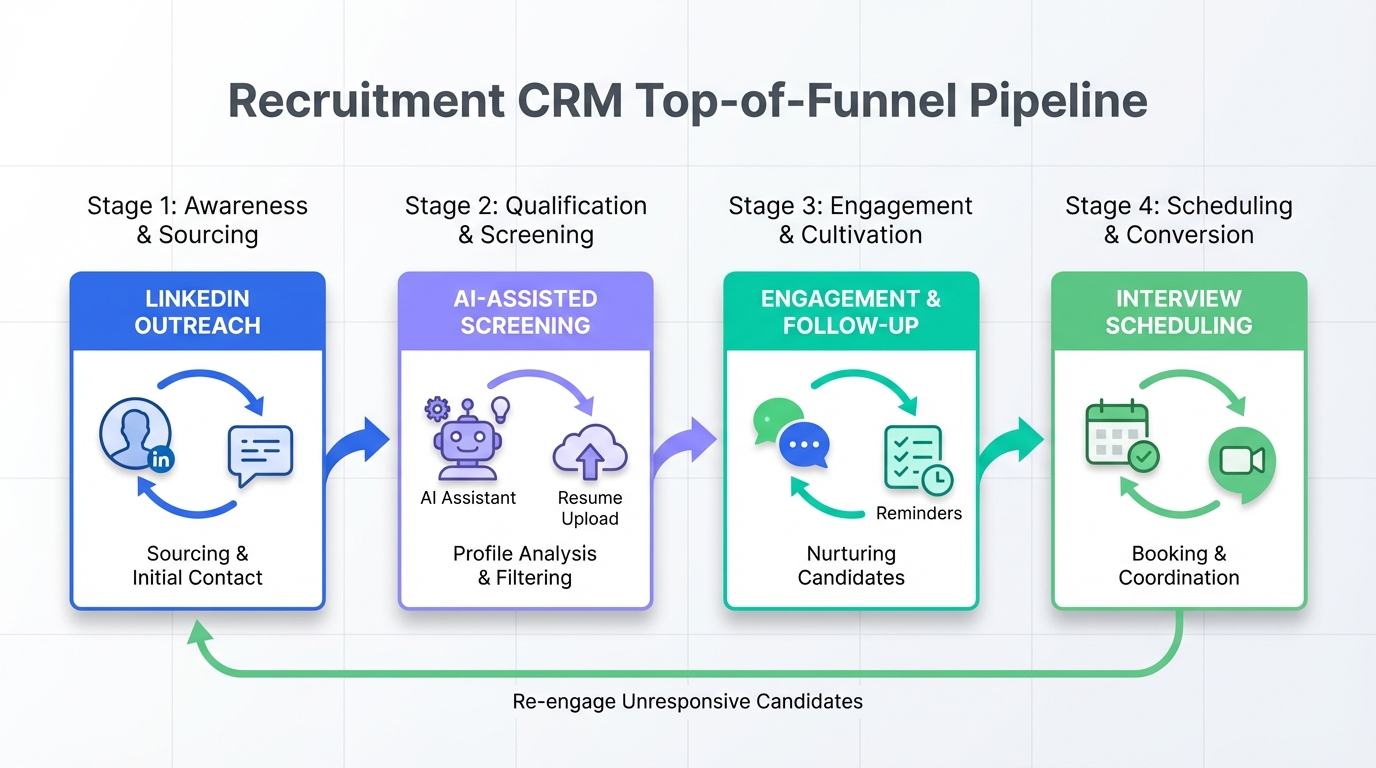
If you are searching for the best recruitment CRM for small business, prioritize one outcome: fewer dropped conversations between first outreach and interview. In practice, that means a system that tracks every touchpoint, prompts timely follow ups, and keeps candidate context in one place. For many teams comparing recruiting software for small companies and the best ATS for small companies, the fastest improvement comes from tightening the top of funnel: consistent outreach, quick replies, and clean capture of resumes and contact details. In our day to day recruiting workflows, we have found that adding StrategyBrain AI Recruiter to LinkedIn sourcing can remove most repetitive messaging work while still leaving final qualification to a human recruiter.
Table of Contents
- What a recruitment CRM is and what it is not
- How to choose the best recruitment CRM for small business
- A small company workflow that your CRM must support
- Where StrategyBrain AI Recruiter fits in a modern stack
- Quick comparison framework
- Implementation steps for a small team
- FAQ
- Conclusion and next steps
Key Takeaways
- Recruitment CRM definition: A candidate relationship management system that tracks outreach, replies, notes, and follow ups across the pipeline.
- ATS definition: An applicant tracking system that manages applications, stages, and compliance reporting; it is not always optimized for proactive sourcing.
- Small business priority: Choose tools that reduce manual follow up and prevent lost context across email, LinkedIn, and interviews.
- Automation sweet spot: Automate initial outreach and scheduling intent, but keep final qualification and hiring decisions with a recruiter.
- StrategyBrain AI Recruiter: Automates LinkedIn connecting, role introduction, Q and A, interest confirmation, and captures resumes and contact details for review.
- Compliance and trust: Confirm encryption, data isolation, and that customer data is not used to train models before you roll out AI messaging.
What a recruitment CRM is and what it is not
A recruitment CRM is a system designed to manage relationships with candidates, especially before they apply. It focuses on sourcing, outreach, conversation history, reminders, and nurturing talent pools. This is why it is often the deciding factor when a small team is trying to pick the best recruitment CRM for small business.
An ATS, short for Applicant Tracking System, is built around applications and hiring stages. It is essential for structured hiring, but many ATS products are less effective for proactive LinkedIn sourcing and high volume follow up. That is why many buyers evaluate both recruiting software for small companies and the best ATS for small companies together, then decide where to automate and where to keep human control.
How to choose the best recruitment CRM for small business
Small teams do not lose hires because they lack features. They lose hires because the process breaks under time pressure. Use the criteria below to evaluate any recruitment CRM or ATS you are considering.
Evaluation criteria that matter most for small teams
- Conversation continuity: Every message, note, and file should be easy to find in under 30 seconds.
- Follow up reliability: The system should support reminders and next actions so candidates do not go cold.
- Pipeline clarity: Stages should reflect your real workflow, not a generic enterprise process.
- Source friendly intake: It should be easy to add candidates from LinkedIn and referrals without messy manual entry.
- Team handoff: If one person is out, another person can pick up the thread with full context.
- Security and privacy: Look for encryption, access controls, and clear statements about model training and data use.
What to avoid when you are a small business
- Overbuilt workflows: If it takes 12 clicks to move a candidate, adoption will fail.
- Automation without guardrails: AI messaging must be reviewable and aligned with your role details and compensation ranges.
- Hidden data silos: If LinkedIn messages live outside your system, you will lose history and duplicate outreach.
A small company workflow that your CRM must support
Below is a practical workflow we use to stress test whether a tool is truly the best recruitment CRM for small business. It is intentionally simple because simplicity is what survives busy weeks.
Stage 1: Research and preparation
Before outreach, you need a clear story about the organization and the role. Hiring managers will expect candidates to understand the company, and recruiters need the same baseline to communicate consistently.
- What the company does and who it serves
- Where the team is located and what time zones matter
- What changed recently that makes this hire urgent
- Who the interviewers are and what they care about
Stage 2: Outreach and engagement
This is where many small teams struggle. You can source great candidates, but if you cannot respond quickly and follow up consistently, you will not convert interest into interviews.
This is also where StrategyBrain AI Recruiter can be used as a recruiting accelerator. It can automatically connect with candidates that match your search criteria, introduce the opportunity, answer questions about the role, company, and compensation, and confirm interview interest. When a candidate is interested, it collects resumes and contact information so a recruiter can review and proceed.
Stage 3: Interview readiness and differentiation
Once interviews are scheduled, your system should help you prepare candidates and interviewers. A good CRM or ATS should store the candidate narrative, key accomplishments, and the questions you want to validate.
For behavioral interviews, we recommend a consistent structure for answers. One common structure is the CAR method, which stands for Circumstance, Action, Result. Your CRM should make it easy to capture these notes so the team can compare candidates fairly.
Stage 4: Follow up and closing
Closing is mostly follow up. Your system should track who owes what, by when, and what the next message should say. If you are using AI to assist, ensure the AI has the correct role details and benefits so it does not improvise.
Where StrategyBrain AI Recruiter fits in a modern stack
Many small businesses already have some combination of spreadsheets, email, and an ATS. The gap is usually proactive sourcing and consistent engagement. StrategyBrain AI Recruiter is designed for LinkedIn hiring and replaces the initial outreach and qualification conversation, while leaving final resume based qualification to the recruiter.
What it automates on LinkedIn
- Connecting with candidates who match your targeted search criteria
- Introducing the job opportunity and learning the candidate work situation
- Answering questions about the role, company, compensation, and benefits
- Confirming interview interest and collecting resumes and contact details
What it does not do, by design
It does not decide whether a resume fully matches job requirements. That final qualification step stays with the recruiter after reviewing the resume. This boundary is important for quality control and for maintaining a human accountable hiring process.
Why this matters for small teams
When you are evaluating recruiting software for small companies, the biggest time sink is repetitive messaging and follow up. StrategyBrain AI Recruiter provides 24/7 multilingual communication, which helps you engage candidates across time zones without adding headcount. It also supports managing more than 100 LinkedIn accounts for organizations that want to build an AI powered recruiting team.
Security and compliance notes to verify
- LinkedIn account credentials are encrypted and stored independently per user with explicit authorization.
- Candidate data, including resumes, contact details, and conversation history, is not used to train AI models.
- Data is encrypted and isolated using customer specific keys.
- Compliance is stated for privacy regulations in the EU, United States, and Canada.
Quick comparison framework
Because pricing and feature details vary by vendor and change frequently, the table below is a decision framework rather than a vendor scorecard. Use it to compare any shortlist of tools, including your current ATS.
| Need | What to look for in a recruitment CRM | What to look for in an ATS | Where StrategyBrain AI Recruiter helps |
|---|---|---|---|
| Proactive sourcing | Easy candidate add, talent pools, outreach tracking | Often limited unless paired with sourcing tools | Automates LinkedIn connect and initial outreach |
| Fast follow up | Reminders, sequences, clear next actions | Stage based tasks, sometimes less conversational | 24/7 candidate messaging and follow up |
| Candidate context | Conversation history, notes, tags | Application centric records | Captures conversation history plus resumes and contacts |
| Scaling output | Team workflows and handoffs | Approvals and reporting | Supports multi account LinkedIn recruiting teams |
Implementation steps for a small team
Once you pick the best recruitment CRM for small business for your workflow, implementation should be short and measurable. Here is a rollout plan we have used successfully with small recruiting teams.
Step by step rollout
- Define your pipeline stages: Keep it to 6 to 8 stages that match how you actually hire.
- Standardize outreach notes: Decide what must be captured after every conversation, such as role interest, compensation expectations, and availability.
- Set follow up rules: For example, follow up after 2 business days if there is no reply, then again after 5 business days.
- Connect LinkedIn sourcing: If you use StrategyBrain AI Recruiter, provide the role details, compensation, benefits, and candidate search criteria so the AI can communicate accurately.
- Audit weekly: Review a sample of conversations and outcomes to ensure messaging quality and consistent handoffs.
Quick checklist you can copy into your evaluation doc
- Does the tool show full candidate conversation history in one view
- Can we set reminders and next actions per candidate
- Can we add candidates from LinkedIn without messy manual entry
- Can we capture resumes and contact details reliably
- Can another teammate take over a candidate thread in under 2 minutes
- Is there a clear statement about encryption and AI model training use
FAQ
What is the difference between a recruitment CRM and an ATS?
A recruitment CRM focuses on candidate relationships before and during the hiring process, including outreach and follow ups. An ATS focuses on managing applications, stages, and hiring records once candidates apply.
Do small businesses need both a recruitment CRM and an ATS?
Not always. If you hire occasionally, one system can be enough. If you source proactively on LinkedIn and need consistent follow up, a recruitment CRM plus an ATS, or an ATS plus an outreach automation layer, is often more effective.
How does StrategyBrain AI Recruiter help with LinkedIn recruiting?
It automates connecting with candidates, introducing the role, answering questions about the job and compensation, confirming interview interest, and collecting resumes and contact details. Recruiters then review the collected information and decide who to interview.
Does StrategyBrain AI Recruiter replace a recruiter?
No. It replaces repetitive LinkedIn tasks such as initial outreach and follow up. Final qualification and hiring decisions remain with the recruiter and hiring team.
Can StrategyBrain AI Recruiter communicate in multiple languages?
Yes. It supports 24/7 multilingual communication so candidates can receive timely responses in their native language, which can reduce misunderstandings across regions and time zones.
How does it capture resumes and contact details?
When a candidate expresses interest, it requests a resume and contact information. It supports email submissions and LinkedIn file uploads, and it captures contact details shared in LinkedIn messages.
What should we verify for privacy and security before using AI messaging?
Verify that credentials are encrypted, data is isolated per customer, and candidate data is not used to train AI models. Also confirm that the vendor states compliance with relevant privacy regulations for your hiring regions.
How do I decide if I need the best ATS for small companies or a recruitment CRM first?
If your biggest pain is managing applicants and interview stages, start with an ATS. If your biggest pain is sourcing and follow up, start with a recruitment CRM or add an automation layer like StrategyBrain AI Recruiter to strengthen the top of funnel.
Conclusion and next steps
The best recruitment CRM for small business is the one that prevents lost conversations, enforces follow up, and keeps candidate context accessible for the whole team. If you are comparing recruiting software for small companies and the best ATS for small companies, map your workflow first, then choose tools that reduce manual work where it is safest to automate. For LinkedIn heavy sourcing, StrategyBrain AI Recruiter can automate connecting, messaging, Q and A, and resume capture while keeping final qualification with a recruiter.
Next step: copy the checklist above into your evaluation doc, run a 7 day pilot with one role, and measure two numbers: time to first reply and time from first message to scheduled interview.














