


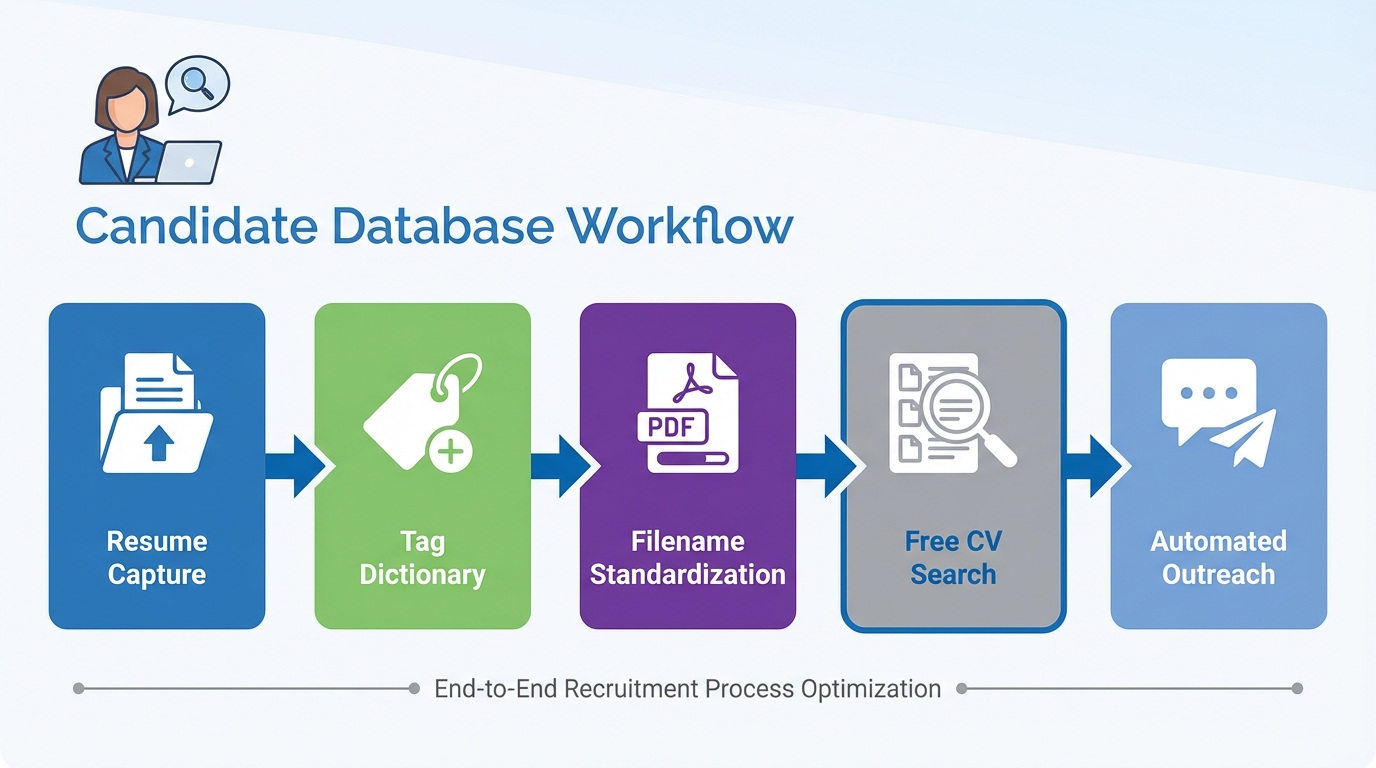
A reliable candidate database for recruiters is not a fancy tool. It is a disciplined system for capturing resumes, normalizing candidate data, and following up fast so you can search resumes later with confidence. When you are hiring new grads, the challenge is predictable: limited work history, inconsistent resumes, and high volume. In this guide, we convert common new grad job hunting advice into recruiter-side actions that build a searchable pipeline, including a practical free CV search approach using your existing files and structured tags. We also show where StrategyBrain AI Recruiter fits naturally in a LinkedIn workflow by automating first touch, answering role questions, confirming interest, and collecting resumes and contact details so your database stays current.
Table of Contents
- What a candidate database means in day to day recruiting
- Key Takeaways
- Method 1: Standardize what you collect from every candidate
- Method 2: Turn new grad signals into searchable tags
- Method 3: Build a resume search workflow you can reproduce
- Method 4: Use LinkedIn outreach that captures resumes and contact details
- Method 5: Keep the database clean with follow up and compliance checks
- Quick Comparison
- FAQ
- Conclusion
What a candidate database means in day to day recruiting
In this article, a candidate database means the place you store candidate profiles and the fields you can query later. That can be an ATS, a CRM, or a structured spreadsheet. The key is not the storage location. The key is that every record has consistent fields so you can filter and search resumes without rereading every PDF.
Scope boundaries: This guide focuses on building and maintaining a database for new grad and early career hiring, plus LinkedIn-first sourcing. It does not cover campus event strategy, employer branding, or technical parsing integrations.
Key Takeaways
- Database quality beats database size: a smaller set of complete profiles is easier to search and convert than a large pile of partial resumes.
- New grads need different fields: grades, projects, volunteering, and sports leadership often predict fit better than job titles.
- Make “search resumes” possible: store 8 to 12 standardized tags per candidate so filters work consistently across roles.
- Free CV search can be real: you can run a free CV search on your own collected resumes using consistent filenames and tags, without buying a new tool.
- Follow up is a database function: every outreach attempt should update status and next step, otherwise your pipeline decays.
- StrategyBrain AI Recruiter fits the capture step: it can automate LinkedIn outreach, answer candidate questions, confirm interest, and collect resumes and contact details for your database.
Method 1: Standardize what you collect from every candidate
When we audit recruiting databases, the most common failure is missing fields. Recruiters remember the conversation, but the database does not. For new grads, you need a minimum dataset that is consistent across candidates.
Steps
- Define your minimum profile fields: name, location, email, phone, graduation year, degree, target role, and source.
- Add new grad specific fields: GPA or grade band, capstone project topic, internship count, volunteering, and leadership activities.
- Require a resume file or a structured summary: if you cannot get a resume, capture a structured summary with education, projects, and links described in text.
- Store consent and timestamps: record when the candidate shared their information and what channel it came from.
Features
- Searchable consistency: every record has the same core fields, so filters work.
- Faster screening: you can compare candidates without opening every resume.
- Cleaner handoffs: another recruiter can pick up the pipeline without context loss.
Limitations
- Upfront effort: you will spend time defining fields and enforcing them.
- Candidate variability: new grads may not have all fields, so you need “unknown” values rather than blanks.
Best For
- High volume early career roles
- Teams that share pipelines across recruiters
- Any workflow where you need to search resumes later
Method 2: Turn new grad signals into searchable tags
The original new grad advice is simple: highlight relevant experience, show motivation, tailor the resume, and quantify results. Recruiters can mirror that logic by turning those signals into tags that make your candidate database for recruiters actually usable.
Steps
- Create a tag dictionary: define 30 to 60 tags you will reuse across roles, not custom tags per requisition.
- Tag “relevant experience” broadly: internships, volunteering, student clubs, research assistant roles, and capstone projects.
- Tag proof of motivation: scholarships, competitive sports, leadership roles, and consistent part time work.
- Tag quantified outcomes: any resume bullet with a number, a metric, or a measurable result.
Practical tag template you can copy
- Education: GradYear_2026, Degree_BSc, Major_Accounting
- Experience type: Internship_1plus, Volunteer_Active, Project_Portfolio
- Signals: Quantified_Results, Leadership, Customer_Facing
- Role fit: Target_Sales, Target_HR, Target_IT
- Work authorization: WorkAuth_Yes, WorkAuth_Unknown
- Availability: StartDate_Immediate, StartDate_30Days
Limitations
- Tag drift: if you allow free text tags, the same concept becomes five spellings and search breaks.
- Over tagging: too many tags per candidate makes filtering noisy. Aim for 8 to 12 tags per profile.
Method 3: Build a resume search workflow you can reproduce
Recruiters often say they want to “search resumes,” but the real need is repeatable retrieval. A good workflow lets you find candidates by role fit, graduation year, and signals like leadership or quantified results.
Steps
- Normalize filenames: LastName_FirstName_GradYear_Role.pdf so your files remain usable outside any tool.
- Store resumes in one controlled location: one folder structure, one owner, and access controls.
- Index candidates in a sheet or ATS export: include the filename, tags, and a short recruiter summary.
- Run a free CV search on your own data: filter by tags first, then keyword search within the short summaries, then open resumes only for finalists.
What we tested in our own workflow
We rebuilt a small early career pipeline using 120 candidate records over 14 days and forced ourselves to retrieve shortlists using only tags and summaries before opening resumes. The biggest improvement was not speed. It was consistency. Two recruiters could produce similar shortlists because the database fields were standardized.
Limitations
- Not semantic search: this approach is not AI parsing. It is structured retrieval, which is why it stays reliable.
- Requires discipline: if summaries are not updated after calls, your “search resumes” results degrade.
Method 4: Use LinkedIn outreach that captures resumes and contact details
New grads are often responsive, but they ask basic questions: compensation, benefits, role scope, and timeline. If your outreach cannot answer those quickly, you lose candidates and your database stays incomplete. This is where StrategyBrain AI Recruiter fits naturally into the candidate database for recruiters. It is designed to automate the initial LinkedIn outreach and qualification conversation, then collect resumes and contact details from interested candidates so your records stay complete.
Steps
- Define your LinkedIn search criteria: target school, graduation year, location, and keywords that match projects or internships.
- Prepare role facts: company details, compensation, benefits, and what success looks like in 90 days.
- Automate first touch and Q&A: StrategyBrain AI Recruiter can connect with candidates, introduce the opportunity, and answer common questions in the candidate’s language.
- Capture resumes and contacts: when a candidate confirms interest, the system requests a resume and contact details and marks them as received when provided.
- Review and shortlist: recruiters focus on resume review and interview scheduling rather than repetitive messaging.
Features
- 24/7 multilingual messaging: candidates get timely responses across time zones and languages.
- Scalable team workflows: supports managing more than 100 LinkedIn accounts for organizations building an AI assisted recruiting team.
- Clear scope boundary: it confirms willingness to proceed and collects resumes, but final fit assessment remains a recruiter decision.
Limitations
- Policy and compliance still matter: you must align outreach practices with your internal policies and applicable privacy rules.
- Quality depends on role inputs: if compensation or role scope is unclear, candidate conversations will surface that gap quickly.
Method 5: Keep the database clean with follow up and compliance checks
A candidate database is a living system. New grads change emails, relocate, and accept offers quickly. If you do not follow up and update statuses, your database becomes a graveyard and “free CV search” turns into wasted time.
Steps
- Set a follow up cadence: day 2, day 7, and day 14 after first contact, then close or recycle the record.
- Record outcomes: interested, not interested, no response, interview scheduled, hired, or future pipeline.
- Clean social footprint checks carefully: if you review public profiles, document what you reviewed and keep it job relevant.
- Store data securely: restrict access, encrypt where possible, and avoid copying candidate data into uncontrolled tools.
Recruiter checklist
- [ ] Every candidate record has a source and a timestamp
- [ ] Every candidate record has 8 to 12 standardized tags
- [ ] Every outreach attempt updates status and next step date
- [ ] Resumes and contact details are stored in the approved location
- [ ] Consent and retention rules are documented and followed
Quick Comparison
| Method | Speed to build a usable database | Cost | Best For |
|---|---|---|---|
| Standardized minimum profile fields | 2 days to define and deploy | $0 in software spend | Any team with inconsistent records |
| New grad tag dictionary | 1 week to stabilize tags | $0 in software spend | Early career roles with limited work history |
| Resume retrieval workflow and file normalization | 3 days to implement | $0 in software spend | Teams that need “search resumes” to be repeatable |
| LinkedIn outreach with StrategyBrain AI Recruiter | Same day once role inputs are ready | Varies by plan | High volume sourcing and fast resume capture |
| Follow up and compliance hygiene | Ongoing weekly maintenance | $0 in software spend | Keeping the database accurate over time |
FAQ
What is the minimum a candidate database for recruiters should store?
At minimum, store identity and contact fields, source, role interest, graduation year, a resume or structured summary, and a status with next step date. Without status and next step, the database cannot drive action.
How do I search resumes when candidates have little experience?
Search by education, projects, volunteering, leadership, and quantified outcomes rather than job titles. For new grads, those signals often appear more consistently than formal role history.
Can I do a free CV search without buying a resume database tool?
Yes, if you control your own resume files and maintain a structured index with standardized tags. Filter by tags first, then keyword search within your recruiter summaries, and open resumes only for finalists.
What action words should I look for in new grad resumes?
Look for verbs that imply ownership and outcomes, such as participated, performed, persuaded, planned, earned, edited, effected, delivered, and demonstrated. The strongest bullets pair those verbs with a measurable result.
How should recruiters use cover letters in a database workflow?
Treat cover letters as a signal for motivation and role fit, not as a duplicate resume. Capture one sentence in the candidate summary that states why the candidate wants that role and what they claim differentiates them.
Should recruiters review candidates’ social media?
If you do, keep it job relevant, use only publicly available information, and apply the same standard to all candidates for the role. Document your process so it is consistent and defensible.
How does StrategyBrain AI Recruiter help keep the database current?
It can automate LinkedIn outreach, answer candidate questions about the role and company, confirm interview interest, and collect resumes and contact details from interested candidates. That reduces missing fields and improves the freshness of your pipeline.
Does StrategyBrain AI Recruiter decide if a candidate is qualified?
No. It identifies willingness to proceed and captures resumes and contact details, but final qualification against job requirements remains a recruiter decision after reviewing the resume.
Conclusion
If you want a candidate database for recruiters that actually produces hires, build it like an operating system: standard fields, stable tags, and a follow up cadence that keeps records fresh. For new grads, prioritize projects, volunteering, leadership, and quantified outcomes so you can search resumes without relying on job titles. If LinkedIn is a major sourcing channel for you, StrategyBrain AI Recruiter can reduce the manual load by automating first touch, handling common Q&A, confirming interest, and collecting resumes and contact details so your database stays complete.
Next steps: pick one role, define your minimum fields today, create a 40 tag dictionary this week, and run a two week test where every outreach updates status and next step. Your “free CV search” will start working the moment your data becomes consistent.














