


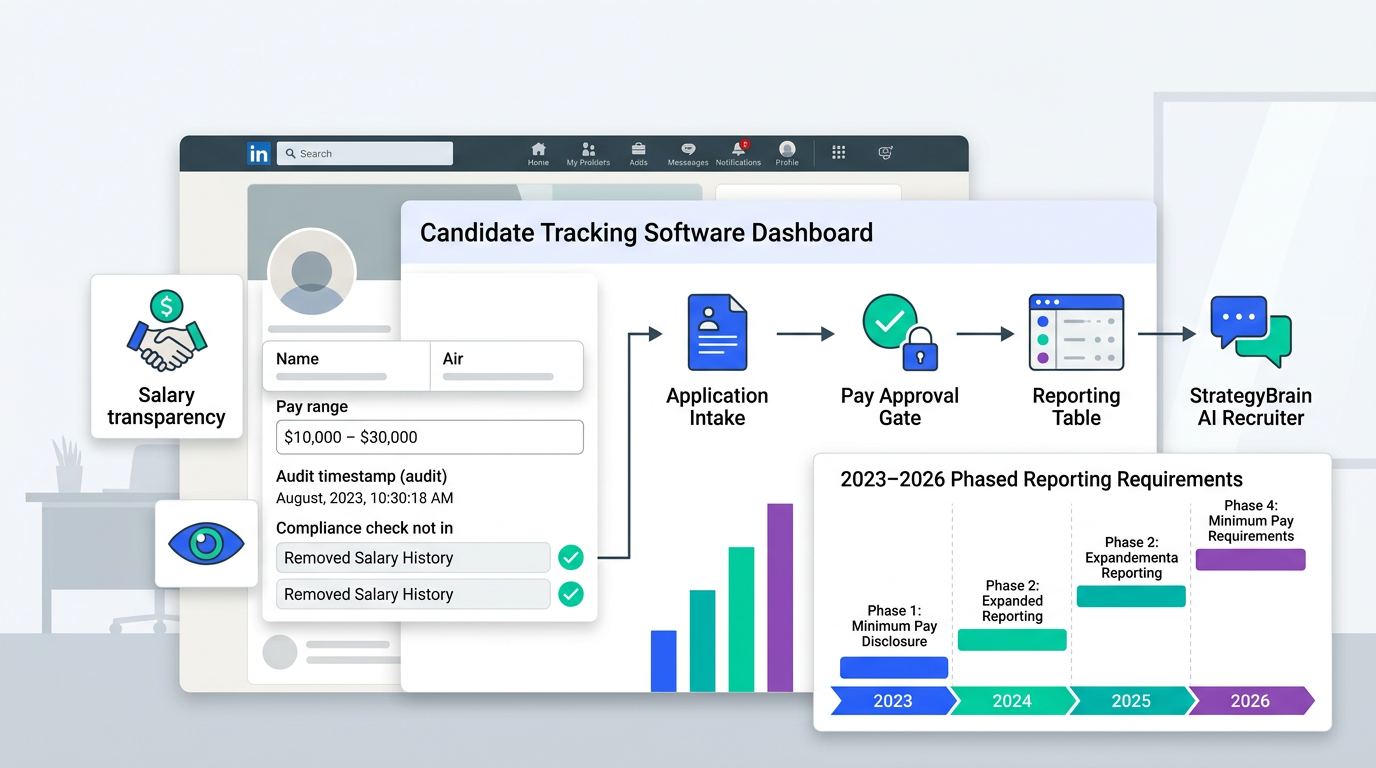
Candidate tracking software is one of the simplest ways to make pay transparency compliance easier because it centralizes job applications, standardizes what recruiters can ask, and preserves an audit friendly record of pay ranges, candidate communications, and hiring decisions. In British Columbia, the Pay Transparency Act restricts salary history questions, protects pay discussions, requires pay or pay ranges on publicly advertised job postings starting November 1, and phases in annual pay transparency reporting by employer size through 2026. This guide breaks down what the Act says, what to change in your job application software and employment application software workflows, and how StrategyBrain AI Recruiter can automate early LinkedIn outreach and résumé collection so your team spends more time on final evaluation and less time on repetitive messaging.
Table of Contents
- What candidate tracking software does in a pay transparency workflow
- BC Pay Transparency Act requirements employers ask about most
- Workflow changes to make inside job application software
- Where StrategyBrain AI Recruiter fits in the process
- Quick compliance mapping table
- FAQ
- Conclusion and next steps
What candidate tracking software does in a pay transparency workflow
Candidate tracking software is a system that captures and organizes candidate data across the hiring funnel, from application intake to interview notes and offer details. In practice, it is the record keeper that helps you prove consistency. That matters more when compensation information is more visible and when candidates are explicitly protected for discussing pay.
When we review hiring operations, the compliance gaps usually come from scattered tools. A recruiter might use a spreadsheet for ranges, email for approvals, and a separate inbox for candidate questions. Candidate tracking software reduces that fragmentation by keeping the hiring story in one place.
What to store for defensibility
- Job posting pay range and the date it was approved for publication.
- Compensation rationale such as level, location, and internal equity notes.
- Interview and screening notes tied to job related criteria.
- Candidate communications including questions about pay and your responses.
- Offer details including base pay, bonus eligibility, and overtime assumptions when applicable.
BC Pay Transparency Act requirements employers ask about most
The BC Pay Transparency Act aims to reduce gender pay gaps through transparency. The source article notes the province’s gender pay gap at 17% in 2022, and frames the Act as a shift from informal pay sharing to formal disclosure practices.
1) Salary history questions are restricted
BC employers are no longer permitted to ask applicants what they were paid by other employers. Employers can still use pay information they already have for an employee in a previous role at the same organization, and they can use publicly available information for similar positions.
2) Employees can discuss pay without retaliation
Employees are free to discuss earnings with co workers or applicants. They can also ask their employer about their pay, ask about pay transparency reporting, and provide information to the Director of Pay Transparency without retribution. The source article states employers cannot dismiss, suspend, demote, discipline, or harass employees for engaging in these conversations.
3) Public job postings must include pay or pay range starting November 1
Beginning November 1, employers must include expected pay or pay range information for specific job opportunities that are publicly advertised. The source article notes an exception for general help wanted promotions that do not refer to a specific position.
4) Annual reporting is phased in by employer size through 2026
The reporting mandate is phased in. The source article states the following thresholds:
- 2023: BC Government and the province’s six largest Crown corporations.
- 2024: Organizations with 1,000+ employees.
- 2025: Organizations with 300+ employees.
- 2026: Organizations with 50+ employees.
5) Reporting content and collection notes
The annual report considers hourly wages, overtime, and bonuses. It discloses discrepancies across male, female, and non binary employees collectively, and the source article notes that real wage data such as dollar amounts do not need to be reported.
Gender information should be collected according to the province’s Gender and Sex Data Standards. Employees can voluntarily update their information or decline to provide it.
Reports must be posted on the company website. If there is no website, the report must be posted in a conspicuous place at the worksite, and it must be available to the public upon request.
Workflow changes to make inside job application software
Pay transparency compliance is rarely a single setting. It is a set of workflow decisions. Below are changes we recommend implementing in your employment application software and candidate tracking software so recruiters do not have to remember rules under pressure.
Step 1: Remove salary history fields and scripts
- Audit application forms for fields like “current salary” and “previous compensation.” Remove them from all templates used in BC hiring.
- Update screening scorecards so compensation expectations are captured as candidate preferences, not as prior pay.
- Train recruiters on compliant phrasing such as “What range are you targeting for your next role?” and document the approved script in the system.
Step 2: Standardize pay range approvals for job postings
- Create a pay range approval step that must be completed before a job can be published.
- Lock the published range in the job record so edits require a new approval event.
- Store the rationale such as level, location, and internal equity notes in a structured field.
Step 3: Build a reporting ready data model
The Act’s reporting discussion in the source article highlights hourly wages, overtime, and bonuses. Even if your organization is not yet in scope, designing your data model early reduces future rework.
- Separate base pay from variable pay so bonuses are not buried in free text.
- Track pay type such as hourly or salary in a consistent field.
- Keep overtime assumptions explicit when they apply to the role.
Step 4: Add a “pay transparency safe” communication log
Because employees and applicants can discuss pay, recruiters should assume compensation questions will come earlier and more often. Candidate tracking software should make it easy to log what was shared and when.
- Use templates for pay range responses so answers are consistent across recruiters.
- Log candidate questions as structured tags, for example “pay range,” “bonus,” “overtime,” “benefits.”
- Attach approvals when exceptions are made, such as a revised range for a hard to fill role.
Step 5: Define what the system should not do
Compliance improves when you define boundaries. For example, a system can help you document and automate, but it should not decide who is qualified without human review. This is also consistent with how StrategyBrain AI Recruiter is designed, because it automates outreach and interest confirmation but does not determine whether a résumé fully matches job requirements.
Where StrategyBrain AI Recruiter fits in the process
StrategyBrain AI Recruiter is built for LinkedIn hiring workflows where the biggest time sink is repetitive outreach, follow up, and early qualification. In our experience, that is also where process inconsistency creeps in, especially when recruiters are juggling multiple roles and time zones.
What it automates on LinkedIn
- Candidate connection and introduction based on recruiter provided search criteria and job details.
- Two way Q and A about the role, company, and compensation, using the information you provide.
- Interest confirmation so recruiters focus on candidates who want to proceed.
- Résumé and contact collection from interested candidates, including email submissions and LinkedIn file uploads.
Why this matters for candidate tracking software
Candidate tracking software is only as complete as the data that makes it into the system. AI Recruiter helps by capturing early stage conversations and collecting résumés and contact details in a consistent way, which reduces the risk of missing records when hiring volume increases.
Multilingual and always on communication
AI Recruiter provides 24/7 multilingual messaging in the candidate’s native language. For global hiring teams, this reduces delays in early engagement and helps keep candidate experience consistent across regions.
Scaling with multiple LinkedIn accounts
AI Recruiter supports managing more than 100 LinkedIn accounts so organizations can build AI powered recruitment teams. This is useful when you need to scale outreach without adding headcount, while still routing final qualification decisions to recruiters.
Limitations to plan for
- Final qualification remains human led because AI Recruiter does not decide whether a résumé fully matches job requirements.
- Compliance depends on your inputs because the system answers compensation questions based on the job details you provide.
- Policy alignment is still required because your team must define what compensation information is approved for sharing at each stage.
Quick compliance mapping table
| Requirement from the source article | What to implement in candidate tracking software | Where AI Recruiter can help |
|---|---|---|
| Do not ask applicants about previous salaries | Remove salary history fields, lock compliant scripts, audit templates | Use approved job details for consistent early messaging |
| Include pay or pay range on publicly advertised job postings starting November 1 | Pay range approval workflow, version history, publishing gate | Reinforce the same range in LinkedIn conversations when candidates ask |
| Annual reporting phased in through 2026 by employer size | Structured fields for hourly wages, overtime, bonuses, and pay type | Reduce manual work by standardizing early funnel data capture |
| Employees can discuss pay and ask about reporting without retaliation | Communication log, templates, and consistent documentation | Always on responses with consistent tone and content |
| Gender data collected under standards and can be declined | Voluntary self identification workflow with opt out tracking | Not a primary function, keep this in HRIS or reporting workflow |
FAQ
Can candidate tracking software help with pay transparency reporting?
Yes. Candidate tracking software can store pay ranges, offer details, and structured compensation fields that make reporting easier later. The BC Pay Transparency Act reporting described in the source article considers hourly wages, overtime, and bonuses, so those fields should not live only in free text.
Are we allowed to ask candidates what they made in their last job in BC?
No. The source article states BC employers are no longer permitted to ask applicants what they have been paid by other employers. You can still discuss expectations for the next role and use publicly available market information for similar positions.
When do job postings need to include a pay range?
The source article states that beginning November 1, employers must include expected pay or pay range information for specific job opportunities that are publicly advertised. General help wanted promotions that are not tied to a specific position are noted as an exception.
What employer sizes are required to report, and when?
The source article describes a phased approach: 2024 includes organizations with 1,000 or more employees, 2025 includes 300 or more employees, and 2026 includes 50 or more employees. It also notes 2023 applies to the BC Government and six large Crown corporations.
Does StrategyBrain AI Recruiter replace our recruiters?
No. AI Recruiter automates early LinkedIn outreach, follow up, and résumé collection, but it does not determine whether a résumé fully matches job requirements. Recruiters remain responsible for final qualification and interview decisions.
How does AI Recruiter handle résumé and contact collection?
AI Recruiter requests résumés and contact details from candidates who express interest. It supports email submissions and LinkedIn file uploads, and it captures contact details shared in LinkedIn messages so recruiters can move qualified candidates into interviews.
How should we handle candidates who want to discuss pay early?
Use a consistent, approved pay range message and log it in your job application software. If you use AI Recruiter, ensure the job details you provide include the approved range and the boundaries of what can be discussed at that stage.
Do we need to report exact dollar amounts in the annual report?
The source article states that real wage data such as dollar amounts need not be reported. It describes reporting as disclosing discrepancies across groups rather than publishing individual wages.
Conclusion and next steps
Pay transparency compliance becomes much easier when your candidate tracking software is designed to prevent salary history questions, enforce pay range approvals, and preserve a clean record of what was posted and what was communicated. The BC Pay Transparency Act details in the source article also make it clear that reporting obligations expand through 2026, so building structured compensation fields now is a practical investment.
Next steps: first, remove salary history fields and update recruiter scripts in your employment application software. Second, add a pay range approval gate for public job postings. Third, decide where StrategyBrain AI Recruiter should sit in your funnel so LinkedIn outreach, follow up, and résumé collection are consistent and documented, while recruiters keep control of final qualification.














