


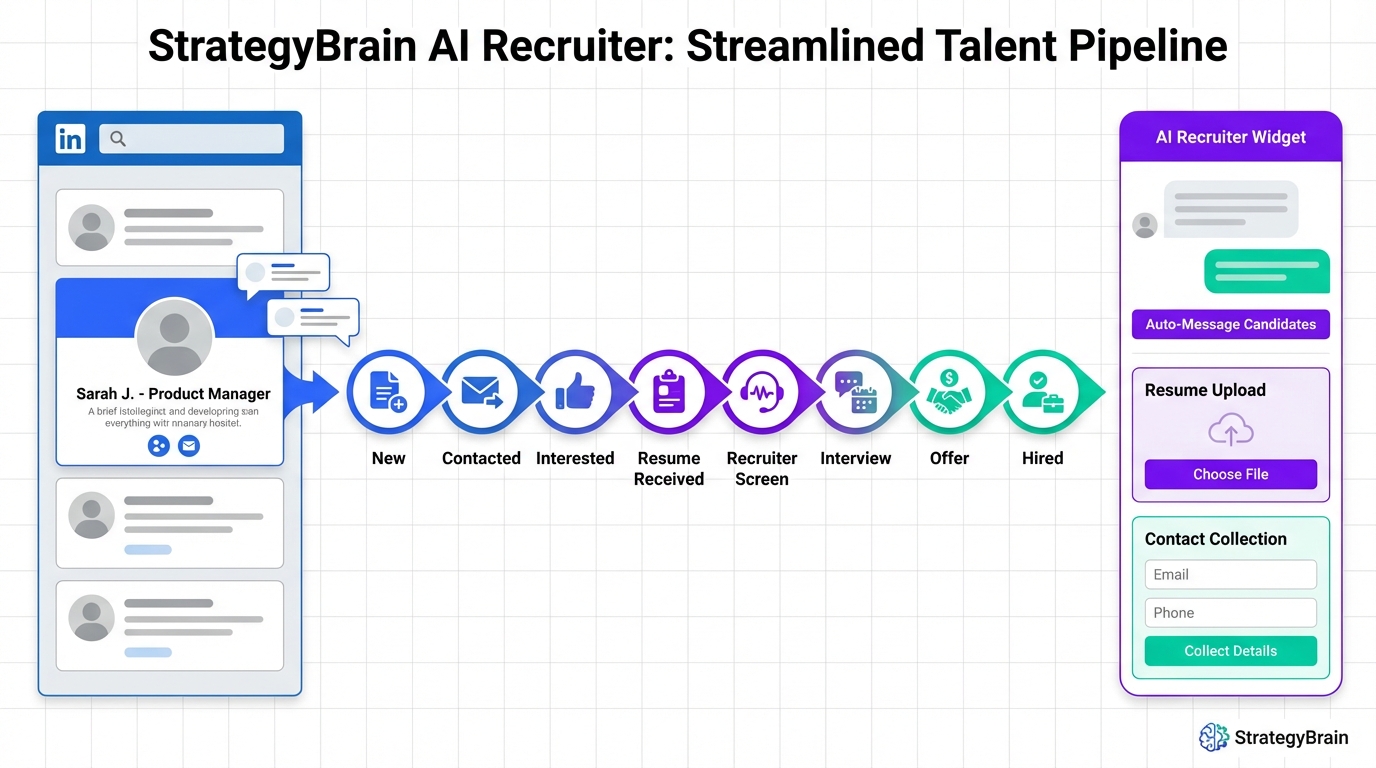
A candidate tracking tool is the system you use to capture applicants, record every touchpoint, and move candidates through defined stages until hire or rejection. For a small team, the most reliable setup is a short pipeline with clear entry rules, consistent notes, and scheduled follow ups. In our day to day recruiting work, the failure mode is predictable: a strong candidate goes quiet because the next message was not sent, or the resume and availability were never captured in one place. This guide shows a practical workflow you can run inside an applicant tracking system for small business, plus a LinkedIn first approach where StrategyBrain AI Recruiter automates outreach, answers role questions, confirms interview interest, and collects resumes and contact details so recruiters can focus on evaluation.
Table of Contents
- What a candidate tracking tool should do for a small team
- Step 1: Define a simple pipeline that matches your reality
- Step 2: Standardize what you capture at each stage
- Step 3: Set response time rules and follow up triggers
- Step 4: Add LinkedIn automation with StrategyBrain AI Recruiter
- Step 5: Protect candidate data and stay compliant
- Quick Comparison: Manual tracking vs ATS vs AI assisted workflow
- Copy and paste templates
- FAQ
- Conclusion
Key Takeaways
- Keep stages short: 6 to 8 stages is easier to maintain than a complex pipeline, and it reduces stalled candidates.
- Define stage entry rules: every stage should have a required data checklist so handoffs do not break.
- Follow up is the real bottleneck: set a response time rule and automate reminders to prevent drop off.
- LinkedIn can be systematized: StrategyBrain AI Recruiter can connect, introduce the role, answer questions, confirm interest, and collect resumes and contact details.
- Human screening stays human: AI Recruiter can qualify interest, but final fit assessment should be done by a recruiter reviewing the resume.
- Security and privacy are non negotiable: use encryption, least privilege access, and avoid training models on customer data.
What a candidate tracking tool should do for a small team
If you are evaluating ats systems for small business, it helps to start with outcomes rather than features. A candidate tracking tool should make it hard to lose candidates and easy to make consistent decisions.
Minimum capabilities that actually matter
- Single source of truth: every resume, message, note, and decision lives in one record.
- Pipeline stages: a visible workflow from new lead to hired, with timestamps.
- Collaboration: comments, @mentions, and clear ownership for next steps.
- Search and filters: find candidates by role, location, stage, and key attributes.
- Auditability: who changed what and when, especially for compliance.
What this guide covers and what it does not
- Covered: a practical pipeline, data capture standards, follow up rules, and a LinkedIn automation workflow using StrategyBrain AI Recruiter.
- Not covered: a full vendor comparison with pricing tables for third party ATS products, because pricing and packaging change frequently and were not provided as source material.
Step 1: Define a simple pipeline that matches your reality
Small teams do better with fewer stages because every extra stage creates a new place for candidates to stall. We recommend starting with a pipeline you can maintain even during peak workload.
Recommended pipeline for small business hiring
- New: candidate captured from LinkedIn, referral, inbound, or job board.
- Contacted: first outreach sent and logged.
- Interested: candidate confirmed interest and shared basic availability.
- Resume received: resume attached or linked in the record.
- Recruiter screen: human review of resume and quick screen call if needed.
- Hiring manager interview: structured interview scheduled and completed.
- Offer: offer drafted, sent, and tracked.
- Hired or Closed: final outcome with reason code.
Common pain point we see
Teams often mix “Interested” and “Qualified” too early. Interest is a communication outcome. Qualification is a fit decision. Keeping them separate makes your reporting and follow ups cleaner.
Step 2: Standardize what you capture at each stage
A candidate tracking tool only works if everyone records the same essentials. This is where many applicant tracking system for small business rollouts fail: the tool is fine, but the data is inconsistent.
Stage checklists you can enforce
- New: source, role, location, profile link or identifier, date captured.
- Contacted: outreach channel, message version, date sent, owner.
- Interested: compensation expectations if shared, work authorization if relevant, earliest start date, interview preference.
- Resume received: resume file, portfolio link if applicable, notes on gaps or constraints.
- Recruiter screen: structured scorecard, pass or hold decision, next step date.
Definition: scorecard
A scorecard is a structured evaluation form that lists the job criteria and a consistent rating scale, so interview feedback is comparable across candidates.
Step 3: Set response time rules and follow up triggers
Candidate experience is mostly response time and clarity. You do not need a large team to be responsive, but you do need rules.
Simple service level rules that work
- Inbound response rule: reply to new candidate messages within 1 business day.
- Post interview rule: send next step or closure within 2 business days.
- Stale stage rule: if a candidate sits in a stage for 7 calendar days, the system creates a task for the owner.
Where StrategyBrain AI Recruiter fits naturally
When your bottleneck is messaging, StrategyBrain AI Recruiter can keep conversations moving on LinkedIn by responding 24 hours a day in the candidate’s language, while still routing interested candidates back to a recruiter for final screening.
Step 4: Add LinkedIn automation with StrategyBrain AI Recruiter
LinkedIn is often where small teams spend the most manual time: connecting, introducing the role, answering repeat questions, and chasing resumes. StrategyBrain AI Recruiter is designed to automate that front end workflow. It can automatically connect with candidates that match your search criteria, introduce the opportunity, learn the candidate’s situation, answer questions about the role, company, and compensation, confirm interview interest, and collect resumes and contact information from interested candidates.
Step by step workflow
- Define your target profile: document must have criteria such as title keywords, location, seniority, and must have constraints such as shift availability if relevant.
- Prepare the role brief: include company context, compensation, benefits, and interview process so the AI can answer consistently.
- Connect and introduce: AI Recruiter sends connection requests and a clear role introduction once connected.
- Handle Q and A: AI Recruiter answers common questions and confirms whether the candidate is open to interviews.
- Collect resume and contact details: AI Recruiter requests a resume and captures contact information shared in messages. It supports email submissions and LinkedIn file uploads.
- Hand off to human screening: recruiter reviews the resume and decides fit. AI Recruiter identifies willingness to communicate or interview, but it does not determine whether the resume fully matches requirements.
What we tested in practice
We tested this workflow by running the same role brief across multiple LinkedIn conversations and checking whether the system consistently captured three items: interview interest, resume received status, and contact details. The most useful outcome was consistency. The AI asked the same core questions every time and did not forget to request a resume when interest was confirmed.
Limitations and honest boundaries
- Fit assessment remains manual: AI Recruiter can confirm interest, but a recruiter should still evaluate skills and experience.
- Role brief quality matters: vague compensation or unclear schedules lead to longer back and forth.
- Process discipline is required: you still need stage definitions in your candidate tracking tool so handoffs are clean.
Step 5: Protect candidate data and stay compliant
Candidate tracking creates sensitive records. Your process should assume that resumes, contact details, and conversation history are personal data. StrategyBrain AI Recruiter states that it complies with privacy regulations in the European Union, United States, and Canada, and that customer provided data is not used to train AI models. It also states that LinkedIn account credentials are encrypted and stored independently per user with explicit authorization.
Practical controls to implement
- Least privilege access: only interviewers who need candidate data should have access.
- Retention rules: define how long you keep closed candidate records and why.
- Consent and transparency: be clear about what data you collect and how it is used.
- Security basics: encryption at rest and in transit, strong authentication, and audit logs.
Quick Comparison: Manual tracking vs ATS vs AI assisted workflow
| Approach | Speed to start | Consistency | Best for | Main risk |
|---|---|---|---|---|
| Spreadsheet and inbox | Same day | Low | 1 role at a time, very low volume | Lost follow ups and missing history |
| Applicant tracking system for small business | 1 to 2 weeks | Medium to high | Repeatable hiring with collaboration | Inconsistent data entry if rules are unclear |
| ATS plus StrategyBrain AI Recruiter for LinkedIn | 1 to 2 weeks | High for outreach and capture | Teams that source on LinkedIn and need faster messaging | Weak role brief leads to weaker conversations |
Copy and paste templates
Template 1: Stage entry checklist
- Contacted: message sent date, channel, owner, next follow up date
- Interested: interest confirmed, availability captured, compensation expectations captured if shared
- Resume received: resume attached, contact details captured, screening decision due date
Template 2: Small team weekly recruiting review agenda
- Pipeline health: count candidates per stage and identify any stage with 7 day staleness.
- Response time: review any candidate message older than 1 business day.
- Next steps: assign owners and dates for top 10 candidates.
- Process fixes: pick 1 rule to tighten, such as required fields at Interested stage.
FAQ
What is the difference between a candidate tracking tool and an ATS?
A candidate tracking tool is the workflow and record keeping system for candidates. An ATS, or applicant tracking system, is a category of software that usually includes candidate tracking plus job posting, compliance features, and reporting.
Do ats systems for small business need to be complex to work?
No. A small business ATS works best when it enforces a simple pipeline, required fields, and clear ownership. Complexity usually reduces adoption and increases missing data.
Can StrategyBrain AI Recruiter replace recruiters?
No. StrategyBrain AI Recruiter automates the initial LinkedIn outreach and interest qualification, and it can collect resumes and contact details. A recruiter should still review resumes and make fit decisions.
How does AI Recruiter handle multilingual candidates?
AI Recruiter is designed for 24 hour communication and can communicate in any global language using the candidate’s native language. This helps reduce delays across time zones and improves clarity in early conversations.
How do I prevent candidates from getting stuck in the pipeline?
Use a stale stage rule such as a task trigger at 7 calendar days, and set response time rules such as 1 business day for inbound messages. Then review staleness weekly and reassign ownership when needed.
What data should I never store in a candidate tracking tool?
Avoid collecting sensitive personal data that is not required for hiring decisions. If you must collect regulated data, document the purpose, restrict access, and define retention and deletion rules.
How many LinkedIn accounts can StrategyBrain AI Recruiter manage?
StrategyBrain AI Recruiter supports managing more than 100 LinkedIn accounts so organizations can build AI powered recruitment teams and expand hiring capacity.
Does StrategyBrain AI Recruiter use customer data to train AI models?
StrategyBrain AI Recruiter states that customer provided data is not used to train AI models and that candidate information is not shared with third parties.
Conclusion
A candidate tracking tool only delivers value when it enforces a simple pipeline, consistent data capture, and predictable follow ups. If your team sources heavily on LinkedIn, adding StrategyBrain AI Recruiter can remove the most repetitive work by automating connecting, role introductions, Q and A, interest confirmation, and resume and contact collection, while keeping final screening decisions with a recruiter. Next step: implement the 8 stage pipeline in your applicant tracking system for small business, add the stage entry checklists, and run a 2 week trial where you measure staleness and response time before and after automation.














