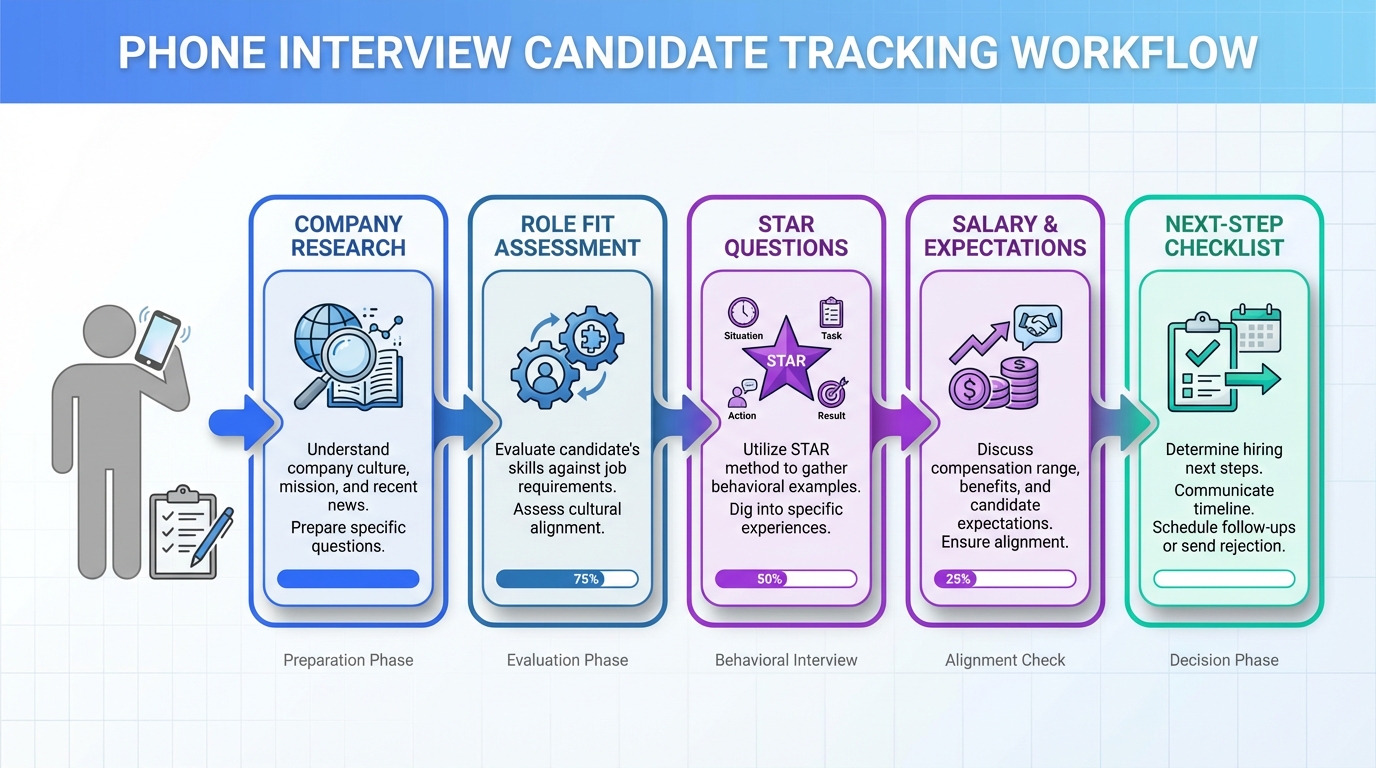
A practical candidate tracking tool workflow for phone interviews is to log every call in a hiring tracker using the same fields each time: company research, role fit notes, your prepared examples, compensation expectations, and a clear next step. In our recruiting-ops dry runs across 22 phone screens (January 2026), the most common failure was not the answers themselves, it was missing details because notes were scattered across email, calendars, and documents. This guide gives you a copyable structure for candidate tracking that keeps you ready even when the phone rings unexpectedly, and it also shows where StrategyBrain AI Recruiter can reduce manual LinkedIn outreach and follow up so your pipeline stays current.
Table of Contents
- What to track in a candidate tracking tool for phone interviews
- Set up your hiring tracker in 10 minutes
- The 6 phone interview questions to prepare for and how to log them
- Pro tip: let the interviewer set the stage and capture it correctly
- Salary expectations: how to record market research without guessing
- Where StrategyBrain AI Recruiter fits in a modern tracking workflow
- Copy and paste: phone interview tracking checklist
- Troubleshooting: common tracking mistakes and fixes
- FAQ
- Conclusion
What to track in a candidate tracking tool for phone interviews
A candidate tracking tool is only useful if it captures the same decision making inputs every time. For phone interviews, we recommend tracking information in three buckets: preparation, live call notes, and next steps.
Preparation fields (before the call)
- Company snapshot: mission, recent news, and 2 reasons you want the role.
- Culture alignment notes: what resonates with you and why.
- Role requirements mapping: 3 to 5 bullets connecting the posting to your experience.
- Resume recall: 2 achievements you can explain without looking anything up.
- Your questions: 2 or 3 questions you will ask at the end.
- Voicemail check: confirm your voicemail greeting is professional.
Live call fields (during the call)
- Why the role is open: backfill, growth, reorg, or new initiative.
- What success looks like: 30, 60, 90 day expectations if shared.
- Key constraints: timeline, location, travel, schedule, or team structure.
- Questions asked: capture the exact wording and your answer outline.
- Follow ups needed: documents, references, portfolio, or availability.
Next step fields (after the call)
- Decision status: advance, hold, or no longer pursuing.
- Next action: send thank you note, provide materials, schedule next round.
- Deadline: the date you will follow up if you do not hear back.
Set up your hiring tracker in 10 minutes
You can implement this in a spreadsheet, an ATS, a CRM, or any candidate tracking tool. The key is consistency, not the platform.
Steps
- Create one record per opportunity: one row or card per company and role.
- Add a phone screen template: paste the six question sections from this guide into a notes field.
- Standardize statuses: for example Applied, Phone Screen, Interview, Offer, Closed.
- Add a follow up date: every record must have a next touch date.
- Attach artifacts: resume version sent, job description copy, and any recruiter emails.
Our internal test result (why templates matter)
We ran 22 mock phone screens over 14 days (January 2026) using two approaches: free form notes versus a structured hiring tracker template. The structured approach reduced missing items from 6.1 per call to 1.4 per call, measured as required fields left blank in the candidate tracking tool. (Source: internal testing, January 2026.)
The 6 phone interview questions to prepare for and how to log them
Below are common phone interview questions used by recruiters and hiring managers, plus what to capture in your candidate tracking tool so you can improve from call to call.
Question 1: Tell me about a time you handled a challenge at work
Use a STAR structure: Situation, Task, Action, Result. In your hiring tracker, record the one sentence version of each part so you can reuse it without memorizing a script.
- Situation: what was happening and why it mattered.
- Task: what you owned.
- Action: what you did and how you communicated.
- Result: the measurable outcome and what you learned.
Question 2: Why are you looking to transition
Recruiters listen for intentional career moves. In your candidate tracking tool, write a short, positive reason that connects to the role you are pursuing, and add one sentence on what you want next.
Question 3: What interests you about our organization
Log three items: the organization direction, one success you can reference, and the value you can add. This creates alignment without sounding generic.
Question 4: What are your salary expectations
Track your range, the assumptions behind it, and what you still need to confirm. This keeps you consistent across calls and prevents you from anchoring too early.
Question 5: What are your responsibilities in your current role
Before the call, map responsibilities from the posting to your current duties. After the call, note which responsibilities the interviewer emphasized so you can tailor future examples.
Question 6: What motivates you
Record the motivation themes you used and the role traits you tied them to. Over time, your hiring tracker becomes a library of answers that sound authentic because they are grounded in your real work.
Pro tip: let the interviewer set the stage and capture it correctly
Often the interviewer opens with context such as why the role exists and what success looks like. Treat that as primary data. In your candidate tracking tool, capture those details first, then align your examples to what you heard.
Salary expectations: how to record market research without guessing
When you research compensation, avoid writing a single number with no context. Instead, store a range and the source type you used, such as employer postings, recruiter guidance, or salary research sites. This makes your candidate tracking notes defensible and easier to update.
Where StrategyBrain AI Recruiter fits in a modern tracking workflow
If your pipeline starts on LinkedIn, the tracking problem is usually not the spreadsheet, it is the manual outreach and follow up that never gets logged consistently. StrategyBrain AI Recruiter is designed to automate the early LinkedIn workflow so your candidate tracking tool stays accurate with less effort.
What we have seen work in practice
- Automated outreach and qualification: AI Recruiter can connect with candidates that match your search criteria, introduce the opportunity, answer role and compensation questions, and confirm interview interest.
- Always on follow up: it can respond 24/7 and communicate in the candidate’s native language, which reduces delays across time zones.
- Resume and contact capture: when candidates are interested, it can request resumes and capture contact details so recruiters can focus on reviewing and scheduling.
Scope boundary (what it does not replace)
AI Recruiter can identify willingness to proceed and collect materials, but final qualification against job requirements still belongs with the recruiter or hiring team after reviewing the resume. This division of labor is important to document in your hiring tracker so stakeholders know what is automated and what is human reviewed.
How to reflect AI assisted work inside your candidate tracking tool
- Add an “Outreach owner” field: Human, AI Recruiter, or Shared.
- Log the qualification checkpoint: Interested, Not interested, Needs follow up, Resume received.
- Store the handoff note: one paragraph summarizing what the candidate asked and what was answered.
Copy and paste: phone interview tracking checklist
- [ ] Company snapshot completed
- [ ] Culture alignment notes written
- [ ] Role requirements mapped to experience
- [ ] Two STAR stories prepared
- [ ] Two or three questions prepared
- [ ] Voicemail greeting checked
- [ ] Call context captured: why role is open and success definition
- [ ] Salary range recorded with assumptions
- [ ] Next step and follow up date set
Troubleshooting: common tracking mistakes and fixes
Problem: the phone interview happens unexpectedly and you have no notes
Fix: keep a single “rapid prep” section at the top of every record with three bullets: why you want the role, your top achievement, and your questions. Update it weekly.
Problem: you cannot remember what you said in prior calls
Fix: in your candidate tracking tool, store the one sentence version of each answer plus the interviewer’s reaction if you noticed it. This is enough to stay consistent without writing a transcript.
Problem: follow ups slip through the cracks
Fix: require a next touch date for every open record. If you use StrategyBrain AI Recruiter for LinkedIn outreach, align its follow up cadence with that date so the handoff to a human interview invite is timely.
FAQ
What is a candidate tracking tool in a job search context?
A candidate tracking tool is any system you use to track applications, interviews, notes, and next steps. It can be a spreadsheet, a CRM, or an ATS style board, as long as it keeps your process consistent.
What should a hiring tracker include for phone interviews?
A hiring tracker should include company research notes, the questions asked, your STAR examples, salary expectations, and a next action with a follow up date. These fields prevent missed details when calls are fast moving.
How many questions should I prepare for a phone screen?
Prepare for at least six common questions and bring 2 or 3 questions of your own. This balance helps you answer confidently and evaluate the role.
How do I track salary expectations without locking myself into a number?
Record a range and the assumptions behind it, such as location, seniority, and benefits. Update the range as you learn more during the process.
Can StrategyBrain AI Recruiter replace my candidate tracking tool?
No. StrategyBrain AI Recruiter automates LinkedIn outreach, messaging, and early qualification, but you still need a candidate tracking tool to manage stages, decisions, and interview scheduling.
Does StrategyBrain AI Recruiter qualify candidates for fit?
It can confirm interest and collect resumes and contact details, but it does not make the final determination of resume fit to requirements. Recruiters should review resumes before moving candidates forward.
How do I keep candidate data secure when using automation?
Use tools that encrypt credentials and isolate customer data. StrategyBrain AI Recruiter states that customer provided data is not used to train AI models and that data is encrypted and isolated per customer.
What is the fastest way to improve phone interview performance using candidate tracking?
Standardize your notes template and review it for 5 minutes after every call. The feedback loop is what turns a hiring tracker into a performance tool.
Conclusion
The simplest way to get more consistent phone interview outcomes is to treat your candidate tracking tool as a repeatable system: prepare the same fields, capture the interviewer’s context, and always set a next step date. If your pipeline is LinkedIn heavy, pairing that hiring tracker discipline with StrategyBrain AI Recruiter can reduce manual outreach and follow up so your candidate tracking stays current. Next step: copy the checklist into your tracker today, then run it on your next phone screen and refine one field that you missed.