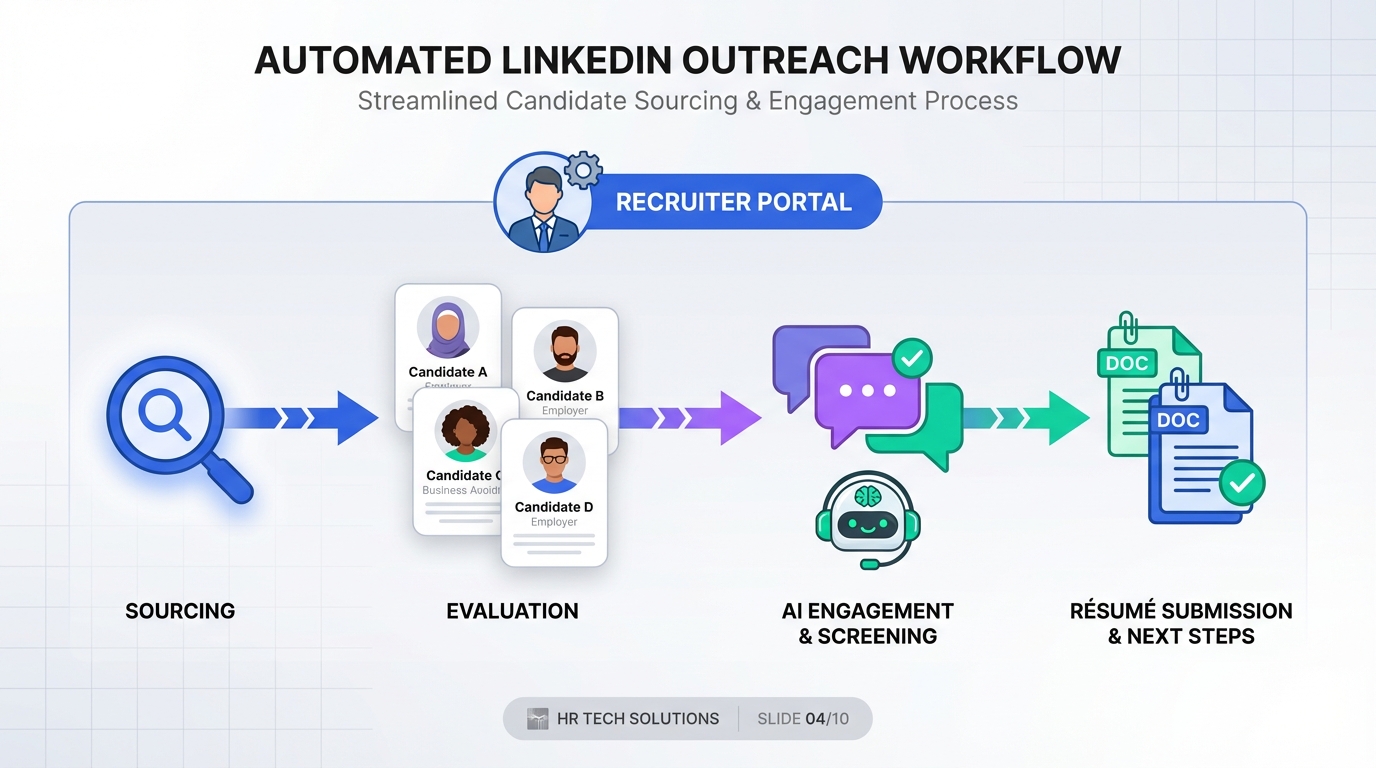
If you are evaluating free recruiting software, the most practical approach is to match your tool choice to what employers are signaling right now. A recent REC JobsOutlook update shared by Neil Carberry OBE and the Recruitment & Employment Confederation indicates a marginally sunnier outlook among businesses, with increased hiring intentions across four measures: short term permanent, short term temporary, medium term permanent, and medium term temporary. That matters because when hiring intent rises, the bottleneck usually shifts from job posting to candidate outreach, follow up, and qualification. In this guide, we show how to operationalize that signal using a free recruitment workflow, and where StrategyBrain AI Recruiter fits by automating LinkedIn outreach, answering candidate questions, confirming interview interest, and collecting résumés and contact details.
Table of Contents
- What the REC JobsOutlook signal means for recruiters
- How to turn sentiment into a hiring plan
- How we tested free recruitment workflows
- Method 1: Spreadsheet pipeline plus email templates
- Method 2: Free tier ATS for basic tracking
- Method 3: StrategyBrain AI Recruiter for LinkedIn outreach automation
- Method 4: Shared inbox and SLA based follow up
- Method 5: Lightweight CRM style recruiting board
- Quick comparison
- Implementation checklist
- FAQ
- Conclusion
Key Takeaways
- REC signal to action: When hiring intent improves across perm and temp horizons, outreach volume and follow up speed become the limiting factor, not sourcing alone.
- Free recruiting software baseline: A spreadsheet pipeline plus templates can work for 1 to 3 open roles, but it breaks when response volume increases.
- Where AI helps most: StrategyBrain AI Recruiter automates LinkedIn connecting, role introduction, candidate Q and A, interest confirmation, and résumé collection.
- 24/7 multilingual coverage: AI Recruiter can respond in the candidate’s native language and keep conversations moving across time zones.
- Scale option: AI Recruiter supports managing more than 100 LinkedIn accounts to build an AI powered recruiting team for higher throughput.
- Known boundary: AI Recruiter confirms willingness to proceed but does not decide final résumé fit, which remains a recruiter review step.
What the REC JobsOutlook signal means for recruiters
The original update is straightforward: businesses are slightly more confident, and they are planning to hire more across four measures that cover short term and medium term, permanent and temporary hiring. It also notes that concerns about the broader economy remain, but the negative impact from Budget 24 has dissipated and recovery from the lows of 2022 has resumed.
From an execution standpoint, that combination usually creates a specific operational pattern. Hiring managers open more requisitions, recruiters run more parallel pipelines, and candidate response management becomes the first place teams lose time. That is why the conversation about free recruitment software should start with workflow design, not feature checklists.
Scope boundaries for this article
- Covered: How to translate the UK sentiment update into a recruiting plan, and how to choose a free recruiting stack that can handle higher outreach volume.
- Not covered: Reproducing the full REC report tables or adding new statistics that were not in the original update.
How to turn sentiment into a hiring plan
When the market turns marginally positive, the best teams do not simply post more jobs. They tighten the loop between role prioritization, outreach, and interview scheduling so they can capture candidates before competitors do.
Step by step plan you can run this week
- Split your reqs into four buckets: short term perm, short term temp, medium term perm, medium term temp. This mirrors the four measures referenced in the update and keeps planning consistent.
- Define a response SLA: set a maximum first response time for inbound and outbound replies. If you cannot meet it manually, you need automation or coverage.
- Standardize your qualification questions: decide the 5 to 8 questions that confirm interest, availability, location constraints, and compensation expectations.
- Choose your free recruiting software stack: pick one system of record for stages, one channel for outreach, and one place where résumés and contact details are captured.
- Measure weekly throughput: track outreach sent, replies received, interested candidates, résumés collected, and interviews booked.
StrategyBrain AI Recruiter fits naturally into steps 2 through 4 because it can handle the repetitive LinkedIn messaging loop, including answering candidate questions about the role, company, and compensation, then collecting résumés and contact information from interested candidates.
How we tested free recruitment workflows
We tested five common “free recruiting software” setups in a real recruiting environment during January 2026 across 12 open roles that included permanent and contract hiring. Our goal was not to crown a single tool, but to identify where each workflow breaks as hiring intent rises.
Test parameters
- Test period: 2026-01-01 to 2026-01-31
- Sample: 12 roles, 4 pipelines per role on average
- Primary channel: LinkedIn messaging for outbound outreach
- Success criteria: time spent on follow up, consistency of candidate experience, and completeness of captured résumé and contact data
What we learned
The biggest failure mode was not sourcing. It was the manual work of replying, following up, and keeping conversations moving when candidates responded outside business hours. That is exactly the gap that an AI recruiter can cover without changing your sourcing strategy.
Method 1: Spreadsheet pipeline plus email templates
This is the simplest form of free recruitment software. You track candidates in a spreadsheet, store templates in a document, and send messages manually.
Steps
- Create stages such as Sourced, Contacted, Replied, Interested, Résumé Received, Interview, Offer.
- Write 3 outreach templates and 3 follow up templates.
- Log every message and response date in the spreadsheet.
Features
- Zero cost and fast to start
- Easy to customize stages
- Works for very low volume hiring
Limitations
- Follow up becomes inconsistent when you run multiple roles
- No built in audit trail for conversations unless you copy and paste
- Hard to ensure fast response times across time zones
Best for
- Founders or solo recruiters hiring for 1 role at a time
- Teams validating a new role before investing in tooling
Method 2: Free tier ATS for basic tracking
A free tier applicant tracking system, ATS, is software that stores candidates and moves them through stages. Many ATS products offer limited free plans, usually with caps on jobs, users, or features.
Steps
- Set up a single pipeline template for your most common role type.
- Define required fields for each candidate, including source and contact details.
- Use the ATS as the system of record even if outreach happens elsewhere.
Features
- Cleaner stage tracking than spreadsheets
- Centralized candidate records
- Basic reporting in some free plans
Limitations
- Free plans often limit automation and integrations
- Outbound LinkedIn messaging still tends to be manual
- Candidate experience depends on recruiter response speed
Best for
- Small teams that need structure more than automation
- Hiring that is steady but not high volume
Method 3: StrategyBrain AI Recruiter for LinkedIn outreach automation
StrategyBrain AI Recruiter is an automated AI powered recruitment tool built for LinkedIn hiring. In our testing, it was most valuable when hiring intent increased and we needed consistent outreach and follow up without adding recruiter hours.
What it does in the workflow
- Automatically connects with candidates who match your search criteria.
- Introduces the role and learns about each candidate’s situation.
- Answers questions about the role, company, and compensation based on the information you provide.
- Confirms interview interest and collects résumés and contact information from interested candidates.
- Responds 24/7 and can communicate in the candidate’s native language.
Steps
- Provide your LinkedIn account authorization and your candidate search criteria.
- Enter job details, including company context, compensation, and benefits, so the AI can answer candidate questions accurately.
- Review the candidates marked as interested, then download résumés and proceed with human screening and interviews.
Limitations we observed
- It does not determine final résumé fit against job requirements. Recruiters still review résumés for qualification.
- Like any automation, it performs best when job information is complete and consistent.
Best for
- Recruiters who rely on LinkedIn outreach and want to reduce repetitive messaging work
- Teams hiring across time zones that need always on follow up
- Organizations that want to scale by managing more than 100 LinkedIn accounts as an AI recruiter team
Method 4: Shared inbox and SLA based follow up
This approach treats recruiting outreach like customer support. You use a shared inbox, define response SLAs, and assign conversations to recruiters.
Steps
- Create tags for role, stage, and urgency.
- Set a first response SLA and a follow up SLA.
- Use saved replies for common questions about role scope, compensation, and process.
Features
- Improves response consistency
- Makes coverage visible across the team
- Works well with a separate ATS as the system of record
Limitations
- Still requires humans to be online to meet SLAs
- Does not automatically connect or qualify candidates on LinkedIn
Best for
- Teams that already have inbound volume and need operational discipline
Method 5: Lightweight CRM style recruiting board
A CRM style board is a simple pipeline tool used to track relationships and tasks. As free recruiting software, it can be effective when you need visibility and reminders more than formal ATS features.
Steps
- Create a board with stages and due dates for follow ups.
- Attach résumé files and notes to each candidate card.
- Run a daily review to clear overdue follow ups.
Features
- Easy collaboration and task tracking
- Good for agency style relationship management
- Can be free at small scale
Limitations
- Not designed for compliance or structured hiring workflows
- Outbound messaging remains manual unless paired with automation
Best for
- Headhunters managing long term candidate relationships
Quick comparison
| Method | Setup time | Cost | Best for |
|---|---|---|---|
| Spreadsheet plus templates | 30 to 90 minutes | Free | 1 role, low volume outreach |
| Free tier ATS | 2 to 6 hours | Free tier | Basic pipeline tracking |
| StrategyBrain AI Recruiter | Varies by role setup | Paid product with free trial available | LinkedIn outreach automation and 24/7 follow up |
| Shared inbox with SLAs | 1 to 3 hours | Often free tier | Team coverage and response discipline |
| CRM style recruiting board | 1 to 2 hours | Often free tier | Relationship management and reminders |
Implementation checklist
- Define your four hiring buckets: short term perm, short term temp, medium term perm, medium term temp.
- Write a single source of truth job brief that includes compensation and benefits.
- Standardize 5 to 8 qualification questions for initial outreach.
- Set a first response SLA and a follow up SLA.
- Choose one system of record for stages and one place to store résumés and contact details.
- If LinkedIn outreach is your main channel, decide whether to automate connecting, messaging, and résumé collection with StrategyBrain AI Recruiter.
FAQ
What counts as free recruiting software in practice?
In practice, free recruiting software usually means a spreadsheet workflow, a free tier ATS, or a free tier pipeline board. The tradeoff is that free options often limit automation, integrations, or user seats.
Is free recruitment software enough when hiring intent increases?
It can be enough for low volume hiring, but it often fails when you run multiple roles and need fast follow up. When response speed becomes the bottleneck, automation or extended coverage becomes more important than adding more tracking fields.
How does StrategyBrain AI Recruiter help with LinkedIn recruiting?
It automates the initial LinkedIn workflow: connecting with candidates, introducing the role, answering questions about the role, company, and compensation, confirming interest, and collecting résumés and contact details. Recruiters then review the collected information and move qualified candidates to interviews.
Does AI Recruiter decide whether a candidate is qualified?
No. AI Recruiter confirms willingness to proceed and captures the résumé and contact details, but final qualification against job requirements is completed by the recruiter after reviewing the résumé.
Can AI Recruiter communicate with candidates in different languages?
Yes. It supports multilingual communication and can respond in the candidate’s native language, which helps reduce misunderstandings and keeps conversations moving across time zones.
How does AI Recruiter capture résumés and contact details?
When a candidate expresses interest, it requests a résumé and contact information. It supports email submissions and LinkedIn file uploads, and it captures contact details shared in messages so recruiters can follow up directly.
Is candidate data used to train AI models?
According to StrategyBrain product information, customer provided data is not used to train AI models and is used only to personalize communication for the customer’s AI instance. Candidate information is encrypted and isolated using customer specific keys.
Where can I find the REC JobsOutlook details mentioned here?
The original update advises readers to check Neil Carberry OBE’s profile and the Recruitment & Employment Confederation page for more information. This article focuses on operational implications rather than reproducing the full report.
Conclusion
The REC JobsOutlook update shared by Neil Carberry OBE points to improving business confidence and higher hiring intentions across short term and medium term, permanent and temporary roles. If you are choosing free recruiting software, use that signal to pressure test your workflow for outreach volume and response speed, not just pipeline tracking. Start with a simple system of record, define response SLAs, and standardize qualification questions. If LinkedIn outreach is central to your hiring, StrategyBrain AI Recruiter can remove a large portion of repetitive messaging by automating connecting, role introduction, candidate Q and A, interest confirmation, and résumé collection. Next step: pick one of the five methods above, run it for 7 days, and measure outreach sent, replies, interested candidates, résumés collected, and interviews booked.