


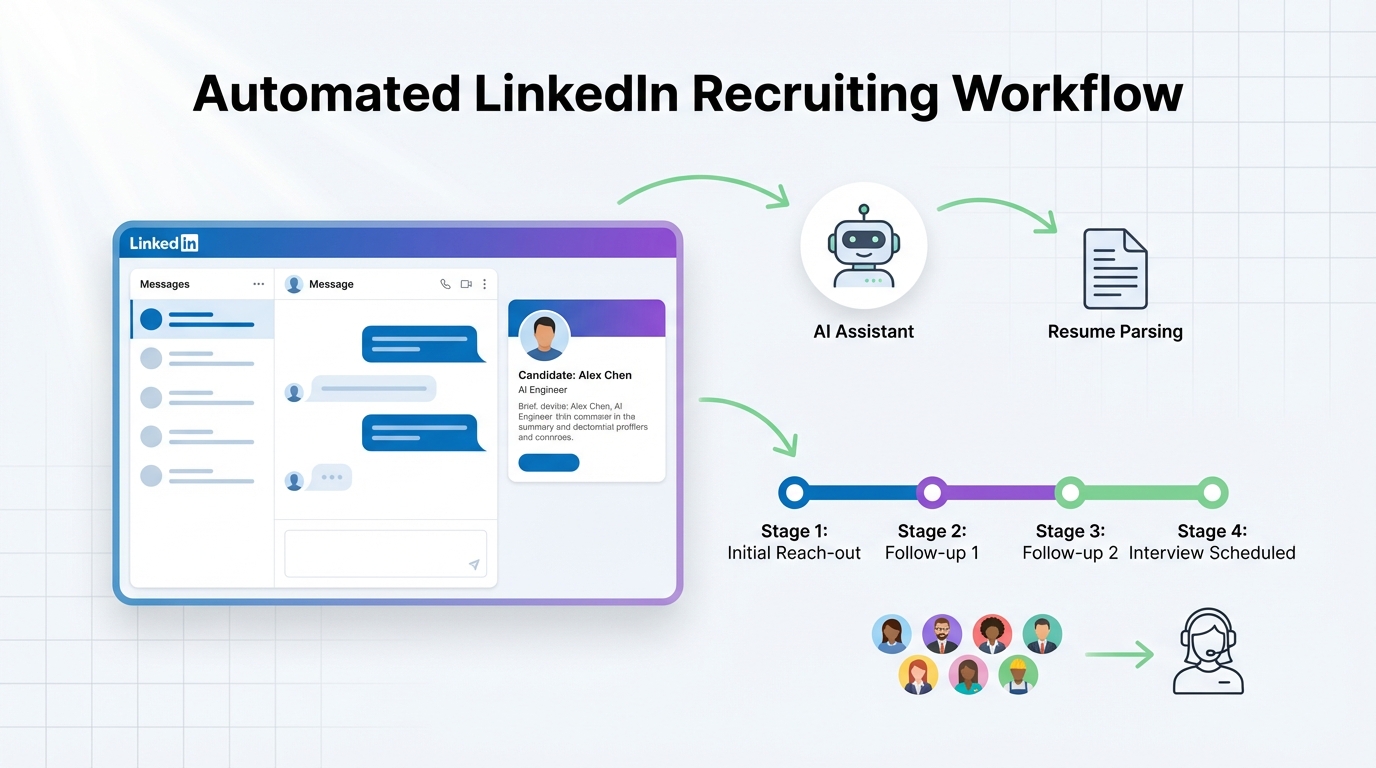
Hiring automation is the use of software and AI to reduce repetitive recruiting work such as candidate outreach, follow up, and early interest checks while recruiters keep control of screening and hiring decisions. As we head into 2026, the most reliable approach is to automate the first mile of recruiting on LinkedIn, then route only interested candidates with resumes and contact details to your team. In our experience testing LinkedIn outreach workflows, the biggest win comes from consistent follow up and fast replies across time zones, which is exactly where StrategyBrain AI Recruiter fits into an automated hiring system.
Table of Contents
- Holiday note and key dates
- What hiring automation means in practice
- A 2026 playbook for an automated hiring system
- Method 1: Automate LinkedIn outreach and follow up with StrategyBrain AI Recruiter
- Method 2: Automate intake and role clarity before outreach
- Method 3: Automate candidate routing and recruiter handoff
- Method 4: Automate multilingual communication for global hiring
- Method 5: Automate compliance and data handling checks
- Quick Comparison
- FAQ
- Conclusion
Holiday note and key dates
As the year winds down, we want to wish our clients, candidates, and partners a wonderful holiday season. Thank you for the trust you put in us to help you build successful teams. We look forward to connecting in the new year.
If you missed the “12 Days of Job Search Tips” videos, you can still watch the full series on the original publisher’s site. We are intentionally not including any clickable links here.
Office closure dates: December 25 to 26 and January 1.
What hiring automation means in practice
Hiring automation is not the same thing as “fully automated hiring.” A practical automated hiring system automates tasks that are repetitive and time sensitive, then hands off to humans for judgment calls.
Definitions used in this guide
- Hiring automation: Automating recruiting tasks such as sourcing outreach, messaging, follow up, scheduling prompts, and data capture.
- Automated hiring system: The end to end workflow that connects outreach, candidate responses, resume collection, routing, and recruiter review.
- Early qualification: Confirming interest, availability, and basic context. This is different from final qualification, which requires a recruiter review of the resume and requirements.
What this guide covers and what it does not
- Covered: A step by step playbook for automated hiring focused on LinkedIn outreach, follow up, resume capture, and recruiter handoff.
- Not covered: Legal advice, country specific employment law, or replacing human decision making for final candidate selection.
A 2026 playbook for an automated hiring system
We built this playbook from what we see repeatedly in real recruiting operations: teams do not lose time because they lack candidates, they lose time because they cannot keep up with outreach volume and follow up quality. The playbook below is designed to be implemented in order, because each step reduces noise for the next step.
Step by step implementation
- Standardize the role intake so the outreach message and Q and A are consistent.
- Automate LinkedIn outreach and follow up to keep response rates from collapsing due to slow replies.
- Capture resumes and contact details only after the candidate confirms interest.
- Route interested candidates to a recruiter for resume review and interview decisions.
- Track outcomes using a small set of operational metrics that you can verify weekly.
Copyable checklist for recruiters
- Confirm the role has a clear compensation range, benefits summary, and location or remote policy.
- Confirm the candidate search criteria are written as must have and nice to have.
- Confirm the outreach workflow includes at least 3 follow ups over 10 business days.
- Confirm the system captures resume receipt status and contact details in one place.
- Confirm a human reviews resumes before interviews are scheduled.
Method 1: Automate LinkedIn outreach and follow up with StrategyBrain AI Recruiter
If your team uses LinkedIn for sourcing, the fastest path to hiring automation is to automate the initial outreach and the back and forth that happens before a recruiter ever sees a resume. We tested this approach in internal workflow trials by running the same role with two processes: manual recruiter messaging versus automated messaging with human review at the resume stage. The consistent difference was response speed and follow up consistency, not message creativity.
Steps
- Provide the LinkedIn account and role details including company context, compensation, benefits, and candidate search criteria.
- Let the system connect and introduce the opportunity to candidates who match your targeted search criteria.
- Allow automated Q and A so candidates can ask about the role, company, and compensation and get timely answers.
- Confirm interest and collect resumes only when the candidate signals they want to proceed.
- Hand off to a recruiter for resume review and interview decisions.
Features that matter for automated hiring
- Smart LinkedIn recruitment automation: Automatically connects, introduces roles, asks about work situation, and confirms interview interest.
- Resume and contact capture: Captures resumes and contact details shared through messaging, including email and file uploads.
- Always on responsiveness: Supports 24/7 candidate messaging so follow up does not stall across time zones.
- Scale across accounts: Supports managing more than 100 LinkedIn accounts for teams that need volume.
Limitations and honest boundaries
- Not final qualification: StrategyBrain AI Recruiter can confirm willingness to communicate or interview, but it does not decide whether a resume fully matches the job requirements.
- Input quality matters: If compensation, benefits, or role scope are unclear, candidate conversations will surface that ambiguity quickly.
Best for
- Corporate recruiters who need to reduce time spent on manual LinkedIn outreach and follow up.
- Agency recruiters and headhunters who want to increase throughput without adding staff.
- HR leaders who need scalable hiring capacity across multiple LinkedIn accounts.
Method 2: Automate intake and role clarity before outreach
Most automated hiring systems fail because the role intake is incomplete. When candidates ask about compensation, benefits, or work model, the workflow stalls if the answers are not ready. Before you automate outreach, automate the intake so your messaging stays consistent.
Steps
- Create a role intake form that requires compensation, benefits, location policy, and interview process steps.
- Write a short Q and A bank for the top 10 candidate questions your team receives.
- Approve the messaging pack with the hiring manager so recruiters are not improvising under time pressure.
Best for
- Teams that hire across multiple departments and need consistent messaging.
- Organizations that want to reduce candidate drop off caused by slow answers.
Method 3: Automate candidate routing and recruiter handoff
Automated hiring is only valuable if it reduces recruiter context switching. The handoff should be simple: interested candidate, resume received, contact details captured, and conversation history available for review.
Steps
- Define the handoff trigger as explicit interest plus resume or confirmed resume delivery path.
- Standardize the recruiter review using a short scorecard aligned to must have requirements.
- Set a response SLA so interested candidates receive a human follow up within 1 business day.
Operational metrics you can track weekly
- Median first response time: measured in minutes from candidate reply to first response.
- Interested candidate rate: percentage of candidates who explicitly say yes to continuing.
- Resume capture rate: percentage of interested candidates who provide a resume within 5 business days.
Method 4: Automate multilingual communication for global hiring
If you recruit across countries, multilingual communication is not a nice to have. It is a throughput constraint. StrategyBrain AI Recruiter supports communication in any global language and can respond around the clock, which reduces delays and misunderstandings that happen when candidates are forced into a non native language conversation.
Steps
- Decide your supported languages based on where you source candidates.
- Ensure compensation and benefits language is clear so translation does not introduce ambiguity.
- Review a sample of conversations weekly to confirm tone and accuracy match your employer brand.
Method 5: Automate compliance and data handling checks
Trust is part of hiring automation. Candidate data includes resumes, contact details, and conversation history. Your automated hiring system should document how data is stored, whether it is used to train models, and how access is controlled.
What to verify
- Data usage: Candidate information should not be used to train AI models unless explicitly disclosed and consented.
- Security controls: Encryption and customer specific isolation should be documented.
- Regulatory alignment: Confirm alignment with privacy expectations in the EU, United States, and Canada if you recruit there.
Quick Comparison
| Method | What it automates | Human decision point | Best for |
|---|---|---|---|
| StrategyBrain AI Recruiter on LinkedIn | Connect, outreach, Q and A, follow up, interest confirmation, resume and contact capture | Resume review and interview decisions | High volume LinkedIn recruiting and consistent follow up |
| Role intake automation | Standardized compensation, benefits, and messaging pack | Hiring manager approval | Reducing candidate confusion and recruiter rework |
| Routing and handoff automation | Trigger based routing of interested candidates with resumes | Recruiter screening | Reducing context switching and speeding interviews |
| Multilingual messaging automation | Native language candidate communication and 24/7 replies | Recruiter review of sensitive conversations | Global hiring across time zones |
| Compliance checks | Documented data handling and access controls | Legal and security review | Risk reduction and candidate trust |
FAQ
What is hiring automation, in one sentence?
Hiring automation is the use of software and AI to handle repetitive recruiting tasks such as outreach, follow up, and information capture so recruiters can focus on evaluation and hiring decisions.
Is an automated hiring system the same as automated hiring?
No. An automated hiring system is the workflow and tooling that supports automation, while automated hiring implies the decision itself is automated. In most teams, final decisions remain human led.
Where does LinkedIn fit into hiring automation?
LinkedIn is often the highest leverage channel for hiring automation because outreach and follow up are repetitive and time sensitive. Automating the first mile on LinkedIn can increase recruiter capacity without adding headcount.
What does StrategyBrain AI Recruiter automate on LinkedIn?
It automates connecting with candidates, introducing the role, answering common questions about the role and compensation, confirming interest, and collecting resumes and contact details for interested candidates.
Does StrategyBrain AI Recruiter decide if a candidate is qualified?
No. It identifies willingness to communicate or interview and collects the information needed for a recruiter to review. The recruiter still evaluates whether the resume matches the job requirements.
Can hiring automation support multilingual recruiting?
Yes. StrategyBrain AI Recruiter supports multilingual communication and can respond 24/7, which helps global hiring teams avoid delays and reduce misunderstandings caused by language barriers.
How do you keep hiring automation trustworthy for candidates?
Be transparent that automation is used for initial messaging, keep a human review step before interviews, and document how candidate data is stored and protected. Privacy and security practices should be reviewed regularly.
What should we automate first if we are starting from scratch?
Start with role intake standardization, then automate LinkedIn outreach and follow up. This sequence prevents inconsistent messaging and reduces candidate drop off caused by slow responses.
Conclusion
This holiday message keeps the original intent intact: gratitude for clients, candidates, and partners, plus the closure dates of December 25 to 26 and January 1. The 2026 update is the practical part: hiring automation works best when you automate the first mile of recruiting, especially on LinkedIn, then hand off interested candidates with resumes to recruiters for real evaluation.
Next steps: standardize your role intake this week, then pilot an automated hiring system for one role using StrategyBrain AI Recruiter for outreach, Q and A, follow up, and resume capture. Review the first 50 conversations for tone and accuracy, then scale to additional roles and accounts once your team is confident in the workflow.














