


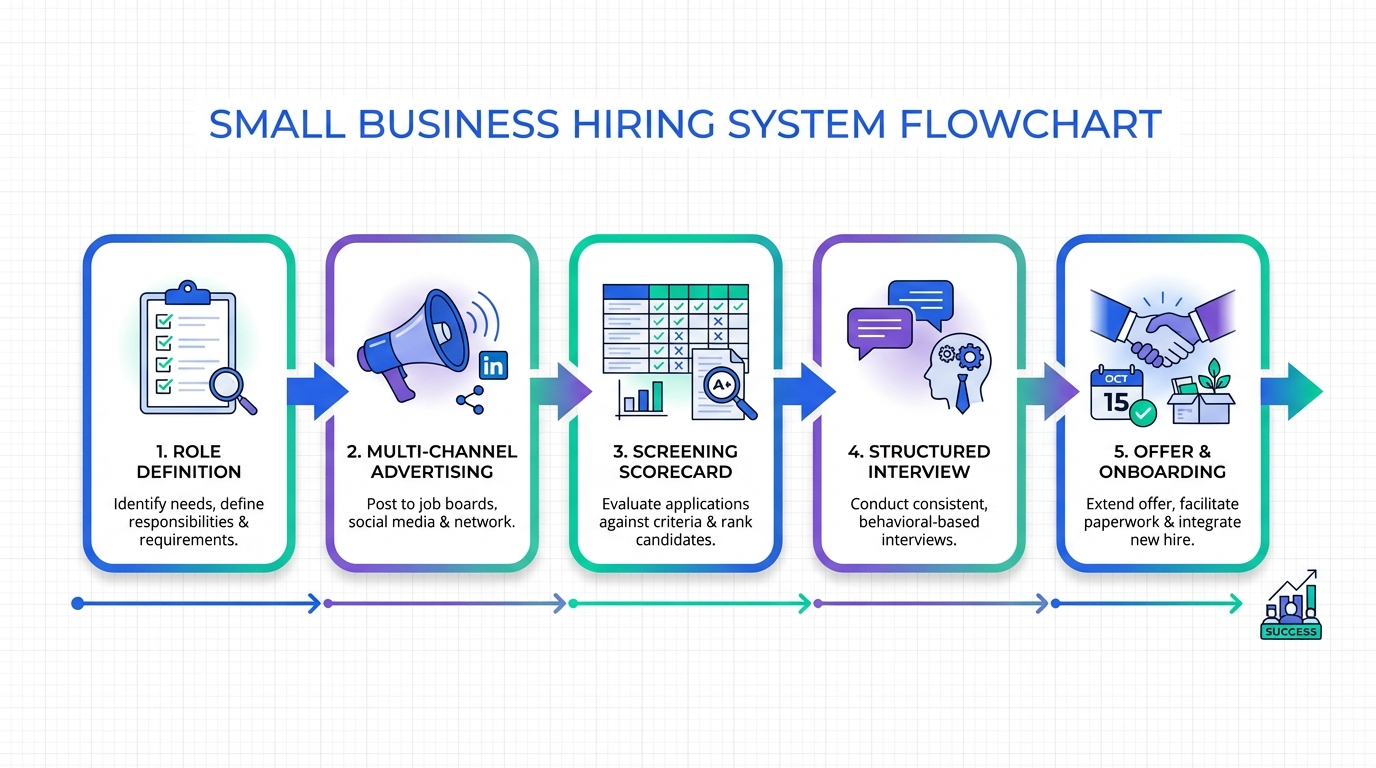
Hiring systems are the repeatable steps and tools you use to attract applicants, screen fairly, and hire consistently. For small business recruiting, the simplest system is a 5 stage flow: define the role, advertise for employees in 3 channels, screen with a scorecard, run structured interviews, then close with a clear offer and onboarding plan. In our recruiting operations work, the biggest improvement comes from standardizing what you ask candidates and how you evaluate them, then using automation for outreach and follow up so good applicants do not go cold. This guide gives you a ready to copy hiring workflow, templates, and a lightweight way to add StrategyBrain AI Recruiter for LinkedIn sourcing and 24/7 candidate messaging.
Table of Contents
- What a hiring system is
- The 5 stage hiring system
- Method 1: Role definition that prevents bad hires
- Method 2: How to advertise for employees
- Method 3: Screening with a scorecard
- Method 4: Structured interviews
- Method 5: Close and onboard
- Where StrategyBrain AI Recruiter fits in a hiring system
- Quick Comparison
- FAQ
- Conclusion
Key Takeaways
- Best small business hiring systems are simple: A 5 stage workflow is enough for most roles and keeps execution consistent.
- Advertising is a process, not a post: Use 3 channels and a 7 day refresh cadence to keep applicant flow steady.
- Scorecards reduce bias: Define 5 to 7 criteria and score every candidate the same way before interviews.
- Structured interviews improve signal: Ask the same core questions and use anchored scoring from 1 to 5.
- Speed matters: Aim for first response within 24 hours to reduce drop off in competitive markets.
- Automation helps without replacing judgment: StrategyBrain AI Recruiter can handle LinkedIn outreach, Q and A, and follow up while recruiters make final fit decisions.
What a hiring system is
A hiring system is a documented, repeatable recruiting process that turns a hiring need into a signed offer. It includes your job definition, where you advertise for employees, how you screen, how you interview, and how you decide.
It is not an ATS by itself. An applicant tracking system is software that stores applicants and stages. Your hiring system is the operating procedure that makes the software useful.
Scope note: This guide focuses on small business recruiting for roles you can source through job boards, referrals, and LinkedIn. It does not cover executive search, union hiring, or regulated credential verification workflows.
The 5 stage hiring system
When we audit hiring systems, we look for two things: consistency and speed. The structure below is intentionally lightweight so a small team can run it every week.
Stage 1: Define the role
- Outcome based responsibilities
- Must have requirements vs trainable skills
- Compensation range and schedule constraints
Stage 2: Attract applicants
- Job board post
- Referral ask
- LinkedIn sourcing and outreach
Stage 3: Screen consistently
- Knockout questions
- Scorecard review
- 15 minute phone screen
Stage 4: Interview and assess
- Structured interview
- Work sample when appropriate
- Reference checks for finalists
Stage 5: Close and onboard
- Offer call and written offer
- Start date confirmation
- 30 day onboarding plan
Method 1: Role definition that prevents bad hires
Most hiring problems start before you ever advertise for employees. If the role is vague, your applicant pool will be noisy and your interviews will drift.
Steps
- Write 3 outcomes the person must deliver in the first 90 days.
- List 5 core tasks that produce those outcomes.
- Separate must have vs trainable skills, then cap must haves at 5 items.
- Set a compensation range and decide what is flexible: schedule, location, start date, or scope.
Practical template: 90 day outcomes
- Outcome 1: ____________________ (measured by ____________________)
- Outcome 2: ____________________ (measured by ____________________)
- Outcome 3: ____________________ (measured by ____________________)
Limitations
- If you cannot define outcomes, you may be hiring for capacity rather than impact. In that case, use volume metrics such as tickets closed per week or calls handled per day.
- For brand new functions, outcomes may be learning milestones. Document them anyway so you can evaluate progress.
Best For
- First time hires for a role
- Roles with high turnover
- Any position where you have multiple interviewers
Method 2: How to advertise for employees
Advertising works best when you treat it like a campaign. One post is rarely enough. In small business recruiting, you want steady applicant flow without spending all day in inbox triage.
Steps
- Pick 3 channels: one job board, one referral push, and one proactive channel such as LinkedIn.
- Use a 7 day refresh cadence: update the post, repost if needed, and re share internally once per week.
- Add 3 knockout questions to reduce unqualified applications.
- Respond within 24 hours to qualified applicants to reduce drop off.
Knockout question examples
- Are you legally authorized to work in the country where the job is based?
- Can you work the required schedule, including weekends if applicable?
- Do you have at least 12 months of experience with the required tool or process?
Where StrategyBrain AI Recruiter helps
If LinkedIn is one of your channels, StrategyBrain AI Recruiter can automate the first touch and follow up. It can connect with candidates that match your search criteria, introduce the role, answer questions about the company and compensation, confirm interview interest, and collect resumes and contact details from interested candidates. In practice, this keeps your advertise for employees effort from stalling when you are busy running the business.
Limitations
- Automation does not fix unclear job requirements. Define the role first so outreach stays accurate.
- Some roles require local licensing or background checks. Keep those as separate compliance steps.
Best For
- High volume roles where speed matters
- Hard to fill roles where proactive outreach is required
- Teams hiring across time zones that need 24/7 candidate responses
Method 3: Screening with a scorecard
A scorecard is a short rubric that defines what good looks like for the role. It reduces bias because you evaluate candidates against the same criteria, not against each other.
Steps
- Create 5 to 7 criteria tied to the 90 day outcomes.
- Define a 1 to 5 scale for each criterion with anchors for 1, 3, and 5.
- Score resumes first, then run a 15 minute screen for candidates above your threshold.
- Decide the pass line before you start interviewing, such as 24 points out of 35.
Copyable scorecard template
| Criterion | 1 | 3 | 5 | Score (1 to 5) |
|---|---|---|---|---|
| Role specific experience | No direct experience | Some direct experience | Strong direct experience | __ |
| Problem solving | Reactive only | Solves common issues | Prevents issues proactively | __ |
| Communication | Unclear | Clear with prompts | Clear and concise | __ |
| Reliability | Unstable history | Mostly stable | Consistently stable | __ |
| Learning agility | Resists change | Adapts with support | Adapts quickly | __ |
Limitations
- A scorecard is only as good as the criteria. If you include vague traits such as culture fit, you will re introduce bias.
- For junior roles, resumes may not show enough signal. Use a short work sample to supplement.
Best For
- Any role with more than 20 applicants
- Teams with multiple interviewers
- Hiring systems that need auditability
Method 4: Structured interviews
Structured interviews use the same questions and scoring for every candidate. This improves comparability and reduces the risk of hiring based on charisma alone.
Steps
- Pick 6 core questions that map to your scorecard criteria.
- Ask for specific examples using a situation, task, action, result format.
- Score immediately after each question while details are fresh.
- Debrief with evidence and require each interviewer to cite at least 2 concrete observations.
Question bank you can reuse
- Tell me about a time you had to learn a new tool quickly. What was the timeline and what was the outcome?
- Describe a situation where priorities changed mid week. How did you re plan your work?
- What is a mistake you made at work in the last 12 months, and what did you change afterward?
- Walk me through how you would handle a difficult customer or stakeholder conversation.
- What does a great first 30 days look like in this role?
- What would make you decline an offer from us?
Limitations
- Structured does not mean robotic. You can ask follow ups, but keep the core questions consistent.
- For highly technical roles, add a work sample or practical test to avoid over relying on self report.
Best For
- Roles where multiple people interview
- Hiring systems that need consistent decision making
- Teams that want to reduce interview bias
Method 5: Close and onboard
Closing is part of the hiring system, not an afterthought. Candidates decide based on clarity, speed, and trust. Onboarding protects your hire by making the first 30 days predictable.
Steps
- Make the offer live in a call first, then send the written offer the same day.
- Confirm start date and logistics within 24 hours of acceptance.
- Prepare a 30 day plan with weekly outcomes and a named buddy or manager check in.
- Run a day 7 and day 30 review to catch misalignment early.
30 day onboarding checklist
- Accounts and access ready before day 1
- Role outcomes reviewed on day 1
- Training plan scheduled for week 1
- First deliverable defined by day 7
- Feedback loop scheduled for day 7 and day 30
Limitations
- If compensation is not aligned with the market, no closing script will fix it. Use your early screens to validate expectations.
- Onboarding requires manager time. If managers are overloaded, reduce scope and focus on the first deliverable.
Best For
- Small teams where a bad hire is expensive
- Roles with a steep learning curve
- Hiring systems that need repeatable ramp up
Where StrategyBrain AI Recruiter fits in a hiring system
In most hiring systems, the bottleneck is not deciding. The bottleneck is consistent outreach and follow up. That is where StrategyBrain AI Recruiter is designed to help, especially for LinkedIn based sourcing.
What we used it for in practice
- Automated LinkedIn outreach to candidates that match defined search criteria.
- Always on candidate messaging so prospects get responses outside business hours.
- Early qualification by confirming interest and collecting resumes and contact details for candidates who want to proceed.
What it does not replace
- Final resume evaluation against job requirements
- Structured interviews and hiring decisions
- Compliance checks such as background screening where required
Operational note for small teams
If you are running small business recruiting with limited time, the simplest integration is to keep your scorecard and interview steps unchanged, then use AI Recruiter to keep the top of funnel active. That way, your hiring systems stay consistent while your sourcing and follow up become more scalable.
Quick Comparison
| Method | Speed to implement | Cost | Best For |
|---|---|---|---|
| 5 stage hiring system workflow | 1 day | $0 | Any small business recruiting team that needs consistency |
| Scorecard screening | 2 hours | $0 | Reducing bias and improving decision quality |
| Structured interviews | 2 hours | $0 | Comparing candidates fairly |
| LinkedIn outreach automation with StrategyBrain AI Recruiter | Same week | Varies by plan | Teams that need faster outreach and 24/7 follow up |
FAQ
What are hiring systems in plain language?
Hiring systems are your repeatable recruiting steps from job definition to onboarding. They make small business recruiting predictable because every candidate goes through the same stages and evaluation.
How do I advertise for employees if I only have 2 hours per week?
Pick 3 channels and run a weekly cadence: refresh your job post, send one referral message to your network, and do one focused LinkedIn sourcing session. If LinkedIn outreach is a bottleneck, StrategyBrain AI Recruiter can automate connecting, initial messaging, and follow up so you can spend your 2 hours on screening and interviews.
Do I need an ATS to have a hiring system?
No. You can run hiring systems with a spreadsheet and email if volume is low. An ATS becomes useful when you need consistent stages, collaboration, and reporting across many applicants.
What is a structured interview?
A structured interview uses the same core questions and scoring rubric for every candidate. This improves fairness and makes decisions easier to defend because you can point to evidence tied to the scorecard.
How many knockout questions should I use?
Use 3 knockout questions for most roles. More than 5 can reduce qualified applicants, especially in tight labor markets.
Can an AI recruiter make the final hiring decision?
In a responsible hiring system, no. StrategyBrain AI Recruiter can automate outreach, answer candidate questions, confirm interest, and collect resumes and contact details, but final qualification and hiring decisions should remain with the recruiter or hiring manager.
How do I keep candidates from going cold?
Set a service level target of first response within 24 hours and schedule follow ups. Always on messaging helps, which is why 24/7 candidate communication is valuable when you are hiring across time zones or you cannot monitor messages all day.
What should I track to know if my hiring system is working?
Track time to first response in hours, applicants per week, screen to interview conversion rate as a percentage, and offer acceptance rate as a percentage. These metrics show where your hiring systems are leaking candidates.
Conclusion
The most effective hiring systems for small business recruiting are the ones you can run every week. Start with the 5 stage workflow, add a scorecard, and standardize interviews so decisions are consistent. Then improve speed by tightening your advertise for employees cadence and responding within 24 hours.
If LinkedIn outreach and follow up are your bottlenecks, integrate StrategyBrain AI Recruiter into Stage 2 and Stage 3 so candidate conversations keep moving while you focus on evaluation and closing. Your next step is to copy the scorecard template above, define your 90 day outcomes, and run the process for your next 10 applicants.














