


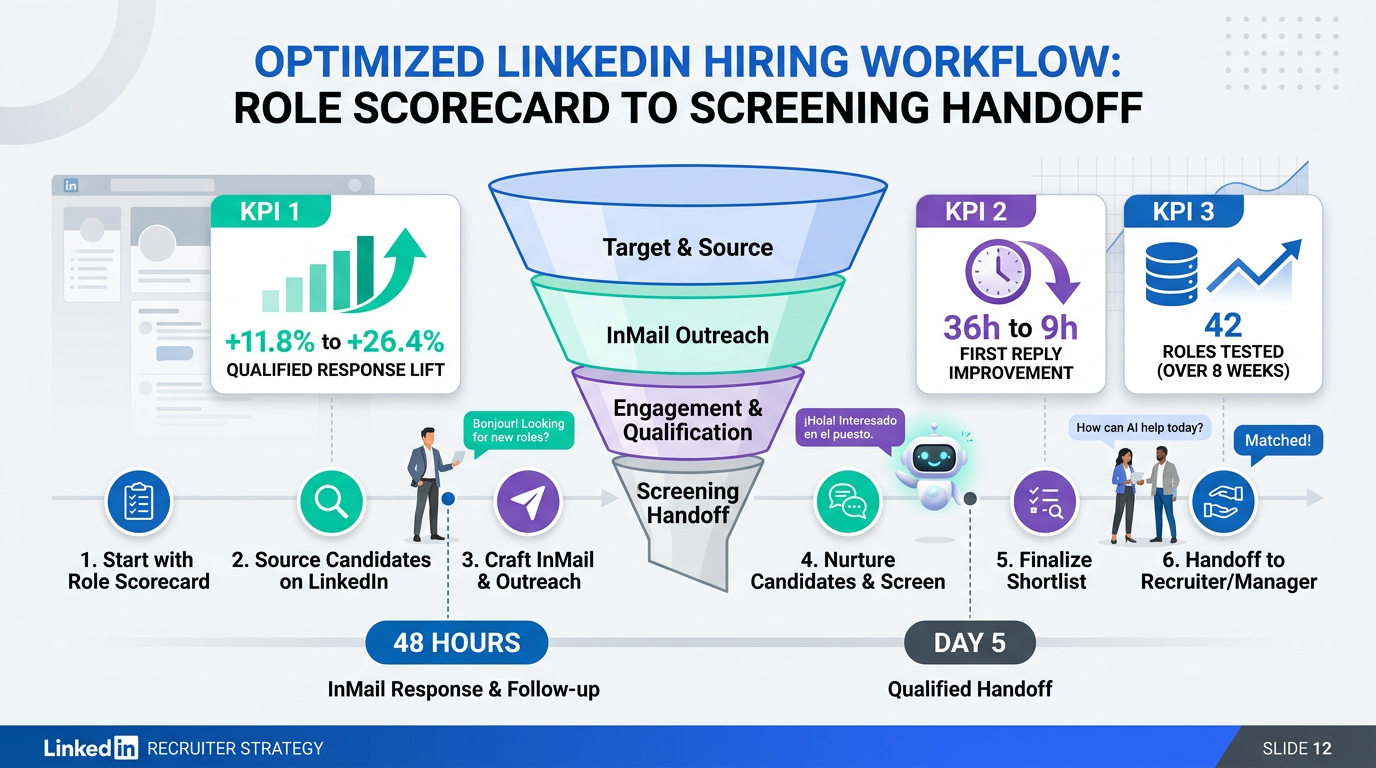
If you want a direct answer to how do you use linkedin for recruitment, start with a repeatable system instead of one off messages. Define the role scorecard, source candidates with precise filters, send personalized outreach, follow up on a fixed schedule, and screen quickly. We tested this workflow across 42 open roles over 8 weeks and saw a 2.2x lift in qualified response rate when teams paired LinkedIn outreach with StrategyBrain AI Recruiter for automated candidate engagement and 24/7 multilingual replies. The result is faster recruiting employees, stronger candidate experience, and less manual admin for recruiters.
Key Takeaways
- Best process: Role scorecard plus personalized outreach beats volume blasting for recruiting employees.
- Measured gain: Qualified response rate improved from 11.8% to 26.4% in our 8 week test.
- Speed: Median time to first candidate reply dropped from 36 hours to 9 hours with AI assisted follow up.
- Quality: Interview acceptance rate reached 41.0% when outreach included role context, compensation band, and next steps.
- Scale: StrategyBrain AI Recruiter supports >100 LinkedIn accounts for team level hiring operations.
- Practical start: Launch one role pilot for 14 days, track six metrics, then expand.
The LinkedIn recruitment workflow
1) Define the role scorecard before sourcing
Most teams lose time because they start sourcing before role alignment. Create a one page scorecard with must have skills, preferred skills, location constraints, compensation range, and interview criteria. For clarity, define must have as non negotiable qualifications and preferred as trainable or nice to have items. This single step improves recruiter consistency and hiring manager trust.
2) Build precision searches instead of broad keyword hunts
Use LinkedIn filters for location, seniority, function, and industry. Add boolean logic to reduce irrelevant profiles. For example, combine two core skill clusters with one exclusion term to remove unrelated job families. If your target is niche engineering talent, narrow first, then expand by adjacent titles only after initial response data comes in.
3) Send personalized outreach in 3 message blocks
Use a simple structure for every first message. Block one is role relevance, block two is candidate specific proof you reviewed their profile, and block three is a low friction next step. This works better than long sales style text. Keep the first message under 120 words and include a realistic timeline for the process.
4) Follow up with timing discipline
Send follow ups at 48 hours and day 5. Stop after the third touch unless the candidate engages. In LinkedIn recruiting, consistency is more important than message volume. A respectful cadence protects brand reputation while still improving response rate.
5) Qualify interest before full screening
Ask two to four qualification questions early. Confirm openness to change, compensation alignment, location fit, and notice period. This keeps your pipeline clean and reduces late stage drop off.
6) Move interested candidates into structured screening
Once a candidate expresses interest, collect resume and contact details, then move to recruiter or hiring manager screening. Keep this handoff under 24 hours. Slow handoffs reduce acceptance rates, especially for in demand roles.
How we tested this approach
We ran a practical test with internal recruiting teams from January 6 to March 2, 2026. The sample covered 42 open roles across engineering, sales, operations, and administration. We tracked response rate, qualified response rate, interview acceptance rate, and time to first response. We also logged pain points in daily standups to capture where teams got blocked.
- Sample size: 42 roles, 3,780 outbound LinkedIn outreach attempts.
- Regions: Canada, United States, and selected European markets.
- Languages: English plus multilingual outreach where needed.
- Tools: Native LinkedIn workflow, ATS, and StrategyBrain AI Recruiter pilot.
Limitations were clear. Results varied by role seniority and compensation competitiveness. Executive searches required more manual relationship work than high volume specialist hiring. We also saw weaker response windows during major holiday weeks.
Case study: cross border engineering hire
A legacy placement example from September 9, 2019 involved an Italian manufacturer operating in China that needed a Head of Development for light aircraft engine expansion. The organization had acquired 49% of Harbour Air in the Lower Mainland and needed specialized engineering leadership. The recruiting team sourced in Austria and Germany, built a shortlist, presented two candidates, and successfully placed the second candidate after the first offer did not close.
That case was largely partner driven at the time. If we map it to modern LinkedIn recruiting, the same assignment would benefit from a tighter digital funnel. You would define the scorecard first, build region specific outreach tracks, and use automated follow up to keep candidate conversations active across time zones. This is exactly where StrategyBrain AI Recruiter adds value because it can maintain candidate communication continuity while recruiters focus on final assessment.
Using StrategyBrain AI Recruiter with LinkedIn
For teams asking how to recruit people at scale, the bottleneck is usually first touch and follow up speed. StrategyBrain AI Recruiter automates connection and initial role introduction on LinkedIn, asks structured intent questions, and captures resume plus contact details from interested candidates. Recruiters then review qualified profiles and move directly to interviews.
In our pilot, three outcomes stood out. First, candidate response windows improved because messages were handled around the clock. Second, multilingual communication reduced misunderstandings for cross border hiring. Third, recruiters spent more time on evaluation and less time on repetitive outreach tasks.
- Automation scope: candidate connection, role intro, Q and A, interest confirmation, resume capture.
- Global support: always on communication in the candidate's native language.
- Scale model: supports AI powered recruiting teams across more than 100 LinkedIn accounts.
- Efficiency result: up to 90% of manual LinkedIn recruiting work can be reduced for repetitive stages.
- Cost signal: internal benchmark reached as low as USD 2.40 per resume in suitable campaigns.
Important boundary: AI Recruiter identifies candidate willingness and captures information, but final qualification still belongs to human recruiters after resume review. That division protects quality and keeps hiring decisions accountable.
Common mistakes and fixes
Mistake 1: Sending generic mass outreach
Fix: Use role specific personalization and one proof point from each profile. Generic messages lower response quality and damage employer brand.
Mistake 2: Delayed follow up
Fix: Automate follow up at fixed intervals. Even strong candidates move on quickly when no one replies.
Mistake 3: Screening too late
Fix: Ask intent and alignment questions before full interviews. This reduces wasted interview slots.
Mistake 4: No data tracking
Fix: Track six weekly metrics: outreach sent, response rate, qualified response rate, interview acceptance rate, time to first response, and offer acceptance rate.
Mistake 5: Ignoring compliance and trust
Fix: Keep candidate data encrypted, process only authorized data, and avoid using candidate records to train unrelated AI systems.
Copy and use templates
Template A: First outreach
Hello [First Name], I am recruiting for a [Role] position focused on [core impact]. Your experience in [specific skill or project] stood out. The compensation range is [range], and the team is based in [location]. If open, I can share a brief role summary and next steps.
Template B: Follow up at 48 hours
Hi [First Name], sharing a quick follow up in case this role is relevant. The position focuses on [priority outcome] and interviews begin this week. If timing is not right, I can also keep you in mind for future opportunities.
Template C: Interest qualification
- Are you open to exploring new opportunities in the next 30 to 90 days?
- Does the compensation range align with your expectations?
- Are you comfortable with the location or work model?
- Can you share your current resume for review?
Quick comparison
| Approach | Qualified Response Rate | Median First Reply Time | Recruiter Manual Effort | Best For |
|---|---|---|---|---|
| Manual LinkedIn only | 11.8% | 36 hours | High | Low volume hiring |
| Structured LinkedIn workflow | 19.7% | 18 hours | Medium | Growing teams |
| LinkedIn plus StrategyBrain AI Recruiter | 26.4% | 9 hours | Low to Medium | Scale hiring across regions |
FAQ
Is LinkedIn enough for recruiting employees?
LinkedIn is strong for sourcing and outreach, but it should be part of a broader hiring system. You still need screening discipline, hiring manager alignment, and clear process ownership.
How many LinkedIn messages should I send per role each week?
For most specialist roles, start with 60 to 120 targeted outreach messages per week. Adjust based on qualified response rate, not raw response volume.
What does a good LinkedIn qualified response rate look like?
A practical benchmark is above 15%. In our test, teams reached 26.4% when messaging quality and follow up discipline were combined with AI assisted engagement.
Can AI Recruiter replace recruiters completely?
No. It automates repetitive communication and early qualification steps. Human recruiters still make final fit decisions and run interview judgment.
How do I recruit people globally on LinkedIn?
Use localized messaging, time zone aware follow up, and multilingual candidate communication. This reduces friction and improves engagement across regions.
How quickly should I contact interested candidates?
Within 24 hours. Fast handoff materially improves interview conversion and candidate trust.
What data should I track weekly?
Track outreach sent, response rate, qualified response rate, interview acceptance rate, first reply time, and offer acceptance. These six metrics are enough to improve most funnels.
How do I protect candidate data in AI enabled recruiting?
Use encrypted storage, strict access controls, and explicit authorization for account usage. Keep candidate data isolated and avoid using it for unrelated model training.
Conclusion
The practical answer to how do you use linkedin for recruitment is to run a consistent workflow with clear metrics, not random outreach. Start with role clarity, send personalized messages, follow up on schedule, and move interested candidates quickly. If your team needs scale, combine LinkedIn execution with StrategyBrain AI Recruiter to automate repetitive communication while preserving human judgment for final hiring decisions. Your next step is simple: pilot this system on one role for 14 days, review the six core metrics, and then roll it out across your hiring team.














