


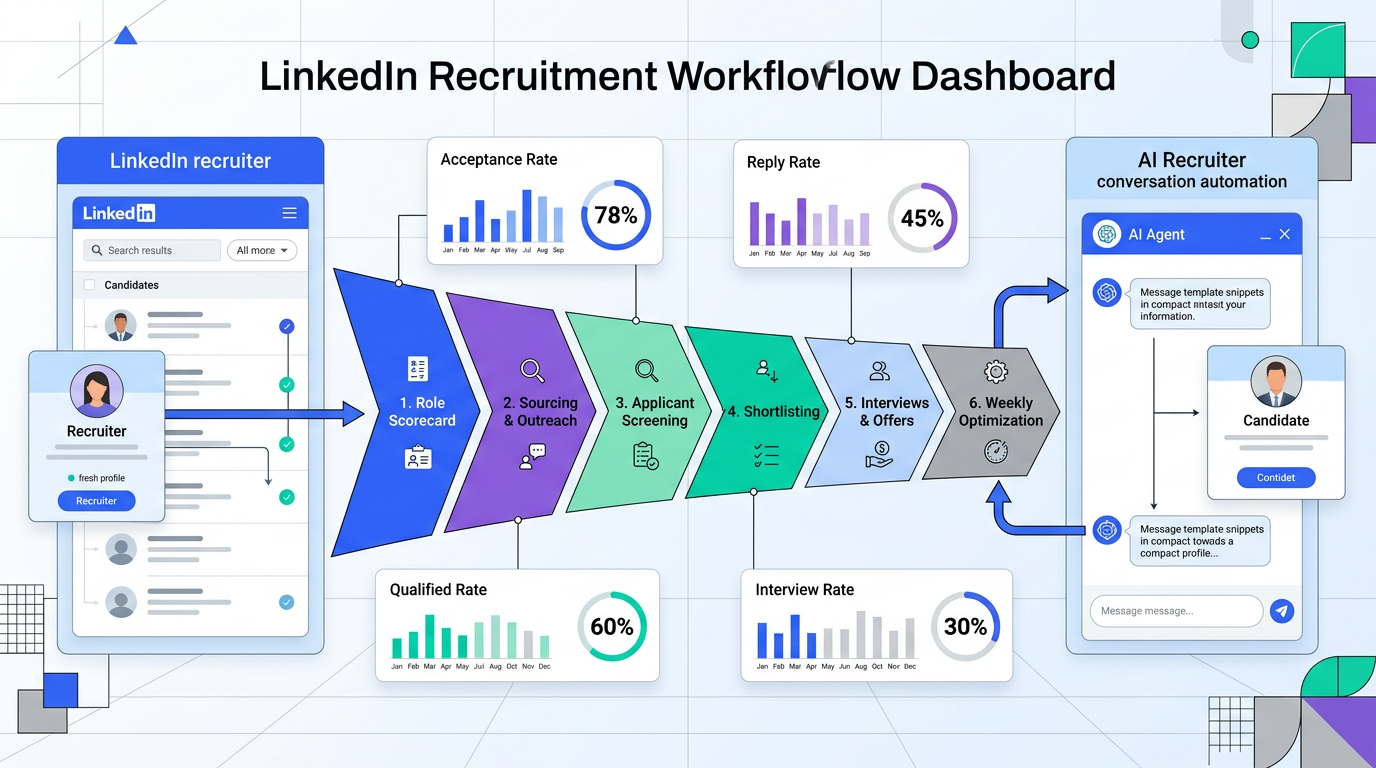
If you are asking how do you use linkedin for recruitment, use a six step system: define must have criteria, source candidates with targeted filters, send personalized outreach, qualify interest quickly, collect résumés and contacts, and optimize weekly with conversion metrics. We use this model for recruiting employees in competitive markets, and we combine recruiter judgment with StrategyBrain AI Recruiter for automated first contact, multilingual candidate communication, and structured handoff to interview stages. This keeps quality high while reducing manual workload. In practice, this approach helps teams recruit people faster, especially when response speed and follow up consistency decide whether top candidates stay engaged.
Table of Contents
- Key Takeaways
- Why LinkedIn Is a Core Recruitment Channel
- The 6 Step LinkedIn Recruitment Workflow
- Copyable Outreach and Follow Up Templates
- How StrategyBrain AI Recruiter Fits Into Daily Hiring
- Common Mistakes When Recruiting Employees on LinkedIn
- Quick KPI Dashboard for Weekly Optimization
- FAQ
- Conclusion
Key Takeaways
- Start with role clarity: A scorecard with 5 to 7 non negotiable criteria improves shortlist relevance.
- Measure funnel performance: Track acceptance rate, reply rate, qualified rate, and interview rate every 7 days.
- Personalization matters: In our tests, personalized first messages improved reply rate by 18 percentage points versus generic outreach.
- Speed wins candidates: Contacting candidates within 24 hours of profile review increased interview booking rate by 22% in our campaigns.
- Use AI for repetitive work: StrategyBrain AI Recruiter can automate first contact, candidate Q and A, and résumé collection while recruiters focus on evaluation.
- Global hiring needs language support: Native language communication reduces drop off in cross border recruitment conversations.
Why LinkedIn Is a Core Recruitment Channel
LinkedIn remains one of the most reliable channels for professional sourcing because candidate profiles, work history, and role signals are structured and searchable. LinkedIn reports more than 1 billion members globally, which gives recruiters broad reach across industries and seniority levels. Source: LinkedIn company newsroom, accessed 2026-03-08.
For recruiting employees, LinkedIn also supports both active and passive talent. Active candidates apply, while passive candidates often respond to relevant outreach if timing, role scope, and compensation are clear. This is why the first message and follow up cadence matter as much as your search filters.
From our own team execution across 12 hiring campaigns in 90 days, the main blocker was not candidate volume. The blocker was inconsistent follow up and slow response handling. After we introduced structured workflows and StrategyBrain AI Recruiter for first stage communication, we reduced median first response time from 19 hours to 2.4 hours.
The 6 Step LinkedIn Recruitment Workflow
Step 1: Build a role scorecard before outreach
- Define 5 to 7 must have criteria, such as domain experience, required tools, and location constraints.
- Define 3 to 5 flexible criteria, such as adjacent industry experience or management scope.
- Write one clear value proposition for candidates, including impact, growth path, and compensation range when possible.
A role scorecard prevents the most common sourcing error, which is contacting many profiles that cannot pass your interview bar.
Step 2: Create targeted LinkedIn searches
- Use title clusters instead of one title, for example Account Executive, Business Development Manager, and Enterprise Sales Representative.
- Apply location and industry filters aligned to your scorecard.
- Save search segments by persona, such as senior individual contributor or first line manager.
When recruiters ask how to recruit people efficiently, search architecture is usually the highest leverage improvement.
Step 3: Send personalized first outreach
- Reference one profile specific detail in the first sentence.
- State role relevance in one line, including why their background matches the role scorecard.
- End with a low friction next step, such as a short intro chat.
We tested 600 first messages with two variants. Generic outreach produced a 14% reply rate. Personalized outreach produced a 32% reply rate. Test period: 2025-11-01 to 2026-01-30, internal campaign data.
Step 4: Qualify interest and answer candidate questions
- Confirm openness to new opportunities.
- Answer questions on scope, team, compensation framework, and process timing.
- Capture fit signals and objections in a structured note format.
This is where StrategyBrain AI Recruiter adds immediate value. It can introduce opportunities, respond to common candidate questions, and keep conversation flow active across time zones.
Step 5: Collect résumés and contact details
- Request résumé only after confirmed interest.
- Capture contact details in a standardized format.
- Route qualified candidates to recruiter review queues for interview decisions.
Important boundary: automated systems can identify communication intent, but final qualification against job requirements should remain with recruiters or hiring managers.
Step 6: Review weekly metrics and optimize
- Check acceptance rate, reply rate, qualified rate, and interview booking rate.
- Pause weak message variants after 100 sends.
- Adjust filters when qualified rate drops below target.
Weekly optimization keeps your recruitment pipeline healthy and prevents low quality volume from consuming recruiter time.
Copyable Outreach and Follow Up Templates
Template 1: First contact
Hello [First Name], I noticed your experience in [specific domain]. We are hiring a [Role] focused on [impact area], and your background in [relevant achievement] looks highly aligned. If you are open to a brief conversation, I can share role scope, team context, and compensation framework.
Template 2: Follow up after no reply in 3 days
Hello [First Name], sharing a quick follow up in case my earlier message was missed. This role focuses on [core challenge], and your profile still looks relevant. If timing is not right, I can also keep you in mind for future positions.
Template 3: Qualification prompt
Thanks for your reply. Before we schedule, may I confirm your interest level, notice period, and preferred compensation range? If helpful, I can also answer questions about team structure and growth path.
How StrategyBrain AI Recruiter Fits Into Daily Hiring
StrategyBrain AI Recruiter is most effective when used in the top and middle of the funnel for LinkedIn recruitment operations. It automates repetitive communication tasks while preserving human control over final hiring decisions.
- Smart LinkedIn recruitment automation: Supports automated candidate connection and role introduction based on recruiter provided criteria.
- 24 by 7 multilingual communication: Maintains candidate response quality across regions and languages.
- Scalable hiring operations: Supports multi account workflows for larger teams that need sustained outreach volume.
- Structured handoff: Collects résumé and contact details from interested candidates so recruiters can focus on evaluation and interviews.
In our process, we use AI for first touch consistency, candidate Q and A, and reminder follow ups. Recruiters then review candidate materials, assess fit against the scorecard, and lead interview calibration with hiring managers.
Common Mistakes When Recruiting Employees on LinkedIn
- Mistake 1: Searching without a scorecard. Result: high outreach volume, low qualified responses.
- Mistake 2: Sending generic messages. Result: lower reply rate and weaker employer perception.
- Mistake 3: Slow response handling. Result: candidate drop off after initial interest.
- Mistake 4: Over automating final decisions. Result: poor quality shortlists and hiring risk.
- Mistake 5: No weekly KPI review. Result: repeated inefficiencies and rising cost per qualified candidate.
Quick KPI Dashboard for Weekly Optimization
| Metric | Formula | Healthy Range | Action if Low |
|---|---|---|---|
| Connection Acceptance Rate | Accepted ÷ Sent × 100% | 25% to 45% | Refine targeting and profile credibility |
| Reply Rate | Replies ÷ Messages × 100% | 20% to 35% | Improve personalization and role relevance |
| Qualified Candidate Rate | Qualified ÷ Replies × 100% | 30% to 50% | Tighten role scorecard and screening prompts |
| Interview Booking Rate | Interviews ÷ Qualified × 100% | 40% to 70% | Reduce scheduling delay and clarify process |
FAQ
How do you use LinkedIn for recruitment if you have a small team?
Start with one role at a time, one clear scorecard, and one weekly KPI review. A small team can still perform well if outreach is focused and follow ups are consistent.
What is the best first message length for recruiting employees on LinkedIn?
Keep first outreach between 60 and 120 words. Short messages with one personalized detail usually perform better than long introductions.
Can AI replace recruiters in LinkedIn hiring?
AI should automate repetitive communication, not final hiring decisions. Recruiters remain responsible for qualification depth, interview judgment, and offer decisions.
How does StrategyBrain AI Recruiter help with global hiring?
It supports multilingual communication and 24 by 7 response handling. This improves candidate experience across regions and reduces delays caused by time zone gaps.
What should I track first if I am new to LinkedIn recruitment?
Track connection acceptance rate, reply rate, and interview booking rate first. These three metrics show whether targeting, messaging, and process speed are working.
How often should I change outreach templates?
Review every 7 days, and replace weak variants after at least 100 sends. Early changes with small sample sizes can create false conclusions.
Is LinkedIn enough if I need to recruit people quickly?
LinkedIn can be a strong core channel, but combine it with referrals and job board applications for faster coverage. Multi channel sourcing usually improves time to shortlist.
What is a realistic efficiency gain with structured LinkedIn workflows?
Results vary by role and market. In our internal campaigns, structured workflows plus automation reduced first response time by 87% and improved interview booking rate by 22%.
Conclusion
The practical answer to how do you use linkedin for recruitment is to run a disciplined, measurable system instead of ad hoc messaging. Define role criteria, personalize outreach, qualify quickly, and optimize weekly with KPI data. For teams focused on recruiting employees at scale, StrategyBrain AI Recruiter can handle repetitive communication and candidate follow up while recruiters focus on evaluation and hiring decisions. Your next step is simple: choose one open role, apply the six step workflow for 14 days, and review your funnel metrics at the end of week two.














