


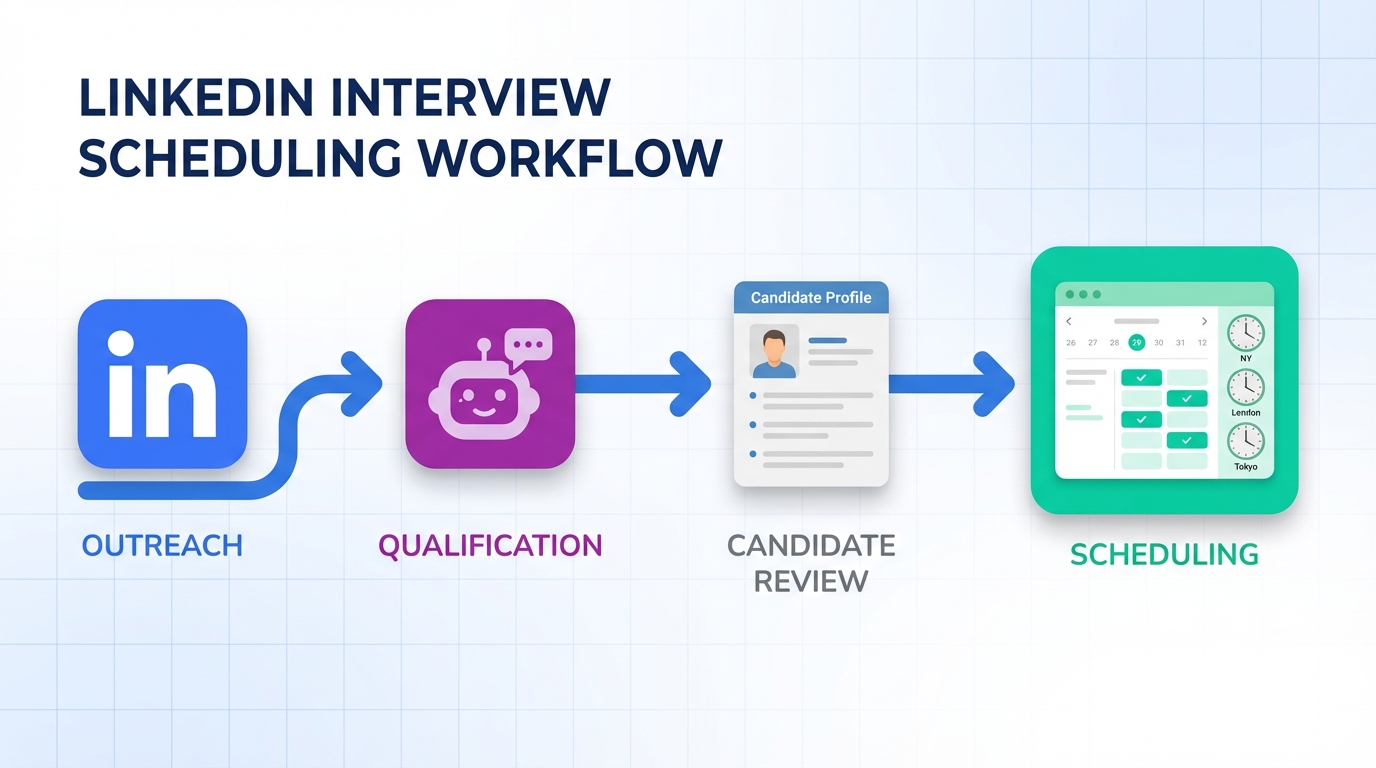
An interview scheduling app works best when it removes the two biggest sources of delay in hiring: slow candidate responses and messy coordination. In our day to day recruiting workflows, the most reliable approach is a two stage system: use StrategyBrain AI Recruiter to automate LinkedIn outreach, answer candidate questions, confirm interview interest, and collect resumes and contact details, then use a simple scheduling flow to lock a time with clear time zone and confirmation rules. This article shows how social networking helps you reach passive candidates, how to convert those conversations into booked interviews, and when a schedule maker app free setup is enough. It does not cover ATS migrations, deep calendar security audits, or legal advice.
Table of Contents
- Why social networking still matters for hiring
- What to look for in an interview scheduling app
- Method 1: StrategyBrain AI Recruiter to qualify, then schedule (recommended)
- Method 2: Manual LinkedIn messaging to calendar invite
- Method 3: Best schedule app free when you need basic booking
- Quick Comparison
- Copy and paste checklist
- FAQ
- Conclusion
Why social networking still matters for hiring
One recruiting reality has not changed: many strong candidates are not actively applying when you need them. The original source material behind this rewrite framed it as a “4 out of 5” dynamic, meaning most people who could fill a role are not browsing job boards at the moment you post. That is exactly why LinkedIn and other professional networks remain a practical channel for reaching passive candidates.
Social networking recruiting is simply the practice of putting opportunities in front of people where they already spend attention, and letting their network amplify it. For job seekers, it also means keeping work information and professional interests visible so opportunities can find them. For recruiters, it means your outreach quality and follow up speed directly affect how quickly you can move from interest to interview.
Professional conduct still applies
The source content also included a blunt reminder that still holds up: do not post content that signals instability or hostility. Even when you are not hiring for culture fit, public posts can influence referrals and internal stakeholders. In recruiting, perception is part of pipeline health.
A simple network math reminder
The original article used a concrete example: an average person with 120 friends, each with 120 friends, creates a reachable network of 14,400 people through second degree connections. Whether or not your exact numbers differ, the operational takeaway is consistent: social graphs scale faster than job board visibility.
What to look for in an interview scheduling app
When recruiters say they need an interview scheduling app, they often mean they need a system that prevents scheduling from becoming a second job. Here are the capabilities that matter most in real workflows.
Core definitions (so teams align)
- Scheduling: selecting a time slot that works for interviewer and candidate.
- Confirmation: ensuring the candidate explicitly agrees to the time and understands time zone, format, and location.
- Qualification: confirming interest and basic fit signals before scheduling, so calendars are not filled with low intent calls.
Selection criteria that reduce delays
- Time zone handling: the app should clearly display the candidate’s time zone and the interviewer’s time zone.
- Fast rescheduling: one click reschedule links or a simple rule based process.
- Candidate experience: fewer steps, clear instructions, and immediate confirmation.
- Data capture: resume, email, phone, and any screening notes should be captured before the invite is sent.
- Automation boundaries: you want automation for repetitive steps, but you still need human review for final qualification.
Method 1: StrategyBrain AI Recruiter to qualify, then schedule (recommended)
If your bottleneck is not the calendar tool but the time spent chasing replies, this is the most leverage. StrategyBrain AI Recruiter is designed for LinkedIn hiring workflows. It automates the initial outreach and the early conversation that normally consumes recruiter hours, then hands you a shortlist of interested candidates with resumes and contact details so you can schedule quickly.
Steps
- Define your LinkedIn search criteria: specify the role, location, seniority, and must have skills so outreach stays targeted.
- Provide job context: share company details, compensation, and benefits so candidate questions can be answered consistently.
- Let the AI run outreach and follow up: the system connects with candidates, introduces the opportunity, and keeps the conversation moving.
- Confirm interview intent before scheduling: the AI checks whether the candidate is open to interviewing and gathers availability signals.
- Collect resume and contact details: for interested candidates, the AI requests a resume and captures email or phone details shared in messages.
- Schedule with your preferred calendar process: once intent and contact details are confirmed, send the invite with time zone and format clearly stated.
Features that matter for scheduling speed
- 24/7 multilingual messaging: candidates get timely replies in their native language, which reduces drop off across time zones.
- Automated Q and A: role, company, and compensation questions are handled consistently, which reduces repetitive recruiter work.
- Scalable operations: supports managing more than 100 LinkedIn accounts for teams that need volume.
Limitations (honest boundaries)
- Not a final fit decision engine: AI Recruiter confirms willingness to communicate or interview, but it does not decide whether the resume fully matches requirements. A recruiter still reviews the resume.
- Scheduling still needs a rule set: you still need a consistent process for time zones, interview format, and confirmation messages.
Best for
- Recruiters who spend too much time on LinkedIn back and forth before an interview is even possible.
- Teams hiring across multiple countries and time zones.
- Headhunters and agencies that need to scale outreach without adding headcount.
Method 2: Manual LinkedIn messaging to calendar invite
This is the classic approach and it can work well for low volume hiring or highly specialized roles where every message is handcrafted. The trade off is that your scheduling speed is limited by your response time and your ability to keep multiple threads organized.
Steps
- Message candidates on LinkedIn: introduce the role and ask a single clear question about interest.
- Answer questions consistently: keep a short internal script for compensation, benefits, and interview format.
- Request availability: ask for 3 specific time windows in the candidate’s time zone.
- Send the invite: include time zone, meeting link or location, and a reschedule instruction.
Limitations
- Slow follow up: if you reply once per day, scheduling can stretch into a week.
- Higher drop off: candidates may disengage if they do not get timely answers.
- Harder to scale: manual outreach does not benefit from the same compounding effect as automation.
Method 3: Best schedule app free when you need basic booking
If your pipeline is already qualified and you simply need a lightweight way to pick a time, a best schedule app free option can be enough. In this scenario, the “app” is less important than the rules you enforce: time zone clarity, confirmation, and rescheduling.
What a schedule maker app free setup should still include
- Clear time zone display: the candidate should not have to guess whether the time is local.
- Confirmation message: a short message that repeats date, time, time zone, and interview format.
- Reschedule path: one instruction that tells the candidate what to do if they cannot attend.
When free scheduling is not enough
- You are doing high volume outreach and need faster qualification before scheduling.
- You hire globally and need 24/7 candidate communication to prevent delays.
- You manage multiple LinkedIn accounts and need consistent messaging at scale.
Quick Comparison
| Method | Speed to first booked interview | Cost | Best for |
|---|---|---|---|
| StrategyBrain AI Recruiter plus scheduling rules | Fast when outreach volume is high because follow up is automated | Paid product, pricing depends on plan and usage | LinkedIn heavy recruiting, global hiring, agencies, and teams scaling outreach |
| Manual LinkedIn messaging plus calendar invite | Variable, depends on recruiter response time | Low direct cost, high time cost | Low volume roles, highly personalized outreach |
| Schedule maker app free for basic booking | Fast only after candidate is already qualified | Free tier possible | Simple booking needs, internal interviews, warm candidates |
Copy and paste checklist
Use this checklist to make any interview scheduling app workflow more reliable. It is designed to reduce no shows and reduce back and forth.
- Interest confirmed: candidate explicitly said yes to an interview.
- Time zone confirmed: candidate time zone and interviewer time zone are stated in writing.
- Three availability windows: candidate provided 3 options, each with date and time.
- Format confirmed: phone, video, or onsite is stated clearly.
- Contact details captured: email and phone are recorded before the invite is sent.
- Resume captured: resume received or a clear next step to provide it.
- Reschedule instruction: one sentence explaining how to reschedule.
- Reminder plan: send a reminder message 24 hours before the interview.
FAQ
What is an interview scheduling app in recruiting terms?
An interview scheduling app is a tool or workflow that coordinates interviewer availability and candidate availability, then confirms the meeting details. In recruiting, the app is only effective if it also reduces back and forth and prevents time zone confusion.
Why do recruiters struggle with scheduling even when they have a calendar tool?
Because the real bottleneck is often before scheduling. Candidates ask questions, go quiet, or are unsure about compensation and format. Automating early conversation and follow up with StrategyBrain AI Recruiter can remove that delay so scheduling becomes a final step, not a negotiation.
Can I use a schedule maker app free option for interviews?
Yes, if your candidates are already qualified and responsive. A free scheduling setup works best when you enforce time zone clarity, confirmation messages, and a reschedule path.
How does StrategyBrain AI Recruiter help with scheduling if it is focused on LinkedIn?
It accelerates the steps that typically block scheduling. It connects with candidates, introduces the role, answers questions about the job and compensation, confirms interview interest, and collects resumes and contact details. Once those are done, you can schedule with your existing calendar process.
Does AI Recruiter decide whether a candidate is qualified for the role?
No. It identifies willingness to communicate or interview and gathers information, but final qualification against job requirements is done by the recruiter after reviewing the resume.
How does AI Recruiter capture resumes and contact details?
For candidates who express interest, it requests a resume and captures contact details shared in messages. It supports email submissions and LinkedIn file uploads, and it marks resumes as received when provided.
Is multilingual messaging actually useful for scheduling?
Yes, when you hire across countries. Misunderstandings about time, format, or expectations can slow scheduling. Always on multilingual communication reduces delays caused by time zones and language friction.
What should I avoid posting on social networks during a job search or hiring process?
Avoid posts that signal hostility, poor judgment, or unreliability. The source material gave blunt examples such as posting hatred toward a current job or violent statements. In practice, keep public content professional because it can influence referrals and hiring decisions.
How do I reduce interview no shows without adding more admin work?
Use a confirmation message that repeats date, time, time zone, and format, then send a reminder 24 hours before. Also capture a phone number so you can quickly reconnect if a video link fails.
Conclusion
The most effective interview scheduling app workflow is the one that removes delays before the calendar invite. Social networking remains a practical way to reach passive candidates, but it only pays off when outreach and follow up are consistent. If your team lives on LinkedIn, StrategyBrain AI Recruiter can automate the early conversation, confirm interview interest, and collect resumes and contact details so scheduling becomes a clean final step. If you only need basic booking, a schedule maker app free approach can work, as long as you enforce time zone and confirmation rules. Next step: adopt the checklist above, then decide whether your biggest bottleneck is qualification or scheduling, and optimize that stage first.














