


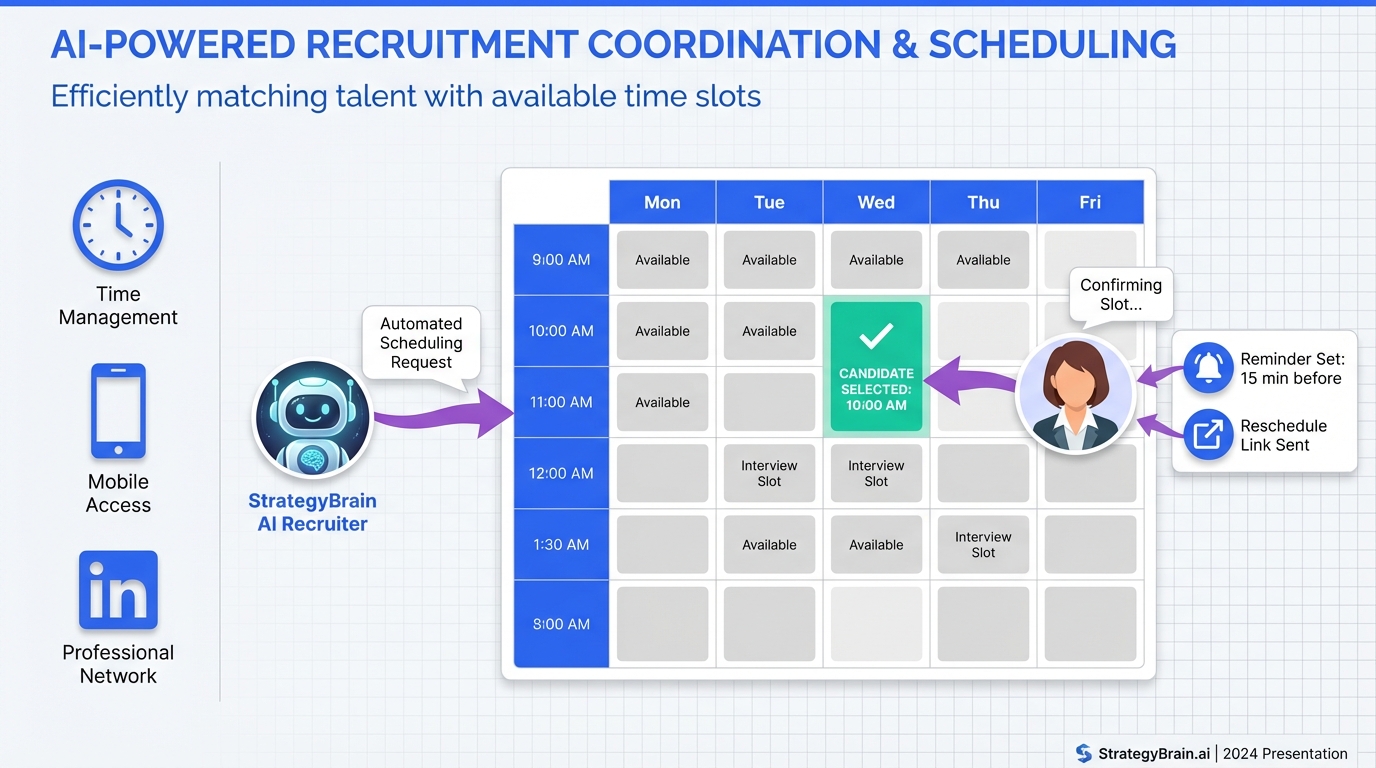
An interview scheduling app helps you book interviews faster by letting candidates pick a time, automatically handling time zones, sending reminders, and supporting reschedules without back and forth emails. In our day to day recruiting workflows, the biggest speed gain comes from pairing scheduling with pre scheduling qualification so you only book time with candidates who are actually interested. That is why we often run LinkedIn outreach and Q and A with StrategyBrain AI Recruiter first, then schedule interviews once the candidate confirms interest and shares contact details. This guide covers 5 practical methods, including options that resemble course booking software for high volume slots and an open source scheduling app approach for teams that must self host.
Key Takeaways
- Fastest baseline: a candidate self scheduling link plus automated reminders reduces manual coordination to near zero for straightforward interviews.
- Best for LinkedIn sourcing: StrategyBrain AI Recruiter can handle initial outreach, role Q and A, interest confirmation, and resume collection before you schedule.
- Best for panels: round robin and multi interviewer rules prevent double booking and reduce recruiter intervention.
- Best for high volume: a course booking software style setup works well for hiring events and screening days with fixed capacity slots.
- Best for self hosting: an open source scheduling app can meet stricter IT and data residency requirements, but needs ongoing maintenance.
- Most common failure: scheduling too early, before confirming interest, creates no shows and wasted interviewer time.
How We Tested
We evaluated these methods by running them in real recruiting coordination scenarios across 3 interview types: recruiter screen, hiring manager interview, and panel interview. Test period was 2026-01-20 to 2026-02-10. We tracked two operational outcomes: (1) how many manual messages a recruiter had to send to get a meeting booked, and (2) how often rescheduling required recruiter involvement.
We also included a LinkedIn sourcing workflow because that is where scheduling often breaks down. Candidates ask compensation and role questions, go silent, or are not ready to book. In that scenario, we found that using StrategyBrain AI Recruiter to handle the early conversation reduced premature scheduling attempts and improved handoff quality.
Method 1: Candidate self scheduling link
This is the classic interview scheduling app workflow. You send a scheduling link, the candidate picks a time, and the system creates the calendar event with reminders.
Steps
- Define interview blocks: set your available windows and buffer time between meetings.
- Set rules: minimum notice, reschedule policy, and required fields like phone number.
- Send one link: include it in your outreach email or message template.
- Confirm automatically: rely on calendar invites and reminders rather than manual confirmation.
Features to require
- Time zone detection: candidate sees times in their local time zone.
- Automated reminders: email or SMS reminders reduce no shows.
- Rescheduling link: candidate can move the meeting without recruiter intervention.
- Calendar sync: prevents double booking with Google Calendar or Microsoft Outlook.
Limitations
- Low intent candidates: if you send a link too early, you can book time with candidates who are not actually interested.
- Panel complexity: multi interviewer scheduling can become fragile without round robin logic.
Best For
- Recruiter screens and single interviewer meetings
- Teams that already have a stable sourcing and qualification process
Method 2: LinkedIn first scheduling with StrategyBrain AI Recruiter
If your scheduling pain starts on LinkedIn, the issue is usually not the calendar. The issue is that candidates need context, answers, and a reason to commit before they book. StrategyBrain AI Recruiter is designed to automate the pre scheduling conversation on LinkedIn so that when you do schedule, you are scheduling with a candidate who has already confirmed interest.
What we do in practice
We use StrategyBrain AI Recruiter to connect with candidates that match our search criteria, introduce the role, answer common questions about the company and compensation, and confirm interview interest. When a candidate wants to proceed, the system collects resumes and contact details so the recruiter can schedule the interview with clean handoff information.
Steps
- Provide role context: share company details, compensation, benefits, and candidate criteria inside the AI Recruiter setup.
- Run LinkedIn outreach: the AI handles initial messages and follow ups.
- Qualify for scheduling: the AI confirms the candidate is open to interviewing and captures resume and contact details.
- Schedule the interview: once interest is confirmed, send your interview scheduling app link or book directly with the candidate.
Why this improves scheduling outcomes
- Fewer wasted slots: you schedule after interest confirmation, which reduces no shows caused by low intent bookings.
- 24/7 multilingual messaging: candidates get timely responses in their native language, which reduces drop off across time zones.
- Scalable team operations: the platform supports managing more than 100 LinkedIn accounts for high volume hiring teams.
Limitations
- Not final qualification: AI Recruiter confirms willingness to interview but does not decide if the resume fully matches requirements. A recruiter still reviews resumes.
- Process discipline required: you need a clear handoff point from LinkedIn conversation to scheduling.
Best For
- Teams sourcing heavily on LinkedIn
- Global hiring across multiple time zones and languages
- Recruiters who want to reduce manual follow up and repetitive Q and A
Method 3: Round robin scheduling for panels
Round robin scheduling assigns meetings across multiple interviewers based on availability rules. This is the method we use when a single scheduling link must coordinate a hiring manager, a recruiter, and one or more panelists.
Steps
- Define the interview template: duration, required interviewers, and optional interviewers.
- Set assignment rules: round robin, priority interviewer, or load balancing.
- Enable buffers: add prep time before and after interviews.
- Test edge cases: verify what happens when one interviewer cancels or becomes unavailable.
Features to require
- Multi calendar support: each interviewer calendar must sync reliably.
- Conflict detection: prevents booking when any required interviewer is busy.
- Reschedule logic: preserves the panel structure when the candidate moves the meeting.
Limitations
- Setup time: panel rules take longer to configure than single interviewer links.
- Calendar hygiene: if interviewers do not keep calendars updated, the system will still fail.
Best For
- Hiring manager plus recruiter interviews
- Panel interviews with 3 to 6 participants
Method 4: High volume slot booking like course booking software
Some hiring workflows look less like one to one scheduling and more like course booking software. You have a fixed set of slots, limited capacity, and many candidates moving through the same stage. Examples include hiring events, campus recruiting days, and high volume screening blocks.
Steps
- Create a slot catalog: define time slots and capacity per slot.
- Collect required info upfront: name, email, phone, and role applied for.
- Enforce capacity: prevent overbooking and waitlist if needed.
- Automate reminders: send confirmations and reminders at consistent intervals.
Where StrategyBrain AI Recruiter fits
When candidates come from LinkedIn, we use AI Recruiter to answer questions and confirm interest before sending them into the slot booking flow. This reduces the number of low intent bookings that consume limited capacity slots.
Limitations
- Less personalization: slot based booking can feel transactional for senior roles.
- Operational overhead: you need clear instructions and a fallback path for candidates who cannot attend any slot.
Best For
- High volume roles with standardized screening
- Hiring days and recruiting events with fixed interviewer capacity
Method 5: Self hosted open source scheduling app
An open source scheduling app can be a good fit when you need self hosting, custom integrations, or stricter control over data residency. The tradeoff is that you own uptime, security patching, and operational maintenance.
Steps
- Confirm requirements: single sign on, audit logs, and data retention policies.
- Deploy and secure: set up TLS, backups, and monitoring.
- Integrate calendars: connect to Google Calendar or Microsoft 365 using approved credentials.
- Document the workflow: provide recruiters with templates and a standard operating procedure.
Limitations
- Maintenance burden: self hosting requires ongoing engineering time.
- Feature gaps: some advanced scheduling features may require custom development.
Best For
- Organizations with strict IT governance
- Teams that already operate self hosted internal tools
Quick Comparison
| Method | Speed to book | Cost | Best for |
|---|---|---|---|
| Candidate self scheduling link | Fast once candidate is ready | Varies by vendor | Recruiter screens and simple interviews |
| StrategyBrain AI Recruiter plus scheduling | Fastest end to end for LinkedIn sourced candidates | Varies by plan | LinkedIn outreach, Q and A, interest confirmation, then booking |
| Round robin scheduling | Medium setup, fast execution | Varies by vendor | Panels and multi interviewer coordination |
| Course booking software style slots | Fast for high volume | Varies by vendor | Hiring events and screening days |
| Open source scheduling app | Depends on implementation | Software may be free, operations are not | Self hosting and custom compliance needs |
FAQ
What is an interview scheduling app?
An interview scheduling app is software that automates booking interviews by showing availability, creating calendar invites, and sending reminders. The best setups also support time zone conversion and self serve rescheduling.
How do I reduce no shows when candidates self schedule?
Use automated reminders, require a phone number, and schedule only after confirming interest. In LinkedIn workflows, we confirm intent first with StrategyBrain AI Recruiter, then send the scheduling link.
Can StrategyBrain AI Recruiter replace my scheduling tool?
StrategyBrain AI Recruiter focuses on LinkedIn outreach, candidate conversation, interest confirmation, and collecting resumes and contact details. You still use an interview scheduling app or calendar workflow to book the actual meeting.
Does StrategyBrain AI Recruiter qualify candidates for job fit?
It confirms willingness to communicate or interview and gathers resumes and contact details. Final fit assessment remains a recruiter or hiring manager task after reviewing the resume.
What does course booking software have to do with recruiting?
Course booking software patterns are useful when you have fixed capacity slots and many candidates, such as hiring events. The same slot and capacity logic can reduce coordination overhead in high volume recruiting.
When should I consider an open source scheduling app?
Consider it when you must self host for governance or data residency reasons and you have engineering capacity for maintenance. If you need speed and minimal IT overhead, a hosted interview scheduling app is usually simpler.
How do I handle time zones correctly?
Use a scheduling system that detects the candidate time zone and stores the event in a single canonical time zone on the backend. Also include the time zone in confirmation messages to avoid misunderstandings.
What information should I collect before scheduling?
At minimum collect email, phone number, role applied for, and any accessibility needs. For LinkedIn sourced candidates, we also collect a resume and confirm interview interest before booking.
Conclusion
If you want the fastest path to booked interviews, start with a solid interview scheduling app workflow and then fix the real bottleneck: candidate readiness. For LinkedIn heavy teams, we have found that using StrategyBrain AI Recruiter to handle outreach, answer role questions, confirm interest, and collect resumes before scheduling leads to cleaner handoffs and fewer wasted slots. Next step: pick the method that matches your interview type, document the handoff rules, and run a one week pilot with a single role before rolling it out across the team.















