


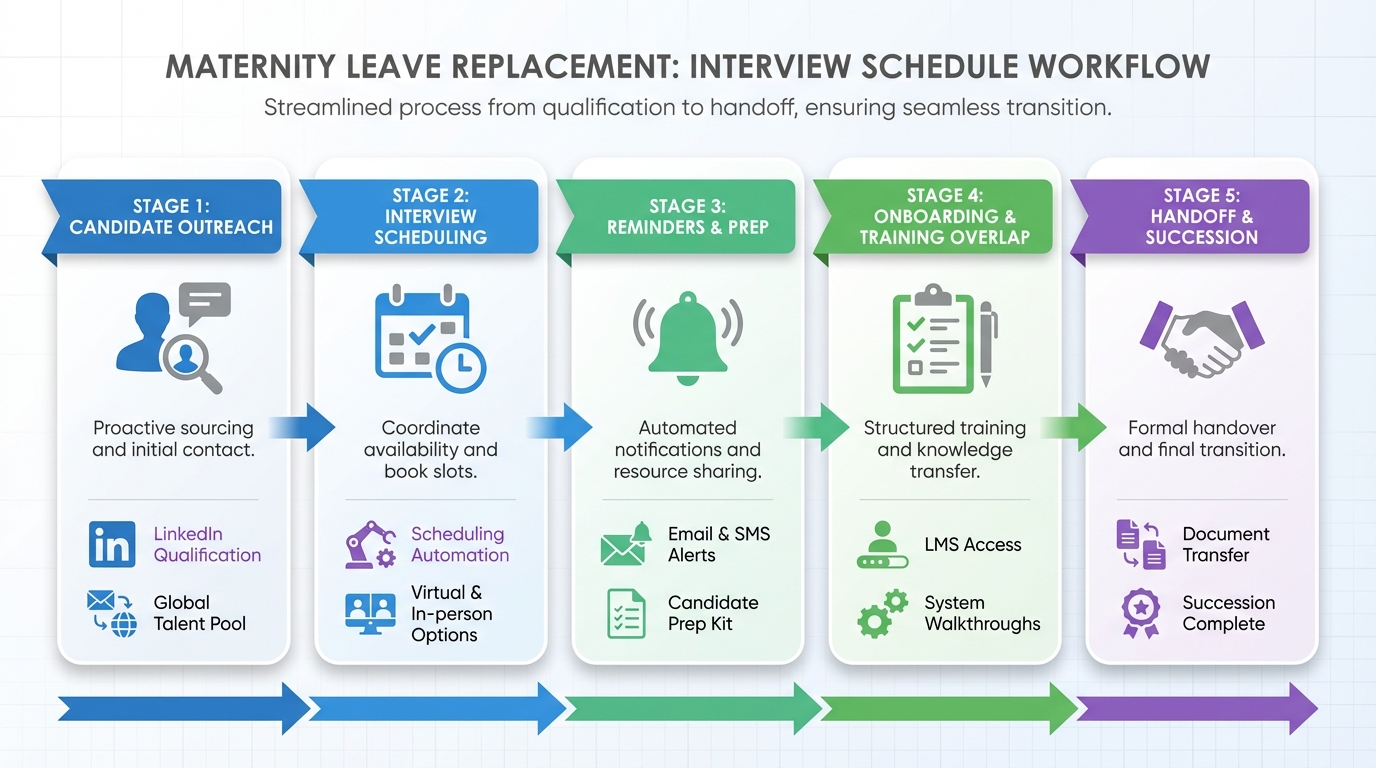
If you are hiring a maternity leave replacement, an interview scheduling app is the simplest way to prevent delays, missed handoffs, and calendar chaos. The practical approach is to start planning as soon as the leave is known, define the scope of coverage, then run a repeatable interview schedule that collects availability, confirms time zones, sends reminders, and makes rescheduling painless. In our recruiting operations work, the biggest improvement comes from combining scheduling automation with earlier LinkedIn qualification so you only schedule interviews with candidates who have confirmed interest and shared the basics needed to move forward.
Table of Contents
- What to plan before you schedule interviews
- Method 1: Interview scheduling app workflow for maternity leave coverage
- Method 2: Use StrategyBrain AI Recruiter to qualify on LinkedIn before scheduling
- Method 3: Schedule training and handoff so the transition actually works
- Method 4: How to choose the best scheduling software for small business hiring
- Quick Comparison
- Templates: interview schedule and coordination checklist
- FAQ
- Conclusion
Key Takeaways
- Start early: Begin maternity leave replacement planning as soon as the leave is known to avoid last minute hiring risk.
- Define scope first: Decide which tasks are redistributed internally and which require a temporary hire before you build an interview schedule.
- Use scheduling automation: An interview scheduling app reduces back and forth by centralizing availability, confirmations, reminders, and rescheduling.
- Qualify before you book: StrategyBrain AI Recruiter can automate LinkedIn outreach, answer role questions, confirm interview interest, and collect resumes and contact details before scheduling.
- Plan training as a calendar project: Schedule overlap, documentation time, and stakeholder check ins so the replacement ramps faster.
- Prioritize adaptability: For maternity leave coverage, adaptability and communication are often more predictive of success than perfect industry match.
What to plan before you schedule interviews
Scheduling is only efficient when the role is clear. For maternity leave coverage, you usually have more notice than with an unexpected vacancy, so you can design the role around business needs instead of copying the current job description line by line.
Define the coverage scope in 30 minutes
Before you open your calendar, align on what must be covered and what can be paused. This prevents interviews from drifting into vague conversations that do not map to real work.
- Must do tasks: Work that cannot stop during the leave period.
- Can be redistributed: Tasks that existing team members can absorb with clear ownership.
- Can be deferred: Work that can wait until the employee returns.
- Temporary role shape: A coverage role can be narrower or different if that is what the business actually needs.
Set the interview goal for a temporary hire
For maternity leave replacements, we optimize interviews for speed to productivity. That means screening for adaptability, communication, and initiative, because the replacement must ramp quickly and ask the right questions without constant prompting.
Method 1: Interview scheduling app workflow for maternity leave coverage
This method is the baseline. It turns your hiring process into a predictable scheduling system that candidates and interviewers can follow.
Steps
- Create a structured interview schedule: Define stages, interviewers, and decision criteria before you send any invites.
- Publish interviewer availability: Add working hours, time zone rules, and buffer times between interviews.
- Send a single scheduling link or time selection request: Candidates choose from approved slots, which reduces email ping pong.
- Automate confirmations and reminders: Use reminders for candidates and interviewers to reduce no shows.
- Enable rescheduling with guardrails: Allow rescheduling within a defined window so the process does not stall.
- Capture interview notes in the same workflow: Keep scorecards and feedback deadlines tied to the calendar event.
Features to require in an interview scheduling app
- Time zone handling: Automatic conversion for candidates and distributed interview panels.
- Round robin scheduling: Balanced assignment across interviewers.
- Buffer rules: For example, 10 minute buffers between interviews to prevent overruns.
- Calendar sync: Two way sync with your team calendars to avoid double booking.
- Reschedule and cancellation controls: Candidate self service with limits.
- Audit trail: Visibility into who changed what and when.
Limitations we see in real hiring operations
- Scheduling does not create candidate intent: If you schedule too early, you waste interviewer time on candidates who are not actually interested.
- Scheduling does not answer candidate questions: Candidates still need fast responses about role scope, compensation, and next steps.
- Scheduling does not collect resumes by itself: You still need a reliable way to gather resumes and contact details before interviews.
Best for
- Teams that already have qualified applicants and need to move fast.
- Hiring managers who want consistent interview stages and fewer scheduling errors.
- Small teams that need the best scheduling software for small business operations without adding coordinators.
Method 2: Use StrategyBrain AI Recruiter to qualify on LinkedIn before scheduling
When the bottleneck is not the calendar but the early funnel, we use StrategyBrain AI Recruiter to reduce the number of low intent interviews. It is an automated AI recruiting system designed for LinkedIn hiring that handles initial outreach and basic qualification so your interview scheduling app is used for candidates who are ready to talk.
What it does before you schedule
- Automated candidate connections: Reaches out to candidates who match your targeted search criteria.
- Role introduction and Q and A: Introduces the opportunity and answers questions about the role, company, compensation, and benefits based on the information you provide.
- Interest confirmation: Confirms whether the candidate is open to interviewing.
- Resume and contact collection: Collects resumes and contact details from interested candidates so recruiters can review and schedule interviews.
- 24/7 multilingual messaging: Responds around the clock in the candidate’s native language, which is useful for global hiring and time zone gaps.
Steps
- Provide the job context: Share company details, compensation, benefits, and candidate search criteria.
- Let the AI run outreach and follow up: The system connects, introduces the role, and handles early conversation.
- Review the collected resumes and contact details: This is where human judgment stays essential.
- Schedule interviews only for confirmed interested candidates: Now your interview scheduling app is used for high intent candidates, which improves interviewer utilization.
Scope boundary
StrategyBrain AI Recruiter can identify willingness to communicate or interview, but it does not decide whether a resume fully matches job requirements. Final qualification remains a recruiter or hiring manager responsibility.
Why this matters for maternity leave coverage
Maternity leave hiring often has a fixed start date and a real ramp up requirement. The combination of LinkedIn automation plus scheduling automation reduces two common delays: slow candidate responses and slow calendar coordination.
Method 3: Schedule training and handoff so the transition actually works
Hiring is only half the project. The other half is making the replacement productive quickly. If possible, the employee going on leave should train the replacement, and that training needs calendar time, not just good intentions.
Steps
- Book overlap sessions: Schedule knowledge transfer meetings before the leave begins.
- Schedule documentation time: Reserve time for the employee to write instructions, not just explain them verbally.
- Create a contacts handoff: Include suppliers, clients, and internal stakeholders with context for each relationship.
- Set weekly check ins: Short check ins during the replacement period reduce drift and rework.
- Plan the return transition: As the leave end approaches, schedule a phased return plan and clarify what happens to the temporary role.
Limitations
- If the leave start date changes, your training calendar must be flexible.
- If the role is high context, you may need more overlap time than you initially expect.
Method 4: How to choose the best scheduling software for small business hiring
If you are selecting an interview scheduling app for a small team, the best tool is usually the one that reduces coordination work without creating new admin overhead. Use this decision checklist to avoid buying features you will not use.
Selection checklist
- Setup time: Can you configure an interview schedule in 30 minutes?
- Team adoption: Does it work with the calendars your interviewers already use?
- Candidate experience: Can candidates reschedule within rules without emailing your team?
- Workflow fit: Does it support multi stage interviews and scorecards?
- Security basics: Does it support access controls and audit logs?
- Global readiness: Does it handle time zones cleanly if you hire internationally?
Quick Comparison
| Method | Primary goal | What it automates | Best for |
|---|---|---|---|
| Interview scheduling app workflow | Reduce calendar back and forth | Availability, confirmations, reminders, rescheduling | Teams with qualified candidates ready to book |
| StrategyBrain AI Recruiter plus scheduling | Reduce low intent interviews | LinkedIn outreach, early Q and A, interest confirmation, resume and contact collection | Teams hiring on LinkedIn who need faster funnel to interview |
| Training and handoff scheduling | Speed up ramp up | Overlap sessions, documentation time, check ins | Roles with high context or many stakeholder relationships |
| Small business selection checklist | Avoid tool sprawl | Decision criteria, rollout plan | Small teams choosing the best scheduling software for small business |
Templates: interview schedule and coordination checklist
These are designed for maternity leave replacement hiring. Copy them into your ATS notes or internal doc.
Template 1: Interview schedule for maternity leave replacement
- Stage 1: 15 minute recruiter screen: Confirm availability window, compensation alignment, and start date.
- Stage 2: 30 minute hiring manager interview: Evaluate adaptability, communication, and initiative using scenario questions.
- Stage 3: 45 minute practical exercise or work sample: Focus on the must do tasks defined in scope.
- Stage 4: 30 minute stakeholder interview: Validate collaboration style and handoff readiness.
- Decision deadline: Set a feedback cutoff time on the same day as the final interview.
Template 2: Scheduling and transition checklist
- Before interviews: Confirm scope, interviewers, scorecard, and time zone rules.
- Before offers: Confirm training overlap dates and documentation deliverables.
- Week 1 of replacement: Schedule daily 15 minute check ins for 5 business days.
- Weeks 2 to 6: Schedule weekly 30 minute check ins with the manager.
- Return planning: Schedule a transition meeting 14 calendar days before expected return.
FAQ
What is an interview scheduling app?
An interview scheduling app is software that automates interview booking by collecting availability, syncing calendars, sending confirmations and reminders, and supporting rescheduling within rules.
How early should I start hiring for a maternity leave replacement?
Start as soon as you know the leave is expected. Even with advance notice, start dates can shift, and early planning gives you time to define scope, interview, and schedule training overlap.
Do I need a perfect match for a temporary replacement?
Not always. For maternity leave coverage, we prioritize adaptability and communication because the replacement must ramp quickly and handle changing priorities.
How do I reduce no shows in my interview schedule?
Use automated reminders, confirm time zones in the invite, and keep rescheduling self service within a defined window. Also qualify interest before booking so candidates are more committed.
How does StrategyBrain AI Recruiter fit into scheduling?
It helps before scheduling by automating LinkedIn outreach, answering candidate questions about the role, confirming interview interest, and collecting resumes and contact details. Then your interview scheduling app is used for candidates who are ready to meet.
Can StrategyBrain AI Recruiter replace recruiter judgment?
No. It can confirm willingness to communicate or interview, but it does not determine whether a resume fully matches job requirements. Recruiters still make the final qualification decision.
What should the employee going on leave prepare for the replacement?
Ask for written instructions, key contacts such as suppliers and clients, and a phased handoff plan. Schedule overlap sessions if possible so knowledge transfer is not rushed.
What should small businesses look for in scheduling software?
Look for fast setup, calendar sync, time zone handling, rescheduling controls, and a clean candidate experience. For small teams, the best scheduling software for small business is the one that reduces coordination work without adding admin burden.
Conclusion
Maternity leave coverage hiring works best when you treat it as a timeline project. Define the coverage scope early, run a structured interview schedule, and use an interview scheduling app to automate booking and reminders. If LinkedIn is a key sourcing channel, add StrategyBrain AI Recruiter to automate early outreach, answer candidate questions, confirm interest, and collect resumes and contact details so you schedule interviews with higher intent candidates. Next step: copy the interview schedule template above, set your stages, and book the training overlap on the calendar before the leave begins.














