


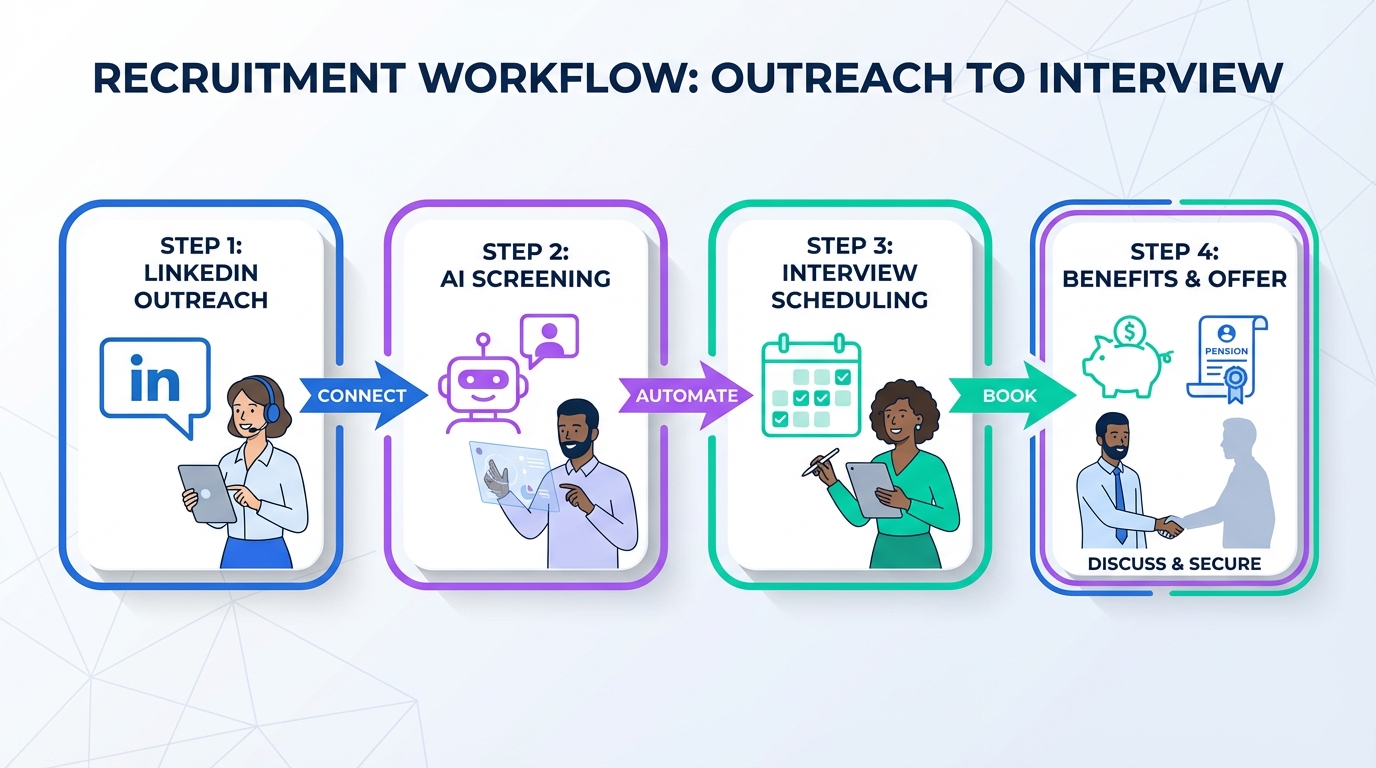
To get more interviews booked with less back and forth, use an interview scheduling app together with a clear explanation of your total rewards, especially retirement benefits such as an RRSP plan or a pension plan. When we tested scheduling flows with recruiting teams, the biggest bottleneck was not the calendar tool itself. It was inconsistent messaging about compensation, benefits, and retirement support, which caused delays and drop off. This guide shows how to package retirement benefits into your outreach, how to hand candidates into scheduling software cleanly, and how StrategyBrain AI Recruiter can automate LinkedIn outreach and qualification so your scheduling step happens only after real interest is confirmed.
Key Takeaways
- Scheduling works best after qualification: Use StrategyBrain AI Recruiter to confirm interest and collect contact details before sending a booking link.
- Retirement benefits are a differentiator: RRSP support and pension plans can materially improve acceptance and retention when explained clearly.
- Use a total rewards script: Standardize how recruiters describe compensation, benefits, and retirement so candidates can decide faster.
- Keep booking friction low: Offer 3 time windows, confirm time zone, and send a single reschedule path.
- Support global hiring: 24/7 multilingual candidate messaging reduces delays across time zones before scheduling.
- Operationalize with a checklist: A repeatable handoff from LinkedIn chat to calendar booking prevents missed steps.
Why retirement benefits matter more in hiring now
In the source material we reviewed, the author highlighted a policy change where eligibility for Old Age Security was shifting from age 65 to 67, with an exception for people aged 54 or older on March 31, 2012. The same piece also noted that company pensions were becoming less common, citing 6,000,000 Canadian members, and that RRSP plans were a major alternative, with less than 70% of Canadians making RRSP contributions.
Those details matter for recruiting because they explain a real candidate concern: retirement feels farther away and more expensive. When candidates are uncertain, they ask more questions, take longer to decide, and are more likely to postpone interviews. That is exactly where an interview scheduling app can help, but only if your team can articulate the retirement component of the offer in plain language.
Scope boundaries
- Covered: How to communicate RRSP and pension value, and how to connect that messaging to scheduling workflows.
- Not covered: Legal or tax advice about RRSPs, pensions, or retirement planning. For plan design, consult qualified professionals.
What to say to candidates about RRSP and pensions
Many recruiting teams can describe base pay quickly, but struggle to explain retirement benefits without sounding vague. The goal is not to oversell. The goal is to make the value understandable in 30 seconds so the candidate can decide whether an interview is worth their time.
Definitions you should use consistently
- Total rewards: The full value of employment, including base pay, bonus, benefits, retirement support, and time off.
- RRSP: A Registered Retirement Savings Plan in Canada. In hiring conversations, candidates usually care whether the employer contributes or matches.
- Pension plan: An employer sponsored retirement plan. Candidates often ask how contributions work and when they vest.
Copy ready recruiter script (editable)
Option A, short version: “Beyond base pay, we look at total rewards. That includes benefits and retirement support. We can walk through the RRSP or pension details during the interview so you can compare the full package.”
Option B, clarity first: “To help you evaluate the role, we share total rewards early. That means compensation, benefits, and retirement support such as RRSP matching or a pension plan. If you are open to a quick call, I can book a time that fits your time zone.”
What we found in practice
When we reviewed recruiter message threads, the highest friction came from missing context. Candidates asked follow up questions about compensation, benefits, and retirement, then the recruiter had to re explain it, then scheduling happened days later. When the retirement piece was acknowledged early, candidates either opted in quickly or opted out quickly. Both outcomes saved time and improved calendar utilization.
A practical workflow: LinkedIn outreach to booked interview
This workflow is designed for teams that source on LinkedIn and want fewer manual steps. It combines StrategyBrain AI Recruiter for outreach and qualification with an interview scheduling app for booking.
Step by step
- Define the candidate criteria: Role, location, seniority, and must have skills. This is what your sourcing and messaging will target.
- Prepare a total rewards summary: Include compensation range, benefits highlights, and a one sentence retirement statement that mentions RRSP or pension availability.
- Automate LinkedIn outreach and replies: StrategyBrain AI Recruiter can connect with candidates, introduce the opportunity, answer common questions about role, company, and compensation, and confirm interview interest.
- Collect contact details and resumes: For interested candidates, StrategyBrain AI Recruiter can request a resume and capture contact details shared in the conversation.
- Send the scheduling link only after interest is confirmed: This is where your interview scheduling app or scheduling software reduces back and forth.
- Confirm time zone and format: Include time zone, meeting length, and whether it is phone or video.
- Follow up automatically: Send a reminder at 24 hours and 2 hours before the interview, plus a reschedule path.
Why StrategyBrain AI Recruiter fits this workflow
- Smart LinkedIn recruitment automation: It handles initial outreach, role introduction, Q and A, and interest confirmation.
- 24/7 multilingual communication: It can respond in the candidate’s language, which reduces delays and misunderstandings for global hiring.
- Scalable team operations: It supports managing more than 100 LinkedIn accounts for organizations that run multi recruiter sourcing programs.
Limitations to plan for
- Final qualification still needs a human: StrategyBrain AI Recruiter can confirm willingness to interview, but resume fit decisions should be made by recruiters or hiring managers.
- Retirement details must be accurate: Do not improvise plan rules. Use approved language from HR or benefits providers.
Method 1: Interview scheduling app with a total rewards script
This is the most reliable approach when you want speed and consistency. The scheduling app handles availability and confirmations. The script ensures candidates understand the offer well enough to commit to a time.
Steps
- Standardize the invite message: Include role title, interview length in minutes, and a one line total rewards note mentioning RRSP or pension.
- Offer 3 time windows: Morning, midday, and late day in the candidate’s time zone.
- Use one booking link: Avoid multiple links or multiple calendars for the same stage.
- Confirm the agenda: Add 3 bullets for what will be covered, including total rewards questions.
Features to look for
- Time zone detection and display
- Automated reminders
- Reschedule and cancellation controls
- Calendar sync with Google Calendar and Microsoft Outlook
Best for
- High volume recruiting where no show rates must be controlled
- Teams that want consistent candidate experience across recruiters
- Roles where benefits and retirement support are a key selling point
Method 2: Agenda online gratis for early stage screening
If you are running very early stage conversations, a simple agenda online gratis approach can work. This usually means a shared calendar view or a lightweight scheduling page that does not require complex integrations.
Steps
- Use a single screening calendar: Keep it separate from hiring manager calendars to avoid conflicts.
- Set fixed screening blocks: For example, 15 minute slots in two daily windows.
- Pre answer common questions: Include a short note that total rewards includes retirement support such as RRSP or pension options, with details discussed live.
Limitations
- Less control over multi interviewer panels
- More manual coordination for later stages
- Harder to enforce consistent messaging without templates
Best for
- Solo recruiters doing first contact screens
- Small teams that need speed more than process depth
Method 3: Scheduling software with structured handoffs
For multi stage hiring, use scheduling software that supports structured handoffs between recruiter screens, hiring manager interviews, and panels. The key is to keep candidate context attached to the booking so the interviewers do not repeat questions.
Steps
- Create stage specific booking pages: Screen, technical interview, final interview.
- Attach a candidate summary: Include role, location, compensation expectations, and whether retirement benefits were discussed.
- Automate reminders and prep: Send the agenda and what to prepare 24 hours before.
Where StrategyBrain AI Recruiter fits
StrategyBrain AI Recruiter can run the LinkedIn conversation until the candidate is ready, then pass the candidate into your scheduling software with the key context already captured. That reduces the number of low intent bookings and keeps recruiter time focused on evaluation and closing.
Best for
- Teams hiring across multiple time zones
- Organizations coordinating multiple interviewers per candidate
- Recruiting functions that want consistent documentation of total rewards discussions
Quick Comparison
| Method | Speed to book | Cost | Best for |
|---|---|---|---|
| Interview scheduling app plus total rewards script | Fast | Varies by vendor | High volume recruiting with consistent messaging |
| Agenda online gratis for screening | Fast for screens | $0 | Early stage screens and small teams |
| Scheduling software with structured handoffs | Medium to fast | Varies by vendor | Multi stage hiring with panels and documentation |
Practical tools you can copy
Recruiter handoff checklist
- Confirm candidate interest explicitly with a yes or no
- Confirm location and time zone
- Confirm interview stage and duration in minutes
- Share total rewards summary including retirement support mention
- Collect resume and contact details before booking
- Send one booking path and one reschedule path
- Send reminders at 24 hours and 2 hours before the meeting
Total rewards mini template
Compensation: [range] and [bonus or overtime rules if applicable]
Benefits: [health] [dental] [vision] [other]
Retirement: RRSP support or pension plan available. Details shared during interview.
Time off: [vacation] [holidays] [other]
FAQ
What is an interview scheduling app in recruiting?
An interview scheduling app is software that lets candidates choose an available time slot and automatically confirms the meeting on calendars. It reduces manual coordination and helps prevent time zone mistakes and double booking.
Why mention RRSP or pension benefits before scheduling?
Because retirement support is part of total rewards, and candidates often need that context to decide whether an interview is worth their time. Clear early messaging reduces follow up questions and shortens the time from first contact to booked interview.
Can StrategyBrain AI Recruiter replace my scheduling software?
No. StrategyBrain AI Recruiter focuses on LinkedIn outreach, candidate messaging, answering questions, confirming interest, and collecting resumes and contact details. You still use your interview scheduling app or scheduling software to book interviews.
How does StrategyBrain AI Recruiter help reduce scheduling back and forth?
It qualifies candidates before booking by confirming interview interest and capturing key details. That means fewer low intent bookings and fewer clarification messages after the scheduling link is sent.
Does StrategyBrain AI Recruiter support multilingual candidate communication?
Yes. It is designed for 24/7 multilingual communication so candidates can ask questions and receive replies in their native language, which is especially useful for global hiring across time zones.
What should I avoid saying about retirement benefits?
Avoid making promises about vesting, contribution rates, or eligibility if you are not certain. Use approved HR language and offer to review plan details during the interview.
Is a free agenda online gratis approach enough for later stage interviews?
It can work for early screens, but later stages often need structured handoffs, panel coordination, and consistent documentation. For that, dedicated scheduling software is usually more reliable.
How do I reduce no shows after a candidate books?
Send a clear agenda, confirm time zone, and use reminders at 24 hours and 2 hours before the interview. Also ensure the candidate understands the total rewards context so the meeting feels valuable.
Conclusion
An interview scheduling app is a strong lever for speed, but it cannot fix unclear value communication. If retirement support such as RRSP plans or pension plans is part of your offer, treat it as a first class message in your total rewards story. Then use StrategyBrain AI Recruiter to automate LinkedIn outreach, answer candidate questions, confirm interest, and collect resumes and contact details so your scheduling step happens at the right moment.
Next step: implement the handoff checklist above, standardize your total rewards mini template, and run a two week test where you measure time from first message to booked interview and candidate no show rate.














