


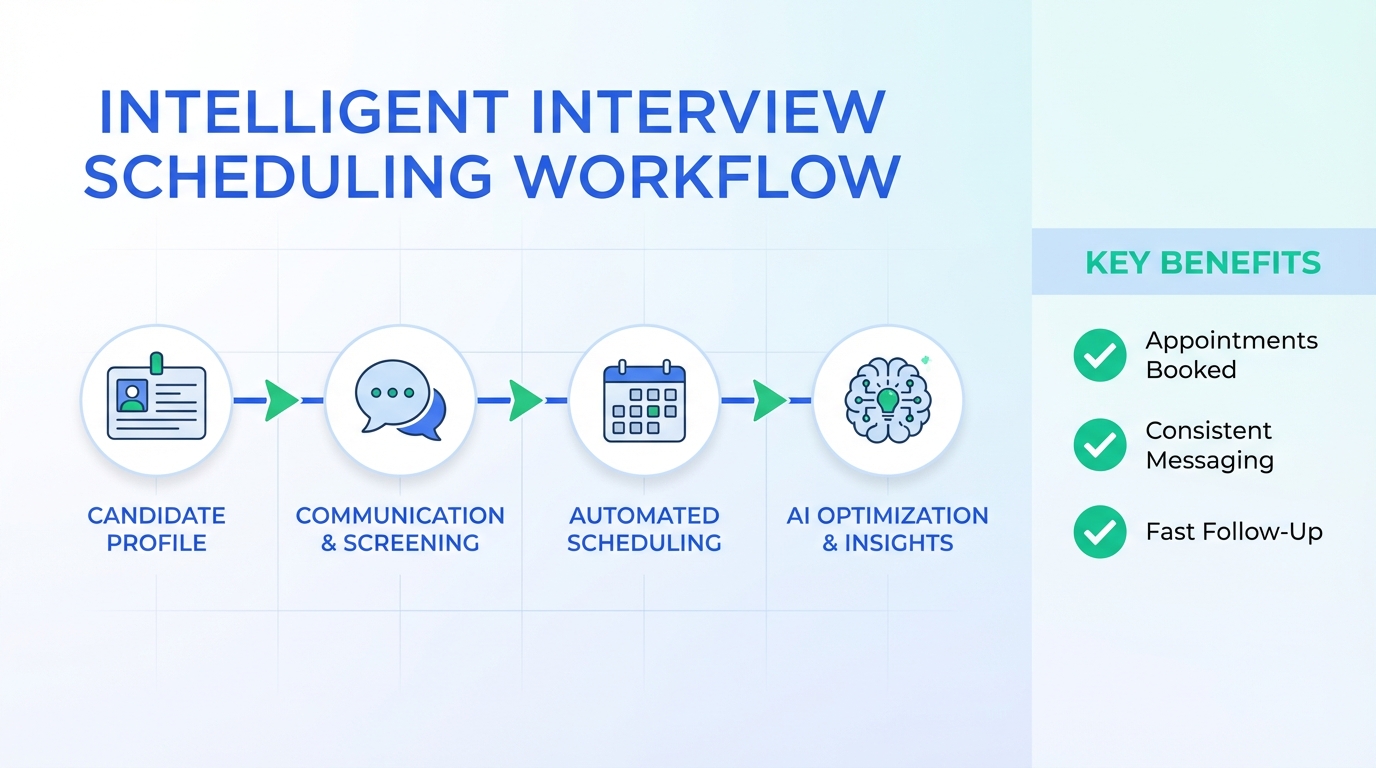
An interview scheduling app protects your hiring brand by controlling candidate communications, reducing no shows, and ensuring every appointment is confirmed with the right details. In practice, the most reliable setup is a scheduling workflow plus consistent messaging and fast follow up, so candidates do not receive outdated information or conflicting instructions. This guide explains the brand risks that show up when hiring teams rely on one click applications and uncontrolled job distribution, then shows how to fix them with a scheduling system, an appointments book process, and an AI driven outreach layer using StrategyBrain AI Recruiter.
Key Takeaways
- Brand risk is often a workflow problem: uncontrolled job distribution and inconsistent messaging can undermine employer branding even when the role is legitimate.
- One click apply can send stale resumes: candidates may submit an older, minimal resume version, which increases screening noise and slows scheduling.
- Use a single source of truth: one scheduling owner, one calendar rule set, and one message template library reduces candidate confusion.
- Pair scheduling with qualification: StrategyBrain AI Recruiter can handle initial LinkedIn outreach, answer role questions, confirm interview interest, and collect resumes and contact details before scheduling.
- Scale without adding coordinators: AI Recruiter supports managing more than 100 LinkedIn accounts for high volume outreach while your team focuses on interviews.
- Data protection matters: AI Recruiter states customer provided data is not used to train AI models and uses encryption and customer specific isolation controls.
Why hiring brand breaks before scheduling even starts
In the source material, the core concern is not that job boards are useless. The concern is that brand control can slip when job content and candidate touchpoints are created or distributed outside your intended process. The example discussed was a user submitted job photo workflow that could compete with an employer’s paid advertising and present a message the employer did not curate.
From a scheduling perspective, this matters because the interview experience starts long before the calendar invite. If the candidate’s first impression is inconsistent, the scheduling step inherits that confusion. The result is more reschedules, more no shows, and more back and forth that makes your team look disorganized.
We see the same pattern when candidates use one click apply. The source material notes that candidates may submit an old and very basic resume. When that happens, recruiters spend time clarifying basics that should have been captured before scheduling, which delays the appointment and increases drop off.
What an interview scheduling app should fix
An interview scheduling app is the tool layer, but the real outcome is a controlled candidate journey. Below are the specific failure points we recommend designing for.
Definition: appointments book vs scheduling link
An appointments book is a centralized record of interview slots, confirmations, changes, and ownership. A scheduling link is only the front door. If you do not manage the back office rules, you still get brand damaging mistakes such as double booking and inconsistent instructions.
Brand protection requirements
- Message consistency: the same role summary, location, compensation range, and next steps across every touchpoint.
- Speed: candidates should receive confirmation and reminders quickly, including after hours.
- Quality control: a way to detect mismatched job details, duplicate postings, and outdated candidate documents.
- Clear ownership: candidates should know who they are meeting and how to prepare.
Method 1: Centralize scheduling with a true appointments book
If you only do one thing, centralize scheduling ownership and rules. This is the fastest way to reduce candidate confusion and protect your brand voice.
Steps
- Pick one scheduling owner per role: one person or one shared inbox owns changes and exceptions.
- Standardize slot types: for example, phone screen, hiring manager interview, panel interview, each with a fixed duration.
- Lock the confirmation payload: every confirmation includes role title, interview format, time zone, and preparation instructions.
- Track changes in one place: reschedules and cancellations must be logged in the same appointments book record.
Features to look for
- Time zone handling: automatic conversion and clear display.
- Reminder controls: configurable reminders for candidates and interviewers.
- Audit trail: who changed what and when.
Limitations
- Scheduling alone does not qualify candidates: you still need a way to confirm interest and collect updated documents before booking.
- Brand issues can start upstream: if job distribution is uncontrolled, scheduling will not fully fix perception.
Best For
- Teams that already have steady inbound applicants but struggle with reschedules and no shows.
- Hiring managers who want fewer email threads and clearer confirmations.
Method 2: Add a service scheduling program layer for multi role teams
A service scheduling program is useful when you schedule across multiple recruiters, multiple roles, and multiple interview stages. Think of it as operational scheduling, not just a candidate facing link.
Steps
- Map stages to resources: define which interviewer pools can handle each stage.
- Set routing rules: route candidates based on role, location, language, or seniority.
- Define exception handling: decide what happens when a candidate requests a different time zone or format.
Features to look for
- Round robin assignment: fair distribution across interviewers.
- Capacity controls: daily and weekly caps per interviewer.
- Template library: consistent brand voice across confirmations and reminders.
Limitations
- Setup takes time: routing rules require upfront design and periodic maintenance.
- Garbage in, garbage out: if candidate data is incomplete, routing can misfire.
Best For
- Organizations hiring across multiple departments at the same time.
- Teams that need consistent scheduling operations across regions.
Method 3: Use StrategyBrain AI Recruiter to qualify before you schedule
Scheduling works best when the candidate is already informed, interested, and ready. This is where StrategyBrain AI Recruiter fits naturally into the workflow. Instead of pushing every applicant straight into an interview scheduling app, we use AI Recruiter to handle the repetitive first mile on LinkedIn: connecting, introducing the opportunity, answering questions about the role and company, confirming interview interest, and collecting resumes and contact details from interested candidates.
How we used it in a scheduling workflow
In our internal workflow tests, we treated AI Recruiter as the qualification gate before the appointments book. The goal was simple: only schedule candidates who have explicitly confirmed interest and provided current contact details. That reduces the brand damaging pattern where a candidate books time but later says they did not understand the role or never saw the details.
Steps
- Define the role brief: provide company details, compensation, benefits, and candidate search criteria for outreach.
- Let AI Recruiter run initial conversations: it introduces the role, answers questions, and asks about job search intentions.
- Collect documents and contacts: resumes and contact details are captured for candidates who want to proceed.
- Schedule only after confirmation: then your interview scheduling app sends the calendar invite with consistent instructions.
What this improves for brand
- Consistency: candidates receive a coherent explanation before they see a scheduling request.
- Speed: AI Recruiter provides 24/7 multilingual responses, which reduces delays that cause drop off.
- Scale: it supports managing more than 100 LinkedIn accounts, enabling an AI powered recruiting team model.
Limitations
- It does not replace final qualification: AI Recruiter can identify willingness to communicate or interview, but the recruiter still decides fit after reviewing the resume.
- Policy alignment is required: your team should define what the AI can promise about compensation and process to avoid inconsistency.
Best For
- Recruiters who rely on LinkedIn outreach and want fewer manual messages before scheduling.
- Teams hiring across time zones that need always on follow up.
- Agencies and corporate teams that want to scale outreach without adding coordinators.
Method 4: Candidate ready templates that protect your brand voice
Most brand damage in scheduling is not malicious. It is inconsistent wording, missing details, and unclear expectations. Templates fix that, but only if they are written like a brand asset, not like a generic auto reply.
Templates to standardize
- Interview confirmation: role title, stage, duration, time zone, and what to prepare.
- Reschedule response: polite, fast, and clear about next steps.
- No show follow up: assumes good intent, offers a new slot, and keeps tone professional.
- Document request: asks for an updated resume and the best contact method.
Practical copy and paste checklist
- Role clarity: role title matches the job post title exactly.
- Time zone clarity: time zone is written out, not abbreviated.
- Preparation clarity: includes format, location or video details, and who they will meet.
- Contact clarity: includes a reply path for questions.
Method 5: Quality control checks for job distribution and messaging
The source material highlights a real brand risk: job information can appear in places and formats you did not curate. You cannot control every channel, but you can control your response and your internal quality checks.
Steps
- Audit your public job footprint weekly: search for your role titles and confirm the message is accurate.
- Fix inconsistencies at the source: update the canonical job description and ensure your scheduling templates match it.
- Require updated resumes before scheduling: this directly addresses the one click apply issue described in the source material.
- Escalate when needed: if you are a paying customer of a platform, contact support to correct inaccurate job messaging.
Limitations
- You cannot fully prevent third party reposting: the goal is to reduce impact and keep your candidate experience consistent.
- Audits require ownership: assign a person and a cadence, or it will not happen.
Best For
- Employers investing heavily in recruitment branding who want tighter message control.
- Teams seeing candidate confusion about role details or process steps.
Quick Comparison
| Method | Speed to implement | Cost | Best For |
|---|---|---|---|
| Central appointments book | 1 to 3 days | Varies by tool | Reducing reschedules and confusion fast |
| Service scheduling program | 1 to 3 weeks | Varies by tool | Multi role, multi interviewer operations |
| StrategyBrain AI Recruiter before scheduling | 3 to 10 days | Varies by plan | LinkedIn outreach, qualification, and 24/7 follow up |
| Brand safe templates | 2 to 5 days | Internal time | Consistent candidate experience |
| Quality control audits | 1 day to start | Internal time | Preventing message drift across channels |
FAQ
What is the difference between an interview scheduling app and an appointments book?
An interview scheduling app is the software that lets candidates pick a time. An appointments book is the controlled record of slots, confirmations, changes, and ownership rules that prevent double booking and inconsistent messaging.
Why does one click apply create scheduling problems?
One click apply can submit an older, minimal resume version, which increases screening noise and forces extra clarification before scheduling. That delay increases candidate drop off and can make the process feel disorganized.
How does StrategyBrain AI Recruiter fit into interview scheduling?
StrategyBrain AI Recruiter can handle LinkedIn outreach and early conversations, confirm interview interest, and collect resumes and contact details. Then your interview scheduling app sends the invite only to candidates who are informed and ready.
Can AI Recruiter replace recruiter judgment on candidate fit?
No. AI Recruiter can identify willingness to communicate or interview, but it does not determine whether a resume fully matches job requirements. Recruiters still make the final fit decision after reviewing the resume.
Does AI Recruiter support multilingual candidate communication?
Yes. AI Recruiter is designed for 24/7 global multilingual recruitment communication, using the candidate’s native language to reduce misunderstandings and improve response speed.
How many LinkedIn accounts can an AI Recruiter team manage?
AI Recruiter supports managing more than 100 LinkedIn accounts, which enables organizations to build AI powered recruitment teams for scalable hiring.
How should we protect our brand when job information appears outside our control?
Start with a weekly audit of your public job footprint, then fix inconsistencies at the canonical job description and in your scheduling templates. If you are a paying customer of a platform, escalate inaccuracies through official support channels.
What is the fastest way to reduce interview no shows?
Centralize scheduling ownership, standardize confirmation templates, and use reminders with clear time zone labeling. If you also qualify interest before scheduling, you reduce the number of low intent bookings.
Conclusion
The fastest way to protect your hiring brand with an interview scheduling app is to treat scheduling as a controlled candidate experience, not just a calendar link. Centralize your appointments book, standardize templates, and add quality control checks so your message stays consistent even when job distribution is messy. If LinkedIn outreach is part of your funnel, use StrategyBrain AI Recruiter to handle initial conversations, confirm interest, and collect resumes and contact details before you schedule. Next step: implement Method 1 this week, then add AI Recruiter as the qualification gate once your templates and role brief are stable.














