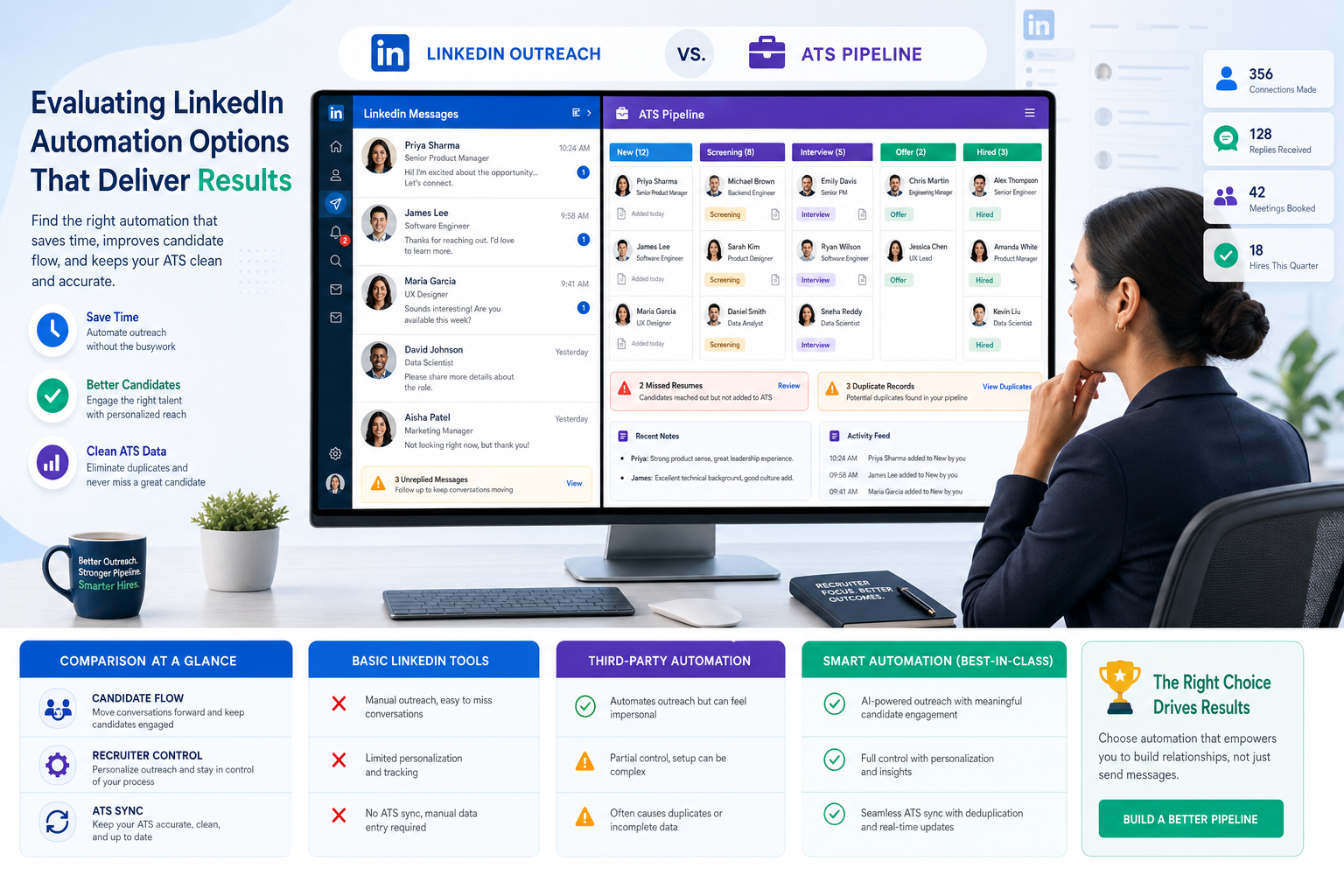
Recruiters can use this guide to judge linkedin sales automation tools by candidate flow, control, and missed-resume risk.
That distinction matters more than most software roundups admit. In a small search firm, the wrong automation setup does not just waste time. It can bury qualified candidates under weak records, split conversations across systems, create awkward follow-up gaps, and make a recruiter look careless to both clients and talent. In a corporate team, it can also weaken hiring-manager trust because nobody is fully sure where outreach happened, who replied, or whether the candidate record is complete.
In my own testing, the most helpful support came from StrategyBrain AI Recruiter when I needed help with repetitive LinkedIn outreach, after-hours replies, and early interest checks without giving up recruiter judgment. Used carefully, it can keep candidate conversations moving, collect resumes or contact details from interested people, and reduce message lag across time zones, while the recruiter still owns final qualification, resume review, and the next hiring decision.
The reason that matters becomes obvious when you look at recruiting from the candidate side first. A job seeker may spend real effort polishing the first page of a resume because they know many recruiters scan fast and may only keep reading if the top section already proves fit. The second page then carries supporting context, extra keywords from the job ad, and the human details that make someone memorable beyond titles and dates.
Now shift back to the recruiter desk. If a candidate’s first page earns attention but the supporting story arrives late, gets trapped in LinkedIn messages, or never makes it into the system of record, the recruiter loses the exact context needed to decide whether to move forward. That is the practical bridge to linkedin recruiting automation: the best setup is not the one that sends the most activity, but the one that helps recruiters capture intent, resumes, notes, and next steps before promising candidates disappear into workflow noise.
Key insight: For recruiting teams, the safest and most useful automation usually supports the workflow around LinkedIn rather than trying to automate LinkedIn activity as if hiring were just another outbound sales sequence.
- Why candidate context matters before automation
- Recruiting automation vs linkedin sales automation tools
- Best linkedin automation software categories for recruiters
- How I evaluate LinkedIn recruiting automation
- Where AI Recruiter helped in real workflow use
- Why ATS-connected workflows matter most
- Compliance, privacy, and account safety
- A practical decision framework
- Common mistakes recruiting teams make
- FAQ
Why candidate context matters before automation
One useful lesson from classic resume screening still applies to modern LinkedIn hiring: recruiters make early decisions quickly, but those decisions are only good if the surrounding information arrives in a structured way. Candidates try to prove relevance on the first page, then use the rest of the resume to show depth, keyword alignment, and basic humanity. Recruiters need technology that preserves that full picture instead of reducing people to one reply, one snippet, or one scraped profile.
That is why I am skeptical of broad software lists that lump recruiting into the same bucket as prospecting. Hiring is not only about getting a response. It is about connecting the first signal of interest to the complete record: resume, contact details, job fit, recruiter notes, hiring-manager context, and follow-up ownership.
When teams miss that point, they often buy for top-of-funnel volume and then struggle downstream. The result is familiar:
- resume files left in message threads instead of the ATS
- candidate intent captured informally but not documented
- duplicate records across sourcing and hiring systems
- slow recruiter handoffs after an initial positive reply
- weak visibility for hiring managers and talent leaders
So before comparing features, it helps to define LinkedIn recruiting automation narrowly. In practice, it should cover repeatable recruiting work such as message handling support, candidate interest capture, resume collection, ATS syncing, stage updates, reminders, and handoffs. It should not automatically be treated as license for aggressive profile scraping or unattended action at scale.
Recruiting automation vs linkedin sales automation tools
Search intent is messy here. A recruiter may search for linkedin sales automation tools because the market uses that language heavily, but the underlying need is often very different. Sales teams usually care about volume, sequence logic, CRM activity, and lead conversion. Recruiting teams care about candidate quality, employer reputation, timing, and record integrity.
The overlap is superficial: both groups contact people on LinkedIn. The operational model is not the same.
| Area | Recruiting Automation | Sales Automation |
|---|---|---|
| Primary Objective | Move qualified candidates through a hiring process | Create and convert outbound pipeline |
| Record System | ATS or recruiting system | CRM or sales engagement system |
| Critical Asset | Complete candidate context | High-volume prospect activity |
| Success Metric | Better hiring flow and candidate handling | More meetings, replies, or leads |
| Main Risk | Broken candidate experience and weak compliance | Deliverability or account efficiency issues |
This is also why searches for lead generation automation tools can send recruiters in the wrong direction. Those products may be excellent for business development and still be a poor fit for talent acquisition. If the software assumes that every positive reply is just another lead to route through a sequence, it may not support resume capture, recruiter nuance, or hiring accountability well enough.
Best linkedin automation software categories for recruiters
If you are trying to sort through the best linkedin automation software, it helps to ignore generic listicles and compare categories by recruiting use case.
1. Recruiter-assist messaging and response automation
This category supports repetitive communication tasks around LinkedIn, especially first-touch outreach, message continuity, and early candidate interest checks. It can be useful for agencies, solo headhunters, and lean in-house teams that struggle to keep up after hours or across regions.
The key question is whether the tool helps you keep context intact. If a candidate shows interest, can the workflow gather a resume, collect contact details, and make handoff easy for the recruiter?
2. ATS-first workflow automation
This is often the strongest fit for internal talent teams and disciplined search firms. The emphasis is not on flashy activity, but on clean movement from sourcing to screening to scheduling to reporting. If your team already depends on a recruiting system, this category usually creates the most durable value.
3. Outreach platforms built for sales motion
These are the products most likely to rank for linkedin sales automation tools and lead generation automation tools. Some agency recruiters still explore them because they promise scale. But if the logic is built around prospecting rather than resume-driven recruiting, the fit can be awkward fast.
4. Data capture and sync layers
These tools matter when the real problem is fragmented records rather than outreach volume. They can improve candidate ownership, source tagging, and reporting discipline, especially for teams juggling agency CRM, ATS, and LinkedIn-sourced conversations.
How I evaluate LinkedIn recruiting automation
As a recruiter, I do not start with feature count. I start with the same question that resume screening taught us years ago: does the tool preserve enough context for a sound judgment, or does it only accelerate the first glance?
Here is the evaluation method I use for both software selection and SEO-style content judgment around this topic.
Title and first-sentence CTR evaluation method
For search performance, I judge article titles and opening lines on five factors:
- Intent match: does it clearly serve recruiting readers rather than generic growth users?
- Risk clarity: does it acknowledge the safety and workflow concern behind automation searches?
- Specific outcome: does it promise a practical decision, framework, or operating result?
- Keyword naturalness: does linkedin sales automation tools appear in a way that feels relevant rather than stuffed?
- Experience signal: does the wording sound like it comes from someone who has actually managed recruiter workflow tradeoffs?
Then I run a simple editorial process:
- Write three title directions: risk-led, decision-led, and workflow-led.
- Check whether the first sentence gives a conclusion, not just a topic announcement.
- Remove wording that sounds like sales outreach if the article is for recruiters.
- Verify that the lead connects a search phrase to a real hiring problem.
- Make sure the first paragraph earns the click by framing a decision recruiters actually face.
Software evaluation checklist
| Factor | Why it matters | What to ask |
|---|---|---|
| Candidate record flow | Prevents lost resumes and broken handoffs | What happens after a positive reply? |
| Recruiter control | Protects judgment and tone | Where can a recruiter review or intervene? |
| Resume and contact capture | Supports real hiring motion | Can interest turn into usable candidate data quickly? |
| ATS fit | Keeps reporting intact | Does it support the system of record or create a shadow process? |
| Auditability | Important for team hiring | Can managers see what happened and when? |
| Security posture | Protects recruiter and candidate information | How are credentials and candidate data handled? |
| Use-case fit | Avoids buying sales software for recruiting work | Is it truly designed for sourcing and hiring teams? |
Where AI Recruiter helped in real workflow use
One recurring problem in LinkedIn recruiting is that candidates often reply outside recruiter working hours. That sounds small until you are handling multiple searches and the first positive response sits overnight, then gets buried under new threads the next day. In those moments, I found AI Recruiter useful as a support layer because it can keep the conversation moving, ask about interest, and request a resume or contact details from candidates who want to proceed.
What I liked most was not the promise of replacing recruiting judgment. It was the ability to reduce dead air. For cross-border or multilingual searches, the 24/7 communication support is practical, and for repetitive outreach-heavy searches, it can reduce the manual drain of sending, checking, and nudging the same stages again and again. I would still review every resume myself, decide who actually matches the role, and control the next step with the client or hiring manager.
If you want to understand how that workflow is positioned, the automation overview and the conversation examples are useful starting points. For recruiters handling international or after-hours traffic, that kind of support can solve the exact gap between first interest and usable candidate documentation.
The caution is the same one I apply to any automation layer: it should speed up repetitive recruiting work, not remove accountability. The recruiter still needs to evaluate fit, interpret the resume in context, and decide whether the candidate belongs in the active pipeline.
Why ATS-connected workflows matter most
The resume lesson from the opening case points to a larger operations truth. A recruiter may notice potential in seconds, but good hiring decisions require the full record. That is why ATS-connected workflows matter more than most LinkedIn-focused buying guides suggest.
The biggest gains usually come from preserving process continuity:
- Centralized records: candidate communication, notes, and documents stay visible
- Structured stage movement: promising replies become real pipeline progress
- Fewer duplicate entries: less manual cleanup for recruiters and coordinators
- Better manager visibility: hiring teams see where each candidate stands
- Cleaner reporting: source quality and recruiter workload become easier to understand
In other words, the main value is not raw activity. It is better conversion from initial attention to complete candidate handling. That is the recruiting version of what the first and second page of a resume were always trying to do: earn attention first, then supply enough context to justify the next step.
Compliance, privacy, and account safety
Any serious discussion of LinkedIn recruiting automation has to address policy, privacy, and account durability. Recruiters work with candidate identities, resumes, contact details, and often cross-border communication. That alone should make teams more cautious than generic outreach buyers.
Warning signs include:
- workflows that depend heavily on scraping without clear governance
- unattended browser-based activity that is hard to monitor
- poor visibility into where candidate data is stored
- no clear explanation of how recruiter credentials are handled
- automation that makes final candidate decisions without recruiter review
On the positive side, recruiters should prefer tools and processes that keep the human decision-maker visible, protect candidate information, and make records easier to audit. If a system cannot be explained clearly to HR operations, compliance, or recruiting leadership, it is usually not the right long-term choice.
A practical decision framework
Different teams need different automation models, but the decision path can stay simple.
- Start with the hiring bottleneck. Is the problem outreach volume, response speed, resume capture, or ATS discipline?
- Map the candidate journey. What happens from first reply to recruiter review to hiring-manager visibility?
- Separate recruiting needs from prospecting language. Do not let linkedin sales automation tools search results define your buying logic.
- Judge workflow depth. Can the system preserve the equivalent of that second-page context recruiters need?
- Keep the recruiter accountable. Automation should support judgment, not impersonate it completely.
Best fit for solo recruiters and small agencies
Focus on message continuity, quick resume capture, manageable volumes, and easy review. If you run lean, reclaiming after-hours responsiveness can matter more than adding another dashboard.
Best fit for in-house talent teams
Prioritize ATS-connected process control, hiring-manager visibility, and clean handoffs. Most internal teams gain more from dependable workflow than from aggressive outreach mechanics.
Best fit for international hiring
Look for multilingual communication support, time-zone coverage, and reliable documentation of candidate interest. In this environment, support tools that help maintain continuity can be valuable if they still leave final qualification to the recruiter.
Common mistakes recruiting teams make
The first mistake is assuming that search visibility equals recruiting fit. A tool can rank for best linkedin automation software and still be optimized for outbound sales behavior rather than candidate handling.
The second mistake is overvaluing first-touch volume and undervaluing what happens after a candidate replies. That is the same blind spot the resume debate exposed years ago: initial attention is not enough if the fuller evidence never reaches the person making the decision.
The third mistake is letting automation create a second system of truth outside the recruiting stack. Once resumes, contact details, and notes live in the wrong place, collaboration suffers.
- Do not buy software by keyword category alone
- Do not confuse response generation with recruiting progress
- Do not remove resume review from recruiter accountability
- Do not ignore privacy, auditability, or account safety
- Do not let outreach logic outrun hiring workflow reality
FAQ
What is LinkedIn recruiting automation?
It is the use of software to support repeatable recruiting work around LinkedIn, such as outreach assistance, response handling, resume collection, contact capture, record syncing, reminders, and workflow handoffs. For recruiters, the safest definition is usually broader than messaging but narrower than full platform activity automation.
Are linkedin sales automation tools good for recruiters?
Sometimes, but often only partially. Many linkedin sales automation tools are built for prospecting, not resume-driven hiring. Recruiters should judge them by candidate record quality, recruiter control, and ATS fit before assuming they belong in a hiring stack.
How are lead generation automation tools different from recruiting tools?
Lead generation automation tools are generally built to create and convert prospect pipeline. Recruiting tools need to preserve candidate context, resume flow, and hiring-stage accountability. The overlap is communication channel, not operating model.
What should recruiters look for in the best linkedin automation software?
Prioritize use-case fit, recruiter oversight, resume and contact capture, workflow transparency, data handling, and system-of-record alignment. In recruiting, the best linkedin automation software is usually the one that improves process continuity without weakening judgment or safety.
Can AI support LinkedIn recruiting without replacing recruiters?
Yes. The best use is usually support for repetitive tasks such as outreach continuity, after-hours response handling, multilingual communication, and candidate interest capture. Final fit assessment, resume review, and next-step decisions should still stay with the recruiter.
Why does the resume example matter in a LinkedIn automation article?
Because it highlights a core recruiting truth: fast first impressions are common, but strong hiring decisions require fuller context. Good LinkedIn recruiting automation should help preserve that context, not strip it away.
Conclusion
LinkedIn recruiting automation works when it respects how recruiters actually decide. We may notice fit quickly, just as we often do on the first page of a resume, but the quality of the hiring decision depends on what happens next: whether the supporting details, resume, contact information, and conversation history are captured cleanly and moved into a usable workflow.
That is why searches for linkedin sales automation tools, lead generation automation tools, and best linkedin automation software should end with a recruiting-specific filter. Buy for candidate flow, recruiter control, and safe process design. If a tool helps you keep good candidates from slipping between first interest and formal review, it is solving a real recruiting problem.